
























Software update issues: September 9, 2019
 Sep 11, 2019 | 6:01 pm
#181
Join Date: Mar 2011
Posts: 6,286
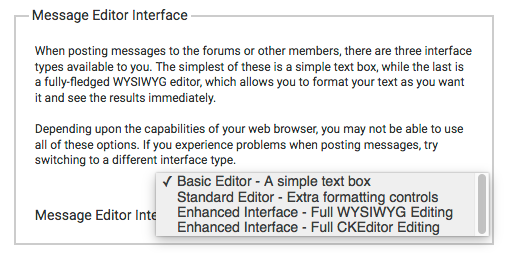
Silly question: If it's no longer supported, why is is still an option?
(And/or why didn't the Full CKEditor simply replace the WYSIWYG as the "Enhanced Interface" for anyone who had that selected, rather than just breaking usability completely?)
 Sep 11, 2019 | 6:34 pm
#183
A FlyerTalk Posting Legend


Join Date: Apr 2004
Location: GVA (Greater Vancouver Area)
Programs: D.R.E.A.D. Gold card holder
Posts: 53,184
My biggest issue is that after posting a reply in a thread, it takes me to the "last" page of the thread. Since I (and most frequent posters I know) have the "newest first" flag set, that means it takes me back to post #1 instead of staying with the most recent posts.
I'd also love it if you could fix the big with # - it should not automatically convert that to a link and force me to edit the reply every time I use it.
I'd also love it if you could fix the big with # - it should not automatically convert that to a link and force me to edit the reply every time I use it.
Sep 11, 2019 | 6:41 pm
#184
FlyerTalk Evangelist


Join Date: Nov 2009
Location: SEA — the REAL Washington; occasionally in the other Washington (DCA area)
Programs: AS MVPG 100K (Atmos Titanium) / 0.5MM; DL fallen PM (1.58MM = “Complimentary Annual GM”); AA Gold
Posts: 24,442
Sep 12, 2019 | 7:25 am
#186
Administrator


Join Date: Sep 2015
Location: Los Angeles
Programs: Internet Brands
Posts: 4,435
My biggest issue is that after posting a reply in a thread, it takes me to the "last" page of the thread. Since I (and most frequent posters I know) have the "newest first" flag set, that means it takes me back to post #1 instead of staying with the most recent posts.
I'd also love it if you could fix the big with # - it should not automatically convert that to a link and force me to edit the reply every time I use it.
I'd also love it if you could fix the big with # - it should not automatically convert that to a link and force me to edit the reply every time I use it.
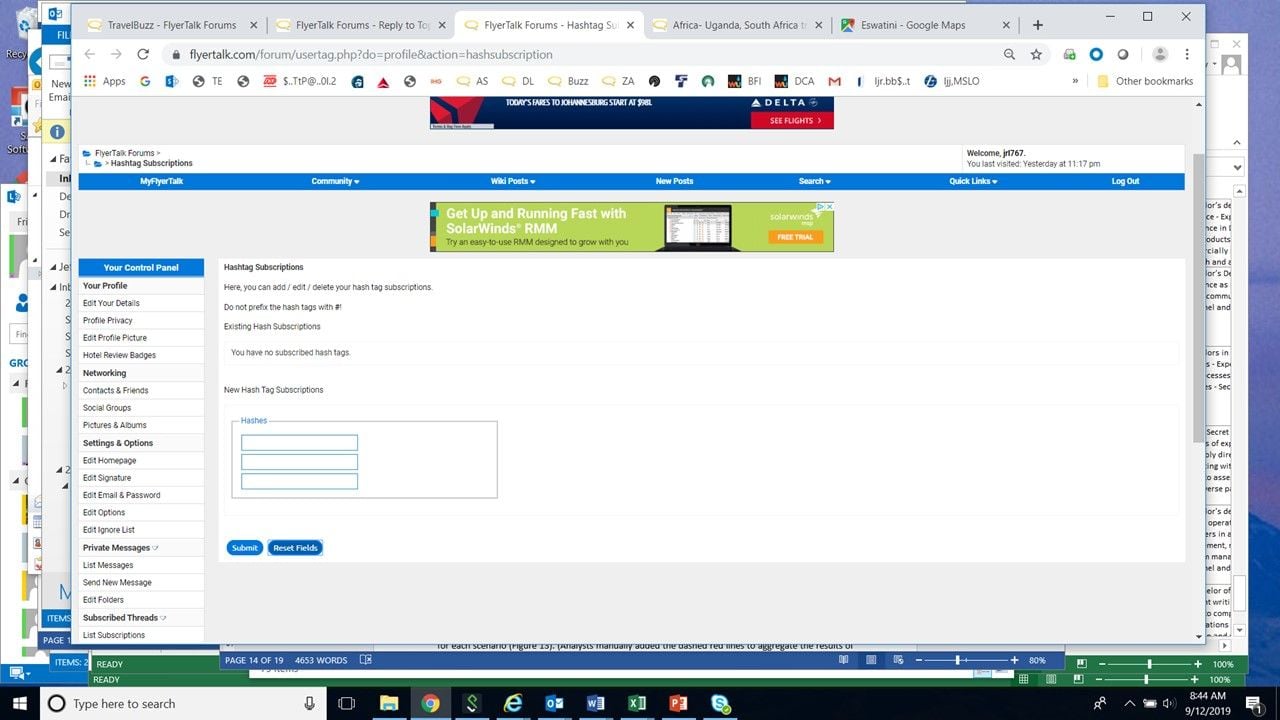
The #hashtag or #pound reading as a "website" is due to the hashtag subscriptions you can edit here: https://www.flyertalk.com/forum/user...shsubscription
Sep 12, 2019 | 7:31 am
#187
Administrator
Join Date: Sep 2015
Location: Los Angeles
Programs: Internet Brands
Posts: 4,435
Sep 12, 2019 | 9:46 am
#188
FlyerTalk Evangelist
Join Date: Nov 2009
Location: SEA — the REAL Washington; occasionally in the other Washington (DCA area)
Programs: AS MVPG 100K (Atmos Titanium) / 0.5MM; DL fallen PM (1.58MM = “Complimentary Annual GM”); AA Gold
Posts: 24,442
The #hashtag or #pound reading as a "website" is due to the hashtag subscriptions you can edit here: https://www.flyertalk.com/forum/user...shsubscription
 Sep 12, 2019 | 9:55 am
#189
Administrator
Join Date: Sep 2015
Location: Los Angeles
Programs: Internet Brands
Posts: 4,435
I have NO subscriptions; please explain how to inhibit that "functionality" so that the # symbol appears as a symbol without automatically inserting "url=https://www.flyertalk.com/forum/usertag.php?do=list&action=hash&hash=hashtag" and "/url" in the source code of the post
Sep 12, 2019 | 10:45 am
#190
Suspended
Join Date: Aug 2013
Location: Southern California, USA
Programs: Marriott Ambassador and LTT, UA Plat/LT Gold, AA Gold
Posts: 8,764
[MENTION=790438]IBJoel[/MENTION] what's the status on fixing the "post in a thread and then get returned to the oldest page of the thread instead of the most recent page" glitch? It's REALLY annoying for those of us who are most active here.
Sep 12, 2019 | 10:54 am
#191
Administrator
Join Date: Sep 2015
Location: Los Angeles
Programs: Internet Brands
Posts: 4,435
I'll ask. Keep in mind that this is only occurring for those who've switched their thread display mode to "Newest First", so it's not the default option.
Sep 12, 2019 | 10:59 am
#192
Suspended
Join Date: Aug 2013
Location: Southern California, USA
Programs: Marriott Ambassador and LTT, UA Plat/LT Gold, AA Gold
Posts: 8,764
My thread display always was set to Newest First. I didn't switch anything. Your system update switched it/caused the issue!
Sep 12, 2019 | 11:11 am
#193
Suspended
Join Date: Aug 2013
Location: Southern California, USA
Programs: Marriott Ambassador and LTT, UA Plat/LT Gold, AA Gold
Posts: 8,764
As a test, I just changed that to Oldest First and back to Newest First. Same issue--I'm still returned to the oldest posts in the threads for which I post.
I am not sent to the oldest posts when I select any thread, however. It's only when I POST in the thread that I am wrongly sent to the oldest post in the thread.
Sep 12, 2019 | 11:16 am
#194
Administrator
Join Date: Sep 2015
Location: Los Angeles
Programs: Internet Brands
Posts: 4,435
Right, so the update changed the behavior of how it functions when you submit a new post. I was just saying that no user account is created with "Newest First" selected in User Options.
Sep 12, 2019 | 11:18 am
#195
Administrator
Join Date: Sep 2015
Location: Los Angeles
Programs: Internet Brands
Posts: 4,435
So again I never changed my thread display: it always was and still was Newest First after the update.
As a test, I just changed that to Oldest First and back to Newest First. Same issue--I'm still returned to the oldest posts in the threads for which I post.
I am not sent to the oldest posts when I select any thread, however. It's only when I POST in the thread that I am wrongly sent to the oldest post in the thread.
As a test, I just changed that to Oldest First and back to Newest First. Same issue--I'm still returned to the oldest posts in the threads for which I post.
I am not sent to the oldest posts when I select any thread, however. It's only when I POST in the thread that I am wrongly sent to the oldest post in the thread.