
























Software update issues: September 9, 2019
 Sep 20, 2019 | 10:54 am
#271
Administrator


Join Date: Sep 2015
Location: Los Angeles
Programs: Internet Brands
Posts: 4,445
Just tested on Desktop, Mobile w/ mobile skin, and Mobile w/desktop skin, and they all directed me to my own post, when I replied. I had Newest First set as my display order.

 Sep 20, 2019 | 8:37 pm
#272
FlyerTalk Evangelist


Join Date: May 2002
Location: Pittsburgh
Programs: MR LT Titanium, AA LT PLT, UA SLV, Avis PreferredPlus, HH Gold, Hertz PC, National Executive, etc.
Posts: 31,692
Can we no longer upload photos from our machines to insert in a post? Clicking "Insert Photo" is back to the "Please enter the URL of your image" of long ago, not the options to upload. Does this mean I need to again find a site to host my photos, upload them, get a URL, copy, paste, etc.?
The " How to post photos" thread isn't very helpful....
The " How to post photos" thread isn't very helpful....
Sep 21, 2019 | 6:07 am
#273


Join Date: May 2010
Location: AVP & PEK
Programs: UA 1K 2MM
Posts: 7,901
Sep 21, 2019 | 11:09 am
#274
FlyerTalk Evangelist


Join Date: Nov 2009
Location: SEA — the REAL Washington; occasionally in the other Washington (DCA area)
Programs: AS MVPG 100K (Atmos Titanium) / 0.5MM; DL fallen PM (1.58MM = “Complimentary Annual GM”); AA Gold
Posts: 24,529
using Safari on iPhone
when I’m quoting a very long post, but only want to address one point toward the end, I’ll replace the first few paragraphs of text with “ ...” (selected the text to delete, but don’t recall if I overtyped or hit “backspace”)
when I hit “Submit” the display has the grey box with “Originally posted by” and the “ ... ”; then there’s a blank line with another grey box containing “Originally posted by” and the rest of the text, followed by another blank line and my reply
the source code has multiple instances of “[ color = # 333333 ]” and “[ / color ]” (spaces added); by deleting some of those I can get rid of the extra grey box so the entire quote appears in a single box
when I’m quoting a very long post, but only want to address one point toward the end, I’ll replace the first few paragraphs of text with “ ...” (selected the text to delete, but don’t recall if I overtyped or hit “backspace”)
when I hit “Submit” the display has the grey box with “Originally posted by” and the “ ... ”; then there’s a blank line with another grey box containing “Originally posted by” and the rest of the text, followed by another blank line and my reply
the source code has multiple instances of “[ color = # 333333 ]” and “[ / color ]” (spaces added); by deleting some of those I can get rid of the extra grey box so the entire quote appears in a single box
Sep 21, 2019 | 2:31 pm
#275
A FlyerTalk Posting Legend


Join Date: Dec 2000
Location: Shanghai
Posts: 46,501
The "like" link has only worked for me about 80% of the time since the recent upgrade...seemingly not a browser issue because I don't notice any difference across devices.
On a completely different topic, there don't seem to be any obvious links to this forum on the ft home page or under the forums menu.
On a completely different topic, there don't seem to be any obvious links to this forum on the ft home page or under the forums menu.
 Sep 21, 2019 | 3:18 pm
#276
FlyerTalk Evangelist
Join Date: Nov 2009
Location: SEA — the REAL Washington; occasionally in the other Washington (DCA area)
Programs: AS MVPG 100K (Atmos Titanium) / 0.5MM; DL fallen PM (1.58MM = “Complimentary Annual GM”); AA Gold
Posts: 24,529
using Safari on iPhone (I think I experienced with Chrome on a laptop also, but can’t say for certain)
copy/paste occasionally duplicates line breaks (multiple lines, with a blank line between each, in the original wind up with two lines between each)
I haven’t looked at the source code when this happened as it was a simple matter to backspace away the extra lines
copy/paste occasionally duplicates line breaks (multiple lines, with a blank line between each, in the original wind up with two lines between each)
I haven’t looked at the source code when this happened as it was a simple matter to backspace away the extra lines
Sep 21, 2019 | 9:41 pm
#277
Join Date: Apr 2014
Programs: UA Gold (ex-GS), Marriott lifetime Plat, Hyatt Globalist
Posts: 923
It doesn’t, but the issue is that the buttons are covered by the multitasking bar (the line at the bottom center of the screen; see my original screenshot). So if I want to go forward or backward I have to tap it once to raise it above the multitasking bar, and then again to actually click the correct button.
Sep 22, 2019 | 2:40 pm
#278
FlyerTalk Evangelist

Join Date: Sep 2003
Location: San Antonio
Programs: DL DM, Former AA EXP now AY Plat, AC 75K, NW Plat, Former CO Gold, Hilton Diamond, Marriott Titanium
Posts: 28,002
Sep 23, 2019 | 7:43 am
#279
Administrator
Join Date: Sep 2015
Location: Los Angeles
Programs: Internet Brands
Posts: 4,445
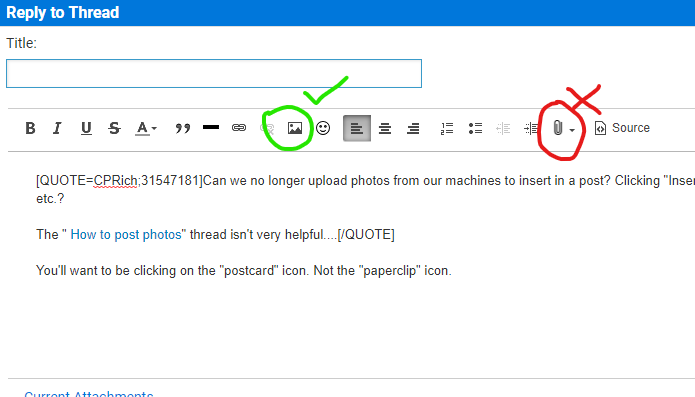
Can we no longer upload photos from our machines to insert in a post? Clicking "Insert Photo" is back to the "Please enter the URL of your image" of long ago, not the options to upload. Does this mean I need to again find a site to host my photos, upload them, get a URL, copy, paste, etc.?
The " How to post photos" thread isn't very helpful....
The " How to post photos" thread isn't very helpful....
 Sep 23, 2019 | 7:47 am
#280
Administrator
Join Date: Sep 2015
Location: Los Angeles
Programs: Internet Brands
Posts: 4,445
using Safari on iPhone
when I’m quoting a very long post, but only want to address one point toward the end, I’ll replace the first few paragraphs of text with “ ...” (selected the text to delete, but don’t recall if I overtyped or hit “backspace”)
when I hit “Submit” the display has the grey box with “Originally posted by” and the “ ... ”; then there’s a blank line with another grey box containing “Originally posted by” and the rest of the text, followed by another blank line and my reply
the source code has multiple instances of “[ color = # 333333 ]” and “[ / color ]” (spaces added); by deleting some of those I can get rid of the extra grey box so the entire quote appears in a single box
when I’m quoting a very long post, but only want to address one point toward the end, I’ll replace the first few paragraphs of text with “ ...” (selected the text to delete, but don’t recall if I overtyped or hit “backspace”)
when I hit “Submit” the display has the grey box with “Originally posted by” and the “ ... ”; then there’s a blank line with another grey box containing “Originally posted by” and the rest of the text, followed by another blank line and my reply
the source code has multiple instances of “[ color = # 333333 ]” and “[ / color ]” (spaces added); by deleting some of those I can get rid of the extra grey box so the entire quote appears in a single box
The quick brown fox jumps over the lazy dog. Sphinx of black quartz, judge my vow. How vexingly quick daft zebras jump!
OK, I think that's enough pangrams for this post.
Sep 23, 2019 | 8:17 am
#281
Administrator
Join Date: Sep 2015
Location: Los Angeles
Programs: Internet Brands
Posts: 4,445
The "like" link has only worked for me about 80% of the time since the recent upgrade...seemingly not a browser issue because I don't notice any difference across devices.
On a completely different topic, there don't seem to be any obvious links to this forum on the ft home page or under the forums menu.
On a completely different topic, there don't seem to be any obvious links to this forum on the ft home page or under the forums menu.
Are there specific posts that your "Like" doesn't work on? Does it work if you press it a second time? I know you said it's on different devices, but do you use a common browser for them (Safari or Chrome come to mind)?
Sep 23, 2019 | 8:20 am
#282
Administrator
Join Date: Sep 2015
Location: Los Angeles
Programs: Internet Brands
Posts: 4,445
using Safari on iPhone (I think I experienced with Chrome on a laptop also, but can’t say for certain)
copy/paste occasionally duplicates line breaks (multiple lines, with a blank line between each, in the original wind up with two lines between each)
I haven’t looked at the source code when this happened as it was a simple matter to backspace away the extra lines
copy/paste occasionally duplicates line breaks (multiple lines, with a blank line between each, in the original wind up with two lines between each)
I haven’t looked at the source code when this happened as it was a simple matter to backspace away the extra lines
Sep 23, 2019 | 8:23 am
#283
Administrator
Join Date: Sep 2015
Location: Los Angeles
Programs: Internet Brands
Posts: 4,445
None yet. Keep in mind that no one is in the office during weekends, but I did ask for an update from tech.
Sep 23, 2019 | 8:25 am
#284
Administrator
Join Date: Sep 2015
Location: Los Angeles
Programs: Internet Brands
Posts: 4,445
It doesn’t, but the issue is that the buttons are covered by the multitasking bar (the line at the bottom center of the screen; see my original screenshot). So if I want to go forward or backward I have to tap it once to raise it above the multitasking bar, and then again to actually click the correct button.
Last edited by IBJoel; Sep 23, 2019 at 8:32 am
Sep 23, 2019 | 1:49 pm
#285
Administrator
Join Date: Sep 2015
Location: Los Angeles
Programs: Internet Brands
Posts: 4,445
using Safari on iPhone (I think I experienced with Chrome on a laptop also, but can’t say for certain)
copy/paste occasionally duplicates line breaks (multiple lines, with a blank line between each, in the original wind up with two lines between each)
I haven’t looked at the source code when this happened as it was a simple matter to backspace away the extra lines
copy/paste occasionally duplicates line breaks (multiple lines, with a blank line between each, in the original wind up with two lines between each)
I haven’t looked at the source code when this happened as it was a simple matter to backspace away the extra lines