
























Software update issues: September 9, 2019
 Sep 27, 2019 | 10:22 am
#301
Administrator


Join Date: Sep 2015
Location: Los Angeles
Programs: Internet Brands
Posts: 4,445
That's because you aren't using the Full CKEditor as your text editor.
 Sep 27, 2019 | 5:30 pm
#302
FlyerTalk Evangelist


Join Date: May 2002
Location: Pittsburgh
Programs: MR LT Titanium, AA LT PLT, UA SLV, Avis PreferredPlus, HH Gold, Hertz PC, National Executive, etc.
Posts: 31,692
What does that mean?
I haven't changed any preferences or settings on FT in at least 10 years.
I hit "Quote" to quote part of a message and reply to it, or I hit "Reply" to type a stand alone Reply. I type in the box and click on the icons that appear when I hit those buttons. Has something changed where clicking on Quote and clicking on Reply are no longer the ways to Quote or Reply to an FT message? Again, it's what I've been doing for years, and the Image dialog box has appeared ever since "enter URL" was replaced with the ability to upload a local image, 3-4 years ago, IIRC.
CKEditor in the FT Search box give "Sorry, but nothing matched your search criteria. Please try again with some different keywords.". In the Flyertalk Wiki, it gives "There were no results matching the query."
Google found me
but Find "Full CKEditor" on that page yield "phrase not found"
I haven't changed any preferences or settings on FT in at least 10 years.
I hit "Quote" to quote part of a message and reply to it, or I hit "Reply" to type a stand alone Reply. I type in the box and click on the icons that appear when I hit those buttons. Has something changed where clicking on Quote and clicking on Reply are no longer the ways to Quote or Reply to an FT message? Again, it's what I've been doing for years, and the Image dialog box has appeared ever since "enter URL" was replaced with the ability to upload a local image, 3-4 years ago, IIRC.
CKEditor in the FT Search box give "Sorry, but nothing matched your search criteria. Please try again with some different keywords.". In the Flyertalk Wiki, it gives "There were no results matching the query."
Google found me
Go here: https://www.flyertalk.com/forum/prof...do=editoptions
And make sure you have "Full CKEditor" selected (and save at the bottom of the page)
And make sure you have "Full CKEditor" selected (and save at the bottom of the page)
Last edited by CPRich; Sep 27, 2019 at 5:42 pm
Sep 27, 2019 | 10:57 pm
#303
FlyerTalk Evangelist


Join Date: Nov 2009
Location: SEA — the REAL Washington; occasionally in the other Washington (DCA area)
Programs: AS MVPG 100K (Atmos Titanium) / 0.5MM; DL fallen PM (1.58MM = “Complimentary Annual GM”); AA Gold
Posts: 24,529
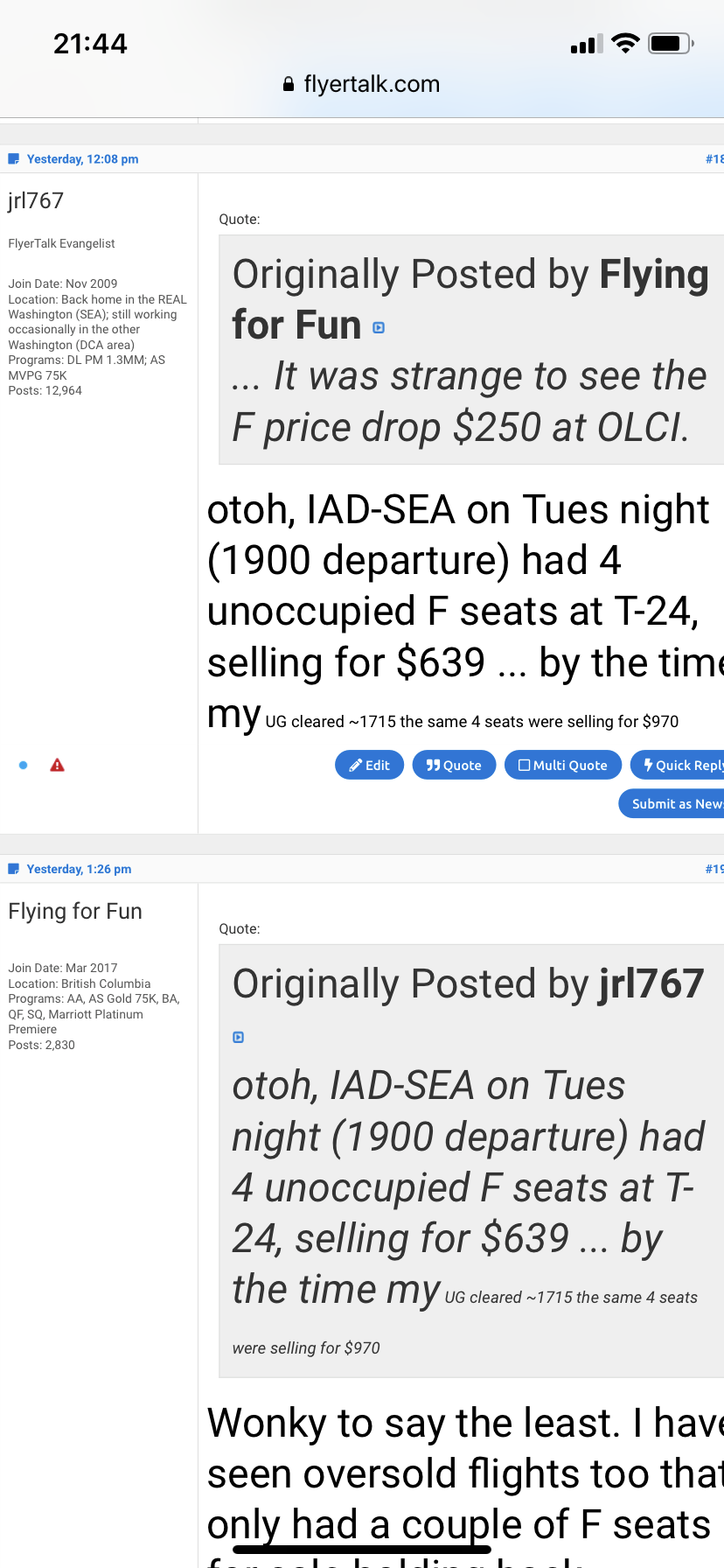
weirdness
a portion of a prior post got re-sized with no editing action on my part
(using Safari on iPhone)
what I saw when looking at the post (note the change in size also appears in the subsequent post that quotes mine)
verified in source code by selecting “Edit”
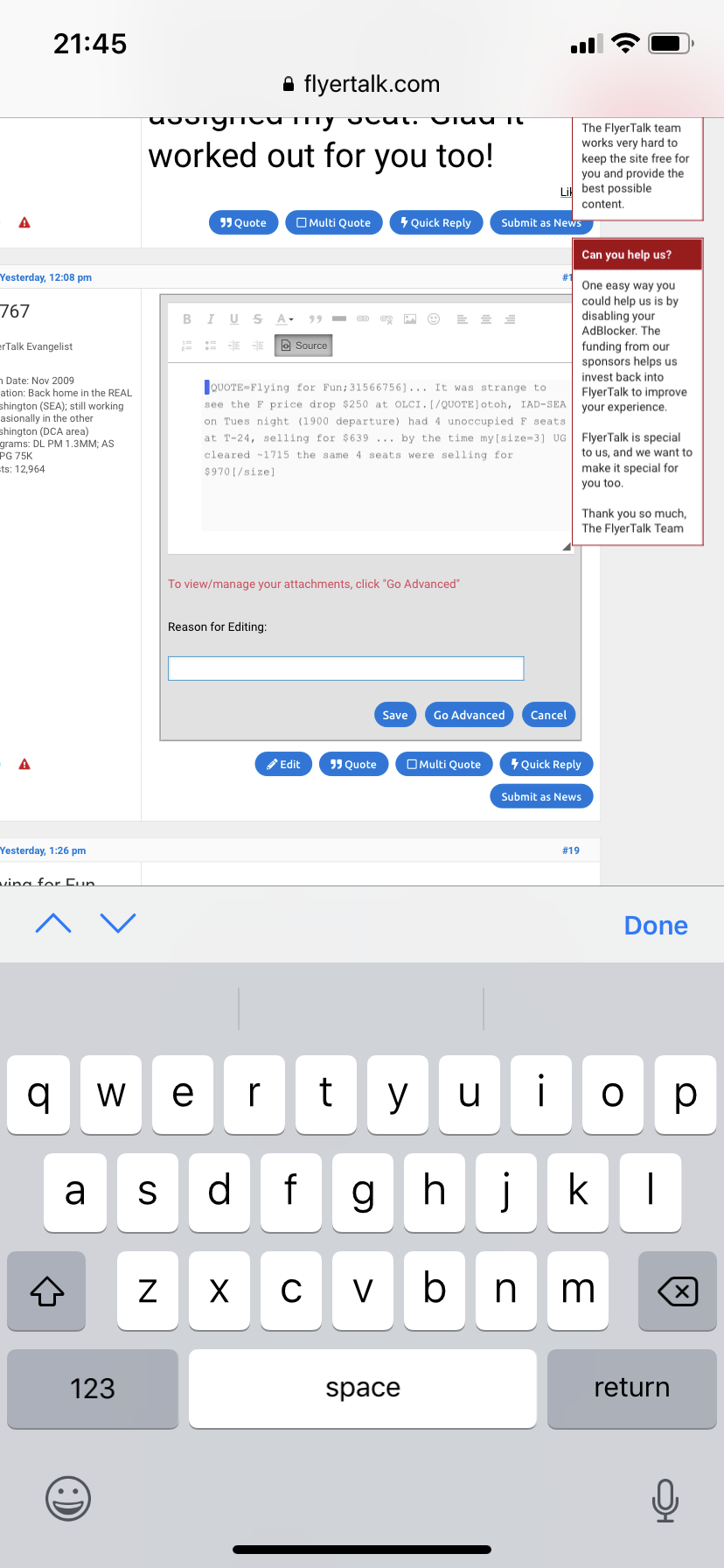
(using Safari on iPhone)
what I saw when looking at the post (note the change in size also appears in the subsequent post that quotes mine)
verified in source code by selecting “Edit”
Last edited by jrl767; Sep 27, 2019 at 11:03 pm
Sep 28, 2019 | 3:05 am
#304
FlyerTalk Evangelist


Join Date: Mar 2010
Location: JER
Programs: BA Silver again, several MUCCI, and assorted Pensions!
Posts: 32,499
Hello again, IBJoel. Further to my 'pictures' comments upthread, I've discovered a few more 'inabilities' relating to Mac on FT. They all relate to the interaction between the mouse pointer and on-screen buttons; however, this morning some of them seem to be fixed already!
Add Pictures. Now seems to be working as before ^
Wiki posts. Not opening when "Click here to display Full Wike" ... now working ^
Quick Reply. Was tending to delete all text whilst typing! Further test needed today!
Like. Wasn't working on Mac, but does on iPad. Now working ^
Well done ... please keep it working!!
* Picture added for effect and to test!

Add Pictures. Now seems to be working as before ^
Wiki posts. Not opening when "Click here to display Full Wike" ... now working ^
Quick Reply. Was tending to delete all text whilst typing! Further test needed today!
Like. Wasn't working on Mac, but does on iPad. Now working ^
Well done ... please keep it working!!
* Picture added for effect and to test!
Sep 30, 2019 | 7:41 am
#305
Administrator
Join Date: Sep 2015
Location: Los Angeles
Programs: Internet Brands
Posts: 4,445
What does that mean?
I haven't changed any preferences or settings on FT in at least 10 years.
I hit "Quote" to quote part of a message and reply to it, or I hit "Reply" to type a stand alone Reply. I type in the box and click on the icons that appear when I hit those buttons. Has something changed where clicking on Quote and clicking on Reply are no longer the ways to Quote or Reply to an FT message? Again, it's what I've been doing for years, and the Image dialog box has appeared ever since "enter URL" was replaced with the ability to upload a local image, 3-4 years ago, IIRC.
CKEditor in the FT Search box give "Sorry, but nothing matched your search criteria. Please try again with some different keywords.". In the Flyertalk Wiki, it gives "There were no results matching the query."
Google found me
but Find "Full CKEditor" on that page yield "phrase not found"
I haven't changed any preferences or settings on FT in at least 10 years.
I hit "Quote" to quote part of a message and reply to it, or I hit "Reply" to type a stand alone Reply. I type in the box and click on the icons that appear when I hit those buttons. Has something changed where clicking on Quote and clicking on Reply are no longer the ways to Quote or Reply to an FT message? Again, it's what I've been doing for years, and the Image dialog box has appeared ever since "enter URL" was replaced with the ability to upload a local image, 3-4 years ago, IIRC.
CKEditor in the FT Search box give "Sorry, but nothing matched your search criteria. Please try again with some different keywords.". In the Flyertalk Wiki, it gives "There were no results matching the query."
Google found me
but Find "Full CKEditor" on that page yield "phrase not found"
Sep 30, 2019 | 7:44 am
#306
Administrator
Join Date: Sep 2015
Location: Los Angeles
Programs: Internet Brands
Posts: 4,445
a portion of a prior post got re-sized with no editing action on my part
(using Safari on iPhone)
what I saw when looking at the post (note the change in size also appears in the subsequent post that quotes mine)
verified in source code by selecting “Edit”
(using Safari on iPhone)
what I saw when looking at the post (note the change in size also appears in the subsequent post that quotes mine)
verified in source code by selecting “Edit”
Sep 30, 2019 | 8:14 pm
#307
FlyerTalk Evangelist
Join Date: Nov 2009
Location: SEA — the REAL Washington; occasionally in the other Washington (DCA area)
Programs: AS MVPG 100K (Atmos Titanium) / 0.5MM; DL fallen PM (1.58MM = “Complimentary Annual GM”); AA Gold
Posts: 24,529
Oct 15, 2019 | 12:30 am
#308
FlyerTalk Evangelist

Join Date: Sep 2003
Location: San Antonio
Programs: DL DM, Former AA EXP now AY Plat, AC 75K, NW Plat, Former CO Gold, Hilton Diamond, Marriott Titanium
Posts: 28,002
Originally Posted by IBJoel;31554032
[i
[i
Originally Posted by FlyerCO
Any update? It's really annoying as you can start typing and then the box goes away, followed by waiting for it to finally come back. It takes long enough sometimes you wonder if page stopped loading.
Oct 15, 2019 | 9:33 am
#309
Administrator
Join Date: Sep 2015
Location: Los Angeles
Programs: Internet Brands
Posts: 4,445
It's over a month. Is there any progress? Really annoying when on a slower connection. If you start typing before it reloads the text box it can 1)prevent it from reloading the text box, 2)cause the system not to save everything you typed when hit submit, or 3)work just fine. Very aggravating, even if #3 happens as it sucks on slower connections.
Oct 16, 2019 | 12:55 am
#310
FlyerTalk Evangelist
Join Date: Sep 2003
Location: San Antonio
Programs: DL DM, Former AA EXP now AY Plat, AC 75K, NW Plat, Former CO Gold, Hilton Diamond, Marriott Titanium
Posts: 28,002
Your misreading what I said. I said the issue is worse on slower connections, not that it only happens on slower connections. The page loads, the text box loads (and if quoting, quoted text loads). The text box then disappears and you have to wait for it to decide to reload. If you start typing before the box disappears and reloads then the text box may not finish reloading.