
























 Feb 14, 2015, 12:53 pm
Last edit by: ExpertFlyer Voice
The purpose of this thread is to post questions, feedback, and report issues with ExpertFlyer. The ExpertFlyer team will respond as soon as possible from the ExpertFlyer Voice account (usually within 24 hours except on weekends).
You can also contact ExpertFlyer support at [email protected]
This is a community-maintained thread— it is not supported by ExpertFlyer.
--------------------
Seat Maps: we're currently not able to show seat maps for flights departing within the next 24 hours for several airlines: DL, BA, QR , ANA, B6, & JL
Searches currently not working:
To search AA upgrades:
You can also contact ExpertFlyer support at [email protected]
This is a community-maintained thread— it is not supported by ExpertFlyer.
--------------------
Seat Maps: we're currently not able to show seat maps for flights departing within the next 24 hours for several airlines: DL, BA, QR , ANA, B6, & JL
Searches currently not working:
- Upgrades - AY, BA, EK, EY, IB, QR, VS
- Awards - AY, BA, IB, EY, QR, VS
To search AA upgrades:
- Use the Award & Upgrade tool
- Only search for individual segments (set the "Connection Preference" drop-down to "Direct/Non-Stop only"). Flight results that are part of a connection won't show the upgrade version of C or A inventory because AA only files upgrade inventory as individual, not married, segments. (Married segments show revenue inventory instead of upgrade inventory.)
- To avoid confusion, check the "Exclude Codeshares" box, as AA awards and upgrades are not valid on codeshares.
- 2 minute video explanation: https://www.youtube.com/watch?v=YGRNFYIbHp4

ExpertFlyer Help Desk, Information and Updates Thread
Oct 15, 2025 | 10:11 am
#4096


Join Date: Jul 2001
Location: SW Michigan, ex SF Bay Area
Posts: 1,005
 Oct 15, 2025 | 10:48 am
#4097

Join Date: Mar 2011
Location: MFR
Programs: UA 1K 2MM
Posts: 3,339
I have an AA ticket, but no seat assigned, on a flight that is sold out. Through the AA website, I cannot select a seat, and EF is showing all seats taken. Yesterday morning I set a seat alert for any seat. I randomly checked around 10pm last night, and there was a seat available, so I grabbed it.
The alert is still set in EF. It never fired, and I was never notified.
While I have strongly defended EF, even in light of its slow progress with fixing issue after issue, not reliably notifying for something as simple as a seat alert is pretty poor.
The alert is still set in EF. It never fired, and I was never notified.
While I have strongly defended EF, even in light of its slow progress with fixing issue after issue, not reliably notifying for something as simple as a seat alert is pretty poor.
I’m getting very frustrated.
Oct 15, 2025 | 11:07 am
#4098
Join Date: Jun 2009
Location: SFO
Programs: UA*1K
Posts: 289
Default Sorting is Still Broken
tl;dr: Please sort all lists of "Saved Queries" alphabetically by default!
Since the dawn of time, "Saved Queries" across EF have been sorted alphabetically by default. This applied equally across the site such as the drop-down menus on the homepage and the "View All Saved Queries" pages.
A few weeks ago, that changed. Suddenly, any lists of "Saved Queries" were no longer being sorted alphabetically. Instead, they were sorted in reverse chronological order by creation date.
This was most obvious in those drop-down menus on the homepage. It became impossible to easily find a saved query in those lists. This was only partially fixed after folks complained.
Any lists of "Saved Queries" outside of those drop-down menus are still not being sorted alphabetically by default like they have been since the dawn of time. Worse yet, it's not possible to sort these lists on the mobile version of EF so you're stuck in reverse chronological order by creation date.
For example, this page on mobile cannot be sorted:
https://www.expertflyer.com/saved-qu...R_AVAILABILITY
EF support doesn't seem to think this is a big deal... I disagree and hope others here do too.
Since the dawn of time, "Saved Queries" across EF have been sorted alphabetically by default. This applied equally across the site such as the drop-down menus on the homepage and the "View All Saved Queries" pages.
A few weeks ago, that changed. Suddenly, any lists of "Saved Queries" were no longer being sorted alphabetically. Instead, they were sorted in reverse chronological order by creation date.
This was most obvious in those drop-down menus on the homepage. It became impossible to easily find a saved query in those lists. This was only partially fixed after folks complained.
Any lists of "Saved Queries" outside of those drop-down menus are still not being sorted alphabetically by default like they have been since the dawn of time. Worse yet, it's not possible to sort these lists on the mobile version of EF so you're stuck in reverse chronological order by creation date.
For example, this page on mobile cannot be sorted:
https://www.expertflyer.com/saved-qu...R_AVAILABILITY
EF support doesn't seem to think this is a big deal... I disagree and hope others here do too.
Oct 15, 2025 | 1:19 pm
#4099


Join Date: Sep 2009
Programs: AA Executive Platinum, Marriott Lifetime Titanium, IHG Platinum
Posts: 2,425
I have an AA ticket, but no seat assigned, on a flight that is sold out. Through the AA website, I cannot select a seat, and EF is showing all seats taken. Yesterday morning I set a seat alert for any seat. I randomly checked around 10pm last night, and there was a seat available, so I grabbed it. ... The alert is still set in EF. It never fired, and I was never notified.
While I have strongly defended EF, even in light of its slow progress with fixing issue after issue, not reliably notifying for something as simple as a seat alert is pretty poor.
While I have strongly defended EF, even in light of its slow progress with fixing issue after issue, not reliably notifying for something as simple as a seat alert is pretty poor.
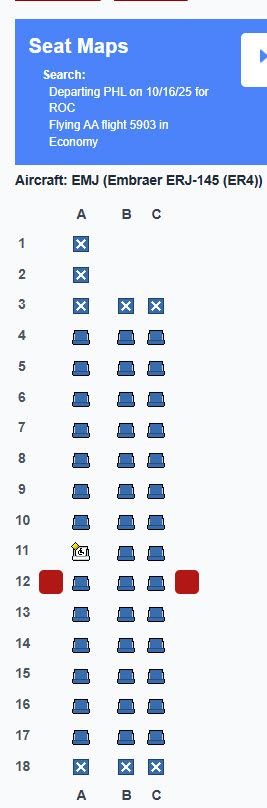
Still, no notification has been received.
Oct 15, 2025 | 4:01 pm
#4100


Join Date: Dec 2002
Location: Tokyo, Japan
Programs: JAL Global Club & oneworld Sapphire, ANA SFC & Star Alliance Gold
Posts: 4,569
Add me to the list of people for whom seat alerts are not working. The last three times I switched to a better seat on a flight, it was because I had found the seat myself when checking the seat map manually. The seat alert which I had already set up did not notify me of the open seat.
 Oct 15, 2025 | 4:05 pm
#4101
Company Representative - ExpertFlyer
Join Date: Jan 2005
Posts: 2,929
I have an AA ticket, but no seat assigned, on a flight that is sold out. Through the AA website, I cannot select a seat, and EF is showing all seats taken. Yesterday morning I set a seat alert for any seat. I randomly checked around 10pm last night, and there was a seat available, so I grabbed it.
The alert is still set in EF. It never fired, and I was never notified.
While I have strongly defended EF, even in light of its slow progress with fixing issue after issue, not reliably notifying for something as simple as a seat alert is pretty poor.
The alert is still set in EF. It never fired, and I was never notified.
While I have strongly defended EF, even in light of its slow progress with fixing issue after issue, not reliably notifying for something as simple as a seat alert is pretty poor.
tl;dr: Please sort all lists of "Saved Queries" alphabetically by default!
Since the dawn of time, "Saved Queries" across EF have been sorted alphabetically by default. This applied equally across the site such as the drop-down menus on the homepage and the "View All Saved Queries" pages.
A few weeks ago, that changed. Suddenly, any lists of "Saved Queries" were no longer being sorted alphabetically. Instead, they were sorted in reverse chronological order by creation date.
This was most obvious in those drop-down menus on the homepage. It became impossible to easily find a saved query in those lists. This was only partially fixed after folks complained.
Any lists of "Saved Queries" outside of those drop-down menus are still not being sorted alphabetically by default like they have been since the dawn of time. Worse yet, it's not possible to sort these lists on the mobile version of EF so you're stuck in reverse chronological order by creation date.
For example, this page on mobile cannot be sorted:
https://www.expertflyer.com/saved-qu...R_AVAILABILITY
EF support doesn't seem to think this is a big deal... I disagree and hope others here do too.
Since the dawn of time, "Saved Queries" across EF have been sorted alphabetically by default. This applied equally across the site such as the drop-down menus on the homepage and the "View All Saved Queries" pages.
A few weeks ago, that changed. Suddenly, any lists of "Saved Queries" were no longer being sorted alphabetically. Instead, they were sorted in reverse chronological order by creation date.
This was most obvious in those drop-down menus on the homepage. It became impossible to easily find a saved query in those lists. This was only partially fixed after folks complained.
Any lists of "Saved Queries" outside of those drop-down menus are still not being sorted alphabetically by default like they have been since the dawn of time. Worse yet, it's not possible to sort these lists on the mobile version of EF so you're stuck in reverse chronological order by creation date.
For example, this page on mobile cannot be sorted:
https://www.expertflyer.com/saved-qu...R_AVAILABILITY
EF support doesn't seem to think this is a big deal... I disagree and hope others here do too.
Last edited by TWA884; Oct 15, 2025 at 4:20 pm Reason: Merge consecutive posts by the same member; please use the multi-quote function. Thank you.
Oct 16, 2025 | 9:58 am
#4102
Company Representative - ExpertFlyer
Join Date: Jan 2005
Posts: 2,929
Hey all - we're seeing some issues with American Airlines searches at the moment and with some users getting a Rate Limit alert when they are not supposed to. We are looking into this. Will post when we have an update.
UPDATE: this should now be resolved. Please email our support team if you encounter this.
UPDATE: this should now be resolved. Please email our support team if you encounter this.
Last edited by ExpertFlyer Voice; Oct 16, 2025 at 10:11 am
Oct 16, 2025 | 10:26 am
#4103


Join Date: Jul 2021
Location: Airport Lounges (Usually in ORD and LHR)
Programs: AA EXP 1MM, AY Gold, QR Gold, Hilton Diamond
Posts: 3,715
I noticed a number of open tech jobs for Red Ventures, not sure which are EF specific or for other portfolio companies. I would apply to a couple where I'd be a good fit, but you couldn't pay me enough to endure being based in CLT!
Oct 16, 2025 | 5:53 pm
#4104


Join Date: Apr 2002
Programs: BA,Amex,Hilton,Hyatt,SPG
Posts: 624
Hi,I just have three more problems:
1.When I search for a flight with a specific date +- 1, 2, or 3 days, the “+1 day” is displayed instead of the desired day
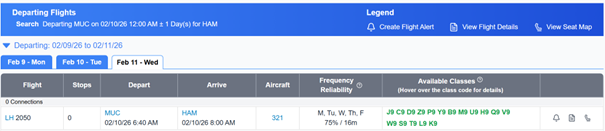
2. If you look at the result for the days before the displayed day (left side), it is the year 2027!
(The same applies if you are looking for a date in 2025, then 2026 will be displayed as result for the days on the left side.)
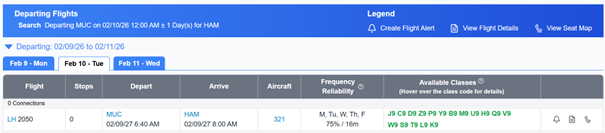
3. When I search for a flight with a specific date +- 1, 2, or 3 days, an error message always appears for the first day (on the left-hand side).

1.When I search for a flight with a specific date +- 1, 2, or 3 days, the “+1 day” is displayed instead of the desired day
2. If you look at the result for the days before the displayed day (left side), it is the year 2027!
(The same applies if you are looking for a date in 2025, then 2026 will be displayed as result for the days on the left side.)
3. When I search for a flight with a specific date +- 1, 2, or 3 days, an error message always appears for the first day (on the left-hand side).
Last edited by Dennis; Oct 16, 2025 at 6:03 pm
Oct 17, 2025 | 11:23 am
#4105
Moderator, Air Canada; FlyerTalk Evangelist
Join Date: Feb 2015
Location: YYC
Programs: AC SE MM, FB Plat, WS Plat, BA Silver, Marriott Plat, Hilton Gold, Accor Gold
Posts: 18,989
I keep getting this erroneous alert. There's no change to the configuration. There has been no change to the specific aircraft assigned to the flight since it started to populate on the flight tracking sites yesterday. But it keeps notifying me anyway.

Oct 17, 2025 | 7:37 pm
#4106


Join Date: Oct 2013
Location: SFO
Programs: AA EXP, UA Plat, Hyatt Glob, Hilton Diamond, Marriott Plat
Posts: 6,248
Not sure if already mentioned, and I'm only noticing when using mobile, not desktop, but when selecting View seat map on a flight from the Flight Availability Results page, the pop-up menu will present an option to "Show requested classes on 1 screen", however even if this is selected it will still show a tabbed view when proceeding to the seat map.
 Oct 20, 2025 | 12:18 am
#4108
Moderator, Air Canada; FlyerTalk Evangelist
Join Date: Feb 2015
Location: YYC
Programs: AC SE MM, FB Plat, WS Plat, BA Silver, Marriott Plat, Hilton Gold, Accor Gold
Posts: 18,989
Site seems to be down altogether at the moment, "HTTP ERROR 431", just when I need it the most to help with some nasty IRROPs. Very frustrating.
I see this is a client side issue. I think it may be a problem with the auto-refresh on availability results. Which, by the way, is (a) an extremely annoying "feature" that shouldn't exist and (b) if it does exist, the refresh rate is way too high. It's far too common for me to change tabs and come back and it has errored out, or I'm still on the tab, but it keeps refreshing just as I'm scrolling through and trying to figure out what my options are.
Anyway, I started getting that 431 after a whole bunch of auto-refreshes, and deleting site data seems to have cleared it up? Before I did that, I couldn't access the homepage or anything else on the site in that browser instance. But Incognito worked.
I see this is a client side issue. I think it may be a problem with the auto-refresh on availability results. Which, by the way, is (a) an extremely annoying "feature" that shouldn't exist and (b) if it does exist, the refresh rate is way too high. It's far too common for me to change tabs and come back and it has errored out, or I'm still on the tab, but it keeps refreshing just as I'm scrolling through and trying to figure out what my options are.
Anyway, I started getting that 431 after a whole bunch of auto-refreshes, and deleting site data seems to have cleared it up? Before I did that, I couldn't access the homepage or anything else on the site in that browser instance. But Incognito worked.
Last edited by Adam Smith; Oct 20, 2025 at 12:35 am
Oct 20, 2025 | 2:48 am
#4109
Join Date: Apr 2014
Programs: BAC Gold. Hilton Gold (downgraded, sob!)
Posts: 754
Site seems to be down altogether at the moment, "HTTP ERROR 431", just when I need it the most to help with some nasty IRROPs. Very frustrating.
I see this is a client side issue. I think it may be a problem with the auto-refresh on availability results. Which, by the way, is (a) an extremely annoying "feature" that shouldn't exist and (b) if it does exist, the refresh rate is way too high. It's far too common for me to change tabs and come back and it has errored out, or I'm still on the tab, but it keeps refreshing just as I'm scrolling through and trying to figure out what my options are.
Anyway, I started getting that 431 after a whole bunch of auto-refreshes, and deleting site data seems to have cleared it up? Before I did that, I couldn't access the homepage or anything else on the site in that browser instance. But Incognito worked.
I see this is a client side issue. I think it may be a problem with the auto-refresh on availability results. Which, by the way, is (a) an extremely annoying "feature" that shouldn't exist and (b) if it does exist, the refresh rate is way too high. It's far too common for me to change tabs and come back and it has errored out, or I'm still on the tab, but it keeps refreshing just as I'm scrolling through and trying to figure out what my options are.
Anyway, I started getting that 431 after a whole bunch of auto-refreshes, and deleting site data seems to have cleared it up? Before I did that, I couldn't access the homepage or anything else on the site in that browser instance. But Incognito worked.