
























 Feb 14, 2015, 12:53 pm
Last edit by: ExpertFlyer Voice
The purpose of this thread is to post questions, feedback, and report issues with ExpertFlyer. The ExpertFlyer team will respond as soon as possible from the ExpertFlyer Voice account (usually within 24 hours except on weekends).
You can also contact ExpertFlyer support at [email protected]
This is a community-maintained thread— it is not supported by ExpertFlyer.
--------------------
Seat Maps: we're currently not able to show seat maps for flights departing within the next 24 hours for several airlines: DL, BA, QR , ANA, B6, & JL
Searches currently not working:
To search AA upgrades:
You can also contact ExpertFlyer support at [email protected]
This is a community-maintained thread— it is not supported by ExpertFlyer.
--------------------
Seat Maps: we're currently not able to show seat maps for flights departing within the next 24 hours for several airlines: DL, BA, QR , ANA, B6, & JL
Searches currently not working:
- Upgrades - AY, BA, EK, EY, IB, QR, VS
- Awards - AY, BA, IB, EY, QR, VS
To search AA upgrades:
- Use the Award & Upgrade tool
- Only search for individual segments (set the "Connection Preference" drop-down to "Direct/Non-Stop only"). Flight results that are part of a connection won't show the upgrade version of C or A inventory because AA only files upgrade inventory as individual, not married, segments. (Married segments show revenue inventory instead of upgrade inventory.)
- To avoid confusion, check the "Exclude Codeshares" box, as AA awards and upgrades are not valid on codeshares.
- 2 minute video explanation: https://www.youtube.com/watch?v=YGRNFYIbHp4

ExpertFlyer Help Desk, Information and Updates Thread
Aug 21, 2025 | 7:45 am
#3946


Join Date: Apr 2012
Location: LON
Programs: Mucci, BAEC, Eurostar
Posts: 4,016
I wonder if others have seen this. When entering airport codes into the search fields, if I use auto complete feature on my Android keyboard (e.g. I've entered this code before and rather than type it out I tap on the suggested value) then Android appends a trailing space to the code (probably helpfully thinking I am going to keep typing another word). The trailing space stays in the field when I tap into another field. Then when I submit the form, EF tells me it can't find the airport code and I have to go into the field to delete the trailing space.
 Aug 21, 2025 | 10:57 am
#3947


Join Date: Jan 2010
Programs: UA, AS
Posts: 2,597
I wonder if others have seen this. When entering airport codes into the search fields, if I use auto complete feature on my Android keyboard (e.g. I've entered this code before and rather than type it out I tap on the suggested value) then Android appends a trailing space to the code (probably helpfully thinking I am going to keep typing another word). The trailing space stays in the field when I tap into another field. Then when I submit the form, EF tells me it can't find the airport code and I have to go into the field to delete the trailing space.
EF Voice, a simple fix would be to always trim any spaces from this field before executing the search.
EF Voice, a simple fix would be to always trim any spaces from this field before executing the search.
Aug 21, 2025 | 12:11 pm
#3948


Join Date: Jul 2019
Location: JNB, SFO
Programs: UA, DL
Posts: 112
I am running across an interesting issue. We are travelling internationally and I run NordVPN. I was looking for flight availability for an EY flight and found that looking at a specific EY flight (LHR-AUH) on a specific day never returned any response. After starting the request, the web page never returned any results. The little spinning circular widget never stopped. If I killed the NordVPN service, it ran immediately.
I am currently traveling internationally and am using public WiFi in hotels and I really want the security of running though a VPN rather than using an unsecured network to use the general internet. And I do want to turn not turn my WiFi off/on/off as a fallback.
I am currently traveling internationally and am using public WiFi in hotels and I really want the security of running though a VPN rather than using an unsecured network to use the general internet. And I do want to turn not turn my WiFi off/on/off as a fallback.
Aug 21, 2025 | 12:28 pm
#3949
Company Representative - ExpertFlyer

Join Date: Jan 2005
Posts: 2,929
Hi All - Heads up that there's a major cloud provider outage hitting multiple services right now. We're seeing authentication issues as a result, so some of you might have trouble logging in. Will update when we know more.
Aug 22, 2025 | 8:27 pm
#3950


Join Date: Feb 2002
Location: BOS
Programs: AA EXP 1MM, DL PM, Bonvoy Ambassador (Plat Life), HH G, Amtrak, B6, MR
Posts: 1,722
ExpertFlyer Voice, can you guys please add the space trimming logic before actually executing the search?
Aug 22, 2025 | 8:29 pm
#3951
Join Date: Feb 2002
Location: BOS
Programs: AA EXP 1MM, DL PM, Bonvoy Ambassador (Plat Life), HH G, Amtrak, B6, MR
Posts: 1,722
Was just looking at fares on DL and noticed that the exact same search results display the same fares as round trip when in card view but one-way when in table view. Anyone else see that?
Aug 22, 2025 | 9:14 pm
#3952

Join Date: Oct 2024
Posts: 517
I got that. But the point I was trying to make was that there's no protection for you (other than you think it might exist).
The point is now that, when using a VPN, your traffic looks similar to the ones from the bad guys and many sites lock-out VPN users on purpose because of that.
The point is now that, when using a VPN, your traffic looks similar to the ones from the bad guys and many sites lock-out VPN users on purpose because of that.
Aug 24, 2025 | 2:04 am
#3953

Join Date: Mar 2008
Location: used to be PER, now it's nowhere/eveywhere
Programs: QFF NB, AA GLD
Posts: 3,689
A minor request in the scheme of things, but
Please add KTI to your list of airports
It's the new airport serving Phnom Penh, Cambodia
It's scheduled to open on September 9th
Several airlines have it in their schedules already - including CX, MH and QR
Please add KTI to your list of airports
It's the new airport serving Phnom Penh, Cambodia
It's scheduled to open on September 9th
Several airlines have it in their schedules already - including CX, MH and QR
 Aug 24, 2025 | 5:00 pm
#3954

Join Date: Apr 2010
Location: ORD
Programs: AA, UA, GE
Posts: 5,388
I got that. But the point I was trying to make was that there's no protection for you (other than you think it might exist).
The point is now that, when using a VPN, your traffic looks similar to the ones from the bad guys and many sites lock-out VPN users on purpose because of that.
The point is now that, when using a VPN, your traffic looks similar to the ones from the bad guys and many sites lock-out VPN users on purpose because of that.
Aug 27, 2025 | 10:18 am
#3957
Join Date: Feb 2003
Location: SFO or OAK
Programs: AA 1MM GLD, Hertz #1 Gold, bunch of other programs w/no status
Posts: 1,755
After many years of premium service I recently downgraded to a free account. As I understand it, I should be able to set one free seat alert. My account states "You have 0 out of 1 free active alerts remaining", but the list of alerts is blank, showing no seat alerts, active, expired, or notified. I guess I am being punished for canceling my service? 
Aug 27, 2025 | 7:09 pm
#3958
Join Date: Jun 2009
Posts: 60
Accuracy of "Available Classes"
The Expert Flyer 'Availability' for Flight 34 YVR to YYZ on Sep 19 shows 13 business class seats available, however when I spoke to the call centre agent they indicated there were only 5 seats. Would EF be incorrect? This seems like a big discrepancy. I am not looking at the seat map, but the actual availability for J, C, and D fare class. If there were only those few seats I would look for a different flight for Eupgrade availability, but the other flight I would take also (shows high availability for those fare classes and I am not sure now of the accuracy.
Aug 27, 2025 | 8:45 pm
#3959
FlyerTalk Evangelist

Join Date: Nov 2004
Location: Melbourne
Programs: ►QFWP/LTG►VA WP►HyattDisc.►HiltonGold►ALL Plat.
Posts: 22,337
The Expert Flyer 'Availability' for Flight 34 YVR to YYZ on Sep 19 shows 13 business class seats available, however when I spoke to the call centre agent they indicated there were only 5 seats. Would EF be incorrect? This seems like a big discrepancy. I am not looking at the seat map, but the actual availability for J, C, and D fare class. If there were only those few seats I would look for a different flight for Eupgrade availability, but the other flight I would take also (shows high availability for those fare classes and I am not sure now of the accuracy.
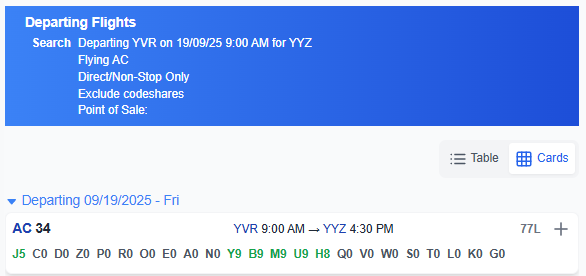
J5 means that AC are prepared to sell no more than 5 - and only in the most expensive category. If it had been showing J5 C4 rather than J5 C0 that would still only mean 5 seats are available to be sold. Note that AC never shows more than 9 seats being available.
Later that day there is this:

This means they are selling no more than 6 business class seats on that flight..
Last edited by serfty; Aug 27, 2025 at 8:57 pm