
























 Feb 14, 2015, 12:53 pm
Last edit by: ExpertFlyer Voice
The purpose of this thread is to post questions, feedback, and report issues with ExpertFlyer. The ExpertFlyer team will respond as soon as possible from the ExpertFlyer Voice account (usually within 24 hours except on weekends).
You can also contact ExpertFlyer support at [email protected]
This is a community-maintained thread— it is not supported by ExpertFlyer.
--------------------
Seat Maps: we're currently not able to show seat maps for flights departing within the next 24 hours for several airlines: DL, BA, QR , ANA, B6, & JL
Searches currently not working:
To search AA upgrades:
You can also contact ExpertFlyer support at [email protected]
This is a community-maintained thread— it is not supported by ExpertFlyer.
--------------------
Seat Maps: we're currently not able to show seat maps for flights departing within the next 24 hours for several airlines: DL, BA, QR , ANA, B6, & JL
Searches currently not working:
- Upgrades - AY, BA, EK, EY, IB, QR, VS
- Awards - AY, BA, IB, EY, QR, VS
To search AA upgrades:
- Use the Award & Upgrade tool
- Only search for individual segments (set the "Connection Preference" drop-down to "Direct/Non-Stop only"). Flight results that are part of a connection won't show the upgrade version of C or A inventory because AA only files upgrade inventory as individual, not married, segments. (Married segments show revenue inventory instead of upgrade inventory.)
- To avoid confusion, check the "Exclude Codeshares" box, as AA awards and upgrades are not valid on codeshares.
- 2 minute video explanation: https://www.youtube.com/watch?v=YGRNFYIbHp4

ExpertFlyer Help Desk, Information and Updates Thread
Aug 5, 2025 | 1:40 am
#3871


Join Date: Mar 2017
Location: AMS
Programs: BAEC Silver, Flying Blue Silver, TK M&S Nobody
Posts: 3,423
 Aug 5, 2025 | 4:17 am
#3872
Join Date: Feb 2023
Programs: BA Gold, United Gold, Eurostar Carte Blanche
Posts: 263
Aug 5, 2025 | 6:04 am
#3873


Join Date: May 2024
Location: BRN
Programs: AY+ PLAT, (ex BA Gold), SAS GOLD, M&M FTL / *S, IHG Gold, Marriott Plat, SBB GA First Class
Posts: 1,667
Update:
- The issue with missing POS from the alert emails has now been fixed
- "Show fares for all travel dates" has now been reinstated in the Fare Information form
- The issue with same-day American Airlines seat maps has also been addressed
Aug 5, 2025 | 11:26 am
#3874


Join Date: Jul 2012
Programs: BA, SQ, AF
Posts: 50
Seat Alerts Incorrect Dates
Hi ExpertFlyer Voice , hope you’re well. I’m not sure if this has been reported already, but I have two seat alerts saved for QR - in both cases when I go to the saved alert, the date is correct, but when I run the alert, the date is out by a day - it’s a day behind when flying from Doha, but the day ahead when flying back. I’ve attached photos of an example - you can see the alert is saved correctly for January 20th but the map showing is for January 19th. I’ve tried deleting and redoing the alerts, same issue. Is this a known glitch? Thank you.
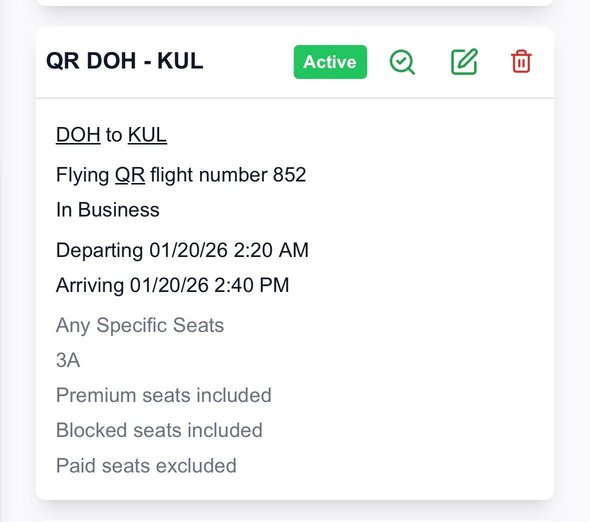
Alert date set for 20/01/26
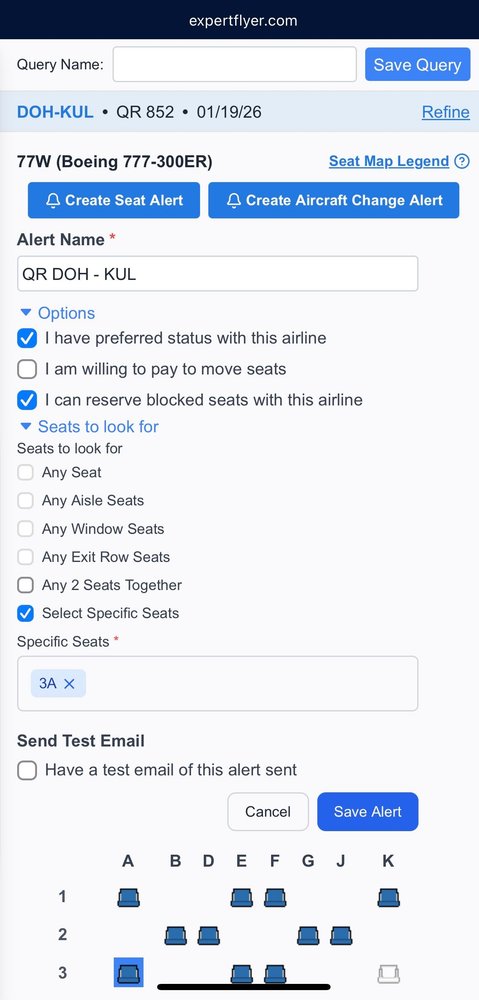
Seat map shows for 19/01/26
Alert date set for 20/01/26
Seat map shows for 19/01/26
Last edited by TWA884; Aug 5, 2025 at 12:30 pm Reason: Reduce images size
Aug 6, 2025 | 5:28 am
#3875


Join Date: Jan 2018
Programs: AF/KL FB Platinum, DL Diamond, Hertz PC, Bonvoy Gold Elite; Hilton Gold
Posts: 1,170
The blocked seat issue is present with AF/KL as well. In the past, blocked seats were correctly shown. As a data point, seats 10A/10L business on AF A359 aircraft with 2 business cabins are always blocked for bassinet use until approx 72h before departure. (Example is AF355 YYZ-CDG TV is fall). 10A/10L show as reserved (not blocked) on everyday in EF.
Aug 6, 2025 | 6:17 am
#3876
FlyerTalk Evangelist


Join Date: Sep 2007
Location: BOS
Programs: DL DM 2MM, Marriott LT Titanium, Hertz PC, Avis PC
Posts: 17,194
Entirely broken - since last night some time, cannot get ANY results for ANY flights. I use my saved queries and the website just spins on 'Loading Results...'
Once that happens, I have to go back to the home page and flight availability link to start a search over, only to get the same spinning results page that never loads.
Website browser interface - Firefox and Edge same result. Have already cleared cookies and also tried private browser mode with same result.
Once that happens, I have to go back to the home page and flight availability link to start a search over, only to get the same spinning results page that never loads.
Website browser interface - Firefox and Edge same result. Have already cleared cookies and also tried private browser mode with same result.
Aug 6, 2025 | 9:34 am
#3877
Company Representative - ExpertFlyer

Join Date: Jan 2005
Posts: 2,928
Entirely broken - since last night some time, cannot get ANY results for ANY flights. I use my saved queries and the website just spins on 'Loading Results...'
Once that happens, I have to go back to the home page and flight availability link to start a search over, only to get the same spinning results page that never loads.
Website browser interface - Firefox and Edge same result. Have already cleared cookies and also tried private browser mode with same result.
Once that happens, I have to go back to the home page and flight availability link to start a search over, only to get the same spinning results page that never loads.
Website browser interface - Firefox and Edge same result. Have already cleared cookies and also tried private browser mode with same result.
Aug 6, 2025 | 9:57 am
#3878
Company Representative - ExpertFlyer
Join Date: Jan 2005
Posts: 2,928
The blocked seat issue is present with AF/KL as well. In the past, blocked seats were correctly shown. As a data point, seats 10A/10L business on AF A359 aircraft with 2 business cabins are always blocked for bassinet use until approx 72h before departure. (Example is AF355 YYZ-CDG TV is fall). 10A/10L show as reserved (not blocked) on everyday in EF.
Aug 6, 2025 | 10:24 am
#3879
Company Representative - ExpertFlyer
Join Date: Jan 2005
Posts: 2,928
Hi ExpertFlyer Voice , hope you’re well. I’m not sure if this has been reported already, but I have two seat alerts saved for QR - in both cases when I go to the saved alert, the date is correct, but when I run the alert, the date is out by a day - it’s a day behind when flying from Doha, but the day ahead when flying back. I’ve attached photos of an example - you can see the alert is saved correctly for January 20th but the map showing is for January 19th. I’ve tried deleting and redoing the alerts, same issue. Is this a known glitch? Thank you.
Alert date set for 20/01/26
Seat map shows for 19/01/26
Alert date set for 20/01/26
Seat map shows for 19/01/26
Last edited by TWA884; Aug 6, 2025 at 1:57 pm Reason: Redact quoted images
Aug 6, 2025 | 11:34 am
#3881
FlyerTalk Evangelist
Join Date: Sep 2007
Location: BOS
Programs: DL DM 2MM, Marriott LT Titanium, Hertz PC, Avis PC
Posts: 17,194
Flight availability is working again... some time this morning after 9am EDT I was able to get flight availability searches to return results instead of blank page with spinning icon.
Aug 6, 2025 | 12:36 pm
#3882
Company Representative - ExpertFlyer
Join Date: Jan 2005
Posts: 2,928
Aug 6, 2025 | 3:01 pm
#3883

Join Date: Jan 2007
Location: YYZ
Programs: CX GO, AC Aeroplan 25K, AMEX PLAT, Hilton Diamond, Marriott Titanium, IHG Spire Amb
Posts: 505
Blocked seats seems to be still broken most of the airlines that used to show correctly.
ExpertFlyer Voice Any updates on CX in particular? Although as mentioned above, I notice the problem extends to quite a few airlines (in fact I think *most* airlines).
ExpertFlyer Voice
Same for CX seat maps, no distinction between occupied and blocked seats, and also unable to access seat map in the final hour to departure. We used to be able to access the correct seat map including blocked vs. occupied seats until after departure.
This is a major functionality loss to myself. Also note that there are other tools right now that can shows occupied vs. blocked seats on CX.
Any updates on whether ExpertFlyer could fix this or is this now a permanent loss? Thanks.
Same for CX seat maps, no distinction between occupied and blocked seats, and also unable to access seat map in the final hour to departure. We used to be able to access the correct seat map including blocked vs. occupied seats until after departure.
This is a major functionality loss to myself. Also note that there are other tools right now that can shows occupied vs. blocked seats on CX.
Any updates on whether ExpertFlyer could fix this or is this now a permanent loss? Thanks.
ExpertFlyer Voice Any updates on CX in particular? Although as mentioned above, I notice the problem extends to quite a few airlines (in fact I think *most* airlines).
 Aug 7, 2025 | 2:03 am
#3885
Join Date: Apr 2014
Programs: BAC Gold. Hilton Gold (downgraded, sob!)
Posts: 754
Hi Ross0. I had this the other day and now you mention it, the problem is still there today. It’s greyed out because you’re asking for more than one seat. My workaround was to select the seat alerts individually for each seat until EF fix it (and I don’t think they’re aware of it yet) and you should be fine. Let us know if this works for you.