
























 Feb 14, 2015, 12:53 pm
Last edit by: ExpertFlyer Voice
The purpose of this thread is to post questions, feedback, and report issues with ExpertFlyer. The ExpertFlyer team will respond as soon as possible from the ExpertFlyer Voice account (usually within 24 hours except on weekends).
You can also contact ExpertFlyer support at [email protected]
This is a community-maintained thread— it is not supported by ExpertFlyer.
--------------------
Seat Maps: we're currently not able to show seat maps for flights departing within the next 24 hours for several airlines: DL, BA, QR , ANA, B6, & JL
Searches currently not working:
To search AA upgrades:
You can also contact ExpertFlyer support at [email protected]
This is a community-maintained thread— it is not supported by ExpertFlyer.
--------------------
Seat Maps: we're currently not able to show seat maps for flights departing within the next 24 hours for several airlines: DL, BA, QR , ANA, B6, & JL
Searches currently not working:
- Upgrades - AY, BA, EK, EY, IB, QR, VS
- Awards - AY, BA, IB, EY, QR, VS
To search AA upgrades:
- Use the Award & Upgrade tool
- Only search for individual segments (set the "Connection Preference" drop-down to "Direct/Non-Stop only"). Flight results that are part of a connection won't show the upgrade version of C or A inventory because AA only files upgrade inventory as individual, not married, segments. (Married segments show revenue inventory instead of upgrade inventory.)
- To avoid confusion, check the "Exclude Codeshares" box, as AA awards and upgrades are not valid on codeshares.
- 2 minute video explanation: https://www.youtube.com/watch?v=YGRNFYIbHp4

ExpertFlyer Help Desk, Information and Updates Thread
Sep 9, 2025 | 1:43 am
#3976


Join Date: Feb 2018
Location: Hong Kong
Posts: 40
Hi ExpertFlyer Voice or anyone
The flight availability function does not return availability of SK8036-SK8041 flight operated by SQ. Is it a bug? or what is the reason behind? Thank you.
The flight availability function does not return availability of SK8036-SK8041 flight operated by SQ. Is it a bug? or what is the reason behind? Thank you.


 Sep 11, 2025 | 8:53 am
#3979
Moderator, Air Canada; FlyerTalk Evangelist
Join Date: Feb 2015
Location: YYC
Programs: AC SE MM, FB Plat, WS Plat, BA Silver, Marriott Plat, Hilton Gold, Accor Gold
Posts: 18,987
I keep getting this issue over and over when trying to create an alert for a specific flight.
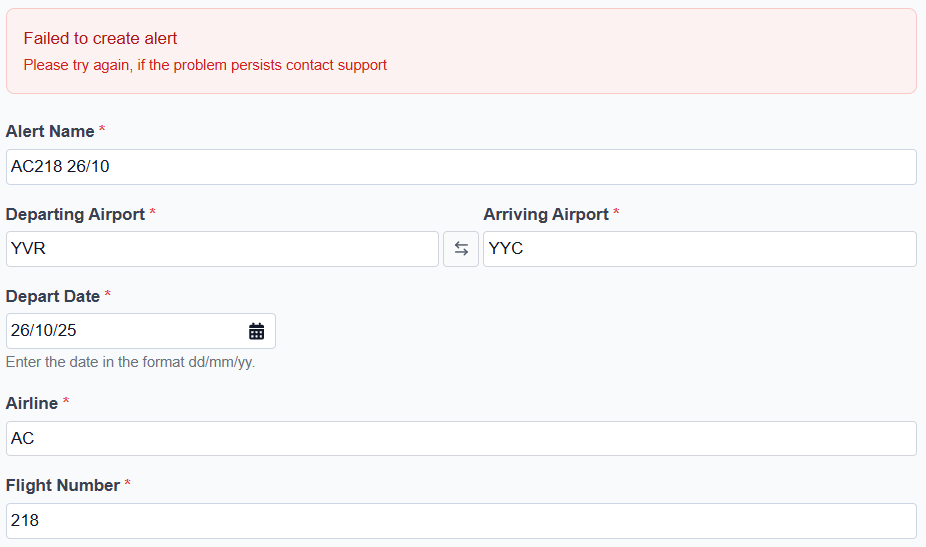
The flight does exist, and I have a schedule alert for it, so I have no idea why it won't work...

The flight does exist, and I have a schedule alert for it, so I have no idea why it won't work...
Sep 11, 2025 | 3:58 pm
#3981
Company Representative - ExpertFlyer

Join Date: Jan 2005
Posts: 2,928
Hi Adam - This is unexpected. Our team will review and I will update you once we know more.
Sep 12, 2025 | 10:05 pm
#3982
Moderator, Air Canada; FlyerTalk Evangelist
Join Date: Feb 2015
Location: YYC
Programs: AC SE MM, FB Plat, WS Plat, BA Silver, Marriott Plat, Hilton Gold, Accor Gold
Posts: 18,987
No. I have over 100 other alerts, all with a slash in the name, including the schedule alert for this same flight and aircraft change alerts for over 40 other flights in October 2025. This wasn't an issue in the old system or the new one. It's only this one flight.

 Sep 15, 2025 | 11:56 am
#3984


Join Date: Jan 2018
Programs: AF/KL FB Platinum, DL Diamond, Hertz PC, Bonvoy Gold Elite; Hilton Gold
Posts: 1,170
Sep 15, 2025 | 12:17 pm
#3985


Join Date: Sep 2009
Programs: AA Executive Platinum, Marriott Lifetime Titanium, IHG Platinum
Posts: 2,425
My guess is there may be blocked seats. So either one of two things is happening:
1) Data sources (APIs, web scrapers, however EF gets its data) are no longer differentiating between blocked seats and occupied/assigned seats
2) Data sources are still differentiating, but EF logic/software is not differentiating and displaying properly
Sep 15, 2025 | 12:34 pm
#3986
Join Date: Jan 2018
Programs: AF/KL FB Platinum, DL Diamond, Hertz PC, Bonvoy Gold Elite; Hilton Gold
Posts: 1,170
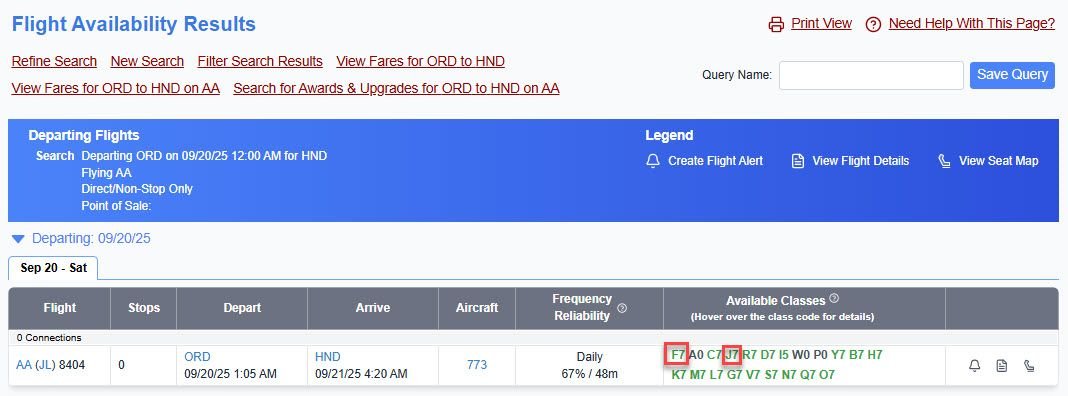
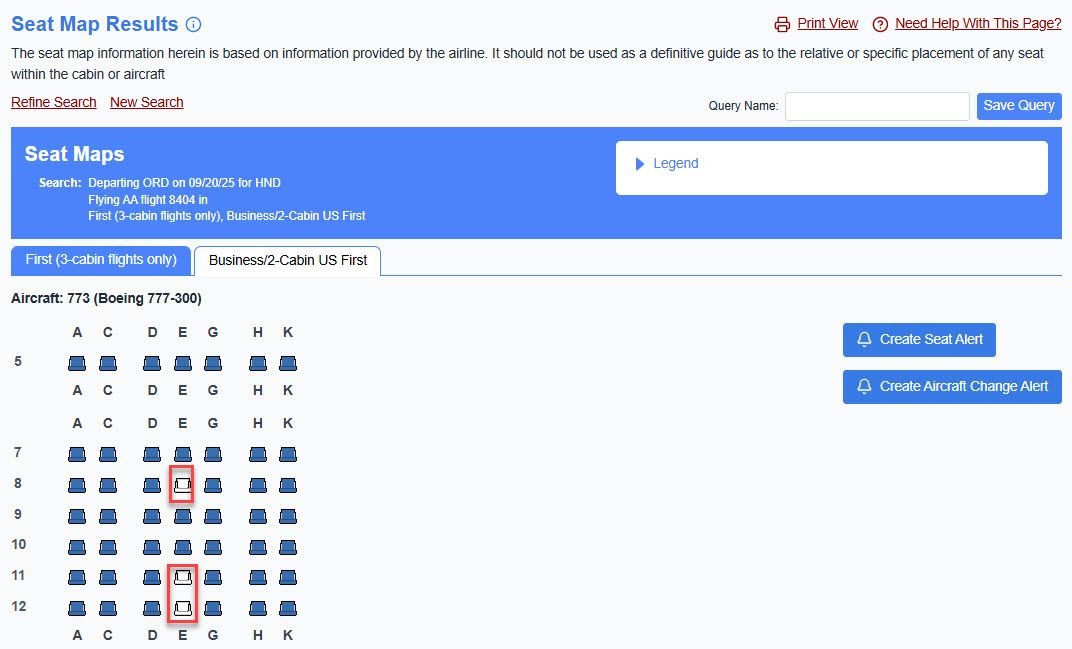
Until recently, this was not an issue with ExpertFlyer. In the example below, there are 7 or more J seats for sale, yet only 3 seats showing that are unassigned. This cannot be correct. But it would be correct to see 3 seats for sale, but showing 5 unassigned, which was common in the past.
My guess is there may be blocked seats. So either one of two things is happening:
1) Data sources (APIs, web scrapers, however EF gets its data) are no longer differentiating between blocked seats and occupied/assigned seats
2) Data sources are still differentiating, but EF logic/software is not differentiating and displaying properly
My guess is there may be blocked seats. So either one of two things is happening:
1) Data sources (APIs, web scrapers, however EF gets its data) are no longer differentiating between blocked seats and occupied/assigned seats
2) Data sources are still differentiating, but EF logic/software is not differentiating and displaying properly
Sep 15, 2025 | 2:28 pm
#3987
Join Date: Sep 2009
Programs: AA Executive Platinum, Marriott Lifetime Titanium, IHG Platinum
Posts: 2,425
Sure, its probably blocked seats. EF has said "they are working on it". At the end of the day, if their GDS or data supplier cannot send block seat metadata, then there is not much they can do. My point is that often times GDS availability from an airline does't match up with seat reservations available for a host of reasons.
Sep 16, 2025 | 12:27 pm
#3988
Company Representative - ExpertFlyer
Join Date: Jan 2005
Posts: 2,928
Until recently, this was not an issue with ExpertFlyer. In the example below, there are 7 or more J seats for sale, yet only 3 seats showing that are unassigned. This cannot be correct. But it would be correct to see 3 seats for sale, but showing 5 unassigned, which was common in the past.
My guess is there may be blocked seats. So either one of two things is happening:
1) Data sources (APIs, web scrapers, however EF gets its data) are no longer differentiating between blocked seats and occupied/assigned seats
2) Data sources are still differentiating, but EF logic/software is not differentiating and displaying properly
My guess is there may be blocked seats. So either one of two things is happening:
1) Data sources (APIs, web scrapers, however EF gets its data) are no longer differentiating between blocked seats and occupied/assigned seats
2) Data sources are still differentiating, but EF logic/software is not differentiating and displaying properly
Sep 16, 2025 | 1:46 pm
#3989
Company Representative - ExpertFlyer
Join Date: Jan 2005
Posts: 2,928
Sep 16, 2025 | 8:14 pm
#3990
Moderator, Air Canada; FlyerTalk Evangelist
Join Date: Feb 2015
Location: YYC
Programs: AC SE MM, FB Plat, WS Plat, BA Silver, Marriott Plat, Hilton Gold, Accor Gold
Posts: 18,987
The flights on major airlines that weren't working (AC, BA) are at least now returning a result. Although for some reason it's inconsistent - e.g. the one I previously reported lists the aircraft as "Boeing 737 MAX 8 (7M8)", whereas other AC-operated flights just say "7M8". Same with AC327 YUL-YYC 9/11/25, which yesterday was also generating an error; it now works and returns "Airbus A220-300", while other AC flights say "223".
But it also appears that the new version of the site only returns one error when an aircraft change alert fails. For instance, with airlines like DM or SI that don't make seat maps available, it returns the same generic "Failed to create alert Please try again, if the problem persists contact support". Before the switch to the new site, it would reject the alert with a message that seat maps were not available for this airline.
I'm still not sure why a seat map is necessary when the flight schedule alert shows the type though...
(Although I'll note that the new site at least seems to have done away with the never-ending aircraft "change" alerts that were triggered by European carriers constantly adding or subtracting a row of intra-Europe business class, which is a very welcome change - I care whether the aircraft is a 223 or a 320, not whether AF is selling 3 rows of J one day and 4 rows the next, or vice versa).
But it also appears that the new version of the site only returns one error when an aircraft change alert fails. For instance, with airlines like DM or SI that don't make seat maps available, it returns the same generic "Failed to create alert Please try again, if the problem persists contact support". Before the switch to the new site, it would reject the alert with a message that seat maps were not available for this airline.
I'm still not sure why a seat map is necessary when the flight schedule alert shows the type though...
(Although I'll note that the new site at least seems to have done away with the never-ending aircraft "change" alerts that were triggered by European carriers constantly adding or subtracting a row of intra-Europe business class, which is a very welcome change - I care whether the aircraft is a 223 or a 320, not whether AF is selling 3 rows of J one day and 4 rows the next, or vice versa).