
























 Feb 14, 2015, 12:53 pm
Last edit by: ExpertFlyer Voice
The purpose of this thread is to post questions, feedback, and report issues with ExpertFlyer. The ExpertFlyer team will respond as soon as possible from the ExpertFlyer Voice account (usually within 24 hours except on weekends).
You can also contact ExpertFlyer support at [email protected]
This is a community-maintained thread— it is not supported by ExpertFlyer.
--------------------
Seat Maps: we're currently not able to show seat maps for flights departing within the next 24 hours for several airlines: DL, BA, QR , ANA, B6, & JL
Searches currently not working:
To search AA upgrades:
You can also contact ExpertFlyer support at [email protected]
This is a community-maintained thread— it is not supported by ExpertFlyer.
--------------------
Seat Maps: we're currently not able to show seat maps for flights departing within the next 24 hours for several airlines: DL, BA, QR , ANA, B6, & JL
Searches currently not working:
- Upgrades - AY, BA, EK, EY, IB, QR, VS
- Awards - AY, BA, IB, EY, QR, VS
To search AA upgrades:
- Use the Award & Upgrade tool
- Only search for individual segments (set the "Connection Preference" drop-down to "Direct/Non-Stop only"). Flight results that are part of a connection won't show the upgrade version of C or A inventory because AA only files upgrade inventory as individual, not married, segments. (Married segments show revenue inventory instead of upgrade inventory.)
- To avoid confusion, check the "Exclude Codeshares" box, as AA awards and upgrades are not valid on codeshares.
- 2 minute video explanation: https://www.youtube.com/watch?v=YGRNFYIbHp4

ExpertFlyer Help Desk, Information and Updates Thread
Feb 18, 2022 | 11:00 am
#2476


Join Date: Dec 2008
Location: CLE
Programs: UA Silver
Posts: 1,284
I just upgraded to EF Basic. When I search Flight Availability with no airline specified, I only get 6 results. I don't see a pagination option. When I refine it to a specific airline, I get 6 results from that airline, only 2 of which appeared on the previous results. Example CLE-SEA Feb 19. No airline specified, shows 6 results, 2 of which are DL. When I refine it to DL, I get 6 results all on DL.
 Feb 18, 2022 | 11:48 am
#2477
Company Representative - ExpertFlyer

Join Date: Jan 2005
Posts: 2,928
I just upgraded to EF Basic. When I search Flight Availability with no airline specified, I only get 6 results. I don't see a pagination option. When I refine it to a specific airline, I get 6 results from that airline, only 2 of which appeared on the previous results. Example CLE-SEA Feb 19. No airline specified, shows 6 results, 2 of which are DL. When I refine it to DL, I get 6 results all on DL.
Feb 19, 2022 | 10:54 am
#2478


Join Date: Jan 2005
Location: London
Programs: AA Plat, SPG Gold
Posts: 204

@EF - any update on timing or whether there is any hope to resolve this?
Feb 19, 2022 | 12:51 pm
#2479
Company Representative - ExpertFlyer
Join Date: Jan 2005
Posts: 2,928
We're sorry you don't have any other use for EF other than BA awards, however we don't have an ETA at this time. We are looking to test a possible solution soon, however when we have updated information we will post it here.
Feb 19, 2022 | 4:25 pm
#2480

Join Date: Jan 2001
Location: Bellevue, WA - AA EXP 3MM
Posts: 2,793
I've been looking at some AA First fares for travel from SEA to LHR. Example: LHR to SEA, 4/1/22 to 4/8/22, Fare basis code INW4C7S4/EUUP. When I click to see Fare Rules in EF, I get a near-blank screen. See below. Any idea what's wrong here?
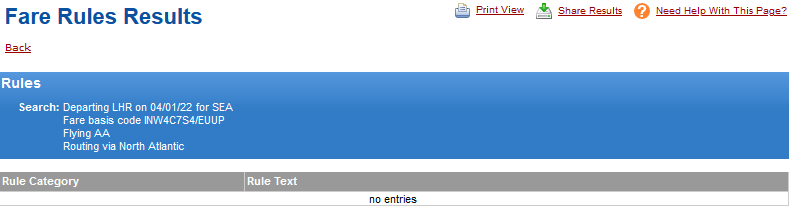
Large number of fares in this market -- apparently 126 filed by AA on SEA-LHR. 43 of those in First (based on what I see when checking only the First checkbox. I need to read fare rules to figure out what could apply to my journey.
Large number of fares in this market -- apparently 126 filed by AA on SEA-LHR. 43 of those in First (based on what I see when checking only the First checkbox. I need to read fare rules to figure out what could apply to my journey.
Feb 19, 2022 | 9:20 pm
#2481
Moderator: Travel Safety/Security, Travel Tools, California, Los Angeles; FlyerTalk Evangelist

Join Date: Dec 2009
Location: LAX
Programs: oneword Emerald
Posts: 24,796
American just announced a temporary suspension of service between Seattle and London due to a delay of 787 deliveries by Boeing. I am not sure of the effective date of the suspension; perhaps that may be the reason for the fare rules not being displayed.
Feb 19, 2022 | 10:26 pm
#2482
Join Date: Jan 2001
Location: Bellevue, WA - AA EXP 3MM
Posts: 2,793
I don't think think that's the problem. One, I noticed this problem a couple weeks ago, before the suspension was announced. Two, the fares I mentioned are for first class, A bucket, which was never on the 772 equipment AA flew SEA-LHR. An AA A fare SEA-LHR would either be for connecting service (via DFW, ORD, JFK, LAX, etc.) or for service on a BA codeshare flight marketed by AA -- both of which continue unchanged.
Feb 19, 2022 | 11:23 pm
#2483
Company Representative - ExpertFlyer
Join Date: Jan 2005
Posts: 2,928
I've been looking at some AA First fares for travel from SEA to LHR. Example: LHR to SEA, 4/1/22 to 4/8/22, Fare basis code INW4C7S4/EUUP. When I click to see Fare Rules in EF, I get a near-blank screen. See below. Any idea what's wrong here?
Large number of fares in this market -- apparently 126 filed by AA on SEA-LHR. 43 of those in First (based on what I see when checking only the First checkbox. I need to read fare rules to figure out what could apply to my journey.
Large number of fares in this market -- apparently 126 filed by AA on SEA-LHR. 43 of those in First (based on what I see when checking only the First checkbox. I need to read fare rules to figure out what could apply to my journey.
Feb 19, 2022 | 11:41 pm
#2484
Join Date: Jan 2001
Location: Bellevue, WA - AA EXP 3MM
Posts: 2,793
ExpertFlyer Voice, thanks for replying and explaining. Weird that it is even possible to have more than one fare with the same fare basis in the same market -- I would have thought each market can only have one fare with a given name??!! What possible purpose to having two fares with the same name in the same market? Why would AA do that?
Can you suggest any workaround? Suppose I don't care which of these rules I read, on the view that maybe all the fares with the same name have the same (or substantially the same) rules. That might be wrong, of course, but it's a good place to start as I try to see whether these fares would work for me.
Can you suggest any workaround? Suppose I don't care which of these rules I read, on the view that maybe all the fares with the same name have the same (or substantially the same) rules. That might be wrong, of course, but it's a good place to start as I try to see whether these fares would work for me.
Feb 19, 2022 | 11:47 pm
#2485
Company Representative - ExpertFlyer
Join Date: Jan 2005
Posts: 2,928
ExpertFlyer Voice, thanks for replying and explaining. Weird that it is even possible to have more than one fare with the same fare basis in the same market -- I would have thought each market can only have one fare with a given name??!! What possible purpose to having two fares with the same name in the same market? Why would AA do that?
Can you suggest any workaround? Suppose I don't care which of these rules I read, on the view that maybe all the fares with the same name have the same (or substantially the same) rules. That might be wrong, of course, but it's a good place to start as I try to see whether these fares would work for me.
Can you suggest any workaround? Suppose I don't care which of these rules I read, on the view that maybe all the fares with the same name have the same (or substantially the same) rules. That might be wrong, of course, but it's a good place to start as I try to see whether these fares would work for me.
Feb 20, 2022 | 5:27 pm
#2486
Join Date: Aug 2004
Programs: AA (EP), Hilton (Diamond), Marriott Bonvoy (Titanium)
Posts: 9,138
The issue is that there is more than one fare with the same fare basis code so the reservation system doesn't know which fares rules to return, so we don't get any rules. On our todo list is to show a message to this effect instead of the blank response you see now.
Feb 20, 2022 | 7:30 pm
#2487
Company Representative - ExpertFlyer
Join Date: Jan 2005
Posts: 2,928
The problem as we noted is that we don't receive any fare rules for any of the duplicate fares. We display the list of duplicate fares in the Fare Information search, and we get back the same list when we request the rules for one of them.
Feb 20, 2022 | 7:57 pm
#2488
Join Date: Aug 2004
Programs: AA (EP), Hilton (Diamond), Marriott Bonvoy (Titanium)
Posts: 9,138
I realize you're not getting the info from your data supplier; I was hoping that it might be possible for you to get your data supplier to give you the rules for all the fares instead of none.
Feb 20, 2022 | 9:54 pm
#2489
Join Date: Dec 2008
Location: CLE
Programs: UA Silver
Posts: 1,284
The Flight Availability vendor only returns 12 segments at a time (or 6 1 connection options, for example). You didn't ask a question in your post, but if your question is how do you see more flights, the easiest option is to change the time of day of the search to see later flight options.
If you expect me to increment the departure times throughout the day to find availability, well, that ain't gonna happen. Cancellation imminent.
Feb 22, 2022 | 1:44 pm
#2490
Join Date: Jan 2010
Posts: 3,198