Jan 14, 2024, 1:29 pm
Last edit by: JY1024
• Saturday evenings, AA loads schedules and runs batch processes. This means some scheduled flights might go missing, or your account may show all zeroes, sometimes well into Sunday. It will all come back.
• If the website doesn't work try the app, or vice versa.
• aa.com troubles? Check by using aktchi's recommended way: http://isup.me- or http://www.isitdown.us, http://www.doj.me
Or use this direct link - http://downorisitjustme.com/res.php?url=aa.com
• If it is just you, try: reload the page, empty your cache, delete one or more cookies, quit and restart the browser, shut down and reboot the computer.
• LRD shared: (maybe)... it's a bad cookie. I use the "Remove Cookie for Site" extension. This adds a menu item to your mouse right-click that clears the cookies for just the domain you are viewing. Works ...for example, clearing Citi cookies before submitting a second, same-day AA credit-card application.
• Drunkmuppet: Go to book flights->advanced->clearhistory.
• azsharonc: How to resolve the 400 errors in Chrome
1. clear you recent search history on the advanced search page
2. you can delete aa.com cookies by left clicking on American Airlines Inc in the address field
Select Cookies from the list
from the list of cookies, expand the caret for aa.com or www.aa.com
click on cookies then click remove.
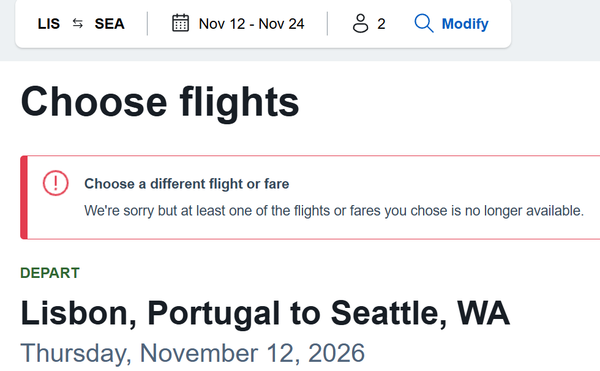
• "Flight / Fare selected no longer available; please modify your request" common booking error
• For Web-related issues, including web-displayed fares issues, call American Airlines Web Services PhonesUnited Kingdom: 0207-365-0777 Mon - Fri 7:00 a.m. - 7:00 p.m. GMT; Sat - Sun 8:30 a.m. - 5:00 p.m.
Servicios Web de AA.com en Español U.S. or Canada 1-800-222-2377, 6:00 a.m. - 2:00 a.m. US CT daily
All Other Locations 1-918-832-1384, 6:00 a.m. - 2:00 a.m. US CT daily
• Get AA.com to remember your account number and password? serfty recommends, for personal devices ONLY: Greasemonkey with the "Allow Password Remembering".
N.B. Older posts have been archived to: 2016 AA.com website & app down, glitch, bug, fix etc. (Consolidated)
ARCHIVE: AA.com 2017 website & app down, glitch, bug, fix etc. (Consolidated
ARCHIVE: aa.com 2018 website down, glitch, bug, etc. (consolidated)
ARCHIVE: aa.com 2019 website down, glitch, bug, etc. (consolidated)
ARCHIVE: aa.com website / app down, glitch, bug, etc. (2020-2023)
AA Forum Moderator Team
• If the website doesn't work try the app, or vice versa.
• aa.com troubles? Check by using aktchi's recommended way: http://isup.me- or http://www.isitdown.us, http://www.doj.me
Or use this direct link - http://downorisitjustme.com/res.php?url=aa.com
• If it is just you, try: reload the page, empty your cache, delete one or more cookies, quit and restart the browser, shut down and reboot the computer.
• LRD shared: (maybe)... it's a bad cookie. I use the "Remove Cookie for Site" extension. This adds a menu item to your mouse right-click that clears the cookies for just the domain you are viewing. Works ...for example, clearing Citi cookies before submitting a second, same-day AA credit-card application.
• Drunkmuppet: Go to book flights->advanced->clearhistory.
• azsharonc: How to resolve the 400 errors in Chrome
1. clear you recent search history on the advanced search page
2. you can delete aa.com cookies by left clicking on American Airlines Inc in the address field
Select Cookies from the list
from the list of cookies, expand the caret for aa.com or www.aa.com
click on cookies then click remove.
• "Flight / Fare selected no longer available; please modify your request" common booking error
• For Web-related issues, including web-displayed fares issues, call American Airlines Web Services PhonesUnited Kingdom: 0207-365-0777 Mon - Fri 7:00 a.m. - 7:00 p.m. GMT; Sat - Sun 8:30 a.m. - 5:00 p.m.
Servicios Web de AA.com en Español U.S. or Canada 1-800-222-2377, 6:00 a.m. - 2:00 a.m. US CT daily
All Other Locations 1-918-832-1384, 6:00 a.m. - 2:00 a.m. US CT daily
• Get AA.com to remember your account number and password? serfty recommends, for personal devices ONLY: Greasemonkey with the "Allow Password Remembering".
N.B. Older posts have been archived to: 2016 AA.com website & app down, glitch, bug, fix etc. (Consolidated)
ARCHIVE: AA.com 2017 website & app down, glitch, bug, fix etc. (Consolidated
ARCHIVE: aa.com 2018 website down, glitch, bug, etc. (consolidated)
ARCHIVE: aa.com 2019 website down, glitch, bug, etc. (consolidated)
ARCHIVE: aa.com website / app down, glitch, bug, etc. (2020-2023)
AA Forum Moderator Team

aa.com website / app down, glitch, bug, etc. (master thread)
May 4, 2026 | 4:02 pm
#286


Join Date: Apr 2000
Location: Palm Beach/ New England
Programs: AA EXP 3MM, DL GM, Marriott Platinum
Posts: 4,459
I am getting a 400 Bad Headers (I'm calling it stack-overflow) error when trying to access the Ticket Receipts page from the "Prefunds" landing page (this landing page has the links for ticket receipts; special service receipts; and refund applications)
Have tried both Windows and Mac. Anyone know how to get in contact with website services at AA?
Have tried both Windows and Mac. Anyone know how to get in contact with website services at AA?
 May 4, 2026 | 4:38 pm
#287


Join Date: Dec 2015
Posts: 271
I am getting a 400 Bad Headers (I'm calling it stack-overflow) error when trying to access the Ticket Receipts page from the "Prefunds" landing page (this landing page has the links for ticket receipts; special service receipts; and refund applications)
Have tried both Windows and Mac. Anyone know how to get in contact with website services at AA?
Have tried both Windows and Mac. Anyone know how to get in contact with website services at AA?
It's in the desktop site's page footer section, under "Receipts and Refunds".
Last edited by MarkY123; May 6, 2026 at 8:10 pm