
























Google Flights - Changes, Updates, Glitches and Help [consolidated thread]
 Mar 21, 2019 | 6:41 pm
#256
Moderator: Hyatt, American Express; FlyerTalk Evangelist


Join Date: Jun 2015
Location: WAS
Programs: :rolleyes:, DL DM, AA EXP, UA Silver, Hyatt Glob, Mlife Noir (=> Marriott Amb), invol FT beta tester
Posts: 21,678
Is it just me?
In the past day or two, GF doesn't display the current price of tracked flights on the "Tracked Flights" page. It has the previous price for every flight stricken out, but not displaying the current price.
It seems to be a bug unless it's something wrong on my end.
Tried different browser and all had the same problem.
In the past day or two, GF doesn't display the current price of tracked flights on the "Tracked Flights" page. It has the previous price for every flight stricken out, but not displaying the current price.
It seems to be a bug unless it's something wrong on my end.
Tried different browser and all had the same problem.
Superficially it feels like there's an AJAX/background call or something that fetches the price info which fails or times out but I've been to lazy to turn on developer tools to see if that's what's really going on...
 Mar 27, 2019 | 12:42 pm
#257


Join Date: Jun 2011
Location: I 35 south bound, finally stopped
Programs: LT PPro/Emerald 4mm, *A GLD, Delta Silver, burned out medical provider, executing our estate plan
Posts: 1,777
<redacted by moderator>, new graph in GF for selected flights may indicate whether the price is high or low compared to historical prices.
https://lifehacker.com/how-to-find-o...eal-1833603694
https://lifehacker.com/how-to-find-o...eal-1833603694
Last edited by TWA884; Mar 27, 2019 at 2:20 pm Reason: Housekeeping
May 28, 2019 | 8:37 pm
#258
Moderator: Hyatt, American Express; FlyerTalk Evangelist
Join Date: Jun 2015
Location: WAS
Programs: :rolleyes:, DL DM, AA EXP, UA Silver, Hyatt Glob, Mlife Noir (=> Marriott Amb), invol FT beta tester
Posts: 21,678

Argh... the "Tracked prices" page now shows the historical price graph for every tracked flight with no way to turn it off. This causes the new layout to be extremely wasteful of vertical space.
In addition the summary now only shows today's price, where in the past it also showed the original price when you added tracking for that search and used green/red color coding to indicate whether the price is now lower or higher.
These two changes in combination make it much harder to scan the page and quickly zero in on "interesting" changes to tracked flights if you have more than a few of them (I currently have 30 although a lot of those are variations on the same trip on slightly different dates/F vs. Y/SFO vs. SJC etc.)
Hanlon's Razor suggests that Google Flights probably just has a PM who thinks their ideas are way more clever and cool than they actually are, but if they had set out on a deliberate campaign to annoy and drive off power users I don't think they could have done a better job of it than what's happened over the last year or so

In addition the summary now only shows today's price, where in the past it also showed the original price when you added tracking for that search and used green/red color coding to indicate whether the price is now lower or higher.
These two changes in combination make it much harder to scan the page and quickly zero in on "interesting" changes to tracked flights if you have more than a few of them (I currently have 30
although a lot of those are variations on the same trip on slightly different dates/F vs. Y/SFO vs. SJC etc.)Hanlon's Razor suggests that Google Flights probably just has a PM who thinks their ideas are way more clever and cool than they actually are, but if they had set out on a deliberate campaign to annoy and drive off power users I don't think they could have done a better job of it than what's happened over the last year or so
May 28, 2019 | 10:33 pm
#259
Moderator: Hyatt, American Express; FlyerTalk Evangelist
Join Date: Jun 2015
Location: WAS
Programs: :rolleyes:, DL DM, AA EXP, UA Silver, Hyatt Glob, Mlife Noir (=> Marriott Amb), invol FT beta tester
Posts: 21,678
Slight correction/update:
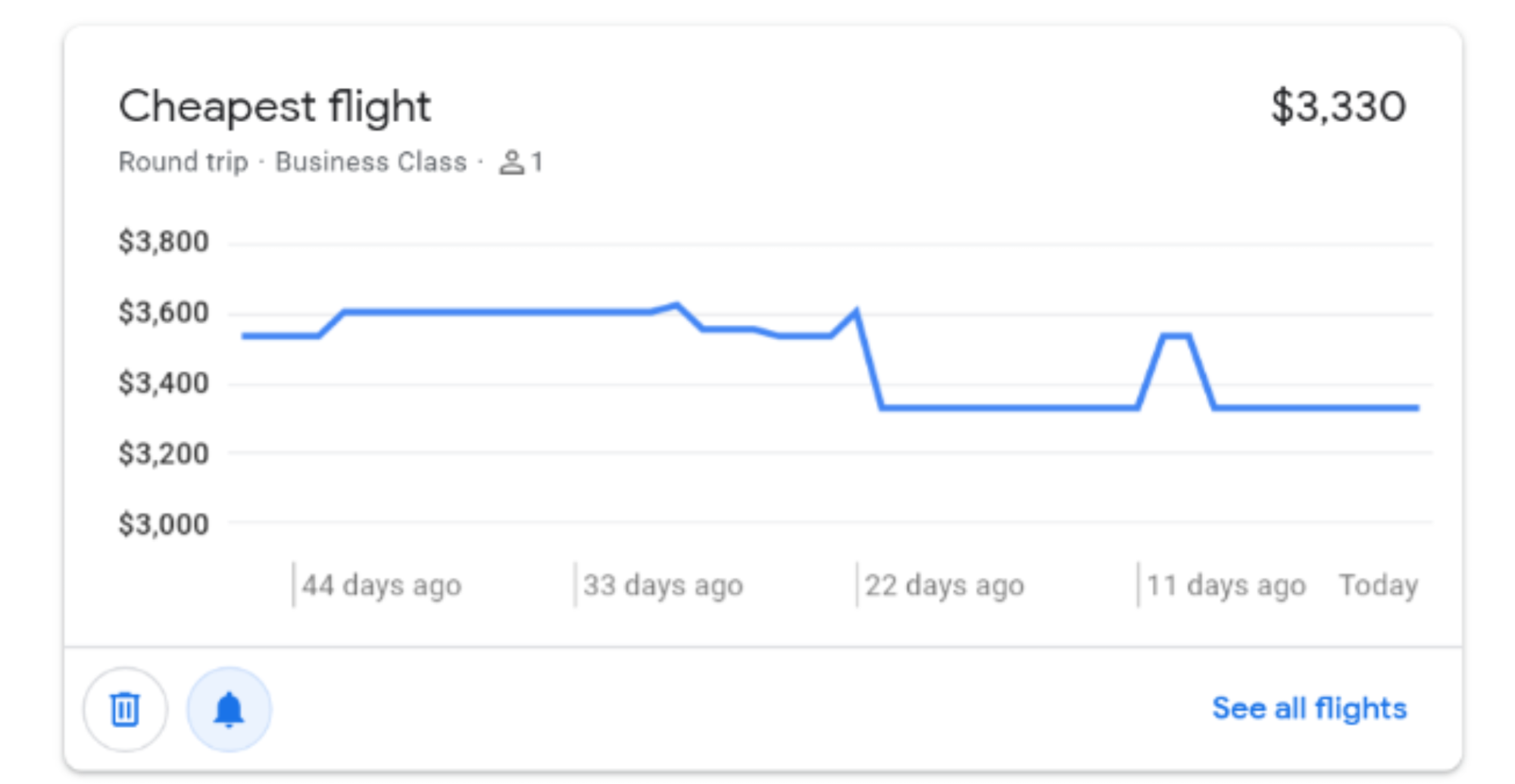
For tracked searches that are simply city-to-city on a particular day, it is as I said above -- the historical price graph is always shown with no way to hide it, and no other visual cues of price change like color/arrow or the original price with strikethrough:
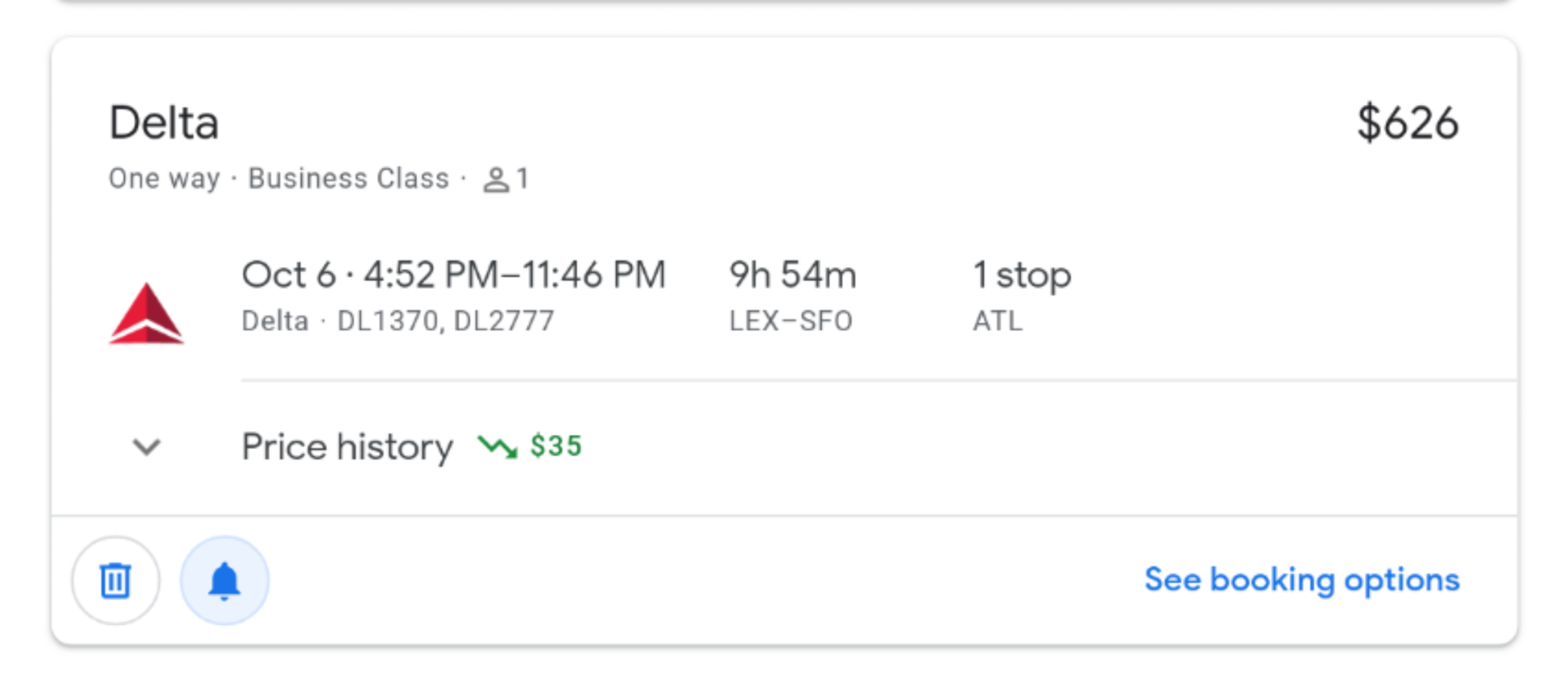
However if you picked specific flights and are tracking that price, the graph *is* collapsible/expandable, but even collapsed my impression is that it now takes up more vertical space, and although there *is* a red or green squiggly arrow, it is still harder to scan an entire list of these and see visually at-a-glance what the state of each item is.
For tracked searches that are simply city-to-city on a particular day, it is as I said above -- the historical price graph is always shown with no way to hide it, and no other visual cues of price change like color/arrow or the original price with strikethrough:
However if you picked specific flights and are tracking that price, the graph *is* collapsible/expandable, but even collapsed my impression is that it now takes up more vertical space, and although there *is* a red or green squiggly arrow, it is still harder to scan an entire list of these and see visually at-a-glance what the state of each item is.
Jun 10, 2019 | 8:12 pm
#260


Join Date: Nov 2015
Location: PDX
Programs: AS Atmos Platinum, AC, AF/KL, AV, BA, VS | Hilton, Hyatt
Posts: 522
Well here's a new one for me: my "Tracked flight prices" page is telling me that I don't have any saved prices yet, but I had a handful up until about two days ago. I tried to add one and it seemed to accept it but it's not showing up. Something is off because I got two emails from GF this morning about price drops on two trips I was tracking...that it now says I'm not tracking. I've reported it so we'll see. The usual clearing the cache, reset Chrome tricks don't seem to work.
Jun 10, 2019 | 8:45 pm
#261
Moderator: Hyatt, American Express; FlyerTalk Evangelist
Join Date: Jun 2015
Location: WAS
Programs: :rolleyes:, DL DM, AA EXP, UA Silver, Hyatt Glob, Mlife Noir (=> Marriott Amb), invol FT beta tester
Posts: 21,678
Well here's a new one for me: my "Tracked flight prices" page is telling me that I don't have any saved prices yet, but I had a handful up until about two days ago. I tried to add one and it seemed to accept it but it's not showing up. Something is off because I got two emails from GF this morning about price drops on two trips I was tracking...that it now says I'm not tracking. I've reported it so we'll see. The usual clearing the cache, reset Chrome tricks don't seem to work.
Jun 11, 2019 | 7:16 am
#262
Join Date: Nov 2015
Location: PDX
Programs: AS Atmos Platinum, AC, AF/KL, AV, BA, VS | Hilton, Hyatt
Posts: 522
By any chance do you have multiple Google accounts that you have recently signed out of and then back into on that computer? Flights normally associates your activity with whichever the first-logged-in account is. If you were then to sign out of all accounts and then sign back in, in a different order, that might be one way this could happen. (If you think this might apply, you can append ?authuser=1 to the URL to switch to the 2nd account -- it starts counting from zero)
Jul 4, 2019 | 12:32 pm
#264


Join Date: Nov 2010
Location: Bristol
Programs: BA GGL, UA Plat, DL Plat, Hilton Diamond
Posts: 2,379
Restricting results by carrier
I'm a long-term user of GF and pretty comfortable with the way it works as well as its little idiosyncracies 
One thing I've not been able to figure out though:
I have tried all 4 combinations:
I guess what I'm looking for is an equivalent to "O:UA" in ITA Matrix - anyone know how to acheive that in GF ?
Thanks in advance
One thing I've not been able to figure out though:
- using the "Airlines" button and selecting "Star Alliance" works fine, and inserts "a:STAR_ALLIANCE*STAR_ALLIANCE;" into the page URL
- the results of any search are then correctly restricted to flights marketed and operated by Star Allliance members - so far, so good
- continuning by choosing "United Airlines ¦ only" logically enough substitutes "a:STAR_ALLIANCE*STAR_ALLIANCE;" with "a:UA*UA;" in the URL
- to my mind, this should mean something like "restrict to <marketing carrier=UA> and/or <operating carrier=UA>..
I have tried all 4 combinations:
- "a:STAR_ALLIANCE*STAR_ALLIANCE;"
- "a:STAR_ALLIANCE*UA;"
- "a:UA*STAR_ALLIANCE;"
- "a:UA*UA;"
I guess what I'm looking for is an equivalent to "O:UA" in ITA Matrix - anyone know how to acheive that in GF ?
Thanks in advance
Jul 7, 2019 | 7:10 pm
#265
Company Representative - ITA Software

Join Date: Feb 2006
Location: Cambridge, MA
Posts: 362
Google Flights only has a marketing airline filter, there is no operating airline filter, and unfortunately there is no real way to simulate one. The fact that we group all marketing variants of a flight into a single itinerary on the display can sometimes make this confusing, but the filters are always on the marketing carrier.
Aug 11, 2019 | 9:35 am
#266

Join Date: Sep 2016
Programs: Flying Blue, Accor Le Club, Hilton HHonors, Hertz Gold Plus, Avis Preferred
Posts: 558
 Dec 9, 2019 | 8:11 am
#267
Join Date: May 2019
Programs: aa
Posts: 38
Google Flights no longer supports multiple originating airports?
Good morning fellow travel aficionados,
Until a few days ago, in google flights, I used to be able to search from multiple airports (up to 6) for example iad, bwi, phl, jfk, ewr, to a region (like Asia or Oceania), over a random period of time (such as an weekend in December, or one week journeys over the next 6 months).
Now when I perform that same search, it eliminates the remaining airports in the search and only allows a search from the first airport code in my list. It will however, allow a search from say NYC (which includes LGA, JFK and EWR), but no more than one specific airport code.
Is it something Im doing wrong? Some setting or update that I can reverse? Any and all guidance will be thoroughly appreciated!
Until a few days ago, in google flights, I used to be able to search from multiple airports (up to 6) for example iad, bwi, phl, jfk, ewr, to a region (like Asia or Oceania), over a random period of time (such as an weekend in December, or one week journeys over the next 6 months).
Now when I perform that same search, it eliminates the remaining airports in the search and only allows a search from the first airport code in my list. It will however, allow a search from say NYC (which includes LGA, JFK and EWR), but no more than one specific airport code.
Is it something Im doing wrong? Some setting or update that I can reverse? Any and all guidance will be thoroughly appreciated!
Dec 9, 2019 | 9:08 am
#268
FlyerTalk Evangelist
Join Date: Jul 2006
Location: Upper Sternistan
Posts: 10,687
Good morning fellow travel aficionados,
Until a few days ago, in google flights, I used to be able to search from multiple airports (up to 6) for example iad, bwi, phl, jfk, ewr, to a region (like Asia or Oceania), over a random period of time (such as an weekend in December, or one week journeys over the next 6 months).
Now when I perform that same search, it eliminates the remaining airports in the search and only allows a search from the first airport code in my list. It will however, allow a search from say NYC (which includes LGA, JFK and EWR), but no more than one specific airport code.
Is it something Im doing wrong? Some setting or update that I can reverse? Any and all guidance will be thoroughly appreciated!
Until a few days ago, in google flights, I used to be able to search from multiple airports (up to 6) for example iad, bwi, phl, jfk, ewr, to a region (like Asia or Oceania), over a random period of time (such as an weekend in December, or one week journeys over the next 6 months).
Now when I perform that same search, it eliminates the remaining airports in the search and only allows a search from the first airport code in my list. It will however, allow a search from say NYC (which includes LGA, JFK and EWR), but no more than one specific airport code.
Is it something Im doing wrong? Some setting or update that I can reverse? Any and all guidance will be thoroughly appreciated!

 Dec 9, 2019 | 9:14 am
#270
Join Date: May 2019
Programs: aa
Posts: 38
Hi and thanks for the reply. Its always worked from 6 max. I can get it to work with a specified destination, but can you do it to a region like oceania or asia over flexible dates?