
























 Feb 14, 2015, 12:53 pm
Last edit by: ExpertFlyer Voice
The purpose of this thread is to post questions, feedback, and report issues with ExpertFlyer. The ExpertFlyer team will respond as soon as possible from the ExpertFlyer Voice account (usually within 24 hours except on weekends).
You can also contact ExpertFlyer support at [email protected]
This is a community-maintained thread— it is not supported by ExpertFlyer.
--------------------
Seat Maps: we're currently not able to show seat maps for flights departing within the next 24 hours for several airlines: DL, BA, QR , ANA, B6, & JL
Searches currently not working:
To search AA upgrades:
You can also contact ExpertFlyer support at [email protected]
This is a community-maintained thread— it is not supported by ExpertFlyer.
--------------------
Seat Maps: we're currently not able to show seat maps for flights departing within the next 24 hours for several airlines: DL, BA, QR , ANA, B6, & JL
Searches currently not working:
- Upgrades - AY, BA, EK, EY, IB, QR, VS
- Awards - AY, BA, IB, EY, QR, VS
To search AA upgrades:
- Use the Award & Upgrade tool
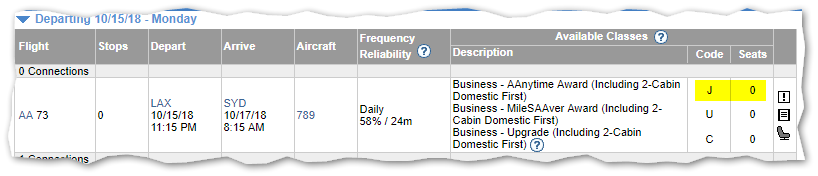
- Only search for individual segments (set the "Connection Preference" drop-down to "Direct/Non-Stop only"). Flight results that are part of a connection won't show the upgrade version of C or A inventory because AA only files upgrade inventory as individual, not married, segments. (Married segments show revenue inventory instead of upgrade inventory.)
- To avoid confusion, check the "Exclude Codeshares" box, as AA awards and upgrades are not valid on codeshares.
- 2 minute video explanation: https://www.youtube.com/watch?v=YGRNFYIbHp4

ExpertFlyer Help Desk, Information and Updates Thread
Apr 19, 2018 | 9:28 pm
#1681
Company Representative - ExpertFlyer


Join Date: Jan 2005
Posts: 2,927
I've been getting the 'Suspicious activity detected' / 'Javascript required' pages more and more. It's as much as every 3-4 queries I run, multiple times within 5-10 minutes (and within minutes of me using it on a new day, so I don't think it's an anti-spam thing). And even more annoying, I often get just a blank white page with no message. If I try to refresh, or even close the tab and open a fresh expertflyer.com tab, I get the same white page with no info on it. It takes about 3-5 minutes of not doing anything for something to show up there (and it's the captcha page).
I'm using the same settings I have been for years, chrome 65 with javascript enabled, and ublock origin addon. It happens both at my office and home computers.
It's only started happening this often in the past few weeks, and I haven't changed anything on my end (except possibly updating chrome).
I'm using the same settings I have been for years, chrome 65 with javascript enabled, and ublock origin addon. It happens both at my office and home computers.
It's only started happening this often in the past few weeks, and I haven't changed anything on my end (except possibly updating chrome).
 Apr 23, 2018 | 4:41 am
#1682
Join Date: Nov 2004
Location: LHR GVA HKG TLV PVG JFK
Programs: AA EXP
Posts: 4,355
I use VPNs as I travel often to China (but use it all the time for the privacy/security)
The never ending "captcha's" is killing expertflyer usability. Both on PC and smartphone!
I use same browser for all the other websites I use and except for a random captcha here and there (usually when paying for something) I don't have this problem. Hence I assume it is an EF policy not a my setup. Why should I switch browsers?
What is EF worried about? the capthca happens before you even login, that someone will abuse all the free info on your general homepage?
If someone is using your free service, then go ahead and use a captcha. Or your paid service, if over XX queries per hour if you are concerned it is a bot. But why before Login?
I don't use it in incognito mode so why can't you just read a cookie and see I am a paying premium subscriber? (yes the VPN will mean a different IP then usual
Even if someone is using a bot, and there are 5 queries a day (my guesstimated average, jumping to actual 25 a day when researching a flight) what does EF care?? I agree EF does not want full GDS type access for $99 a year nor DOS stuff (like every other website does not want that and does not push captchas, and double captchas and double double captchas at you*)
Frustrating to the highest level. A tool mean to de-frustrate our travel experience (and frankly the absolute most expensive online subscription I have. I guess if I had Netflix it would be 2nd)
* I have to turn a picture of a donkey right side up twice (we wouldn't want to make it easy for those bots that can figure out a donkey easily so have to do it twice) to pass, get in, login, and then a few minutes later, usually my first query, it happens again.
The never ending "captcha's" is killing expertflyer usability. Both on PC and smartphone!
I use same browser for all the other websites I use and except for a random captcha here and there (usually when paying for something) I don't have this problem. Hence I assume it is an EF policy not a my setup. Why should I switch browsers?
What is EF worried about? the capthca happens before you even login, that someone will abuse all the free info on your general homepage?
If someone is using your free service, then go ahead and use a captcha. Or your paid service, if over XX queries per hour if you are concerned it is a bot. But why before Login?
I don't use it in incognito mode so why can't you just read a cookie and see I am a paying premium subscriber? (yes the VPN will mean a different IP then usual
Even if someone is using a bot, and there are 5 queries a day (my guesstimated average, jumping to actual 25 a day when researching a flight) what does EF care?? I agree EF does not want full GDS type access for $99 a year nor DOS stuff (like every other website does not want that and does not push captchas, and double captchas and double double captchas at you*)
Frustrating to the highest level. A tool mean to de-frustrate our travel experience (and frankly the absolute most expensive online subscription I have. I guess if I had Netflix it would be 2nd)
* I have to turn a picture of a donkey right side up twice (we wouldn't want to make it easy for those bots that can figure out a donkey easily so have to do it twice) to pass, get in, login, and then a few minutes later, usually my first query, it happens again.
Apr 23, 2018 | 8:38 am
#1683


Join Date: Feb 2001
Location: London
Programs: AA EXP, SPG Plt
Posts: 2,613
I've been getting the 'Suspicious activity detected' / 'Javascript required' pages more and more. It's as much as every 3-4 queries I run, multiple times within 5-10 minutes (and within minutes of me using it on a new day, so I don't think it's an anti-spam thing). And even more annoying, I often get just a blank white page with no message. If I try to refresh, or even close the tab and open a fresh expertflyer.com tab, I get the same white page with no info on it. It takes about 3-5 minutes of not doing anything for something to show up there (and it's the captcha page).
I'm using the same settings I have been for years, chrome 65 with javascript enabled, and ublock origin addon. It happens both at my office and home computers.
It's only started happening this often in the past few weeks, and I haven't changed anything on my end (except possibly updating chrome).
I'm using the same settings I have been for years, chrome 65 with javascript enabled, and ublock origin addon. It happens both at my office and home computers.
It's only started happening this often in the past few weeks, and I haven't changed anything on my end (except possibly updating chrome).
Apr 23, 2018 | 10:26 am
#1684
Company Representative - ExpertFlyer
Join Date: Jan 2005
Posts: 2,927
We're sorry you're having problems, however a few things:
- The system that would show Captcha's sits in front of the website, it isn't part of it, so it has no idea if you are a free or paid member, logged in or not. It is designed to identify non-standard browsers or browsers that don't have JavaScript loaded or fast page loads to detect non-normal behavior to prevent data mining (yes, people have tried).
- This system has been in place for a couple years, and nothing has changed with it recently.
- Certain VPN providers use known abusive data centers as their VPN exit points so that alone will trigger a Captcha (again, as has been the case for a couple years).
- A large amount of quick page loads (of any page) may trigger a captcha.
- When you do solve a Captcha, it should be good for at least 15 minutes. If you get a captcha more often than that, there is an issue with your browser or an add-on (as noted below).
- There is no such thing as a "double captcha". The issue you are describing is caused by one of your browser plugins blocking the cookies and/or JavaScript from our domain which will cause the captchas to happen more often.
- We know that uBlock Origin pushed an update that incorrectly is blocking more of our Javascript beyond ads, so please white-list "expertflyer.com" in uBlock or similar add-ons.
- ....... Plus also recently pushed an update that now has an "Block additional tracking" option. If enabled try turning that off. (We know that ....... normally does not interfere with ExpertFlyer).
- Some browser add-ons change the user-agent string of the browser, making it non-standard. This will also trigger the captcha. This should be turned off for ExpertFlyer.com (again, this has been the case for years).
- If you still need help after taking the above steps, please email us directly at [email protected] with your account information along with the exact trace string from the bottom of the captcha page, your IP address, your browsers user-agent string (What's my user agent?) and a list of browser add-ons you are using.
- The system that would show Captcha's sits in front of the website, it isn't part of it, so it has no idea if you are a free or paid member, logged in or not. It is designed to identify non-standard browsers or browsers that don't have JavaScript loaded or fast page loads to detect non-normal behavior to prevent data mining (yes, people have tried).
- This system has been in place for a couple years, and nothing has changed with it recently.
- Certain VPN providers use known abusive data centers as their VPN exit points so that alone will trigger a Captcha (again, as has been the case for a couple years).
- A large amount of quick page loads (of any page) may trigger a captcha.
- When you do solve a Captcha, it should be good for at least 15 minutes. If you get a captcha more often than that, there is an issue with your browser or an add-on (as noted below).
- There is no such thing as a "double captcha". The issue you are describing is caused by one of your browser plugins blocking the cookies and/or JavaScript from our domain which will cause the captchas to happen more often.
- We know that uBlock Origin pushed an update that incorrectly is blocking more of our Javascript beyond ads, so please white-list "expertflyer.com" in uBlock or similar add-ons.
- ....... Plus also recently pushed an update that now has an "Block additional tracking" option. If enabled try turning that off. (We know that ....... normally does not interfere with ExpertFlyer).
- Some browser add-ons change the user-agent string of the browser, making it non-standard. This will also trigger the captcha. This should be turned off for ExpertFlyer.com (again, this has been the case for years).
- If you still need help after taking the above steps, please email us directly at [email protected] with your account information along with the exact trace string from the bottom of the captcha page, your IP address, your browsers user-agent string (What's my user agent?) and a list of browser add-ons you are using.
Last edited by ExpertFlyer Voice; Apr 23, 2018 at 11:25 am
Apr 24, 2018 | 3:01 am
#1685
Join Date: Nov 2004
Location: LHR GVA HKG TLV PVG JFK
Programs: AA EXP
Posts: 4,355
We're sorry you're having problems, however a few things:
- The system that would show Captcha's sits in front of the website, it isn't part of it, so it has no idea if you are a free or paid member, logged in or not. It is designed to identify non-standard browsers or browsers that don't have JavaScript loaded or fast page loads to detect non-normal behavior to prevent data mining (yes, people have tried).
- This system has been in place for a couple years, and nothing has changed with it recently.
- Certain VPN providers use known abusive data centers as their VPN exit points so that alone will trigger a Captcha (again, as has been the case for a couple years).
- A large amount of quick page loads (of any page) may trigger a captcha.
- When you do solve a Captcha, it should be good for at least 15 minutes. If you get a captcha more often than that, there is an issue with your browser or an add-on (as noted below).
- There is no such thing as a "double captcha". The issue you are describing is caused by one of your browser plugins blocking the cookies and/or JavaScript from our domain which will cause the captchas to happen more often.
- We know that uBlock Origin pushed an update that incorrectly is blocking more of our Javascript beyond ads, so please white-list "expertflyer.com" in uBlock or similar add-ons.
- ....... Plus also recently pushed an update that now has an "Block additional tracking" option. If enabled try turning that off. (We know that ....... normally does not interfere with ExpertFlyer).
- Some browser add-ons change the user-agent string of the browser, making it non-standard. This will also trigger the captcha. This should be turned off for ExpertFlyer.com (again, this has been the case for years).
- If you still need help after taking the above steps, please email us directly at [email protected] with your account information along with the exact trace string from the bottom of the captcha page, your IP address, your browsers user-agent string (What's my user agent?) and a list of browser add-ons you are using.
- The system that would show Captcha's sits in front of the website, it isn't part of it, so it has no idea if you are a free or paid member, logged in or not. It is designed to identify non-standard browsers or browsers that don't have JavaScript loaded or fast page loads to detect non-normal behavior to prevent data mining (yes, people have tried).
- This system has been in place for a couple years, and nothing has changed with it recently.
- Certain VPN providers use known abusive data centers as their VPN exit points so that alone will trigger a Captcha (again, as has been the case for a couple years).
- A large amount of quick page loads (of any page) may trigger a captcha.
- When you do solve a Captcha, it should be good for at least 15 minutes. If you get a captcha more often than that, there is an issue with your browser or an add-on (as noted below).
- There is no such thing as a "double captcha". The issue you are describing is caused by one of your browser plugins blocking the cookies and/or JavaScript from our domain which will cause the captchas to happen more often.
- We know that uBlock Origin pushed an update that incorrectly is blocking more of our Javascript beyond ads, so please white-list "expertflyer.com" in uBlock or similar add-ons.
- ....... Plus also recently pushed an update that now has an "Block additional tracking" option. If enabled try turning that off. (We know that ....... normally does not interfere with ExpertFlyer).
- Some browser add-ons change the user-agent string of the browser, making it non-standard. This will also trigger the captcha. This should be turned off for ExpertFlyer.com (again, this has been the case for years).
- If you still need help after taking the above steps, please email us directly at [email protected] with your account information along with the exact trace string from the bottom of the captcha page, your IP address, your browsers user-agent string (What's my user agent?) and a list of browser add-ons you are using.
2. I surf the web all the time a lot, around the world, different wifi sources different VPN servers (though same VPN provider) and it is only your website "that complains". This happens on PC and Phone (same VPN provider though)
I realise you could have a mere $8 a month subscription and get huge amounts of data for that via bots, and that is a risk. But a risk easily mitigated post login (if too much data is asked for at a fast rate) not just because your scripts don't match
Apr 24, 2018 | 3:31 am
#1686
Join Date: Feb 2001
Location: London
Programs: AA EXP, SPG Plt
Posts: 2,613
We've talked about this before EF. It's your Distil product that's throwing a false positive. You have fixed it for me, but it would happen regularly when clicking fast on a mobile browser. This guy is not crazy.
Apr 24, 2018 | 8:31 am
#1687
Company Representative - ExpertFlyer
Join Date: Jan 2005
Posts: 2,927
1. If you look above you will see the complaints are not just from me on this issue.
2. I surf the web all the time a lot, around the world, different wifi sources different VPN servers (though same VPN provider) and it is only your website "that complains". This happens on PC and Phone (same VPN provider though)
I realise you could have a mere $8 a month subscription and get huge amounts of data for that via bots, and that is a risk. But a risk easily mitigated post login (if too much data is asked for at a fast rate) not just because your scripts don't match
2. I surf the web all the time a lot, around the world, different wifi sources different VPN servers (though same VPN provider) and it is only your website "that complains". This happens on PC and Phone (same VPN provider though)
I realise you could have a mere $8 a month subscription and get huge amounts of data for that via bots, and that is a risk. But a risk easily mitigated post login (if too much data is asked for at a fast rate) not just because your scripts don't match
Everyone who recently saw a captcha because of the recent uBlock change solved the issue by whitelisting ExpertFlyer.com. Your issue is because you use a VPN that has an end point in a known bad data center. That has always resulted in a captcha (which is good for at least 10 min) and always will.
2. Not many sites use services to block data harvesting like we do. But again, it's not new. Yes we do usually only show a captcha if too much data is asked for at a fast rate as you suggest, however if your browser isn't properly loading javascript then that will trigger the captcha no matter what as that is a tell tale sign of a bot (which has always been the case). All sites require their JavaScript to load for the site to work, we are no different. Again, just whitelist ExpertFlyer.com in your browser add-on if it applies to you.
As noted before, if you do whitelist and still have issues, then contact us directly with the additional information mentioned in our last post so we can look up exactly what triggered a captcha for your browsing session. That is not something we can troubleshoot via FlyerTalk as we need the other data to look up the details of your session and as such we won't be responding here further on this issue, thanks.
Last edited by ExpertFlyer Voice; Apr 24, 2018 at 12:02 pm

 Apr 24, 2018 | 9:19 am
#1689
Company Representative - ExpertFlyer
Join Date: Jan 2005
Posts: 2,927
Apr 28, 2018 | 4:44 pm
#1690
Join Date: Sep 2013
Posts: 525
Not sure what's happening. My EF keeps timing out and making me do the CAPTCHA for "suspicious activity"
I'm running Firefox with Privacy Badger, HTTPS everywhere, canvas, and uBlock Origin. The CAPTCHA doesn't let me spin the ball until it's the right way up without timing out.
Tried this in an inprivate window and a regular window. It's all doing this. It's basically made the site next to impossible to use for more than one query.
I'm running Firefox with Privacy Badger, HTTPS everywhere, canvas, and uBlock Origin. The CAPTCHA doesn't let me spin the ball until it's the right way up without timing out.
Tried this in an inprivate window and a regular window. It's all doing this. It's basically made the site next to impossible to use for more than one query.
Apr 28, 2018 | 11:35 pm
#1691
Company Representative - ExpertFlyer
Join Date: Jan 2005
Posts: 2,927
Not sure what's happening. My EF keeps timing out and making me do the CAPTCHA for "suspicious activity"
I'm running Firefox with Privacy Badger, HTTPS everywhere, canvas, and uBlock Origin. The CAPTCHA doesn't let me spin the ball until it's the right way up without timing out.
Tried this in an inprivate window and a regular window. It's all doing this. It's basically made the site next to impossible to use for more than one query.
I'm running Firefox with Privacy Badger, HTTPS everywhere, canvas, and uBlock Origin. The CAPTCHA doesn't let me spin the ball until it's the right way up without timing out.
Tried this in an inprivate window and a regular window. It's all doing this. It's basically made the site next to impossible to use for more than one query.
If you still have issues after whitelisting then, as also noted above, please email us directly at [email protected] with your account information along with the exact trace string from the bottom of the captcha page, your IP address, your browsers user-agent string (What's my user agent?) and a list of browser add-ons you are using.

 May 1, 2018 | 2:47 pm
#1693
Company Representative - ExpertFlyer
Join Date: Jan 2005
Posts: 2,927
If you have further questions about how alerts work, you can email us directly at [email protected]
May 3, 2018 | 8:34 am
#1694


Join Date: May 2014
Location: Great Britain
Programs: Air: QR Silver. BA Silver Emirates, Hotels: CC Gold, IHG Spire AMB, Hilton Diamond.
Posts: 1,537
Showing wildly incorrect data for award space DOH-UTP on QR.
Shows flights on days there are no real flights and isn't even aware of flights happening on the correct days :-(
eg: QR828 on 17th June.
Shows flights on days there are no real flights and isn't even aware of flights happening on the correct days :-(
eg: QR828 on 17th June.
May 3, 2018 | 9:09 am
#1695
Company Representative - ExpertFlyer
Join Date: Jan 2005
Posts: 2,927
As ExpertFlyer doesn't show award space for QR, it's not clear what it is you think you are seeing. QR isn't listed in the Award & Upgrade search, which is the only proper way to see award inventory.