
























CCPA Compliance, Cookie consent, issues
 Aug 25, 2020 | 2:29 am
#16
FlyerTalk Evangelist


Join Date: Aug 2009
Location: ZOA, SFO, HKG
Programs: UA 1K 0.9MM, Marriott Gold, HHonors Gold, Hertz PC, SBux Gold, TSA Pre✓
Posts: 13,807
 Aug 25, 2020 | 4:49 am
#17

Join Date: Jul 2007
Location: Berlin
Programs: LH SEN, BA Gold, SK Gold; Accor Diamond; IHG Diamond-Amb; Meliá/HH/Bonvoy Gold
Posts: 5,682
As a reminder, if I start on https://www.flyertalk.com/ I can access the buttons. But if I use my bookmark to access my preferred starting page (https://www.flyertalk.com/forum/usercp.php) the white overlay is broken.
Let me know, here or via PM, if further details or screenshots would help.
Aug 25, 2020 | 8:22 am
#18
Administrator


Join Date: Sep 2015
Location: Los Angeles
Programs: Internet Brands
Posts: 4,437
That didn't work. I didn't expect it to and can't see why it would.
As a reminder, if I start on https://www.flyertalk.com/ I can access the buttons. But if I use my bookmark to access my preferred starting page (https://www.flyertalk.com/forum/usercp.php) the white overlay is broken.
Let me know, here or via PM, if further details or screenshots would help.
As a reminder, if I start on https://www.flyertalk.com/ I can access the buttons. But if I use my bookmark to access my preferred starting page (https://www.flyertalk.com/forum/usercp.php) the white overlay is broken.
Let me know, here or via PM, if further details or screenshots would help.
Also, this is a long shot, but what happens if you don't use your bookmark and instead just type in (or copy/paste) the User CP URL?
Aug 25, 2020 | 9:57 am
#19
Join Date: Jul 2007
Location: Berlin
Programs: LH SEN, BA Gold, SK Gold; Accor Diamond; IHG Diamond-Amb; Meliá/HH/Bonvoy Gold
Posts: 5,682
Thanks for sticking with this, IBJoel.
Nothing different.
For completeness, I've also tried completely disabling my adblocker. That doesn't help either (and makes everything load so much more slowly that it wouldn't be an acceptable permanent solution anyway).
That was more interesting than I expected -- I couldn't take a screenshot at all using Firefox's built-in feature. Mozilla's help tells me that "Certain pages that contain the HTML <frameset>" can be a problem. Using a third-party screenshot app I got this:
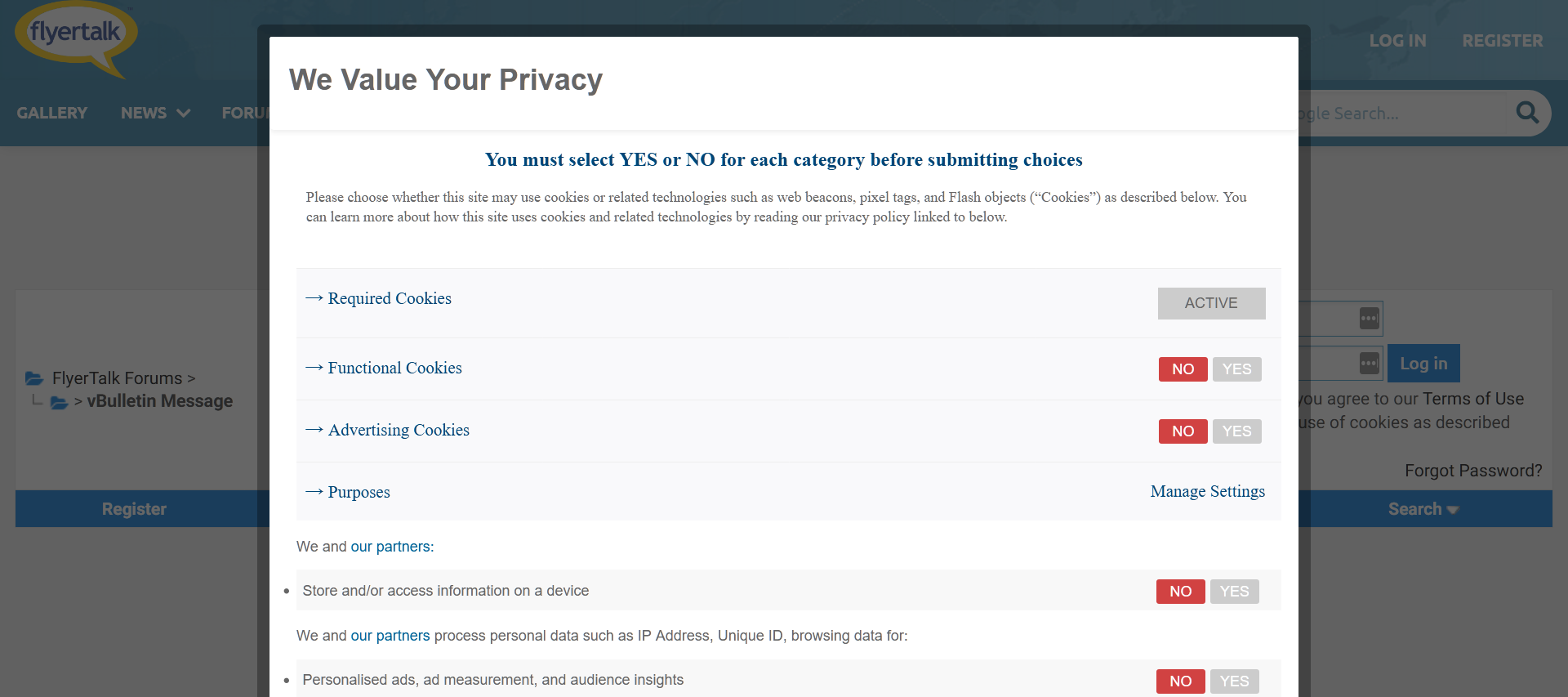
Not pretty but very much what I've been seeing, with the white hovering box fixed and neither it nor the underlying page scrollable.
Hope this helps.
For completeness, I've also tried completely disabling my adblocker. That doesn't help either (and makes everything load so much more slowly that it wouldn't be an acceptable permanent solution anyway).
Yes, please attach a screenshot. I cannot replicate, but I'll report to tech.
Not pretty but very much what I've been seeing, with the white hovering box fixed and neither it nor the underlying page scrollable.
Hope this helps.
Last edited by IMH; Sep 1, 2020 at 11:30 pm Reason: spelling x3
Sep 8, 2020 | 6:06 am
#20
Join Date: Jul 2007
Location: Berlin
Programs: LH SEN, BA Gold, SK Gold; Accor Diamond; IHG Diamond-Amb; Meliá/HH/Bonvoy Gold
Posts: 5,682
Any update on this?
FT continues to be easy to use if I access it from an IP address that's assumed to be in the US, but from outside it really is a royal pain with several extra steps:
1. Go to a non-forum FT page;
2. Wait for the top part of the white box to appear, then click on (or near) "manage settings" to try and coax the bottom part of the box to reveal itself;
3. Make my cookie choices;
4. Click to ackowledge and dismiss the "preferences submitted" message;
5. Go to my normal log-in page and proceed as before.
TrustArc is not user-friendly at the best of times, but other sites have implemented it with fewer steps and no glitches.
FT continues to be easy to use if I access it from an IP address that's assumed to be in the US, but from outside it really is a royal pain with several extra steps:
1. Go to a non-forum FT page;
2. Wait for the top part of the white box to appear, then click on (or near) "manage settings" to try and coax the bottom part of the box to reveal itself;
3. Make my cookie choices;
4. Click to ackowledge and dismiss the "preferences submitted" message;
5. Go to my normal log-in page and proceed as before.
TrustArc is not user-friendly at the best of times, but other sites have implemented it with fewer steps and no glitches.
Sep 8, 2020 | 7:05 am
#21
Administrator
Join Date: Sep 2015
Location: Los Angeles
Programs: Internet Brands
Posts: 4,437
Any update on this?
FT continues to be easy to use if I access it from an IP address that's assumed to be in the US, but from outside it really is a royal pain with several extra steps:
1. Go to a non-forum FT page;
2. Wait for the top part of the white box to appear, then click on (or near) "manage settings" to try and coax the bottom part of the box to reveal itself;
3. Make my cookie choices;
4. Click to ackowledge and dismiss the "preferences submitted" message;
5. Go to my normal log-in page and proceed as before.
TrustArc is not user-friendly at the best of times, but other sites have implemented it with fewer steps and no glitches.
FT continues to be easy to use if I access it from an IP address that's assumed to be in the US, but from outside it really is a royal pain with several extra steps:
1. Go to a non-forum FT page;
2. Wait for the top part of the white box to appear, then click on (or near) "manage settings" to try and coax the bottom part of the box to reveal itself;
3. Make my cookie choices;
4. Click to ackowledge and dismiss the "preferences submitted" message;
5. Go to my normal log-in page and proceed as before.
TrustArc is not user-friendly at the best of times, but other sites have implemented it with fewer steps and no glitches.
Sep 11, 2020 | 10:38 am
#23
FlyerTalk Evangelist

Join Date: Aug 2002
Location: London
Programs: Mucci. Nothing else matters.
Posts: 38,752
As a reminder, if I start on https://www.flyertalk.com/ I can access the buttons. But if I use my bookmark to access my preferred starting page (https://www.flyertalk.com/forum/usercp.php) the white overlay is broken.
If I go directly to https://www.flyertalk.com/forum/usercp.php the white box appears with buttons (including the Save and Exit, Reject All and Accept All buttons at the bottom of the page), but none of them are clickable - every button is dead. The Manage Settings link is also dead.
However, if I go to https://www.flyertalk.com/ then all of those buttons work. This means that I must go to the home page first, do the cookies stuff and only then can I go to https://www.flyertalk.com/forum/usercp.php.
I am usually using Chrome on Windows 10 Pro, but I get the same behaviour with either IE or Edge. However, when I use Firefox and go directly to https://www.flyertalk.com/forum/usercp.php, the white box appears in full and the buttons work.
I have also encountered a similar problem if I'm trying to read a longer thread when not logged in. The white box floats somewhere above the top of the page that's being displayed. However, if I scroll up towards the white box, the previous part of the thread loads and the white box floats up and out of sight again. It makes me feel like I'm suffering the punishment meted out to Sisyphus.
Sep 11, 2020 | 10:43 am
#24
Administrator
Join Date: Sep 2015
Location: Los Angeles
Programs: Internet Brands
Posts: 4,437
I'm not sure that I'm getting exactly the same problem as IMH, but it's similar.
If I go directly to https://www.flyertalk.com/forum/usercp.php the white box appears with buttons (including the Save and Exit, Reject All and Accept All buttons at the bottom of the page), but none of them are clickable - every button is dead. The Manage Settings link is also dead.
However, if I go to https://www.flyertalk.com/ then all of those buttons work. This means that I must go to the home page first, do the cookies stuff and only then can I go to https://www.flyertalk.com/forum/usercp.php.
I am usually using Chrome on Windows 10 Pro, but I get the same behaviour with either IE or Edge. However, when I use Firefox and go directly to https://www.flyertalk.com/forum/usercp.php, the white box appears in full and the buttons work.
I have also encountered a similar problem if I'm trying to read a longer thread when not logged in. The white box floats somewhere above the top of the page that's being displayed. However, if I scroll up towards the white box, the previous part of the thread loads and the white box floats up and out of sight again. It makes me feel like I'm suffering the punishment meted out to Sisyphus.
If I go directly to https://www.flyertalk.com/forum/usercp.php the white box appears with buttons (including the Save and Exit, Reject All and Accept All buttons at the bottom of the page), but none of them are clickable - every button is dead. The Manage Settings link is also dead.
However, if I go to https://www.flyertalk.com/ then all of those buttons work. This means that I must go to the home page first, do the cookies stuff and only then can I go to https://www.flyertalk.com/forum/usercp.php.
I am usually using Chrome on Windows 10 Pro, but I get the same behaviour with either IE or Edge. However, when I use Firefox and go directly to https://www.flyertalk.com/forum/usercp.php, the white box appears in full and the buttons work.
I have also encountered a similar problem if I'm trying to read a longer thread when not logged in. The white box floats somewhere above the top of the page that's being displayed. However, if I scroll up towards the white box, the previous part of the thread loads and the white box floats up and out of sight again. It makes me feel like I'm suffering the punishment meted out to Sisyphus.
Sep 11, 2020 | 10:54 am
#25
FlyerTalk Evangelist
Join Date: Aug 2002
Location: London
Programs: Mucci. Nothing else matters.
Posts: 38,752
All sessions should start with a clean browser and an empty cache because it'll always be in private/incognito mode.
 Sep 15, 2020 | 1:01 am
#29
Join Date: Jul 2007
Location: Berlin
Programs: LH SEN, BA Gold, SK Gold; Accor Diamond; IHG Diamond-Amb; Meliá/HH/Bonvoy Gold
Posts: 5,682
Thank you. I'm not sure that's where the problem actually lies, however. I encounter the same TrustArc / TRUSTe branded overlay window on other sites and the design seems standard. It's just that everywhere else I can make and save selections and move on.
Sep 15, 2020 | 2:35 am
#30
FlyerTalk Evangelist
Join Date: Aug 2002
Location: London
Programs: Mucci. Nothing else matters.
Posts: 38,752
Thank you. I'm not sure that's where the problem actually lies, however. I encounter the same TrustArc / TRUSTe branded overlay window on other sites and the design seems standard. It's just that everywhere else I can make and save selections and move on.