
























Cannot upload images
 Dec 9, 2019 | 3:49 am
#16
FlyerTalk Evangelist


Join Date: Mar 2010
Location: JER
Programs: BA Silver again, several MUCCI, and assorted Pensions!
Posts: 32,499
Well, it's a new day ... and I've tried using "Manage Attachments" and the 'landscape' icon. Both lead to the same screen .. which doesn't work for me. 
I finally achieved a screenshot, but it took nearly a minute to load that pop-up properly and generate (a) the 3rd button ['My Albums'], and (b) activate the 'Cancel' button and other features. And now, after that one success, it's refusing to do any more! The 'page refresh/loading' bar just stalls at around 15% and then freezes
System is Mac (OS Catalina) with Safari, clocking 77 mbps download via fibre cable.
(Edit: After leaving it for a while, I can finally download the screenshot of the whole page! )
)

I finally achieved a screenshot, but it took nearly a minute to load that pop-up properly and generate (a) the 3rd button ['My Albums'], and (b) activate the 'Cancel' button and other features. And now, after that one success, it's refusing to do any more! The 'page refresh/loading' bar just stalls at around 15% and then freezes
System is Mac (OS Catalina) with Safari, clocking 77 mbps download via fibre cable.
(Edit: After leaving it for a while, I can finally download the screenshot of the whole page!
)
Last edited by T8191; Dec 9, 2019 at 4:10 am
 Dec 9, 2019 | 4:54 am
#17
FlyerTalk Evangelist
Join Date: Mar 2010
Location: JER
Programs: BA Silver again, several MUCCI, and assorted Pensions!
Posts: 32,499
IBJoel ...a bit more info for you to hopefully unravel this issue. I'm now starting to be able to insert images in my TR, using the process from 'landscape icon'. The "Download files' screen does, however, take a good minute of so to become fully functional (i.e. the 3rd button appears and all other buttons eventually work). I'm therefore able, incredibly slowly, to re-populate the TR. So this is Qatar Airways? UK-South Africa with QR (and a bit of BA).
This will take a couple of days at this rate, as there's over 70 photos involved. It's taking me 4 minutes per photo to replace!!
This will take a couple of days at this rate, as there's over 70 photos involved. It's taking me 4 minutes per photo to replace!!
Last edited by T8191; Dec 9, 2019 at 5:31 am
Dec 9, 2019 | 8:18 am
#18
Administrator


Join Date: Sep 2015
Location: Los Angeles
Programs: Internet Brands
Posts: 4,444
Sorry to add to the grief, but having the same problems here ... trying to populate a TR with images.
Click on the 'landscape' icon and it takes at least a minute for the upload page [sometimes] to refresh. Managed eventually to upload one using the 'traditional' drag and drop from my desktop, but the 2nd attempt just failed.
It seems from one screen I saw that one is now also supposed to upload from a FT album. Hmmm. I did that (TR 19f CPT) but the photo order was scrambled in the process. And when I tried to upload from the album, it only showed a dozen or so of the 70-odd images.
Seriously borked, it seems!
PS: Tried again. The image downloader seems to be trying to 'write' the 3rd option on the pop-up screen which activates the Drag and Drop, but stalls very early on according to my Mac progress bar. Curiously, I've managed a Drag and Drop with the first image without that 3rd option, but again it just won't do the next one.
Click on the 'landscape' icon and it takes at least a minute for the upload page [sometimes] to refresh. Managed eventually to upload one using the 'traditional' drag and drop from my desktop, but the 2nd attempt just failed.
It seems from one screen I saw that one is now also supposed to upload from a FT album. Hmmm. I did that (TR 19f CPT) but the photo order was scrambled in the process. And when I tried to upload from the album, it only showed a dozen or so of the 70-odd images.
Seriously borked, it seems!
PS: Tried again. The image downloader seems to be trying to 'write' the 3rd option on the pop-up screen which activates the Drag and Drop, but stalls very early on according to my Mac progress bar. Curiously, I've managed a Drag and Drop with the first image without that 3rd option, but again it just won't do the next one.
Dec 9, 2019 | 10:45 am
#19
FlyerTalk Evangelist
Join Date: Mar 2010
Location: JER
Programs: BA Silver again, several MUCCI, and assorted Pensions!
Posts: 32,499
I see you're on a Mac, which browser are you using? I also want to make sure you're on the Full CKEditor for FlyerTalk. You don't really have to upload from your FT album, since any photo is automatically added to your FT album when you upload it to your post and the system automatically pulls from your album. Can you please post a screenshot of your upload page as it attempts to load?
As I said at Post #16 , system is Mac (OS Catalina) with Safari, clocking 77 mbps download via fibre cable. Safari is Version 13.0.3, the latest.
Using FT Desktop NG ... I'm not getting another option showing, apart from Mobile One.
I tried the FT album route but it was s convoluted I gave up. Anyway, I'm now slowly uploading images via the 'normal' route as I said at Post #17 . It just takes a long time for the Upload page to complete loading ...
This is the Upload page initially ... then wait for a minute, as none of the buttons are functional!

... and then eventually, the screen fully loads and it works as advertised.

Essentially, it's hanging up on the generation of the "My Albums" button.
Images on the TR cited at Post # 17 are slowly getting uploaded ... it's just a painfully slow process!
Hope this all helps.
Dec 9, 2019 | 11:53 am
#20
Moderator: The British Airways Club, Iberia Club, Airport Lounges and Eco-conscious Travel


Join Date: Jan 2003
Location: London, UK
Posts: 22,620
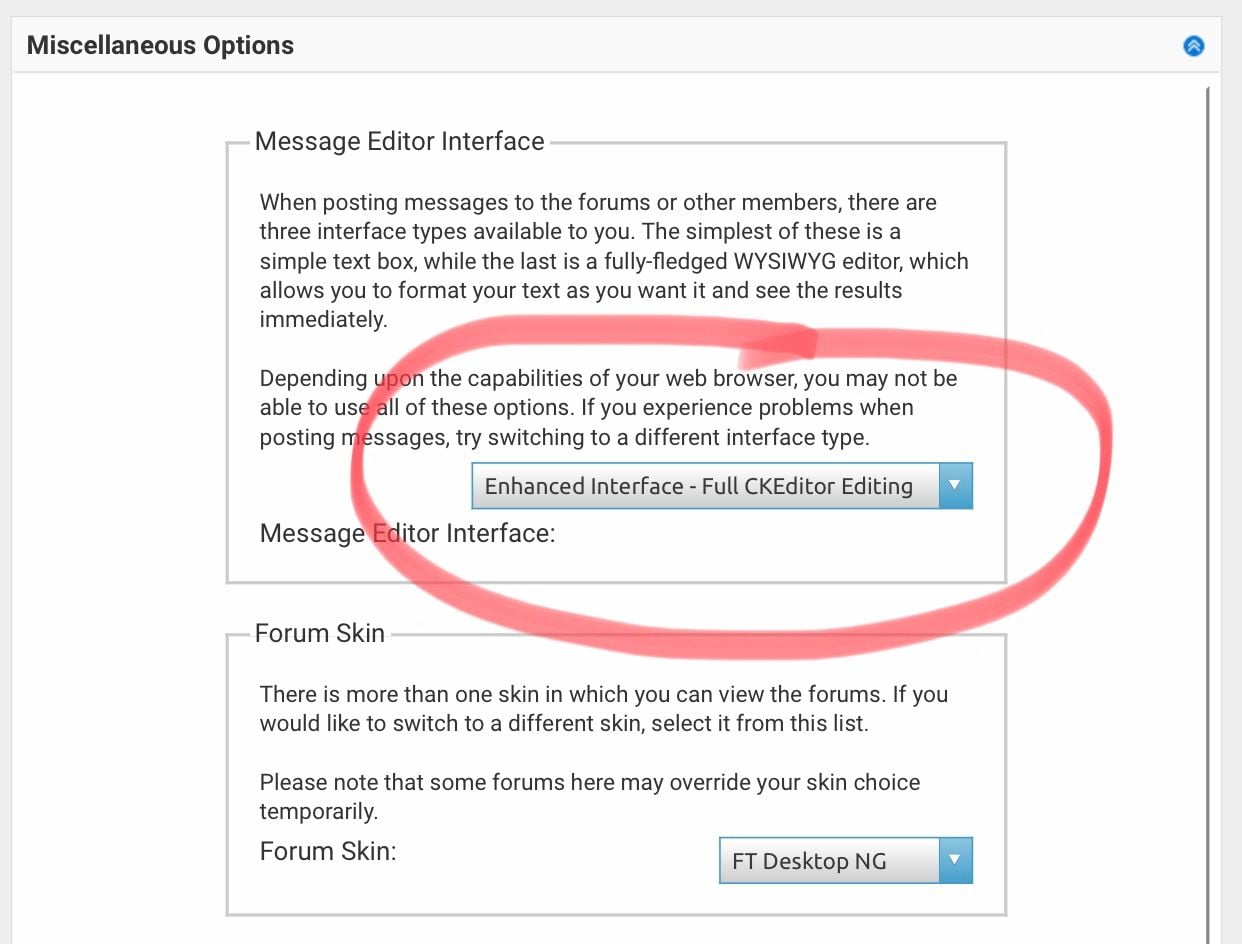
T8191 In my experience, the drag n drop method of adding photos works when the Message Editor Interface is set to the Enhanced Interface - Full CKEditor editing option. You can check and change this setting in your user control panel. Go to Edit Options
Dec 9, 2019 | 1:26 pm
#21
FlyerTalk Evangelist
Join Date: Mar 2010
Location: JER
Programs: BA Silver again, several MUCCI, and assorted Pensions!
Posts: 32,499
Thanks for that clue, Prospero.
These are my relevant settings ... I'd set those ages ago, so it's not that!
Unless FT/IB geeks have screwed things in October/November [ ] I wonder if the Mac OS upgrade to Catalina/64-bit is a factor? It's screwed the scanner element of my Laser multi-function printer already!

These are my relevant settings ... I'd set those ages ago, so it's not that!
Unless FT/IB geeks have screwed things in October/November [
] I wonder if the Mac OS upgrade to Catalina/64-bit is a factor? It's screwed the scanner element of my Laser multi-function printer already!
Last edited by T8191; Dec 9, 2019 at 1:47 pm
Dec 26, 2019 | 12:10 am
#22


Join Date: Oct 2015
Location: NT Australia
Programs: QF WP ALL Gold
Posts: 4,651
Ongoing issue
tried drag and drop
tried advanced/manage attachments
tried clicking on the photo icon
tried every trick I can think of as regards the photo itself- crop, minor edit, convert from JPG->PNG->TIFF and vv
“security token missing”
”security token missing”
”security token missing”
beyond frustrating
what even is a security token and how does one get one?!
eta: about 50% of the time it doesn’t even do that, it just sits there at 0% doing literally nothing for no clear reason. Like ...?!
tried drag and drop
tried advanced/manage attachments
tried clicking on the photo icon
tried every trick I can think of as regards the photo itself- crop, minor edit, convert from JPG->PNG->TIFF and vv
“security token missing”
”security token missing”
”security token missing”
beyond frustrating
what even is a security token and how does one get one?!
eta: about 50% of the time it doesn’t even do that, it just sits there at 0% doing literally nothing for no clear reason. Like ...?!
Last edited by nancypants; Dec 26, 2019 at 12:43 am
Dec 26, 2019 | 2:03 am
#23
FlyerTalk Evangelist
Join Date: Mar 2010
Location: JER
Programs: BA Silver again, several MUCCI, and assorted Pensions!
Posts: 32,499
Blame Internet Brands.
Have had the same issue on PPRuNe, another IB site. The upload pictures control panel takes at least a minute to generate fully and become functional. So it's not just a Flyertalk issue - it's replicated on PPRuNe as well, even though the interface looks different.
Dec 26, 2019 | 2:20 am
#24
Join Date: Oct 2015
Location: NT Australia
Programs: QF WP ALL Gold
Posts: 4,651
steam, uncle T, steam is coming out of my ears
Dec 26, 2019 | 7:57 am
#25
Administrator
Join Date: Sep 2015
Location: Los Angeles
Programs: Internet Brands
Posts: 4,444
Test of 3.2MB image:
OK, that worked. Nancy and T, did you both try all your uploads from the same network? (not that you were both using the same network, I just mean your individual networks, be they wifi, mobile data, etc).

OK, that worked. Nancy and T, did you both try all your uploads from the same network? (not that you were both using the same network, I just mean your individual networks, be they wifi, mobile data, etc).
Dec 26, 2019 | 8:20 am
#26
FlyerTalk Evangelist
Join Date: Mar 2010
Location: JER
Programs: BA Silver again, several MUCCI, and assorted Pensions!
Posts: 32,499
Season’s Greetings, IBJoel.
Yes. I am a simple old gentleman who knows very little about IT. I have one fibre cable into the house, one flickering box of lights that is (I believe) my house-wide WiFi network, and which delivers 50mbps plus upload and download.
As I’m currently on iPad, I’ll see what happens here ... interesting, almost instant response. I wonder if this is related to Mac OS Catalina going 64-bit (whatever that means), but I have no idea what system nancypants uses.

Now, from the Big Mac in the Study ... i won't bother to post a pic ...
... about 1 minute for the Upload Images screen to load fully and become functional [as I described upthread].
Yes. I am a simple old gentleman who knows very little about IT. I have one fibre cable into the house, one flickering box of lights that is (I believe) my house-wide WiFi network, and which delivers 50mbps plus upload and download.
As I’m currently on iPad, I’ll see what happens here ... interesting, almost instant response. I wonder if this is related to Mac OS Catalina going 64-bit (whatever that means), but I have no idea what system nancypants uses.
Now, from the Big Mac in the Study ... i won't bother to post a pic ...
... about 1 minute for the Upload Images screen to load fully and become functional [as I described upthread].
Dec 27, 2019 | 9:07 am
#28
Administrator
Join Date: Sep 2015
Location: Los Angeles
Programs: Internet Brands
Posts: 4,444
Excellent. Since you're both using Catalina, that's something to look into for tech. Thank you! My apologies for the photo frustrations.
Dec 29, 2019 | 4:14 am
#29
FlyerTalk Evangelist
Join Date: Mar 2010
Location: JER
Programs: BA Silver again, several MUCCI, and assorted Pensions!
Posts: 32,499
IBJoel ... possibly related [or not!] but even routine Forum page changes seem to take a while to 'evolve' properly.
e.g. Try to click 'Like' button, it doesn't work ... and then a few seconds later the Forum page jiggles a bit and the button becomes functional.
Same with other little internal links in that format. They get there eventually, but ...
Two examples below.
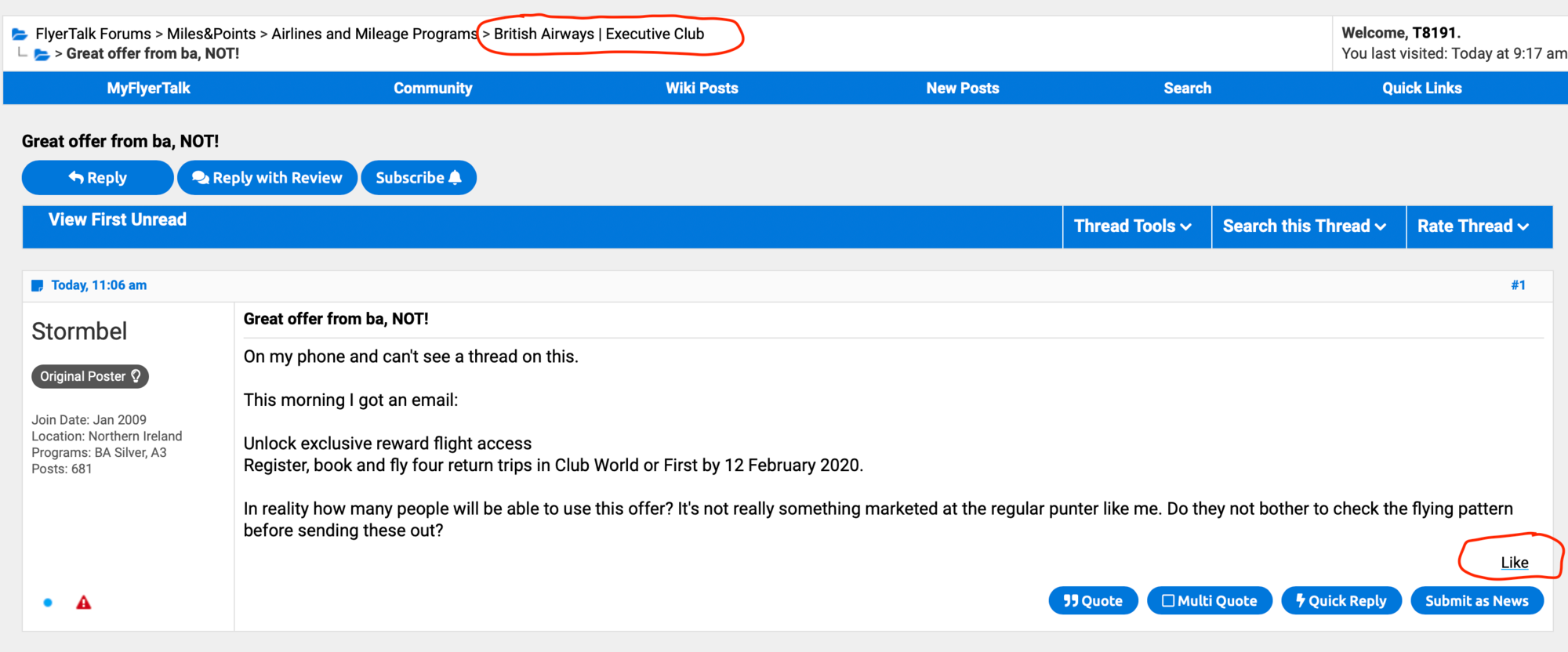
e.g. Try to click 'Like' button, it doesn't work ... and then a few seconds later the Forum page jiggles a bit and the button becomes functional.
Same with other little internal links in that format. They get there eventually, but ...
Two examples below.