
























 Jan 25, 2015, 10:29 am
Last edit by: Zorak
FlyerTalk has the ability to add (or remove) members to an Ignore List, so you are relieved of reading their posts.
Ignore only works at the post level; it will not block an Ignored member's post if it is being quoted by a non-ignored member, nor will it block threads started by a member of your Ignore list - you will see the thread, but the first post will not be readable.
Adding a member to the Ignore list will not block PM / Private Messages or e-mails from them.
(We'd advise being conservative with this, because you may deprive yourself of valuable information at times.)
HOW TO EDIT / ADD A MEMBER TO YOUR IGNORE LIST
Link to GreaseMonkey script.
Link to FireFox add-on[/quote]
Ignore only works at the post level; it will not block an Ignored member's post if it is being quoted by a non-ignored member, nor will it block threads started by a member of your Ignore list - you will see the thread, but the first post will not be readable.
Adding a member to the Ignore list will not block PM / Private Messages or e-mails from them.
(We'd advise being conservative with this, because you may deprive yourself of valuable information at times.)
HOW TO EDIT / ADD A MEMBER TO YOUR IGNORE LIST
- In desktop browser mode:
- Go to My FlyerTalk (leftmost option in your blue Menu Bar). In the Settings and Options subhead in Your a Control Panel (left hand menu column) select Edit Ignore List to add (or remove) member handles.
- OR, click on a member's User ID (in blue) in any of the forum threads and a menu will appear; click on "View Public Profile" to go to their profile page. On the profile page, below their username, there will be two dropdown menus: "Send Message" and "User Lists". Click on "User Lists" and then "Add to Ignore List"
- In either desktop or mobile browser mode:
- OR, if you are signed in, you can use this "express" link to edit your Ignore List (the first method under "desktop browser mode" simply takes you to this link)
Link to GreaseMonkey script.
Link to FireFox add-on[/quote]

Consolidated "'Ignore User' Function - Questions & Experiences" thread
Jan 15, 2025 | 8:24 am
#106
Moderator: Hyatt, American Express; FlyerTalk Evangelist


Join Date: Jun 2015
Location: WAS
Programs: :rolleyes:, DL DM, AA EXP, UA Silver, Hyatt Glob, Mlife Noir (=> Marriott Amb), invol FT beta tester
Posts: 21,643
 (I landed on it from a search result while looking for the missing functionality)


 Jan 30, 2025 | 3:39 pm
#108
Join Date: Feb 2014
Location: Frensham, Lincolnshire
Programs: Royal Flying Corps
Posts: 6,744
Not true at all. ALL organisations invovled with tech make things progressively harder, if not impossible, as the software "matures". It's no different from the previous decades where all software evolved until it included an email function and then all software evolved until it included a social media function. Removing useful and ease of use features/funtionality is just the latest fad for this generation of software "engineers".
Jan 30, 2025 | 6:59 pm
#109
FlyerTalk Evangelist


Join Date: Nov 2009
Location: SEA — the REAL Washington; occasionally in the other Washington (DCA area)
Programs: AS MVPG 100K (Atmos Titanium) / 0.5MM; DL fallen PM (1.58MM = “Complimentary Annual GM”); AA Gold
Posts: 24,444
imo it’s more that the new hires are tasked with doing simpler changes like deleting functionality of a link … but don’t actually understand that a lot of current users *actually like* that functionality (and thus don’t know to question (or dig into) the “why” of the go-do)
 Feb 7, 2025 | 1:16 pm
#110
FlyerTalk Evangelist


Join Date: May 2008
Location: San Francisco
Programs: GM on VX, UA, AA, HA, AS, SY; Budget Fastbreak; GM with hotels; Waymo; Honda crv; iOS
Posts: 36,611
Assuming that this issue is solved…
I use the “my flyertalk” (after clicking my username) and on the left side is the ignore list.
I use the “my flyertalk” (after clicking my username) and on the left side is the ignore list.
Feb 19, 2025 | 8:52 am
#111
FlyerTalk Evangelist

Join Date: Feb 2003
Location: Denver, CO, USA
Programs: Sometimes known as [ARG:6 UNDEFINED]
Posts: 28,758
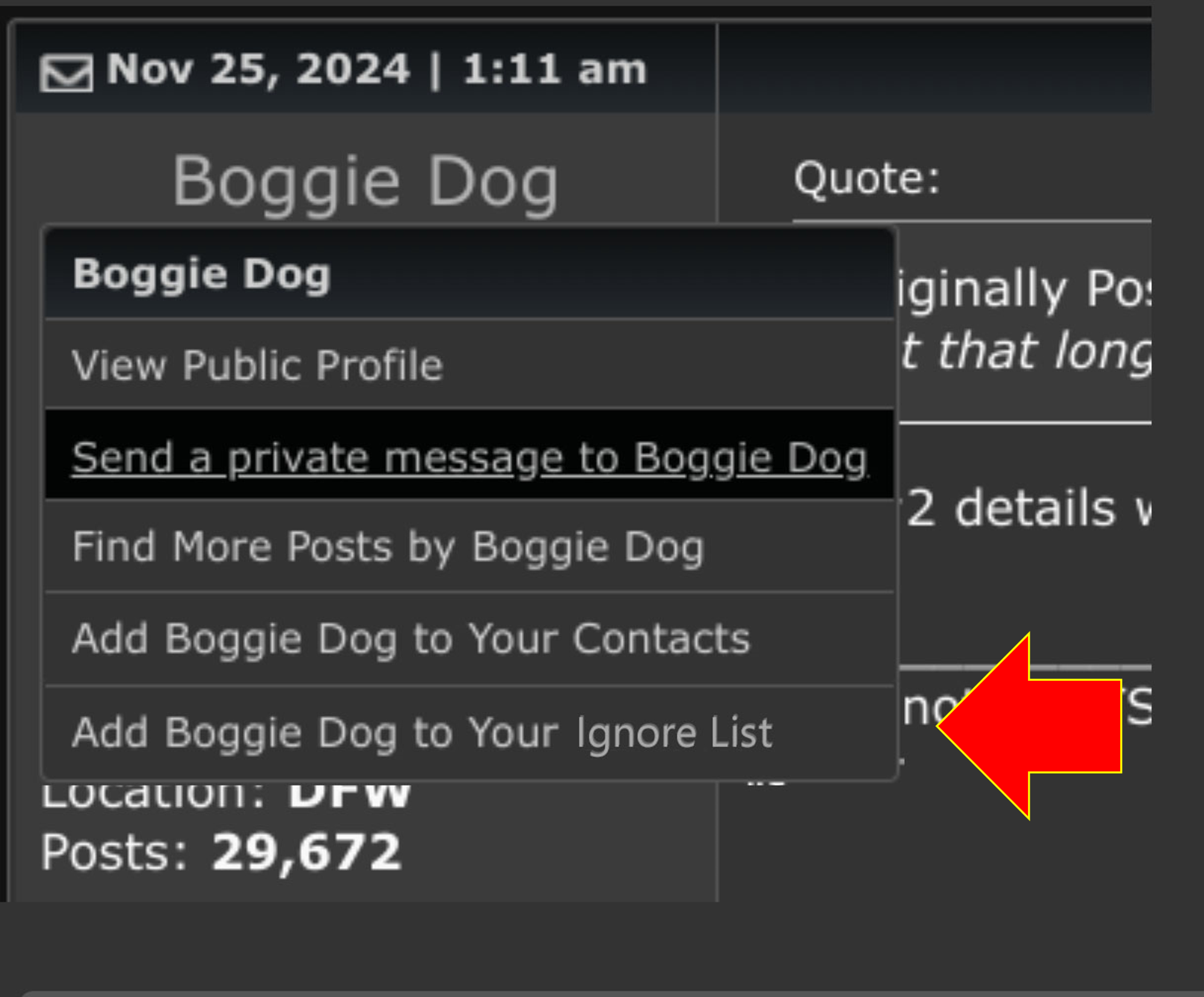
This is approximately what it USED to look like. You could directly ignore a poster by clicking on their name and selecting the bottom option. Much easier than going to "Edit Ignore List" where you have to manually add a user (and you need to spell their username correctly). The function seemed to disappear some time in 2024.
Mar 29, 2025 | 7:27 pm
#112
FlyerTalk Evangelist

Join Date: Mar 2012
Location: Klagetoh
Posts: 24,118
Although not as simple as the deprecated link in the contextual menu, the easiest way I’ve found to add an egregious poster to my own private IL is to chick on said poster’s name, select View Public Profile, then utilize the User Lists drop-down. The last option on that menu is to Add to Ignore List.