
























"Random techie stuff I've been doing during the lockdown" thread
 Jun 5, 2020 | 9:57 am
#46
Original Poster
Ambassador: Emirates Airlines
Join Date: Sep 2004
Location: Manchester, UK
Posts: 19,835
I've decided to do a "Reinstall". @BigLar, you nailed the concerns that I have. After watching many YouTube videos on the subject, its the recovery partition that still confuses me. I will watch more videos to get a better understanding of it.
Before I reinstall, I will definitely backup ALL my files.
Thanks for helping out, everyone!
Before I reinstall, I will definitely backup ALL my files.
Thanks for helping out, everyone!
Bitbefender recently won the "Best in Category" in the PC Pro awards (a UK magazine). They have a deal on at the moment for a 15 device, 2 year license for £29.99.
https://store.pcpro.co.uk/p35662-bit...15-device_2-yr
You may be able to get similar better pricing in the US.
 Jun 5, 2020 | 9:28 pm
#47
FlyerTalk Evangelist


Join Date: Jun 2005
Posts: 38,543
Do you care to share how to clean your laptop. During the last 3 months, I watched my "once very fast" desktop getting sloooooower and slower! I tried a few obvious things such as disable certain "startup" apps and "services". So far to no avail. Sometimes it ran so slowly that I could not even do work on Excel or Word, not to mention Adobe Photoshop! All my HDD and SS disk do not need defrag.
Any help will be appreciated! TIA.
Any help will be appreciated! TIA.
Jun 6, 2020 | 9:26 am
#48


Join Date: Jan 2006
Location: SORT OF HOMELESS
Programs: 14 years AA exp, but no more; & 1MM+, QR-PLT (ow EMD) MR-LTT, HH Gold
Posts: 8,106
Thank you all for the suggestions!
I have good news to report. I had done the Re-Install without touching the personal files and apps. Thanks to what I thought was a very good YouTube video. I followed it faithfully. After 57 minutes, my computer was rebooted. So far, everything seems to be working normally. Thanks again!
Link is shown below:
I have good news to report. I had done the Re-Install without touching the personal files and apps. Thanks to what I thought was a very good YouTube video. I followed it faithfully. After 57 minutes, my computer was rebooted. So far, everything seems to be working normally. Thanks again!
Link is shown below:
Jun 6, 2020 | 5:26 pm
#49
FlyerTalk Evangelist

Join Date: Nov 2002
Location: ORD
Posts: 14,776
New Thing!
Getting back to the overall thread topic, today I pulled about 100' of cable through conduit using a pull string. Now my friends who have a B&B have a new POE-powered switch in their garage that in turn powers the wireless access point there. And we pulled another 100' or so through conduit from there to the house next door they bought and are renovating into a day spa, so they will have internet there all on one happy network!
Today I also learned that Ubiquiti's data sheets are garbage. The data sheet says the USW-Flex has a POE budget of 8W if powered from 802.3af. But it refused to power the access point until I set it to think it was being powered from a POE injector. Even so it's still only drawing 8W of the 15W available in 802.3af.
Today I also learned that Ubiquiti's data sheets are garbage. The data sheet says the USW-Flex has a POE budget of 8W if powered from 802.3af. But it refused to power the access point until I set it to think it was being powered from a POE injector. Even so it's still only drawing 8W of the 15W available in 802.3af.
Jun 7, 2020 | 3:38 am
#50
Original Poster
Ambassador: Emirates Airlines
Join Date: Sep 2004
Location: Manchester, UK
Posts: 19,835
My latest...
As part of my (soon to be ending) job, I need to have multiple VMs with different versions / configurations of a software package. I have all these on a pretty powerful Macbook Pro with 16GB / 1TB. If I'm working at home, I'd copy the VM onto my iMac and copy back when finished. Of course, sometimes I'd forget where I was up to, and I do not know which was the latest version.
"Use the cloud!!!" I hear you shout. I would, but it gets very expensive when you need 8-12GB Ram and 200GB drives as well as a relatively beefy processor.
Anyway, as I've got a server at home (with Windows 10 Pro), I've now moved all the VMs onto that, so I have my own cloud. It's got 32GB RAM, and I can run 3 VMs at the same time (I was pretty much limited to 1 VM on the laptop). Everything gets backed up to iDrive overnight, and I also have Acronis TrueImage that takes a local backup to a 1TB NVMe portable drive.
The PiVPN lets me get in remotely, and I've been using my MacBook 12 as a client (the MacBook Pro is going back to my company when my redundancy kicks in). The MacBook is pretty low powered, but it does the job fine.
So, I've now got my own personal cloud. God knows why I didn't do it sooner. Of course, this relies on me having internet access...
As part of my (soon to be ending) job, I need to have multiple VMs with different versions / configurations of a software package. I have all these on a pretty powerful Macbook Pro with 16GB / 1TB. If I'm working at home, I'd copy the VM onto my iMac and copy back when finished. Of course, sometimes I'd forget where I was up to, and I do not know which was the latest version.
"Use the cloud!!!" I hear you shout. I would, but it gets very expensive when you need 8-12GB Ram and 200GB drives as well as a relatively beefy processor.
Anyway, as I've got a server at home (with Windows 10 Pro), I've now moved all the VMs onto that, so I have my own cloud. It's got 32GB RAM, and I can run 3 VMs at the same time (I was pretty much limited to 1 VM on the laptop). Everything gets backed up to iDrive overnight, and I also have Acronis TrueImage that takes a local backup to a 1TB NVMe portable drive.
The PiVPN lets me get in remotely, and I've been using my MacBook 12 as a client (the MacBook Pro is going back to my company when my redundancy kicks in). The MacBook is pretty low powered, but it does the job fine.
So, I've now got my own personal cloud. God knows why I didn't do it sooner. Of course, this relies on me having internet access...
Jun 9, 2020 | 8:39 am
#51


Join Date: Dec 2009
Location: RDU
Programs: DL DM+(segs)/MM, UA Ag, Hilton DM, Marriott Ti (life Pt), TSA Opt-out Platinum
Posts: 3,366
Great idea for a thread! I've enjoyed reading what others have been up to. Gave me a few ideas.
Tricked out my Home Assistant (HASS) setup (this is pretty much continuous at my house). Added some custom python code and now have about 80 devices connected to HASS doing various tasks. Lights change colors when ring cameras detect motion, when the garage opens, and on other events. Motion detection turns on lights all over the outside. If you haven't used HASS (home-assistant.io), I highly recommend it.
Added an SSL certificate from LetsEncrypt and had a lot of fun trying to point my HASS docker image to that path (outside the container). Took me the better part of a day and I learned a lot about debian docker containers in the process. Now I love docker. Also added Node Red (another docker container) to HASS, and now I'm really dorking it up.
Saw pi-hole mentioned in this thread, so I set that up in another docker container (on a different debian VM due to some port conflicts). Had it working great, then in the process of googling how to trick it out, I realized there's a pfblockerng package for pfSense (my router SW) that does pretty much the same thing, but doesn't require me to open a bunch of ports on my different VLANs to reach pi-hole. So I installed that and just have it listen on every (internal) interface. Worked so well, that the wife actually complained that some of the links she was clicking on no longer worked. Apparently she likes the ads. So I removed the interface from her VLAN (moved her to our IoT VLAN) and set it back to opendns. Too much trouble to add all the exceptions needed for the stuff she clicks on. Lesson learnt. I'll stay on my more strict VLAN and let her hang with the IoT devices.
Other stuff, not necessarily techie in nature:
Tricked out my Home Assistant (HASS) setup (this is pretty much continuous at my house). Added some custom python code and now have about 80 devices connected to HASS doing various tasks. Lights change colors when ring cameras detect motion, when the garage opens, and on other events. Motion detection turns on lights all over the outside. If you haven't used HASS (home-assistant.io), I highly recommend it.
Added an SSL certificate from LetsEncrypt and had a lot of fun trying to point my HASS docker image to that path (outside the container). Took me the better part of a day and I learned a lot about debian docker containers in the process. Now I love docker. Also added Node Red (another docker container) to HASS, and now I'm really dorking it up.
Saw pi-hole mentioned in this thread, so I set that up in another docker container (on a different debian VM due to some port conflicts). Had it working great, then in the process of googling how to trick it out, I realized there's a pfblockerng package for pfSense (my router SW) that does pretty much the same thing, but doesn't require me to open a bunch of ports on my different VLANs to reach pi-hole. So I installed that and just have it listen on every (internal) interface. Worked so well, that the wife actually complained that some of the links she was clicking on no longer worked. Apparently she likes the ads. So I removed the interface from her VLAN (moved her to our IoT VLAN) and set it back to opendns. Too much trouble to add all the exceptions needed for the stuff she clicks on. Lesson learnt. I'll stay on my more strict VLAN and let her hang with the IoT devices.
Other stuff, not necessarily techie in nature:
- Ran some Cat 6 to support two more outdoor PoE Hikvision cams that connect back to an NVR. Boring and tedious, but needed.
- Roughed in and then finished out electrical work in an unfinished basement room.
- Installed a landscape lighting system with Ring transformers (didn't know they were a thing, and was amazed at how cheap they were, comparatively)
- Re-arranged my home office (twice). Considering a new monitor to replace my 34" 4K LG monitor that's 3-4 years old. May go with a two monitor setup, or perhaps a large 5K one (for MBP 16"). Looking at maybe the Dell UltraSharp U4919DW Dell U4919DW, or the next gen LG LG 38NM95C-W . Curious if anyone had experience with either of those.
- Considered buying a third UAP-AC-PRO to enhance wifi, but then decided against it. I think I'll wait for the next gen of wifi before doing anymore upgrades
Jun 13, 2020 | 12:06 pm
#52
Join Date: Jun 2005
Location: London
Posts: 627
On another note related to this thread, I upgraded two 6+ yr old laptops with new RAM and SSDs. Each upgrade was under £100 and it has made a huge difference. I didn't want to spend more for a new laptop as none of them are used for any heavy duty games, or other CPU intensive work.
Jun 20, 2020 | 5:59 pm
#53


Join Date: Nov 2009
Location: La Jolla, California
Programs: KrisFlyer Gold, SWA CP
Posts: 1,132

Got the blood pressure app working on my Samsung Galaxy Active 2 smartwatch. Kinda cool, but my BP seems too high. Need to call the doc.
Also added a second Asus AiMesh router to my home to overpower the wifi my neighbor installed.
Last edited by mike_la_jolla; Jun 20, 2020 at 6:27 pm Reason: More boasting ...
Jun 20, 2020 | 10:20 pm
#54
FlyerTalk Evangelist
Join Date: Jun 2005
Posts: 38,543
Also, any wrist-mounted blood pressure reading will only be accurate if you hold your arm so your wrist is at heart height. With your arm extending down like it usually rests the reading will be high due to gravity.
Jun 21, 2020 | 3:59 am
#55
Original Poster
Ambassador: Emirates Airlines
Join Date: Sep 2004
Location: Manchester, UK
Posts: 19,835
I've been trying to get all my old emails from my company account to somewhere where I can store and search them after I leave the company later this week.
A search for "Email Archiving Solutions" brought up a few products, of which MailStore seemed to be well regarded. I downloaded it, only to find it's Windows only - so no good for me. I tried a few Mac equivalents, none of which were any good.
My next alternative was to copy everything into my Gmail account, so everything would be under proper tags (folders). I created the tags in Gmail, and then went to copy using Outlook Mac. In their wisdom, Microsoft have removed the copy functionality to Gmail accounts. Nice one.
OK - fire up Mac Mail and set up my accounts. After all the messages were downloaded, I started to copy, folder by folder. It all seemed to be going OK, except the messages weren't uploaded to Gmail. So, all the messages were in Mac Mail, but the tags on Gmail were empty.
Next... I looked for alternative email clients that would work on a Mac. EmMail seemed to be well regarded, so I downloaded the trial of that. It's all very nice and fast, and I started copying everything across. All was going well and I left it overnight. However, at some point it stopped uploading, so only half the messages are present. I restarted the client today, and it's uploading again. So, it seems that this will work eventually.
However, EmClient now seems to have stopped synchronising new messages from Gmail Let's see what happens once the uploads have finished!
A search for "Email Archiving Solutions" brought up a few products, of which MailStore seemed to be well regarded. I downloaded it, only to find it's Windows only - so no good for me. I tried a few Mac equivalents, none of which were any good.
My next alternative was to copy everything into my Gmail account, so everything would be under proper tags (folders). I created the tags in Gmail, and then went to copy using Outlook Mac. In their wisdom, Microsoft have removed the copy functionality to Gmail accounts. Nice one.
OK - fire up Mac Mail and set up my accounts. After all the messages were downloaded, I started to copy, folder by folder. It all seemed to be going OK, except the messages weren't uploaded to Gmail. So, all the messages were in Mac Mail, but the tags on Gmail were empty.
Next... I looked for alternative email clients that would work on a Mac. EmMail seemed to be well regarded, so I downloaded the trial of that. It's all very nice and fast, and I started copying everything across. All was going well and I left it overnight. However, at some point it stopped uploading, so only half the messages are present. I restarted the client today, and it's uploading again. So, it seems that this will work eventually.
However, EmClient now seems to have stopped synchronising new messages from Gmail
Let's see what happens once the uploads have finished!
Jun 21, 2020 | 9:52 am
#56
Join Date: Nov 2009
Location: La Jolla, California
Programs: KrisFlyer Gold, SWA CP
Posts: 1,132
Update - I think you're working too hard. All you need is an email client that allows you to store all emails locally.
Update 2 - Anybody else amused that some of the best technical support on the web comes from a travel discussion board?
Last edited by mike_la_jolla; Jun 21, 2020 at 11:57 am Reason: After more research...
Jun 21, 2020 | 11:50 am
#57
Join Date: Nov 2009
Location: La Jolla, California
Programs: KrisFlyer Gold, SWA CP
Posts: 1,132
My understanding is that those devices leave something to be desired in accuracy.
Also, any wrist-mounted blood pressure reading will only be accurate if you hold your arm so your wrist is at heart height. With your arm extending down like it usually rests the reading will be high due to gravity.
Also, any wrist-mounted blood pressure reading will only be accurate if you hold your arm so your wrist is at heart height. With your arm extending down like it usually rests the reading will be high due to gravity.
Jun 21, 2020 | 1:05 pm
#58
Join Date: May 2003
Location: Cleveland, OH
Programs: UA-GS 1MM), Hertz Pres Circle, Starriott Titanium)
Posts: 1,971
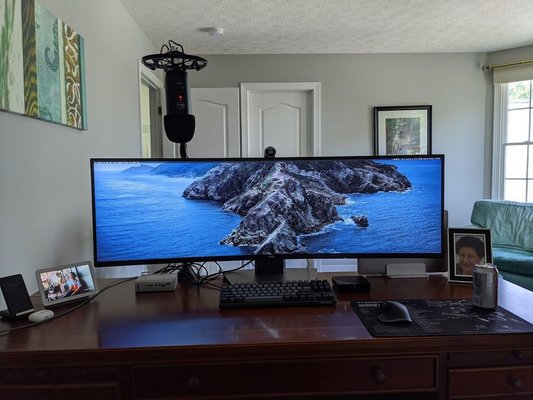
My old 34 inch wide-screen died, so I decided to improve the work from home setup as I'm not traveling @ the moment. New Dell 49 inch
Also, I decided to do some more experimentation into running dual sims on my Pixel 4XL. I'm running FI and Verison's Visible service side-by side and it has been great thus far.
Jun 21, 2020 | 4:19 pm
#59
Join Date: Nov 2009
Location: La Jolla, California
Programs: KrisFlyer Gold, SWA CP
Posts: 1,132
My old 34 inch wide-screen died, so I decided to improve the work from home setup as I'm not traveling @ the moment. New Dell 49 inch
Also, I decided to do some more experimentation into running dual sims on my Pixel 4XL. I'm running FI and Verison's Visible service side-by side and it has been great thus far.
Jun 21, 2020 | 8:20 pm
#60
Join Date: Jan 2007
Programs: No single airline or hotel chain is of much use to me anymore.
Posts: 3,816