
























 Aug 7, 2022, 7:15 am
Last edit by: SPN Lifer
should you be switched to mobile view, simply click on this link and you will be reset. Credit goes to @Zorak . Thanks!!
https://www.flyertalk.com/forum/prof...ons&styleid=24
A possible solution for the opposite, cellphone switched to desktop view, and can't switch back to mobile view, is this link:
https://www.flyertalk.com/forum/prof...ons&styleid=22
However, there could be collateral consequences, as discussed in Post # 72, which also provides an alternative solution.
https://www.flyertalk.com/forum/prof...ons&styleid=24
A possible solution for the opposite, cellphone switched to desktop view, and can't switch back to mobile view, is this link:
https://www.flyertalk.com/forum/prof...ons&styleid=22
However, there could be collateral consequences, as discussed in Post # 72, which also provides an alternative solution.

Switched to mobile view and can't switch back to desktop view
Nov 24, 2022 | 9:49 am
#46


Join Date: Apr 2013
Programs: AA, United, R34 ftw
Posts: 2,064
Just happened to me for the first time--didn't see any option to change back to desktop--used the styleid link to get back to normal. Thankfully I knew about this thread!

 Jan 1, 2023 | 9:34 am
#48
Moderator: Hawaii-based airlines & Hawai'i forums


Join Date: Mar 2003
Location: Ka ʻĀpala Nui, Nuioka
Programs: NEXUS/Global Entry, Delta, United, Hyatt, IHG, Marriott, and Hertz
Posts: 18,724
I believe (and hope) this may be of help: Switched to mobile view and can't switch back to desktop view
Jan 3, 2023 | 8:44 am
#49
Join Date: Aug 2019
Location: Montreal & Nashville
Programs: Aeroplan SE100K, Accor Platinum, Bonvoy Titanium Elite, BW Diamond, Hertz President's Circle
Posts: 391
I believe (and hope) this may be of help: Switched to mobile view and can't switch back to desktop view
I was getting mad, incognito mode was fine but could not get back to normal desktop mode on my computer!!!
 Jan 14, 2023 | 10:36 am
#51

Join Date: Oct 2010
Location: USA
Programs: DL PM - IC RA - HHonors Gold - Hertz Gold - AA - US - CO - Choice Privileges
Posts: 2,085
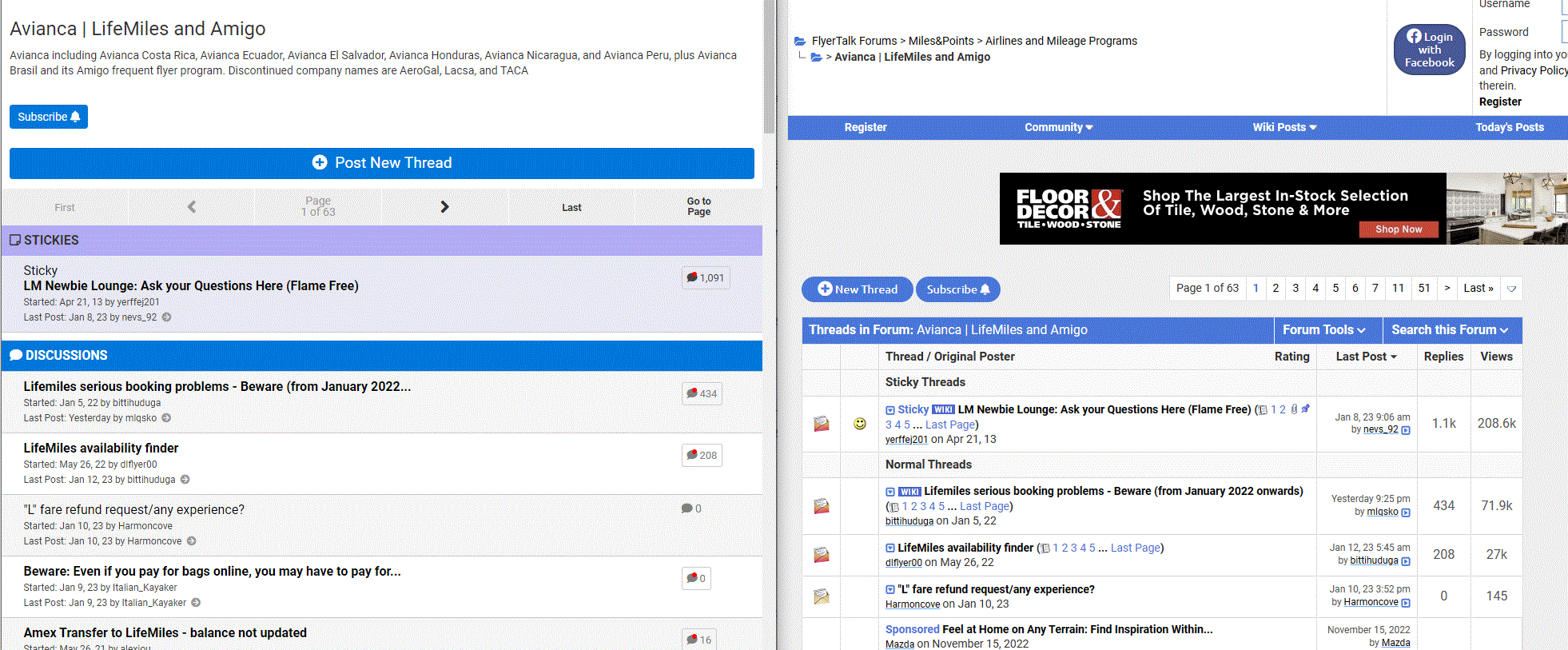
forums look completely different in different browsers
Why do the forums look completely different in different browsers? The one on the left is Chrome. The one on the right is Edge. Is one the new version and one the old version? The version in Edge (the right side) is the one I am most familiar with. The version in Chrome (the left side) is very difficult to navigate...
Jan 14, 2023 | 3:09 pm
#52
FlyerTalk Evangelist


Join Date: Feb 2007
Location: Los Angeles / Basel
Programs: UA 1K MM, AA EXP, Hyatt Globalist
Posts: 27,397
One is in desktop mode, the other mobile mode.
Mine just toggled to mobile mode and I don't know how to turn it back...
Is this true for others too?
Mine just toggled to mobile mode and I don't know how to turn it back...
Is this true for others too?
Jan 14, 2023 | 3:55 pm
#53
Moderator: Hyatt, American Express; FlyerTalk Evangelist


Join Date: Jun 2015
Location: WAS
Programs: :rolleyes:, DL DM, AA EXP, UA Silver, Hyatt Glob, Mlife Noir (=> Marriott Amb), invol FT beta tester
Posts: 21,669
Here's how to switch back:
Switched to mobile view and can't switch back to desktop view
Switched to mobile view and can't switch back to desktop view
You can also force the full desktop skin by adding "?styleid=24" to the URL parameters. If there's already a ?x=y parameter in the URL you can append "&styleid=24" instead.
If anyone is reading this in mobile mode against their volition, you can click on this direct link to the desktop version of the "Edit Options" page: https://www.flyertalk.com/forum/prof...ons&styleid=24 where you can change the Forum Skin (2nd item under "Miscellaneous Options" near the bottom) to "Use Forum Default"
If anyone is reading this in mobile mode against their volition, you can click on this direct link to the desktop version of the "Edit Options" page: https://www.flyertalk.com/forum/prof...ons&styleid=24 where you can change the Forum Skin (2nd item under "Miscellaneous Options" near the bottom) to "Use Forum Default"
May 18, 2023 | 12:58 am
#56

Join Date: Jan 2016
Location: LON
Programs: BAEC
Posts: 5,142
I think your post was merged into this thread, if you didn't realise, the answer is upthread.
May 26, 2023 | 11:39 am
#57
FlyerTalk Evangelist

Join Date: Nov 2009
Location: Northeast Kansas | Colorado Native
Programs: Amex Gold/Plat, UA *G, Hyatt Globalist, IHG Plat Marriott LT Gold, NEXUS, TSA Disparager Unobtanium
Posts: 22,651
Thanks to a prior poster who suggested adding "?styleid=24" to the end of the URL. I got stuck on the mobile thread now (it sucks, IB) and was able to switch back with the above trick.
Oct 12, 2023 | 1:16 pm
#58
FlyerTalk Evangelist

Join Date: Mar 2008
Location: DFW
Posts: 30,986
Unwanted Mobile View on Mobile Devices
Recently while using my Samsung Galaxy Tab S7 tablet and my iPhone 13 the site information displayed when opening Flyertalk changed and I'm seeing what I think is the mobile version of the site. I didn't make any changes, it just changed on its on for both my Android and AppIe OS devices. I found this post
from several years ago that details how to disable the mobile skin although when I follow the listed steps there is no menu to select Desktop/Full View, or Mobile display. The view I see on my mobile devices eliminates some useful forum information but also completely eliminated all advertising (that part I like).
I'd like to get back to a full view as the view I'm seeing is not very useful when following threads. Details on how to change to full site on my mobile devices would be appreciated.
Thanks!
How can I always "View Full Site" and NOT Mobile site?
I'd like to get back to a full view as the view I'm seeing is not very useful when following threads. Details on how to change to full site on my mobile devices would be appreciated.
Thanks!
Oct 12, 2023 | 4:06 pm
#59
Administrator
Join Date: Mar 2023
Posts: 11
Recently while using my Samsung Galaxy Tab S7 tablet and my iPhone 13 the site information displayed when opening Flyertalk changed and I'm seeing what I think is the mobile version of the site. I didn't make any changes, it just changed on its on for both my Android and AppIe OS devices. I found this post from several years ago that details how to disable the mobile skin although when I follow the listed steps there is no menu to select Desktop/Full View, or Mobile display. The view I see on my mobile devices eliminates some useful forum information but also completely eliminated all advertising (that part I like).
I'd like to get back to a full view as the view I'm seeing is not very useful when following threads. Details on how to change to full site on my mobile devices would be appreciated.
Thanks!
I'd like to get back to a full view as the view I'm seeing is not very useful when following threads. Details on how to change to full site on my mobile devices would be appreciated.
Thanks!
Oct 12, 2023 | 6:05 pm
#60
FlyerTalk Evangelist
Join Date: Mar 2008
Location: DFW
Posts: 30,986
I found the fix listed at the top of the thread which worked but I do not see the "View Desktop Site" in the drop down menu of the three bar Top Left Menu.
Thanks for getting me straightened out.