
























(Some) Apostrophes expanding to multiple spaces?
 May 1, 2019 | 3:10 pm
#1
Original Poster
Join Date: Jan 2016
Location: Ex-MSP
Programs: UA: Plat, Marriott: Annual Ambassador, Lifetime Grandfather
Posts: 293
(Some) Apostrophes expanding to multiple spaces?
I mostly frequent the Marriott and United fora here, and for a while, some users' posts have been expanding apostrophes (and sometimes double-quotes) into what appears to be a horizontal tab. As the image below will show, however, it's not all quotes.
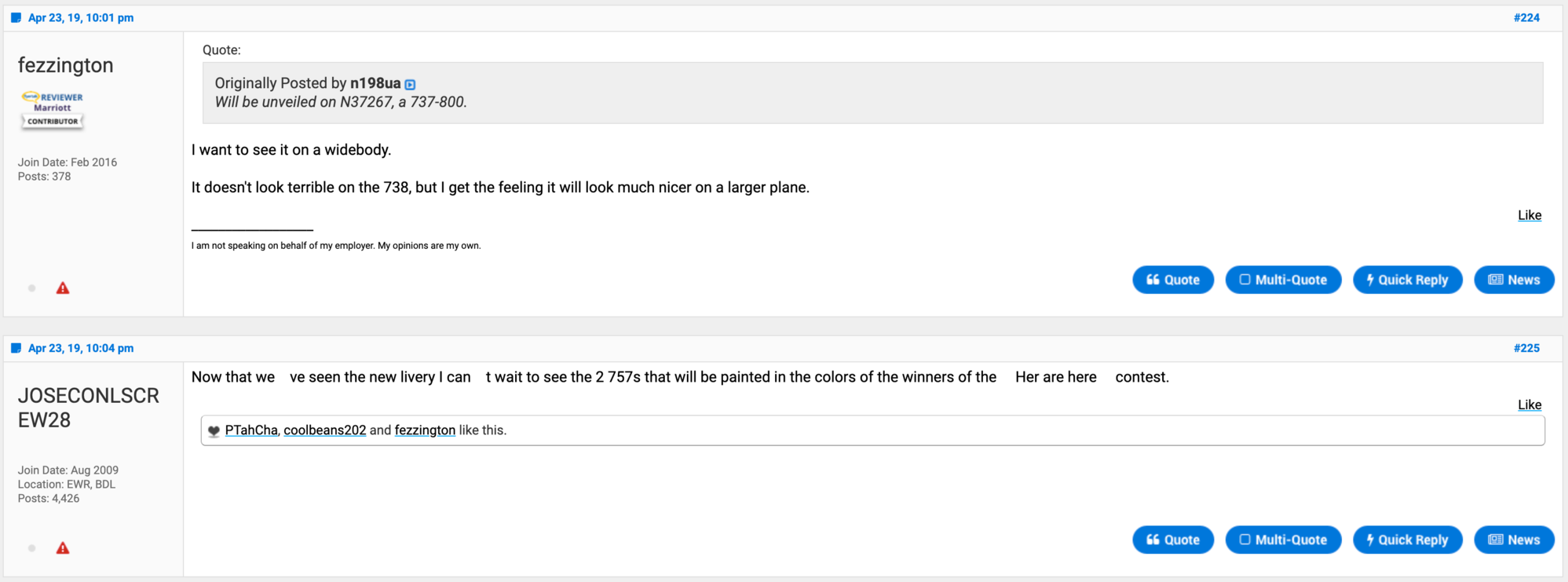
This is from the https://www.flyertalk.com/forum/unit...ft-23rd-6.html thread. Note that fezzington's apostrophe didn't expand, where as JOSECONLSCREW28's did.
I've noticed this behavior in both of the aforementioned fora. I wonder if it's somehow related to (possibly) some users cut-and-pasting from an external editor that uses "smart quotes"?
Mac OSX, latest version. Google Chrome, latest version.
Thanks,
mvitale
This is from the https://www.flyertalk.com/forum/unit...ft-23rd-6.html thread. Note that fezzington's apostrophe didn't expand, where as JOSECONLSCREW28's did.
I've noticed this behavior in both of the aforementioned fora. I wonder if it's somehow related to (possibly) some users cut-and-pasting from an external editor that uses "smart quotes"?
Mac OSX, latest version. Google Chrome, latest version.
Thanks,
mvitale
Last edited by mvitale; May 1, 2019 at 3:11 pm Reason: ++smart quotes comment
 May 1, 2019 | 3:44 pm
#2
No longer with Internet Brands

Join Date: Mar 2011
Location: Los Angeles, CA
Programs: DL DM 1.6MM, Marriott LT Plat
Posts: 5,343
It could be?
Though I am using Chrome and Firefox, and neither of them display the extra spaces as your image shows above.
You may try clearing your browser cache.
Though I am using Chrome and Firefox, and neither of them display the extra spaces as your image shows above.
You may try clearing your browser cache.


 Jul 28, 2019 | 7:36 pm
#6


Join Date: Feb 2019
Location: ARN / OSD / TRD
Programs: AC, SK, Scandic, Marriott
Posts: 1,514
In the last paragraph of https://www.flyertalk.com/forum/31351272-post21.html there is an instance of "don't" which will render correctly when using that direct link.
The apostrophe is also correctly rendered if you access via AC Drops Domestic flight @ Canadian Customs and then scroll down to post 21
If however you have infinite scroll enabled and start at AC Drops Domestic flight @ Canadian Customs and then scroll down to trigger the loading of page 2 posts when you get to post 21 there will be a space instead of the apostrophe in Chrome and it will be stripped in Firefox (both on a Mac). I checked the page source in Chrome and it's just a blank space, there is no control or non-printable character in the text.
Jul 29, 2019 | 10:52 am
#7
Administrator


Join Date: Sep 2015
Location: Los Angeles
Programs: Internet Brands
Posts: 4,445
I've done some testing and can reproduce it now with the infinite scroll feature enabled.
In the last paragraph of https://www.flyertalk.com/forum/31351272-post21.html there is an instance of "don't" which will render correctly when using that direct link.
The apostrophe is also correctly rendered if you access via AC Drops Domestic flight @ Canadian Customs and then scroll down to post 21
If however you have infinite scroll enabled and start at AC Drops Domestic flight @ Canadian Customs and then scroll down to trigger the loading of page 2 posts when you get to post 21 there will be a space instead of the apostrophe in Chrome and it will be stripped in Firefox (both on a Mac). I checked the page source in Chrome and it's just a blank space, there is no control or non-printable character in the text.
In the last paragraph of https://www.flyertalk.com/forum/31351272-post21.html there is an instance of "don't" which will render correctly when using that direct link.
The apostrophe is also correctly rendered if you access via AC Drops Domestic flight @ Canadian Customs and then scroll down to post 21
If however you have infinite scroll enabled and start at AC Drops Domestic flight @ Canadian Customs and then scroll down to trigger the loading of page 2 posts when you get to post 21 there will be a space instead of the apostrophe in Chrome and it will be stripped in Firefox (both on a Mac). I checked the page source in Chrome and it's just a blank space, there is no control or non-printable character in the text.
Oct 5, 2020 | 8:49 am
#10
Administrator
Join Date: Sep 2015
Location: Los Angeles
Programs: Internet Brands
Posts: 4,445
Oct 5, 2020 | 8:20 pm
#11
Join Date: Apr 2017
Posts: 299
Per TechnoTourist's instructions, you'll have to first go 1-2 pages before the specific post referenced, and then scroll down to said post with infinite scroll enabled. Let me know if you're unable to replicate. You'll also notice that if you continue scrolling down through the thread, it'll be the same users whose apostrophes are replaced with spaces.
https://www.flyertalk.com/forum/31748113-post1596.html
https://www.flyertalk.com/forum/31519253-post1519.html
https://www.flyertalk.com/forum/31600328-post1536.html
https://www.flyertalk.com/forum/31604715-post1544.html
https://www.flyertalk.com/forum/31748113-post1596.html
https://www.flyertalk.com/forum/31519253-post1519.html
https://www.flyertalk.com/forum/31600328-post1536.html
https://www.flyertalk.com/forum/31604715-post1544.html