
























 Jul 13, 2022, 8:15 am
Last edit by: moondog
The "FT People on WeChat" group
Our group chat is comprised of FT members and friends of FT members. We talk about pretty much anything except for politics (because Papa Bear has the ability to watch over us). The group has its own QR code, but it has a short shelf life (e.g. about 5 days), so I'm not including it here. The easiest way to join is to add me as a contact (moondogsh) and let me put you in the group.
Contacting Tencent Customer Support
If you want to get in touch with Tencent customer service (e.g. to update your passport number or change your name format so it aligns with your bank accounts), most web resources will advise you to simply message the "WeChat Team" contact. It is extremely difficult to get a human response when using this approach. Calling them also results in a bot experience.
However, the following drill works as of July 2022 (specific menu options can always change, of course; the key is getting yourself to step 5 below):
1. Dial 95716 (or +86 4009100100 from outside of China)
2. Select option 1 for personal accounts
3. Enter your connected phone number followed by #
3. Select option 2 for other questions
4. The bot will ask you to describe your issue using voice; just speak to it in English; it won't understand and will ask you to repeat 3-5 times before giving up
5. Now, the bot will give you ~8 menu options; through trial and error, I can state that option 7 is good for immediate transfer to a human (some of the others might work as well)
6. When the representative picks up, you definitely need to speak Chinese, but your request is presumably fairly easy to convey, and their responses are also pretty simple
7. They might want to move the conversation over to WeChat; this is okay because they will send you an invite to a special customer service queue, which is only ~60% automated
Our group chat is comprised of FT members and friends of FT members. We talk about pretty much anything except for politics (because Papa Bear has the ability to watch over us). The group has its own QR code, but it has a short shelf life (e.g. about 5 days), so I'm not including it here. The easiest way to join is to add me as a contact (moondogsh) and let me put you in the group.
Contacting Tencent Customer Support
If you want to get in touch with Tencent customer service (e.g. to update your passport number or change your name format so it aligns with your bank accounts), most web resources will advise you to simply message the "WeChat Team" contact. It is extremely difficult to get a human response when using this approach. Calling them also results in a bot experience.
However, the following drill works as of July 2022 (specific menu options can always change, of course; the key is getting yourself to step 5 below):
1. Dial 95716 (or +86 4009100100 from outside of China)
2. Select option 1 for personal accounts
3. Enter your connected phone number followed by #
3. Select option 2 for other questions
4. The bot will ask you to describe your issue using voice; just speak to it in English; it won't understand and will ask you to repeat 3-5 times before giving up
5. Now, the bot will give you ~8 menu options; through trial and error, I can state that option 7 is good for immediate transfer to a human (some of the others might work as well)
6. When the representative picks up, you definitely need to speak Chinese, but your request is presumably fairly easy to convey, and their responses are also pretty simple
7. They might want to move the conversation over to WeChat; this is okay because they will send you an invite to a special customer service queue, which is only ~60% automated

wechat(微信)
Apr 8, 2021 | 6:28 pm
#316
Original Poster
A FlyerTalk Posting Legend


Join Date: Dec 2000
Location: Shanghai
Posts: 46,496
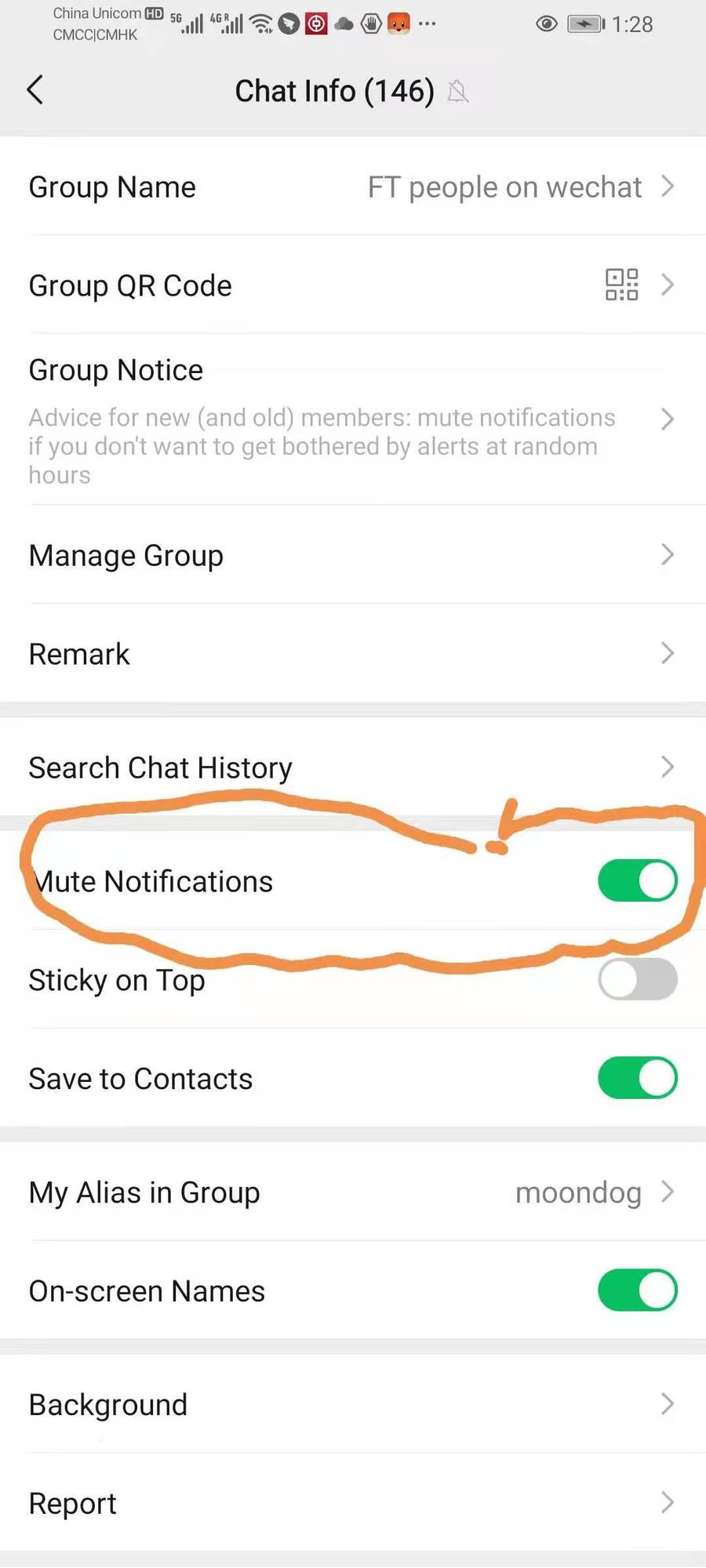
I usually mute notifications for specific groups/posters only. The groups can be particularly annoying if they have lots of activity, and some people like to give me a play-by-play of their entire day (e.g. I'm getting ready to have lunch at Shake Shack now).
 Apr 8, 2021 | 10:17 pm
#317


Join Date: Jun 2009
Posts: 371
Originally Posted by Cryofern View Post"If the in-app WeChat settings aren't cutting it for you, go play around in your operating system settings:
Settings > Apps & notifications > App info > WeChat > App notifications > (choose a category) > Importance > Medium: No sound"
My WeChat app notifications gives me different options than yours. I do have the option to show "notification dot" which I haven't seen before, which is what I think I am looking for. I am leaving on voice and video call invitations, which probably means my phone will ring if I get a call, which is something I want to happen. Thanks much to you and plunet.
Settings > Apps & notifications > App info > WeChat > App notifications > (choose a category) > Importance > Medium: No sound"
My WeChat app notifications gives me different options than yours. I do have the option to show "notification dot" which I haven't seen before, which is what I think I am looking for. I am leaving on voice and video call invitations, which probably means my phone will ring if I get a call, which is something I want to happen. Thanks much to you and plunet.
Last edited by DaileyB; Apr 8, 2021 at 10:19 pm Reason: clarity
 Apr 8, 2021 | 11:31 pm
#318
Original Poster
A FlyerTalk Posting Legend
Join Date: Dec 2000
Location: Shanghai
Posts: 46,496
Originally Posted by Cryofern View Post"If the in-app WeChat settings aren't cutting it for you, go play around in your operating system settings:
Settings > Apps & notifications > App info > WeChat > App notifications > (choose a category) > Importance > Medium: No sound"
My WeChat app notifications gives me different options than yours. I do have the option to show "notification dot" which I haven't seen before, which is what I think I am looking for. I am leaving on voice and video call invitations, which probably means my phone will ring if I get a call, which is something I want to happen. Thanks much to you and plunet.
Settings > Apps & notifications > App info > WeChat > App notifications > (choose a category) > Importance > Medium: No sound"
My WeChat app notifications gives me different options than yours. I do have the option to show "notification dot" which I haven't seen before, which is what I think I am looking for. I am leaving on voice and video call invitations, which probably means my phone will ring if I get a call, which is something I want to happen. Thanks much to you and plunet.
 Apr 9, 2021 | 5:20 am
#319
Original Poster
A FlyerTalk Posting Legend
Join Date: Dec 2000
Location: Shanghai
Posts: 46,496
Originally Posted by Cryofern View Post"If the in-app WeChat settings aren't cutting it for you, go play around in your operating system settings:
Settings > Apps & notifications > App info > WeChat > App notifications > (choose a category) > Importance > Medium: No sound"
My WeChat app notifications gives me different options than yours. I do have the option to show "notification dot" which I haven't seen before, which is what I think I am looking for. I am leaving on voice and video call invitations, which probably means my phone will ring if I get a call, which is something I want to happen. Thanks much to you and plunet.
Settings > Apps & notifications > App info > WeChat > App notifications > (choose a category) > Importance > Medium: No sound"
My WeChat app notifications gives me different options than yours. I do have the option to show "notification dot" which I haven't seen before, which is what I think I am looking for. I am leaving on voice and video call invitations, which probably means my phone will ring if I get a call, which is something I want to happen. Thanks much to you and plunet.
Apr 20, 2021 | 10:08 pm
#320
Join Date: Jun 2009
Posts: 371
All I want to do is simply have a dot appear on my home screen in the way my text messaging works. I am attaching screenshots showing my system that doesn't appear to work that way.
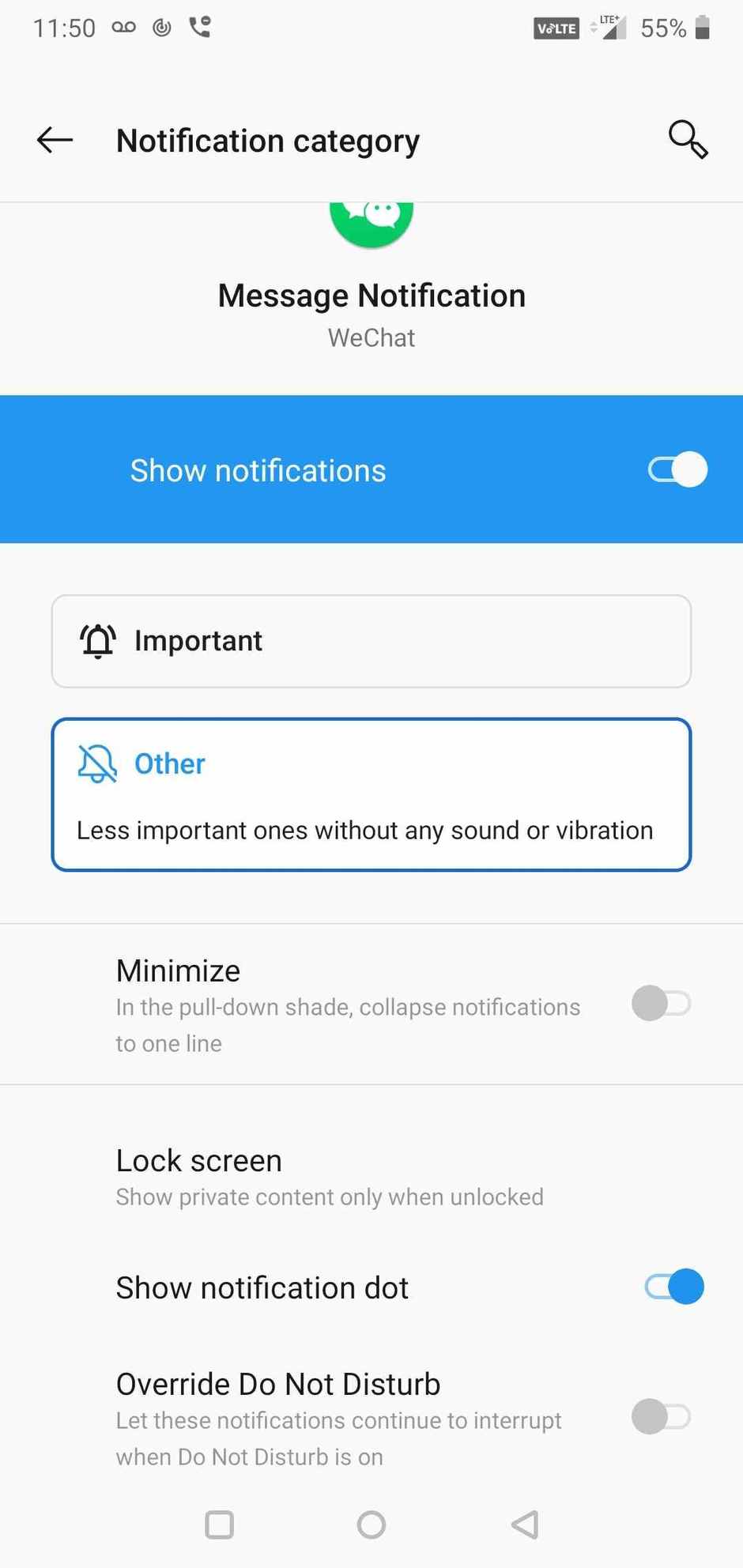
Message notification has important category, but I can't do anything with it. Don't see why I can't simply choose to have dot notifications of messages and not sound notifications.
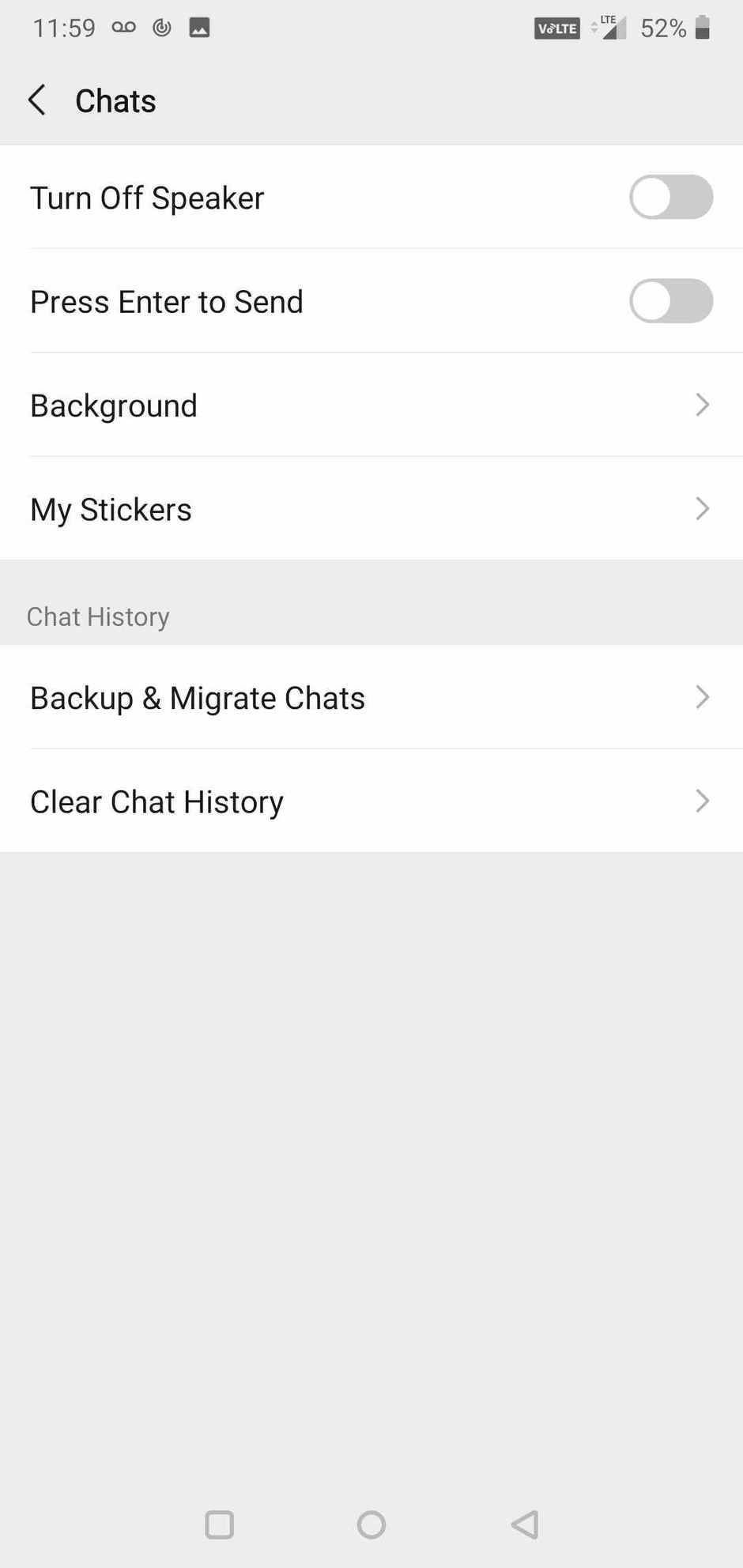
Chats screen doesn't seem to have a messaging option on my system like it appears to have on yours.
Message notification has important category, but I can't do anything with it. Don't see why I can't simply choose to have dot notifications of messages and not sound notifications.
Chats screen doesn't seem to have a messaging option on my system like it appears to have on yours.
Last edited by DaileyB; Apr 20, 2021 at 10:09 pm Reason: make clearer
Apr 21, 2021 | 7:16 am
#322
Original Poster
A FlyerTalk Posting Legend
Join Date: Dec 2000
Location: Shanghai
Posts: 46,496
Apr 22, 2021 | 10:31 pm
#323

Join Date: Nov 2018
Programs: CX, BA
Posts: 91
They say....'if you know the answer, it's simple'!!
So, if anyone can help me who is more tech savvy than myself, which I guess is most people, I would be grateful as I have looked everywhere through my iPhone (11) and cannot find an answer!
Is it possible to change the 'alert' notification sound for incoming WeChat messages?
So, if anyone can help me who is more tech savvy than myself, which I guess is most people, I would be grateful as I have looked everywhere through my iPhone (11) and cannot find an answer!
Is it possible to change the 'alert' notification sound for incoming WeChat messages?
May 25, 2021 | 7:15 pm
#324
FlyerTalk Evangelist


Join Date: Jun 2005
Posts: 38,543
Help!
Once again my wife's Wechat account seems to have blown up. Last time we gave up and simply made a new one.
The password I have written down doesn't seem to work. The mobile number showing on the account I do not recognize--I think maybe it's an old number that has since been changed and I'm sure I updated it on Wechat. Her iPad is logged in but effectively unusable--if her sister calls it will ring but she can't answer, everything else just shows a network error. There's no problem with YouTube on it, though--the network is most certainly working.
It is not anything in the network path, either--as I write this she's using my account off my PC to talk to her sister, no problems.
Any ideas?
The password I have written down doesn't seem to work. The mobile number showing on the account I do not recognize--I think maybe it's an old number that has since been changed and I'm sure I updated it on Wechat. Her iPad is logged in but effectively unusable--if her sister calls it will ring but she can't answer, everything else just shows a network error. There's no problem with YouTube on it, though--the network is most certainly working.
It is not anything in the network path, either--as I write this she's using my account off my PC to talk to her sister, no problems.
Any ideas?
May 25, 2021 | 8:57 pm
#325
Join Date: Apr 2009
Location: HKG
Posts: 1,398
Can you scan QR codes with your wife's iPad WeChat? If you can you may be able to log onto another device that way.
If not then have you attempted the account recovery process? If you have previously designated at least three other WeChat accounts as your emergency contacts that makes the recovery process much easier.
If not then have you attempted the account recovery process? If you have previously designated at least three other WeChat accounts as your emergency contacts that makes the recovery process much easier.
May 25, 2021 | 10:02 pm
#326
Original Poster
A FlyerTalk Posting Legend
Join Date: Dec 2000
Location: Shanghai
Posts: 46,496
Once again my wife's Wechat account seems to have blown up. Last time we gave up and simply made a new one.
The password I have written down doesn't seem to work. The mobile number showing on the account I do not recognize--I think maybe it's an old number that has since been changed and I'm sure I updated it on Wechat. Her iPad is logged in but effectively unusable--if her sister calls it will ring but she can't answer, everything else just shows a network error. There's no problem with YouTube on it, though--the network is most certainly working.
It is not anything in the network path, either--as I write this she's using my account off my PC to talk to her sister, no problems.
Any ideas?
The password I have written down doesn't seem to work. The mobile number showing on the account I do not recognize--I think maybe it's an old number that has since been changed and I'm sure I updated it on Wechat. Her iPad is logged in but effectively unusable--if her sister calls it will ring but she can't answer, everything else just shows a network error. There's no problem with YouTube on it, though--the network is most certainly working.
It is not anything in the network path, either--as I write this she's using my account off my PC to talk to her sister, no problems.
Any ideas?
May 26, 2021 | 3:21 am
#327
Join Date: Jan 2003
Location: HNL
Posts: 1,171
May 26, 2021 | 3:28 am
#328
Original Poster
A FlyerTalk Posting Legend
Join Date: Dec 2000
Location: Shanghai
Posts: 46,496
 , but USA Eric, Eric USA, and America Eric are all pretty easy.
May 27, 2021 | 5:59 pm
, but USA Eric, Eric USA, and America Eric are all pretty easy.
May 27, 2021 | 5:59 pm
#329
FlyerTalk Evangelist
Join Date: Jun 2005
Posts: 38,543
Can you scan QR codes with your wife's iPad WeChat? If you can you may be able to log onto another device that way.
If not then have you attempted the account recovery process? If you have previously designated at least three other WeChat accounts as your emergency contacts that makes the recovery process much easier.
If not then have you attempted the account recovery process? If you have previously designated at least three other WeChat accounts as your emergency contacts that makes the recovery process much easier.
And on my PC I'm not finding any "emergency contact" setting. Phone only, perhaps?
May 27, 2021 | 6:23 pm
#330
Original Poster
A FlyerTalk Posting Legend
Join Date: Dec 2000
Location: Shanghai
Posts: 46,496
I was out all day, when I got home last night I decided to see if anything along those lines was possible--and it's working fine! Absolutely no changes on our end, their system must have had some sort of hiccup. I am going to look into the account recovery stuff for future reference, I didn't know it existed.
And on my PC I'm not finding any "emergency contact" setting. Phone only, perhaps?
And on my PC I'm not finding any "emergency contact" setting. Phone only, perhaps?
The "WeChat Team" contact is available on PC/Mac, and I've had good results fixing problems...apart from not being able to connect my BOC account (they want me to go into a BOC branch and ask them to swap my first and last names; that's not going to happen; thankfully Alipay isn't anal about this).
Following is a checklist of items if you want your WeChat account to be fully functional during your China trips:
-use a Chinese phone number that fulfills the real name registration requirement
-connect your WeChat account to one bank account; it doesn't matter if you actually use this bank account; you simply need it for WeChat pay to work at all
-get the health code miniprogram
-set 3 emergency contacts, and also use an easy (for you) password
Last edited by moondog; May 27, 2021 at 6:30 pm