
























SSD write speed - matching to computer?
 Jun 28, 2015 | 4:14 pm
#1
Original Poster
FlyerTalk Evangelist


Join Date: Nov 1999
Programs: FB PLT again afater a decade as plebian
Posts: 22,932
 SSD write speed - matching to computer?
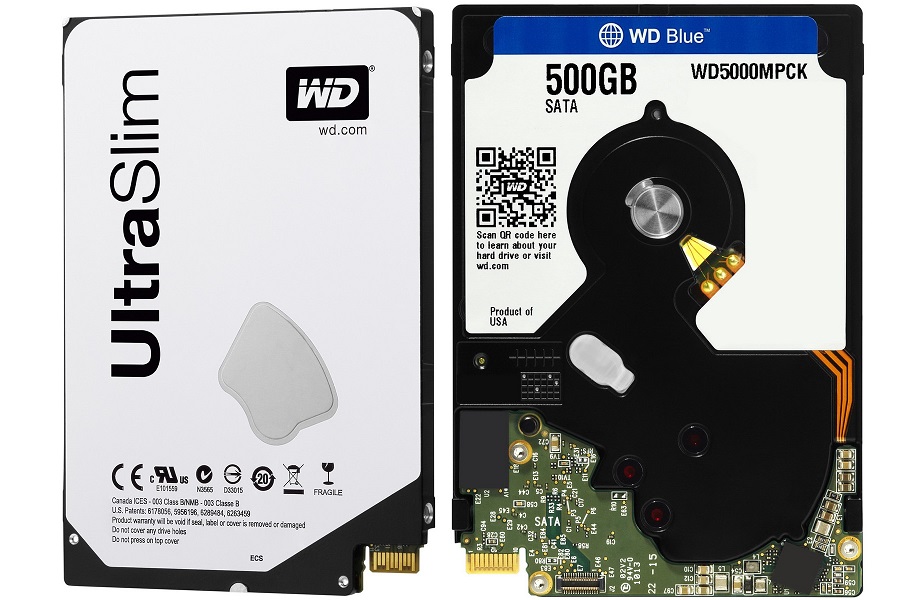
I want to get a SSD for my Lenovo Yoga 2 11. Current drive is a slim line WD (with a proprietary connector which will cost a relatively-small fortune to get around) which is also very s-l-o-w.
I see most SSDs have fast read speed but some have write speeds about 40% or so read speed (others have write speeds near the same). How can one determine how fast a computer can actually write at? Don't want to invest too much if it isn't going to be beneficial.
I see most SSDs have fast read speed but some have write speeds about 40% or so read speed (others have write speeds near the same). How can one determine how fast a computer can actually write at? Don't want to invest too much if it isn't going to be beneficial.
 Jun 28, 2015 | 5:02 pm
#2

Join Date: Jun 2008
Location: Texas
Programs: American Airlines British Airways
Posts: 1,752
I have not seen much on this lately. When I last looked at it there seemed to be little agreement. PC Magazine had a nice overview article on SSD v HDD in February titled SSD vs. HDD: What's the Difference?
I am rebuilding my main computer when Windows 10 comes out as an iso so I am interested in this as well.
As my main computer is a desktop I use a SSD for the OS and programs and a HDD for the data based on the view that you should not write to SSDs too much.
I am rebuilding my main computer when Windows 10 comes out as an iso so I am interested in this as well.
As my main computer is a desktop I use a SSD for the OS and programs and a HDD for the data based on the view that you should not write to SSDs too much.
Jun 28, 2015 | 8:19 pm
#3


Join Date: Jul 2007
Location: Brisbane, Australia
Programs: UA 1K/MM, Marriott Titanium, IHG Gold, Hertz PC, Avis PC
Posts: 8,527
Realistically, this is a myth.
SSD, especially the lower end "consumer" SSDs do have a finite number of writes, but that number is far, far higher than you'd ever expect to use in normal operation in a home PC.
Last I checked my home PC, the SSD that was around 2.5 years old was running at 96% of it's "endurance" remaining. ie, at my current usage, the drive would last at least 50 year.
If you're concerned about the endurance, the best thing you can do is to NOT run the drive near full. Keeping it below 80% full will help with both performance and lifetime.
SSD, especially the lower end "consumer" SSDs do have a finite number of writes, but that number is far, far higher than you'd ever expect to use in normal operation in a home PC.
Last I checked my home PC, the SSD that was around 2.5 years old was running at 96% of it's "endurance" remaining. ie, at my current usage, the drive would last at least 50 year.
If you're concerned about the endurance, the best thing you can do is to NOT run the drive near full. Keeping it below 80% full will help with both performance and lifetime.
Jun 28, 2015 | 8:41 pm
#4
Suspended
Join Date: Jun 2009
Location: YYZ
Programs: AC E50K (*G) WS Gold | SPG/Fairmont Plat Hilton/Hyatt Diamond Marriott Silver | National Exec Elite
Posts: 19,284
I would not be worrying about this. Whether or not that's the lifecycle of a SSD (which for all intents and purposes is not worth discussing because you'll throw it out first before it craps out) or the read vs write speeds. A hard drive spends more time reading data than writing anyways, so that doesn't surprise me.
But it's all moot. Just buy the biggest SSD you can for the money, and for 99.9% of applications, there will be some other bottleneck worth addressing.
But it's all moot. Just buy the biggest SSD you can for the money, and for 99.9% of applications, there will be some other bottleneck worth addressing.
Jun 29, 2015 | 8:45 am
#5

Join Date: Jan 2005
Programs: Dirt
Posts: 949
http://techreport.com/review/27909/t...heyre-all-dead
The 240 GB SSD in my desktop is 1 and half years old, and the write count is only 400 GB. It will meet obsolescence due to the small size before it wears out.
Jun 29, 2015 | 9:40 am
#7
Suspended
Join Date: Jun 2009
Location: YYZ
Programs: AC E50K (*G) WS Gold | SPG/Fairmont Plat Hilton/Hyatt Diamond Marriott Silver | National Exec Elite
Posts: 19,284
Get a RAID card and set it to Raid 0. (just back up your data b/c if you lose one drive, you're toast). The performance and ability to use up all of your disk space is useful for raid 0. Just be aware of the inherent dangers.
Jun 29, 2015 | 10:08 am
#8
FlyerTalk Evangelist
Join Date: Nov 2002
Location: Freeload Univ. Where are you sitting?
Posts: 14,818
RAID 0 is more useful when you need increased read/write speed but, as you noted, it has inherent vulnerabilities.
Jun 29, 2015 | 10:53 am
#9
Suspended
Join Date: Jun 2009
Location: YYZ
Programs: AC E50K (*G) WS Gold | SPG/Fairmont Plat Hilton/Hyatt Diamond Marriott Silver | National Exec Elite
Posts: 19,284
If anything, use Raid 5 or Raid 10. Raid 1 is horribly inefficient from a # of drives perspective. Even Raid 10 is a bit of a waste. Now one has to balance throughput, fault tolerance etc...but for all intents and purposes...
Jun 29, 2015 | 11:10 am
#10
Join Date: Jun 2008
Location: Texas
Programs: American Airlines British Airways
Posts: 1,752
RAID is too much for this data. I would rather use onsite and offsite backups.
The Windows Secrets newsletter suggested encrypting the data on the drives, throwing away the keys, and chunking them in the trash or recycling as available.
The Windows Secrets newsletter suggested encrypting the data on the drives, throwing away the keys, and chunking them in the trash or recycling as available.
Jun 29, 2015 | 11:55 am
#11
Join Date: Jun 2008
Location: Texas
Programs: American Airlines British Airways
Posts: 1,752
Now back to our regularly scheduled question from the OP. I still do not find much on this topic. I looked at the trade group for SATA at www.sata-io.org. I wonder if this is the strange looking interface you have - https://www.sata-io.org/sata-microssd.
Jun 29, 2015 | 1:00 pm
#12
Original Poster
FlyerTalk Evangelist
Join Date: Nov 1999
Programs: FB PLT again afater a decade as plebian
Posts: 22,932
It's a SFF-8784 Edge connector (see the photo below - connector in in the bottom middle of the photo). FWIW, HD - WD5000MPCK - is supposed to be 5mm thick but there's apparently lots of room in the computer for a 7mm drive. FWIW, the drive is supposed to have 6 Gb/sec connector speed.
Below is the EFF-8784 connector:

Below is the standard SATA connector cable for the computer

Disclaimer: I actually haven't opened the laptop yet (requires Torx bits that I dn't have with me) but a drive scan tells me it is the WD drive (the same computer model can also come with a Seagate drive, with a standard SATA connector - a MB to HD connector makes the difference but Lenovo doesn't sell the cable).
Below is the EFF-8784 connector:
Below is the standard SATA connector cable for the computer
Disclaimer: I actually haven't opened the laptop yet (requires Torx bits that I dn't have with me) but a drive scan tells me it is the WD drive (the same computer model can also come with a Seagate drive, with a standard SATA connector - a MB to HD connector makes the difference but Lenovo doesn't sell the cable).
Jun 29, 2015 | 2:28 pm
#13
FlyerTalk Evangelist


Join Date: Jun 2005
Posts: 38,543
Realistically, this is a myth.
SSD, especially the lower end "consumer" SSDs do have a finite number of writes, but that number is far, far higher than you'd ever expect to use in normal operation in a home PC.
Last I checked my home PC, the SSD that was around 2.5 years old was running at 96% of it's "endurance" remaining. ie, at my current usage, the drive would last at least 50 year.
If you're concerned about the endurance, the best thing you can do is to NOT run the drive near full. Keeping it below 80% full will help with both performance and lifetime.
SSD, especially the lower end "consumer" SSDs do have a finite number of writes, but that number is far, far higher than you'd ever expect to use in normal operation in a home PC.
Last I checked my home PC, the SSD that was around 2.5 years old was running at 96% of it's "endurance" remaining. ie, at my current usage, the drive would last at least 50 year.
If you're concerned about the endurance, the best thing you can do is to NOT run the drive near full. Keeping it below 80% full will help with both performance and lifetime.
One drive that hosts two virtual machines. 4 years old, 96% remaining. Other drive, 1 year, no status report.
Jun 29, 2015 | 2:31 pm
#14
Join Date: Jul 2007
Location: Brisbane, Australia
Programs: UA 1K/MM, Marriott Titanium, IHG Gold, Hertz PC, Avis PC
Posts: 8,527
Jun 29, 2015 | 2:36 pm
#15
Suspended
Join Date: Jun 2009
Location: YYZ
Programs: AC E50K (*G) WS Gold | SPG/Fairmont Plat Hilton/Hyatt Diamond Marriott Silver | National Exec Elite
Posts: 19,284
Raid 1 is a mirror. Raid 10 is a striped mirror. I get your point, but surely you get that a Raid 10 array is a lot faster (say 4 drives in a a 10 array vs 2 in a raid 1 array). *again, I get your point...being pedantic now 
Last edited by superangrypenguin; Jun 29, 2015 at 5:51 pm