Introducing Dark Mode!
 Oct 2, 2023 | 11:36 pm
#16


Join Date: Apr 2013
Programs: AA, United, R34 ftw
Posts: 2,064
Typically this is how derivative themes are created, but it only works well when a lot of the graphics are the same. The second you need a bunch of custom graphics, it makes more sense to 'copy and modify' a theme versus making a derivative.
 Oct 3, 2023 | 9:16 am
#17
Original Poster
Administrator


Join Date: Sep 2015
Location: Los Angeles
Programs: Internet Brands
Posts: 4,442
I do the same on Chrome
In Chrome, type chrome://flags into the address bar and hit Enter.
In Chrome, type chrome://flags into the address bar and hit Enter.
- This will open the Experiments page. Tap in the Search flags box and type "dark".
- You'll see an option labeled Auto Dark Mode for Web Contents. Enable it.
- Tap Relaunch to restart the browser with the new dark mode applied.
Oct 3, 2023 | 9:36 am
#18
Moderator: Travel Safety/Security, Travel Tools, California, Los Angeles; FlyerTalk Evangelist


Join Date: Dec 2009
Location: LAX
Programs: oneword Emerald
Posts: 24,808
I do the same on Chrome
In Chrome, type chrome://flags into the address bar and hit Enter.
In Chrome, type chrome://flags into the address bar and hit Enter.
- This will open the Experiments page. Tap in the Search flags box and type "dark".
- You'll see an option labeled Auto Dark Mode for Web Contents. Enable it.
- Tap Relaunch to restart the browser with the new dark mode applied.
Chrome's experimental native Dark Mode looks much better than the Dark Mode option in the mobile version of FlyerTalk and I can tell which of my subscribed forums have new posts, only those with new posts are listed in bold print as opposed to all the forums.
Oct 4, 2023 | 8:58 am
#19
Join Date: May 2015
Location: LAX, BUR
Programs: AS,AA,JB, HH Gold, Starriott Titanium Elite, Hyatt Explorist, Global Entry
Posts: 1,968
By that I mean this center section is a shade of gray, with the borders black. The whole page should be black like every other forum's dark mode and even Twitter/X and Reddit have true dark modes.
The white lettering stands out much better against black., So still a ways to go.
Oct 4, 2023 | 9:20 am
#20
Original Poster
Administrator
Join Date: Sep 2015
Location: Los Angeles
Programs: Internet Brands
Posts: 4,442
After looking at this for a few days it seems this is a Beta mode version and the finished product.
By that I mean this center section is a shade of gray, with the borders black. The whole page should be black like every other forum's dark mode and even Twitter/X and Reddit have true dark modes.
The white lettering stands out much better against black., So still a ways to go.
By that I mean this center section is a shade of gray, with the borders black. The whole page should be black like every other forum's dark mode and even Twitter/X and Reddit have true dark modes.
The white lettering stands out much better against black., So still a ways to go.
Oct 6, 2023 | 11:14 pm
#21

Join Date: Jan 2016
Location: LON
Programs: BAEC
Posts: 5,151
Apologies for the delay. Due to an eye condition I use dark mode and other accessibility tools all the time, it's not a nice to have.
On mobile devices I use the browser with the dark mode rendering flag as IBJoel described, along with a the OS being in dark mode.
The browser being set to dark mode rendering on the FT mobile site is perfect, it works really really well, and nothing "disappears" that I notice. Using the dark mode rendering on many other sites some web components often become difficult to see on the page, radio buttons and toggle switches are often the worst offenders.
On a Windows desktop I don't use the browser dark mode rendering or any specific app and it's dark mode, and instead I use the accessibility tools and switch Windows into high contrast mode (LeftShift + Alt + PrtScn, on a laptop your PrtScn might also need you to press Fn). This does everything in one go, and is a very consistent experience. Colours get stripped and changed but for me it works nicely, there are still some things that are awkward, radio buttons and toggles are again the baddies.
On mobile devices I use the browser with the dark mode rendering flag as IBJoel described, along with a the OS being in dark mode.
The browser being set to dark mode rendering on the FT mobile site is perfect, it works really really well, and nothing "disappears" that I notice. Using the dark mode rendering on many other sites some web components often become difficult to see on the page, radio buttons and toggle switches are often the worst offenders.
On a Windows desktop I don't use the browser dark mode rendering or any specific app and it's dark mode, and instead I use the accessibility tools and switch Windows into high contrast mode (LeftShift + Alt + PrtScn, on a laptop your PrtScn might also need you to press Fn). This does everything in one go, and is a very consistent experience. Colours get stripped and changed but for me it works nicely, there are still some things that are awkward, radio buttons and toggles are again the baddies.
Oct 10, 2023 | 6:57 pm
#22
FlyerTalk Evangelist

Join Date: Mar 2009
Location: NYC
Programs: AS MVPG, DL KM, Bee Six, Bonvoy Plat, Choice Plat, IHG Plat, Avis PC, Natl Exec, Greyhound Road Rwds
Posts: 20,115
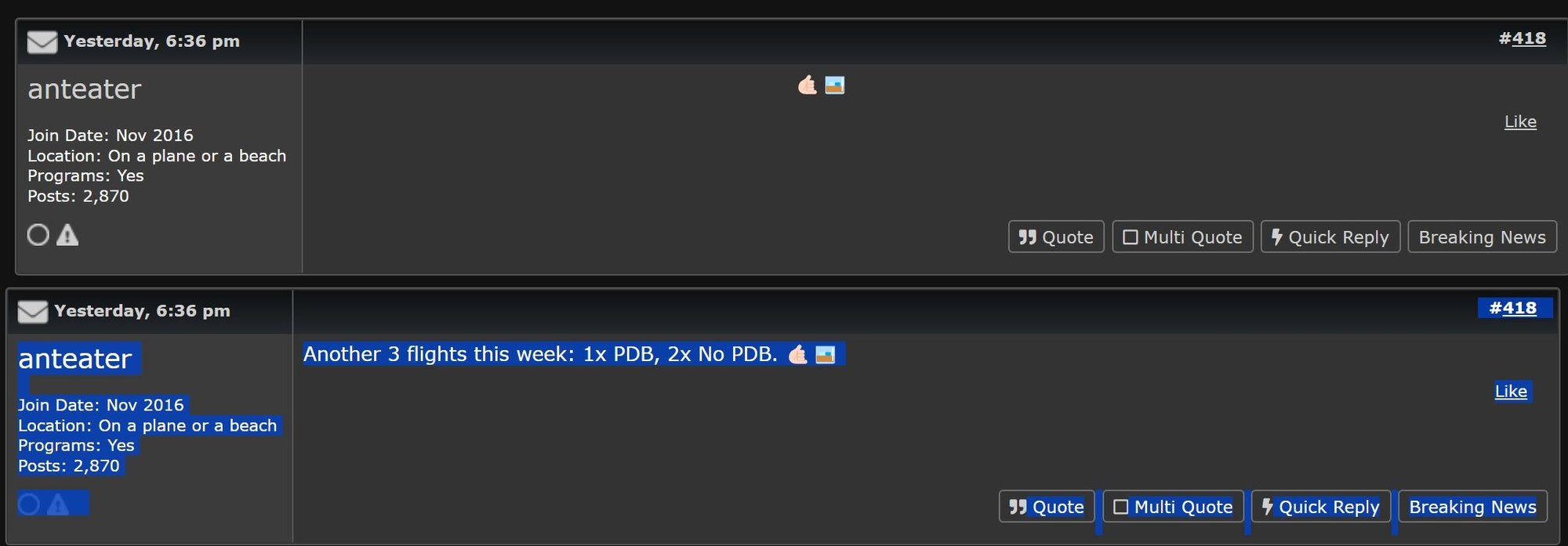
Still having issues with grey text being unreadable in dark mode on PC using Chrome. Example from here: https://www.flyertalk.com/forum/35650635-post418.html
-J.
-J.
Oct 10, 2023 | 7:07 pm
#23
Moderator: Hyatt, American Express; FlyerTalk Evangelist


Join Date: Jun 2015
Location: WAS
Programs: :rolleyes:, DL DM, AA EXP, UA Silver, Hyatt Glob, Mlife Noir (=> Marriott Amb), invol FT beta tester
Posts: 21,688
Still having issues with grey text being unreadable in dark mode on PC using Chrome. Example from here: https://www.flyertalk.com/forum/35650635-post418.html

Granted, one proposal that seems reasonable at first, might be to automatically pick a different color when the color tag is the same as the background, sometimes people do it deliberately -- e.g. presuming "light mode" sometimes people will ask a trivia or secret question kind of thing and use the color tag to make the text white so it doesn't appear initially but shows up when you highlight it. From a usability standpoint it seems like a bad idea for software to change a color setting that a user explicitly specified -- you would get complaints the other way.
Oct 11, 2023 | 7:07 am
#24
FlyerTalk Evangelist
Join Date: Mar 2009
Location: NYC
Programs: AS MVPG, DL KM, Bee Six, Bonvoy Plat, Choice Plat, IHG Plat, Avis PC, Natl Exec, Greyhound Road Rwds
Posts: 20,115
I am a long-time and vocal critic of various technical failings (IMO) of the FT/IB system, but if the dark mode background is #333333, and someone writes a post that explicitly uses the tag "color=#333333" as the color of their text (you can see it if you click Quote on that message and then the Source button in the editor), I am not sure what you want the software to do
Granted, one proposal that seems reasonable at first, might be to automatically pick a different color when the color tag is the same as the background, sometimes people do it deliberately -- e.g. presuming "light mode" sometimes people will ask a trivia or secret question kind of thing and use the color tag to make the text white so it doesn't appear initially but shows up when you highlight it. From a usability standpoint it seems like a bad idea for software to change a color setting that a user explicitly specified -- you would get complaints the other way.
Granted, one proposal that seems reasonable at first, might be to automatically pick a different color when the color tag is the same as the background, sometimes people do it deliberately -- e.g. presuming "light mode" sometimes people will ask a trivia or secret question kind of thing and use the color tag to make the text white so it doesn't appear initially but shows up when you highlight it. From a usability standpoint it seems like a bad idea for software to change a color setting that a user explicitly specified -- you would get complaints the other way.
-J.
Oct 11, 2023 | 7:49 am
#25
Moderator: Hyatt, American Express; FlyerTalk Evangelist
Join Date: Jun 2015
Location: WAS
Programs: :rolleyes:, DL DM, AA EXP, UA Silver, Hyatt Glob, Mlife Noir (=> Marriott Amb), invol FT beta tester
Posts: 21,688
People manually typing in color codes can probably be dismissed as so rare (plus if you do it on purpose then you get what you deserve) but the pasting issue happens a lot when people copy T&C or promo language from websites etc. (and then the rest of what they type matches the pasted color)
 Oct 11, 2023 | 8:23 am
#26
Moderator: Hyatt, American Express; FlyerTalk Evangelist
Join Date: Jun 2015
Location: WAS
Programs: :rolleyes:, DL DM, AA EXP, UA Silver, Hyatt Glob, Mlife Noir (=> Marriott Amb), invol FT beta tester
Posts: 21,688
BTW even black text is difficult (for my aging eyes anyway) to make out against the dark background, e.g.:
https://www.flyertalk.com/forum/35654074-post315.html
Do we remove black from the dropdown palette too?
So it's not a bad idea, but there is some devil in the details...
https://www.flyertalk.com/forum/35654074-post315.html
Do we remove black from the dropdown palette too?
So it's not a bad idea, but there is some devil in the details...
Oct 17, 2023 | 7:50 pm
#27
FlyerTalk Evangelist
Join Date: Mar 2009
Location: NYC
Programs: AS MVPG, DL KM, Bee Six, Bonvoy Plat, Choice Plat, IHG Plat, Avis PC, Natl Exec, Greyhound Road Rwds
Posts: 20,115
BTW even black text is difficult (for my aging eyes anyway) to make out against the dark background, e.g.:
https://www.flyertalk.com/forum/35654074-post315.html
Do we remove black from the dropdown palette too?
So it's not a bad idea, but there is some devil in the details...
https://www.flyertalk.com/forum/35654074-post315.html
Do we remove black from the dropdown palette too?
So it's not a bad idea, but there is some devil in the details...
I'm only harping on this because I saw several posts today that were in the #333333 gray.
-J.
Oct 17, 2023 | 8:32 pm
#28
Join Date: Apr 2013
Programs: AA, United, R34 ftw
Posts: 2,064
I think the biggest problem with reducing the color palette for posts is that is a 'hard function' in vbulletin, so would probably be a long time of hand modifying code--ie, not happening. The other option of completely removing color for a post text option is more easily possible, but I don't remember exactly what that does to existing posts (I think nothing, but been a while since I've looked at these options inside my admincp).
Not great solutions either way. I'm all for requiring people to cut and paste to notepad first to get rid of colors and formatting before pasting into a post.
Not great solutions either way. I'm all for requiring people to cut and paste to notepad first to get rid of colors and formatting before pasting into a post.
Oct 30, 2023 | 4:39 am
#29
FlyerTalk Evangelist
Join Date: Jul 2008
Location: IAH
Programs: UA Plat, DL Silver, Hyatt Ist-iest, Stariott Platinum, Hilton Diamond
Posts: 13,500
I apologize if this was posted previously - but dark mode when I read FT on my phone (android) had a tendency to crash Chrome and various other apps; not always, but frequently. Which never happened pre-dark mode. No issues on my actual computer; and my eyes are forever grateful for dark mode. (as something I have asked for/complained about multiple times)
Last edited by krazykanuck; Oct 30, 2023 at 4:48 am
Feb 12, 2024 | 5:30 am
#30

Join Date: Nov 2012
Location: Rhineland-Palatinate
Programs: *A Gold (A3), HHonor Gold
Posts: 6,940
Dark mode on PC is still not working correctly, text changes to black on black within post very often, more than 20% of the posts are not readable, it is a pain. Is there any plan to get it to work on the basic ?