What is Flyertalk doing that uses so much memory?
 Feb 10, 2020 | 1:27 pm
#1
Original Poster


Join Date: Feb 2012
Posts: 575
What is Flyertalk doing that uses so much memory?
What is Flyertalk doing that uses so much memory? I've never seen this message before on any other website.

What are the best foods for frequent travelers to bring on board?
Activity monitor - Wow. FT memory usage is at the top of the page...
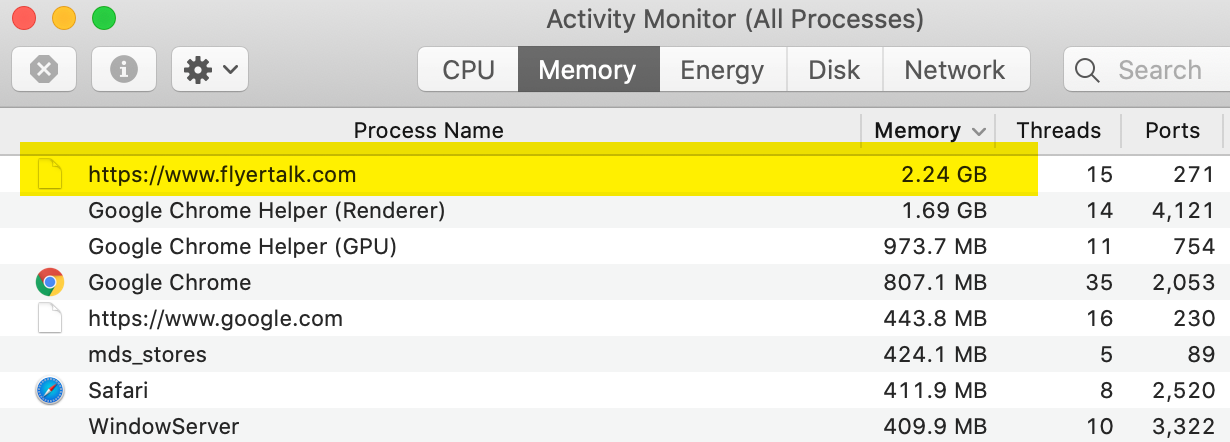
Edit: though looks like I still have some to spare...

FYI (relevant to this forum): On my new MBP 16" with 64GB memory, I rarely see Activity Monitor go < 24 GB of memory used, even when I'm not doing much...
ps:
I thought the best place to post this question would be the InfoDesk forum, but then... Decided not based on looking at the other topics.
What are the best foods for frequent travelers to bring on board?
Activity monitor - Wow. FT memory usage is at the top of the page...
Edit: though looks like I still have some to spare...
FYI (relevant to this forum): On my new MBP 16" with 64GB memory, I rarely see Activity Monitor go < 24 GB of memory used, even when I'm not doing much...
ps:
I thought the best place to post this question would be the InfoDesk forum, but then... Decided not based on looking at the other topics.
Last edited by MareLuce; Feb 10, 2020 at 1:38 pm
 Feb 10, 2020 | 2:02 pm
#3


Join Date: May 2003
Location: Cleveland, OH
Programs: UA-GS 1MM), Hertz Pres Circle, Starriott Titanium)
Posts: 1,971
Being awesome?
Seriously though... I've not seen this. Chrome is a notorious resource hog, but I've never seen such naughtiness from a site, unless you have like 12 million tabs open. Try using Safari?
Seriously though... I've not seen this. Chrome is a notorious resource hog, but I've never seen such naughtiness from a site, unless you have like 12 million tabs open. Try using Safari?
Feb 10, 2020 | 3:47 pm
#4
FlyerTalk Evangelist

Join Date: Jul 2006
Location: Upper Sternistan
Posts: 10,682
I have to say that Ghostery makes these pages much more reasonable processor-wise.
Feb 10, 2020 | 5:03 pm
#5
FlyerTalk Evangelist
Join Date: Jan 2014
Location: San Diego, CA
Programs: GE, Marriott Platinum
Posts: 15,743
 Feb 10, 2020 | 6:10 pm
#7
FlyerTalk Evangelist
Join Date: Jan 2014
Location: San Diego, CA
Programs: GE, Marriott Platinum
Posts: 15,743
Hamburger/vertical dots in the far right of the main toolbar -> More Tools -> Task manager. The "Memory footprint" column for each task beginning with "Tab" in the resulting window is what you're looking for (divided by 1024 to get the amount in MB).


 Feb 11, 2020 | 7:39 am
#11
FlyerTalk Evangelist

Join Date: Nov 2002
Location: ORD
Posts: 14,772
You can also right click in the title bar (to the right of the plus sign you click to add a tab) and choose Task Manager.