
























Leave Site popup? & Full CKEditor
 Jan 24, 2020 | 6:30 am
#16
FlyerTalk Evangelist


Join Date: Aug 2002
Location: London
Programs: Mucci. Nothing else matters.
Posts: 38,752
An update on behaviour with the basic editor, in case it helps with the continuing debugging work:
If I open a page that contains a text entry box, I can now close it again without the warning message coming up, so long as I don't do anything else on the page.
If I try to leave the page by (left-)clicking on a link, the warning message still appears.
If I right-click a link on the page and then ESC out of the context menu, the warning message also still appears.
And if I left-click anywhere on the page that doesn't respond to left-clicking alone (eg a single left-click in the middle of text), the warning message also still appears.
If I open a page that contains a text entry box, I can now close it again without the warning message coming up, so long as I don't do anything else on the page.
If I try to leave the page by (left-)clicking on a link, the warning message still appears.
If I right-click a link on the page and then ESC out of the context menu, the warning message also still appears.
And if I left-click anywhere on the page that doesn't respond to left-clicking alone (eg a single left-click in the middle of text), the warning message also still appears.


 Jan 24, 2020 | 6:49 am
#18


Join Date: Feb 2013
Location: DCA
Posts: 7,777
I'm getting this error but it has nothing to do with editing / posting...for example when I clicked into this thread on page 1 and then clicked to go to page 2 I got it. When I clicked "reply" to type this post I got it. So it's not only happening when I'm in an editor; it's happening every time I try to navigate at all.
Jan 24, 2020 | 9:06 am
#19
Administrator

Join Date: Sep 2015
Location: Los Angeles
Programs: Internet Brands
Posts: 4,440
I'm getting this error but it has nothing to do with editing / posting...for example when I clicked into this thread on page 1 and then clicked to go to page 2 I got it. When I clicked "reply" to type this post I got it. So it's not only happening when I'm in an editor; it's happening every time I try to navigate at all.
- Go here: https://www.flyertalk.com/forum/prof...do=editoptions
- Select "Full CKEditor" near the bottom of the page
- Click "Save" at the bottom of the page
Jan 24, 2020 | 9:29 am
#20
Join Date: Feb 2013
Location: DCA
Posts: 7,777
- Go here: https://www.flyertalk.com/forum/prof...do=editoptions
- Select "Full CKEditor" near the bottom of the page
- Click "Save" at the bottom of the page
Jan 24, 2020 | 10:49 am
#21
FlyerTalk Evangelist
Join Date: Jan 2002
Location: Salt Lake City, Utah, USA
Posts: 10,985
I'm remembering why it was that I quit using the Full CKEditor. It is slow. I have to slow my typing speed in order to not outrace the cursor. Also, it removes carriage returns. So line spacing in my posts gets changed in ways that I did not intend. Guidance in any work-arounds for these issues would be appreciated.
Jan 24, 2020 | 11:04 am
#22
FlyerTalk Evangelist
Join Date: Aug 2002
Location: London
Programs: Mucci. Nothing else matters.
Posts: 38,752
One suggestion made by IBJoel is to click the "Source" button, so that you're effectively using this editor in plain text mode. Do you want to give that a try?
Hopefully the problem with the basic text editor will get fixed, and then those of us who prefer it will be able to go back to it.
Hopefully the problem with the basic text editor will get fixed, and then those of us who prefer it will be able to go back to it.
Jan 25, 2020 | 10:24 pm
#23
FlyerTalk Evangelist

Join Date: Jul 2011
Programs: SEIBU PRINCE CLUB Platinum, Marriott Platinum
Posts: 21,780
What I really want is the editor I was using that was somewhere between the Basic Editor and the Full Editor. Until then, Full Editor is a non-starter for me, so Basic Editor and manually typing in tags as needed is the only way to go.
Jan 27, 2020 | 8:58 am
#24
Administrator
Join Date: Sep 2015
Location: Los Angeles
Programs: Internet Brands
Posts: 4,440
Just switch to Full CK and then when you need to manually type in tags, click "Source" on the far right of the tool bar above the text box.
Jan 27, 2020 | 9:37 am
#26
FlyerTalk Evangelist
Join Date: Aug 2002
Location: London
Programs: Mucci. Nothing else matters.
Posts: 38,752
Jan 27, 2020 | 11:13 am
#27
Administrator
Join Date: Sep 2015
Location: Los Angeles
Programs: Internet Brands
Posts: 4,440
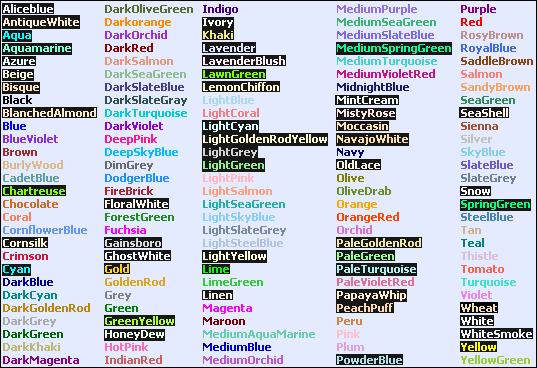
There are also the colors ([color=xxxx ]TEXT[/color ]):
 Jan 27, 2020 | 12:38 pm
#28
FlyerTalk Evangelist


Join Date: Apr 2001
Location: MEL CHC
Posts: 22,926
[ strike ] is sadly gone,replaced by [ s ] , so posts that used [ strike ][ /strike ] have issues
1 step forward - 2 steps backwards as it the way with IB
There used to be a list of BB codes in the lower left, but that gone now (no idea when it disappeared)
Top menu Help --> BB guide:-- errors (used to work)
https://www.flyertalk.com/forum/misc.php?do=bbcode
---> "Error: Cannot use assign-op operators with string offsets in ..../misc.php(475) : eval()'d code on line 1"
If it ain't broke don't fix it
(the loss of the carriage return, as post 21, is frustrating)
Last edited by Mwenenzi; Jan 27, 2020 at 1:44 pm Reason: BB codes not showing
Jan 27, 2020 | 1:22 pm
#29
FlyerTalk Evangelist
Join Date: Jul 2011
Programs: SEIBU PRINCE CLUB Platinum, Marriott Platinum
Posts: 21,780
Feb 7, 2020 | 5:27 am
#30
FlyerTalk Evangelist
Join Date: Aug 2002
Location: London
Programs: Mucci. Nothing else matters.
Posts: 38,752