
























 Jan 22, 2019, 11:17 am
Last edit by: JDiver
There are separate threads for mobile devices as well as for disruptive advertisements and for browser redirects / hijacks, as well as other technical issues. Thank you for keeping the thread on topic and assisting Tech to identify, troubleshoot and deal with bugs in this latest iteration of FlyerTalk for mobile devices.
cblaisd and JDiver, forum Co-Moderators
PLEASE POST SCREENSHOTS of the FULL SCREEN and report your DEVICE TYPE, OPERATING SYSTEM, BROWSER TYPE AND VERSIONS you are using in your post.This thread is strictly for the reporting bugs related to FlyerTalk on your DESKTOP device. (Please refrain from discussion or speculation about issues if they are not reports as specified here.)
Your full report (see above) will assist Internet Brands / FlyerTalk in handling these expeditiously. Admin / Tech attempts to respond to all reports speedily, but eliminating problems / bugs may require devising technical solutions that may require time. (Internet Brands operates during usual work hours on the U. S. West Coast; customary holidays, weekends, etc. are observed.)
To see how to include a screen shot in your post, once you have taken the screen shot follow the instructions "Inserting a photo or image from your device into a post:" in the first post in the thread http://www.flyertalk.com/forum/techn...mage-post.html
Some ways to reverse new features
1) Disabling infinite scroll: (see Post #2 for detail)
2) Restore previous post editing options: (see Post #3 for detail
NOTE: Internet Brands and FlyerTalk discourage the use of software that modifies your FlyerTalk browsing experience (e.g. ad blocking software). IB / FT declines all responsibility for the use of such software and can not provide support or assistance if such software is used. As well, we remind you IB / FT can only provide FlyerTalk free to members because of the financial support of advertisers; using ad blockers denies IB / FT income that would normally pay for your free community membership and browsing experience..
Posts advocating, suggesting, or recommending use of ad blocking etc. software will be summarily deleted.
Link to Archive of 2018 DESKTOP BUG REPORTS
Link to Archive of 2017 FT 15 Nov 2017 Upgrade Tech Thread - BUG REPORTS.
cblaisd and JDiver, forum Co-Moderators
PLEASE POST SCREENSHOTS of the FULL SCREEN and report your DEVICE TYPE, OPERATING SYSTEM, BROWSER TYPE AND VERSIONS you are using in your post.This thread is strictly for the reporting bugs related to FlyerTalk on your DESKTOP device. (Please refrain from discussion or speculation about issues if they are not reports as specified here.)
Your full report (see above) will assist Internet Brands / FlyerTalk in handling these expeditiously. Admin / Tech attempts to respond to all reports speedily, but eliminating problems / bugs may require devising technical solutions that may require time. (Internet Brands operates during usual work hours on the U. S. West Coast; customary holidays, weekends, etc. are observed.)
To see how to include a screen shot in your post, once you have taken the screen shot follow the instructions "Inserting a photo or image from your device into a post:" in the first post in the thread http://www.flyertalk.com/forum/techn...mage-post.html
Some ways to reverse new features
1) Disabling infinite scroll: (see Post #2 for detail)
- Go to My FlyerTalk Control Panel
- Edit options
- Disable Infinite Scroll
- Edit options
2) Restore previous post editing options: (see Post #3 for detail
- Go to My FlyerTalk Control Panel
- Settings and Options
- Miscellaneous Options
- Message Editor Interface and select “Standard Editor -- extra formatting controls” (you may see odd behavior in this unsupported editor)
- Miscellaneous Options
- Settings and Options
NOTE: Internet Brands and FlyerTalk discourage the use of software that modifies your FlyerTalk browsing experience (e.g. ad blocking software). IB / FT declines all responsibility for the use of such software and can not provide support or assistance if such software is used. As well, we remind you IB / FT can only provide FlyerTalk free to members because of the financial support of advertisers; using ad blockers denies IB / FT income that would normally pay for your free community membership and browsing experience..
Posts advocating, suggesting, or recommending use of ad blocking etc. software will be summarily deleted.
Link to Archive of 2018 DESKTOP BUG REPORTS
Link to Archive of 2017 FT 15 Nov 2017 Upgrade Tech Thread - BUG REPORTS.

Issues with FT -- 2019 DESKTOP Devices BUG REPORTS
Jan 3, 2019 | 4:14 pm
#1
Original Poster
FlyerTalk Evangelist


Join Date: Feb 2004
Location: YVR
Programs: AC SE 2MM; UA MP Premier Silver; Marriott Bonvoy LT Titanium Elite; Radisson; Avis PC
Posts: 35,627
 Issues with FT -- 2019 DESKTOP Devices BUG REPORTS
For reals... (?!!!)
At least it only lasted for a couple of minutes, but have to retype my post in the forum I was in.
Just for full effect, and punishment, I've attached a full screen shot.

At least it only lasted for a couple of minutes, but have to retype my post in the forum I was in.
Just for full effect, and punishment, I've attached a full screen shot.
 Feb 11, 2019 | 11:29 am
#2
FlyerTalk Evangelist
Join Date: Jun 2006
Location: IAD/DCA
Posts: 31,871
ARCHIVE: Issues with FT -- 2018 DESKTOP Devices BUG REPORTS
link in last post = broken by forum with the "!" added to url
https://www.flyertalk.com/forum/30571717-post65.html
same post viewed as post link is not broken
(was discussed/reported in that thread)
seems bizarre to me
can be related to edits?
again, sometimes i fix it and it reverts to broken
link in last post = broken by forum with the "!" added to url
https://www.flyertalk.com/forum/30571717-post65.html
same post viewed as post link is not broken
(was discussed/reported in that thread)
seems bizarre to me
can be related to edits?
again, sometimes i fix it and it reverts to broken
Feb 11, 2019 | 12:27 pm
#3
Administrator


Join Date: Sep 2015
Location: Los Angeles
Programs: Internet Brands
Posts: 4,445
ARCHIVE: Issues with FT -- 2018 DESKTOP Devices BUG REPORTS
link in last post = broken by forum with the "!" added to url
https://www.flyertalk.com/forum/30571717-post65.html
same post viewed as post link is not broken
(was discussed/reported in that thread)
seems bizarre to me
can be related to edits?
again, sometimes i fix it and it reverts to broken
link in last post = broken by forum with the "!" added to url
https://www.flyertalk.com/forum/30571717-post65.html
same post viewed as post link is not broken
(was discussed/reported in that thread)
seems bizarre to me
can be related to edits?
again, sometimes i fix it and it reverts to broken
Feb 12, 2019 | 11:37 am
#4
FlyerTalk Evangelist
Join Date: Jun 2006
Location: IAD/DCA
Posts: 31,871
now link is not broken, 24 hours later
FT changing real link into following is annoying when it happens >
https://www.flyertalk.com/forum/![threadnumber]!https://www.flyertalk.com/forum/....
https://www.flyertalk.com/forum/tech...l#post26816287
Issues with FlyerTalk Expert Hotel Reviews? Report them here!
https://www.flyertalk.com/forum/26816287-post2.html
let's see if some of these get broken
4
FT changing real link into following is annoying when it happens >
https://www.flyertalk.com/forum/![threadnumber]!https://www.flyertalk.com/forum/....
https://www.flyertalk.com/forum/tech...l#post26816287
Issues with FlyerTalk Expert Hotel Reviews? Report them here!
https://www.flyertalk.com/forum/26816287-post2.html
let's see if some of these get broken
4
Last edited by Kagehitokiri; Feb 12, 2019 at 3:06 pm
Feb 12, 2019 | 11:43 am
#5
Administrator
Join Date: Sep 2015
Location: Los Angeles
Programs: Internet Brands
Posts: 4,445
now link is not broken, 24 hours later
FT changing real link into following is annoying when it happens >
https://www.flyertalk.com/forum/![threadnumber]!https://www.flyertalk.com/forum/....
FT changing real link into following is annoying when it happens >
https://www.flyertalk.com/forum/![threadnumber]!https://www.flyertalk.com/forum/....
Feb 12, 2019 | 11:44 am
#6
FlyerTalk Evangelist
Join Date: Jun 2006
Location: IAD/DCA
Posts: 31,871
when i posted it was broken with !
i feel like sometimes it happens in my posts when i am editing. but once it happens it doesnt matter if i unbreak the link, it can / will break again, then sometimes goes away at some point later.
note it does not change what displays in the post. but you notice if you hold mouse over link, the ! is there.
i feel like sometimes it happens in my posts when i am editing. but once it happens it doesnt matter if i unbreak the link, it can / will break again, then sometimes goes away at some point later.
note it does not change what displays in the post. but you notice if you hold mouse over link, the ! is there.
Feb 12, 2019 | 11:49 am
#7
Administrator
Join Date: Sep 2015
Location: Los Angeles
Programs: Internet Brands
Posts: 4,445
now link is not broken, 24 hours later
FT changing real link into following is annoying when it happens >
https://www.flyertalk.com/forum/![threadnumber]!https://www.flyertalk.com/forum/....
https://www.flyertalk.com/forum/tech...l#post26816287
Issues with FlyerTalk Expert Hotel Reviews? Report them here!
https://www.flyertalk.com/forum/26816287-post2.html
let's see if some of these get broken
FT changing real link into following is annoying when it happens >
https://www.flyertalk.com/forum/![threadnumber]!https://www.flyertalk.com/forum/....
https://www.flyertalk.com/forum/tech...l#post26816287
Issues with FlyerTalk Expert Hotel Reviews? Report them here!
https://www.flyertalk.com/forum/26816287-post2.html
let's see if some of these get broken
Feb 12, 2019 | 11:52 am
#8
FlyerTalk Evangelist
Join Date: Jun 2006
Location: IAD/DCA
Posts: 31,871
ok very very weird
24 hours ago when i posted the link was broken when looking at thread, and was not broken when linking post (not thread), it did not fix itself after clicking and opening viewpost link.
now i just noticed a post (edited about same time 24 hours ago) get fixed, by simply clicking on the viewpost and opening post in new tab/window. when i went back to thread, they were un-broken. this did not happen 24 hours ago when i was posting here about the broken link when viewed one way.
so i have something to try in future. note the post i just noticed get fixed did stay broken for 24 hours.
edit >
and i forgot something important, browser caching could be a factor.
24 hours ago when i posted the link was broken when looking at thread, and was not broken when linking post (not thread), it did not fix itself after clicking and opening viewpost link.
now i just noticed a post (edited about same time 24 hours ago) get fixed, by simply clicking on the viewpost and opening post in new tab/window. when i went back to thread, they were un-broken. this did not happen 24 hours ago when i was posting here about the broken link when viewed one way.
so i have something to try in future. note the post i just noticed get fixed did stay broken for 24 hours.
edit >
and i forgot something important, browser caching could be a factor.
Last edited by Kagehitokiri; Feb 12, 2019 at 3:06 pm
Feb 13, 2019 | 12:31 pm
#9


Join Date: Oct 2010
Location: Switzerland
Programs: former many things
Posts: 6,898
Odd thing happening. Replied to a thread, reply shows ok but not in the thread overview of the forum:
Finnair A350 XWB master thread

Forum View
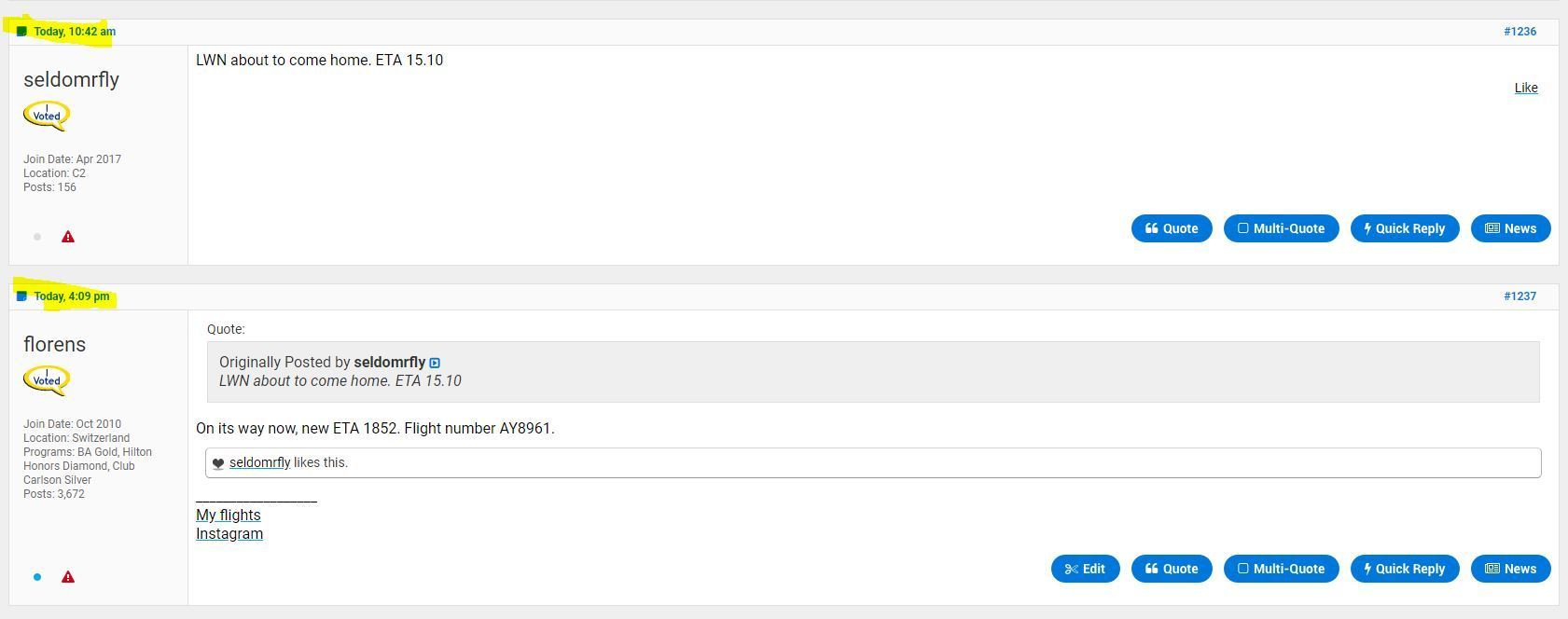
Thread View with my reply
Finnair A350 XWB master thread
Forum View
Thread View with my reply