
























 Nov 30, 2017, 8:41 am
Last edit by: JDiver
Some ways to reverse new features
1) Disabling infinite scroll:
2) Restore previous post editing options:
NOTE: For ease of both members posting and Technical Support, this thread has been split into two threads for 2018; one exclusively for MOBILE devices, the other for DESKTOP devices. You can find them here:
2018 FT Nov 2017 Upgrade for DESKTOP Devices BUG REPORTS (link), and
2018 FT Nov 2017 Upgrade for MOBILE Devices BUG REPORTS
1) Disabling infinite scroll:
- Go to My FlyerTalk Control Panel
- Edit options
- Disable Infinite Scroll
- Edit options
2) Restore previous post editing options:
- Go to My FlyerTalk Control Panel
- Settings and Options
- Miscellaneous Options
- Message Editor Interface and select “Standard Editor -- extra formatting controls” (you may see odd behavior in this unsupported editor)
- Miscellaneous Options
- Settings and Options
NOTE: For ease of both members posting and Technical Support, this thread has been split into two threads for 2018; one exclusively for MOBILE devices, the other for DESKTOP devices. You can find them here:
2018 FT Nov 2017 Upgrade for DESKTOP Devices BUG REPORTS (link), and
2018 FT Nov 2017 Upgrade for MOBILE Devices BUG REPORTS

ARCHIVE: FT 15 Nov 2017 Upgrade Tech Thread - 2017 BUG REPORTS
Nov 15, 2017 | 5:56 pm
#241
Join Date: Feb 2017
Location: Everywhere and Nowhere
Programs: DL GM
Posts: 515
 is symbolic of how poorly this update was executed. The non-transparent background doesn't match the surrounding color
 image on the trending page. This is amateur hour.
 Nov 15, 2017 | 5:59 pm
#242
Join Date: Sep 2016
Location: LON, PDX
Programs: DL PM, AS MVP 75K, HH/SPG/MR Gold, Amex Plat, PRG, CSR
Posts: 2,064
The red To view/manage your attachments, click "Go Advanced" is driving me crazy as well. It's so unnecessarily eye-catching and out of sync with even the (horrible) new color scheme.
Nov 15, 2017 | 5:59 pm
#243
Defunct Account
Join Date: Sep 2013
Posts: 86
You can turn off infinite scroll under "MyFlyertalk" > Edit Options.
How do I turn off infinite scroll? This makes the site unuseable for me, it's already a massive struggle on mobile where it was always around. But now on desktop too? God please no, make it stop. I couldn't even properly navigate this page to see if somebody else had answered this question because it kept jumping all over and i wasn't sure what I'd already read and where I was at.
VERY unimpressed with these changes. Top bar popping in and out is also quite bad.
VERY unimpressed with these changes. Top bar popping in and out is also quite bad.
Nov 15, 2017 | 6:01 pm
#244
Join Date: Sep 2016
Location: LON, PDX
Programs: DL PM, AS MVP 75K, HH/SPG/MR Gold, Amex Plat, PRG, CSR
Posts: 2,064
 Nov 15, 2017 | 6:03 pm
#245
FlyerTalk Evangelist
Join Date: Mar 2014
Location: 4éme
Posts: 12,069
Everything is so BIG! Thanks, I no longer need reading glasses when accessing FT
Nov 15, 2017 | 6:03 pm
#246
FlyerTalk Evangelist


Join Date: May 2015
Location: BOS, YVR, ZRH
Programs: *G
Posts: 18,130
Two more things:
1) Below the quick reply box there's a HUGE blank white space to the right of the "posting rules" box on the left and the "forum jump" box in the bottom right, and the "previous/next thread" at the top. and THEN an ad bar below that. Why not move the ad bar up into that huge blank space and save yourself the trouble of more screen space needed below?
2) The quick links menu in the top right - the last option/line :"User Tagging Statistics Hashtag SubscriptionsPost Reporting Your post reports" is a) terribly formatted (is that really all supposed to be one line?) and b) has terrible line/gap spacing, it's completely snug to the box sides, whereas none of the other options are. That can't be intentional.
1) Below the quick reply box there's a HUGE blank white space to the right of the "posting rules" box on the left and the "forum jump" box in the bottom right, and the "previous/next thread" at the top. and THEN an ad bar below that. Why not move the ad bar up into that huge blank space and save yourself the trouble of more screen space needed below?
2) The quick links menu in the top right - the last option/line :"User Tagging Statistics Hashtag SubscriptionsPost Reporting Your post reports" is a) terribly formatted (is that really all supposed to be one line?) and b) has terrible line/gap spacing, it's completely snug to the box sides, whereas none of the other options are. That can't be intentional.
Nov 15, 2017 | 6:03 pm
#247
Join Date: Sep 2016
Location: LON, PDX
Programs: DL PM, AS MVP 75K, HH/SPG/MR Gold, Amex Plat, PRG, CSR
Posts: 2,064
Admins, is there a way to get back advanced text editor functions that were eliminated?
Things like the buttons for wrapping [QUOTE] and being able to view [ß][/ß] instead of bold?
Things like the buttons for wrapping [QUOTE] and being able to view [ß][/ß] instead of bold?
Last edited by C W; Nov 15, 2017 at 6:23 pm
Nov 15, 2017 | 6:08 pm
#248
Join Date: Feb 2017
Location: Everywhere and Nowhere
Programs: DL GM
Posts: 515
Go to Edit Options, Message Editor Interface and then Standard Editor. Should get what you're looking for, but it looks horrific. There is something jacked up with the formatting.
Nov 15, 2017 | 6:08 pm
#249
Join Date: Sep 2016
Location: LON, PDX
Programs: DL PM, AS MVP 75K, HH/SPG/MR Gold, Amex Plat, PRG, CSR
Posts: 2,064
Also, can this utterly useless and ENORMOUS thing at the top () of my subscribed threads be eliminated, please?
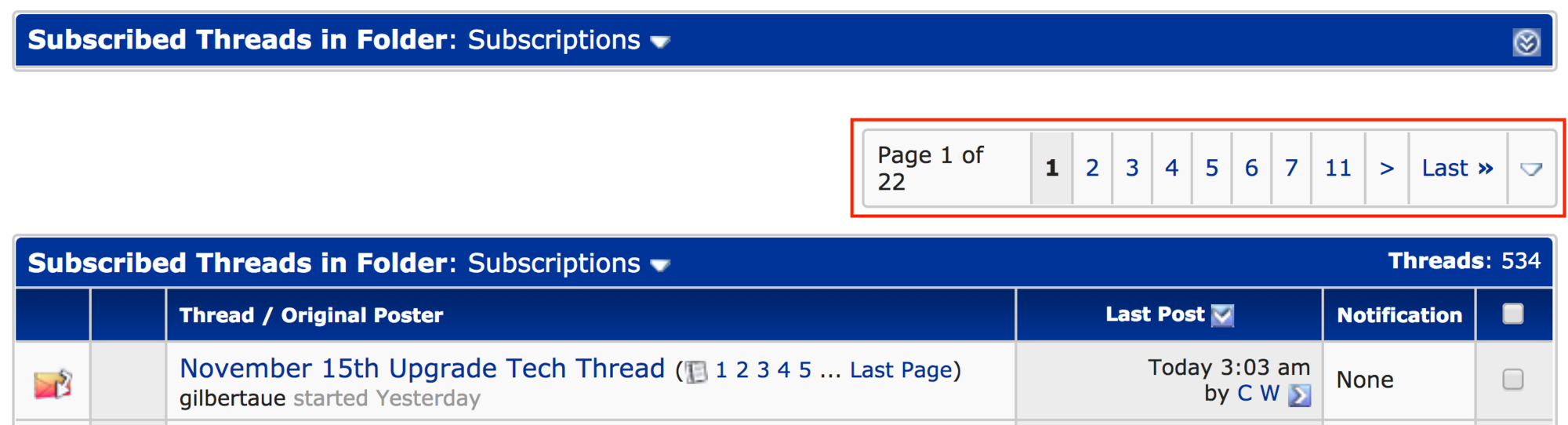
) of my subscribed threads be eliminated, please?
Nov 15, 2017 | 6:11 pm
#250
Join Date: Sep 2016
Location: LON, PDX
Programs: DL PM, AS MVP 75K, HH/SPG/MR Gold, Amex Plat, PRG, CSR
Posts: 2,064
Nov 15, 2017 | 6:13 pm
#251
Join Date: Aug 2017
Posts: 177
 Indentation not working
Has anybody else noticed that indented text doesn't show up as intended, and that the indent button removes the paragraph spacing around the indented text? For example, just after this sentence is a blank line and then the next paragraph should be indented:
This is text that I've clicked the indent button on.
And it doesn't even show up properly if you indent twice:This is text I've highlighted and clicked indent two times on.
I'm not sure why that wouldn't work properly.
Nov 15, 2017 | 6:16 pm
#252
FlyerTalk Evangelist
Join Date: May 2015
Location: BOS, YVR, ZRH
Programs: *G
Posts: 18,130
One more: on mobile, the left menu bar used to contain a "new posts" button/option that's now gone. Can we get that back? I actually liked using it and that functionality on mobile now isn't really the anymore
Nov 15, 2017 | 6:18 pm
#253
Moderator: Information Desk, Women Travelers, FlyerTalk Evangelist


Join Date: Jul 2003
Location: Chicago, IL, USA
Programs: AA Gold
Posts: 16,213
I went to my albums to upload new photos. An album I created a couple days ago isn't visible, and when I go to create a new album, it tells me I don't have permission to, nor do I have permission to upload photos. (I'd post a screenshot, but, you know, I can't.)
Nov 15, 2017 | 6:19 pm
#254
FlyerTalk Evangelist

Join Date: Nov 2011
Location: Brighton. UK
Programs: BA Gold / VS /IHG Diamond & Ambassador
Posts: 14,977
Just awful, awful awful.
Even worse than the BA revamp!
If you wanted to improve the site then sort out things like the search function
Even worse than the BA revamp!
If you wanted to improve the site then sort out things like the search function
Nov 15, 2017 | 6:29 pm
#255
FlyerTalk Evangelist


Join Date: Jan 2007
Location: BOS/UTH
Programs: AA LT PLT; QRPC PLT/OW EMD; Bonvoy LT Titanium
Posts: 14,578
Please restore the old standard theme as a display option.