
























A mapping tool better than Great Circle Mapper?
 Sep 7, 2008 | 10:20 pm
#1
Original Poster


Join Date: Jun 2004
Location: BRU (SEA, JNB)
Programs: Mucci Reperateur des Coeurs Brises
Posts: 4,120
A mapping tool better than Great Circle Mapper?
Although the Great Circle Mapper does a very good job (I assume) of charting distances, ranges and so on, the graphical result showing the flight lines and routes etc. is not very good IMHO. The map produced is very small, lacks any detail and is not very good unless mapping less than only a few routes. I want/need a mapper that allows multiple routes to be represented on either a Mercator and/or orthographic projection, but on a much larger size, with good detail and ability to expand the graphic without enormous distortion (even Photoshop cannot expand the Great Circle Mapper graphics without alot of distortion and loss of detail).
Any suggestions? Thanks!
Any suggestions? Thanks!

 Sep 10, 2008 | 10:17 am
#3


Join Date: Sep 2003
Location: Terra Australis Cognita
Posts: 5,353
What is your end goal -- printing out or exporting the maps, for example?
http://openflights.org/ offers flight mapping on a zoomable Google Maps-type globe, but the routes are (presently) plotted as straight line segments, not great circle lines.
http://openflights.org/ offers flight mapping on a zoomable Google Maps-type globe, but the routes are (presently) plotted as straight line segments, not great circle lines.
Sep 10, 2008 | 10:58 am
#4
Join Date: May 2004
Location: EWR
Programs: SQ - Gold; HHonors - Silver
Posts: 229
This one is my new favorite:
http://www.gpsvisualizer.com/calculators
It also uses google maps. The maps are decently sized and you get to zoom like you would in google maps. It does pop-up the map in a new window/tab, which is a bit weird, but fine for me.
http://www.gpsvisualizer.com/calculators
It also uses google maps. The maps are decently sized and you get to zoom like you would in google maps. It does pop-up the map in a new window/tab, which is a bit weird, but fine for me.
Jan 2, 2013 | 2:53 am
#5
Join Date: Jan 2013
Posts: 3
 greatcirclemapper.net
I recommend http://www.greatcirclemapper.net which uses google maps to visualize your routes on the map. Furthermore there is a big airport, aircraft and airline database and an iphone app will be available soon!
brgds
brgds
Jan 3, 2013 | 12:44 am
#6
Join Date: Oct 2004
Location: PDX
Posts: 2,284
I recommend http://www.greatcirclemapper.net
Feb 6, 2013 | 12:30 pm
#7
Join Date: Feb 2013
Posts: 2
Hi there,
looks great, but the google maps are kind of the usual stuff you get. Maybe you can try out to make your maps trying out airline mapping tool www.routegraph.com. They have some beautiful maps available, and you can plot your own route data.
Cheers
Mcfly
looks great, but the google maps are kind of the usual stuff you get. Maybe you can try out to make your maps trying out airline mapping tool www.routegraph.com. They have some beautiful maps available, and you can plot your own route data.
Cheers
Mcfly
Last edited by Mcfly81; Feb 6, 2013 at 12:31 pm Reason: wrong url

 Mar 18, 2013 | 6:11 pm
#9
Moderator: American AAdvantage

Join Date: May 2000
Location: NorCal - SMF area
Programs: AA LT EXP; HH LT Diamond, Maître-plongeur des Muccis
Posts: 62,948
That tool needs a lot of work, in my opinion. Kind of trashed up appearance with too much hidden by the various widgets.
I entered an upcoming trip of mine (SMF DFW LHR VCE) and get "0 hours" for Flight Time on each segment and the total, for example. That was after getting several errors using three letter IATA codes and being told there was no such airport.
Then the page crashed?
I entered an upcoming trip of mine (SMF DFW LHR VCE) and get "0 hours" for Flight Time on each segment and the total, for example. That was after getting several errors using three letter IATA codes and being told there was no such airport.
Then the page crashed?
I recommend http://www.greatcirclemapper.net which uses google maps to visualize your routes on the map. Furthermore there is a big airport, aircraft and airline database and an iphone app will be available soon!
brgds
brgds
Mar 20, 2013 | 4:47 pm
#10
FlyerTalk Evangelist


Join Date: May 2002
Location: Pittsburgh
Programs: MR LT Titanium, AA LT PLT, UA SLV, Avis PreferredPlus, HH Gold, Hertz PC, National Executive, etc.
Posts: 31,684
I recommend http://www.greatcirclemapper.net
You need to parse the airports asynchronously. I typed in "PIT ORD LAX OGG LIH SFO PIT" for an upcoming trip and it returned "no airport found". It took me a while to figure out that I had to type "PIT", wait for the AJAX(?) call to return a list where I could select the PIT airport, then type in ORD, wait again, select, type in LAX, wait, etc. ACK!
Also, I'm apparently flying Einstein Air, as my flight takes 0:00h
And put in statute miles. Very few folks in the US speak nautical miles or km.
And put a close button on the splash/welcome screen.
Good start, but keep working on it.
Mar 20, 2013 | 8:04 pm
#11
Join Date: Nov 2007
Location: halfway between JFK and LGA
Posts: 976
Perhaps you recommend it because:
You need to parse the airports asynchronously. I typed in "PIT ORD LAX OGG LIH SFO PIT" for an upcoming trip and it returned "no airport found". It took me a while to figure out that I had to type "PIT", wait for the AJAX(?) call to return a list where I could select the PIT airport, then type in ORD, wait again, select, type in LAX, wait, etc. ACK!
Also, I'm apparently flying Einstein Air, as my flight takes 0:00h
And put in statute miles. Very few folks in the US speak nautical miles or km.
And put a close button on the splash/welcome screen.
Good start, but keep working on it.
You need to parse the airports asynchronously. I typed in "PIT ORD LAX OGG LIH SFO PIT" for an upcoming trip and it returned "no airport found". It took me a while to figure out that I had to type "PIT", wait for the AJAX(?) call to return a list where I could select the PIT airport, then type in ORD, wait again, select, type in LAX, wait, etc. ACK!
Also, I'm apparently flying Einstein Air, as my flight takes 0:00h
And put in statute miles. Very few folks in the US speak nautical miles or km.
And put a close button on the splash/welcome screen.
Good start, but keep working on it.
May 15, 2013 | 5:33 am
#12
Join Date: Jan 2013
Posts: 3
the behavior of the search bar makes it a site i won't return to. why should i have to wait for your slow lookup function to identify my airport code and make me select it? i type in LGA MCO and hit calculate before the site can return an error to me and then do nothing. this is a total usability killer.
Regarding the flight time: right now it will only calculate a time if you choose an aircraft or enter the speed. I see this is not clear. There should be a default speed. How much should it be?
For the Windows I think there should be a button to slide it to the side.
Maybe also a print view?
Again, thank you for the great feedback! It's very helpful for me!
Jan 12, 2018 | 5:57 am
#13
Join Date: May 2017
Posts: 11
I built Great Circle Map.
It has two display modes: A Google maps-based projection which is nice since it lets you zoom in as much as you want, and an interactive 3D globe projection which helps explain the weird curves of the route paths
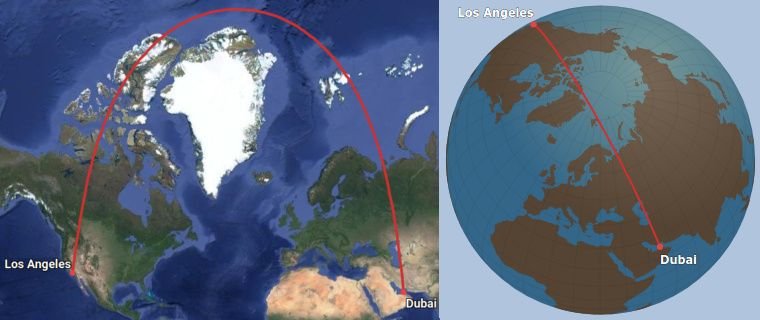
The website is really fast since it never reloads the page. If you type in a route, it will appear instantly.
It addresses some of the problems that have been mentioned in this thread:
* The search lookup function is instantaneous, so inputting routes is very fast even if you don't know the airport codes.
* For people who don't want search, there is a "raw input" mode which works like gcmap.com - just put in the airport codes like "JFK-LHR/AMS".
Cons:
* Mobile version is a bit clunky.
* Not the same breadth of display options as good old gcmap.com (ranges, ETOPS etc).
* A bit more difficult to export as an image - you basically have to take a screen shot.
* Airport database is not as complete as the one on gcmap.com
It has two display modes: A Google maps-based projection which is nice since it lets you zoom in as much as you want, and an interactive 3D globe projection which helps explain the weird curves of the route paths
The website is really fast since it never reloads the page. If you type in a route, it will appear instantly.
It addresses some of the problems that have been mentioned in this thread:
* The search lookup function is instantaneous, so inputting routes is very fast even if you don't know the airport codes.
* For people who don't want search, there is a "raw input" mode which works like gcmap.com - just put in the airport codes like "JFK-LHR/AMS".
Cons:
* Mobile version is a bit clunky.
* Not the same breadth of display options as good old gcmap.com (ranges, ETOPS etc).
* A bit more difficult to export as an image - you basically have to take a screen shot.
* Airport database is not as complete as the one on gcmap.com
Jan 13, 2018 | 5:51 am
#14
Moderator: Aegean Miles+Bonus


Join Date: Oct 2009
Location: AMS / ATH
Programs: AFKL Plat, A3 Gold
Posts: 8,255
I built Great Circle Map.
It has two display modes: A Google maps-based projection which is nice since it lets you zoom in as much as you want, and an interactive 3D globe projection which helps explain the weird curves of the route paths
The website is really fast since it never reloads the page. If you type in a route, it will appear instantly.
It addresses some of the problems that have been mentioned in this thread:
* The search lookup function is instantaneous, so inputting routes is very fast even if you don't know the airport codes.
* For people who don't want search, there is a "raw input" mode which works like gcmap.com - just put in the airport codes like "JFK-LHR/AMS".
Cons:
* Mobile version is a bit clunky.
* Not the same breadth of display options as good old gcmap.com (ranges, ETOPS etc).
* A bit more difficult to export as an image - you basically have to take a screen shot.
* Airport database is not as complete as the one on gcmap.com
It has two display modes: A Google maps-based projection which is nice since it lets you zoom in as much as you want, and an interactive 3D globe projection which helps explain the weird curves of the route paths
The website is really fast since it never reloads the page. If you type in a route, it will appear instantly.
It addresses some of the problems that have been mentioned in this thread:
* The search lookup function is instantaneous, so inputting routes is very fast even if you don't know the airport codes.
* For people who don't want search, there is a "raw input" mode which works like gcmap.com - just put in the airport codes like "JFK-LHR/AMS".
Cons:
* Mobile version is a bit clunky.
* Not the same breadth of display options as good old gcmap.com (ranges, ETOPS etc).
* A bit more difficult to export as an image - you basically have to take a screen shot.
* Airport database is not as complete as the one on gcmap.com
Jan 13, 2018 | 8:51 am
#15
Join Date: May 2017
Posts: 11
Hope that helps!