
























Using A Spreadsheet To Run Award Searches
 Mar 14, 2023 | 10:19 am
#1
Original Poster


Join Date: Sep 1999
Location: CHS
Programs: UA Premier, AA Gold, AC 25K, Marriott LT Titanium, Hyatt Globalist, Hilton Gold
Posts: 2,144
Using A Spreadsheet To Run Award Searches
Searching for airline awards can be problematic. You can pay someone to do it(award booking services) for you or use one of the online tools(ExpertFlyer, point.me) or you can manually do the searches on the airline websites yourself.
The advantages of manual searches are that you are getting immediately bookable results and they don’t cost you anything. The downfall of manual searches are that they can be very time consuming. This is especially true if you are looking for Trans Atlantic or Trans Pacific flights. Trying to use positioning flights adds to the complexity and time needed for a search.
After trying to do manual searches for a couple of upcoming TATL trips, I thought of using embedded links in a spreadsheet to speed up my searches. When you click on the link, your system will automatically open a new browser window and run the search that you have associated with that link. Here is an image of a sample spreadsheet:
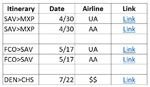
If interested, you can download a copy of spreadsheet here:
tinyurl.com/4jjkfana
To create a url link for a spreadsheet cell, you need to first populate the cell with something. I used the word ‘Link’. After, you need to copy the url of the airline search results and paste it into the cell using Ctl-K to create a hyperlink. After that, each time you click on the cell, the search should run.
This has worked well for me. I can do as many ten searches and review the results all within one minute. After getting my award seats, now I can easily check for better or lower cost flights on a daily basis and spend minimal time doing it. Generally, the airlines don’t charge for changes, so I should be able improve my flights/costs as I get closer to my travel dates.
It does take a little time to set up the spreadsheet, but it has been a big time saver for me.
Notes:
1. Log into your airline accounts before starting any searches. That way, any extra availability you have due to status or credit cards will show.
2. I only have UA and AA miles so have not tested this on other airlines.
3. This works best with United. Any sorting changes you make to the search results changes the url. This allows you to run a search that immediately brings up a calendar view of the search sorted exactly the way you want by using the new url created by sorting.
4. For American, you have to capture the url when the search first starts. If you wait until the search finishes, it will display a generic url. Immediately after starting the search, you need to do a Ctl-L which takes you to the url and then a Ctl-C to capture the url. The search produces the basic unsorted view, but the calendar is only one click away.
5. If you are looking for flight $$ prices, I found this also works with the ITA flight price engine. Just copy your completed search url into a cell and it should work. Sometimes, you may have to push the ‘Search’ button to run the search.
I hope this helps others here.
The advantages of manual searches are that you are getting immediately bookable results and they don’t cost you anything. The downfall of manual searches are that they can be very time consuming. This is especially true if you are looking for Trans Atlantic or Trans Pacific flights. Trying to use positioning flights adds to the complexity and time needed for a search.
After trying to do manual searches for a couple of upcoming TATL trips, I thought of using embedded links in a spreadsheet to speed up my searches. When you click on the link, your system will automatically open a new browser window and run the search that you have associated with that link. Here is an image of a sample spreadsheet:
If interested, you can download a copy of spreadsheet here:
tinyurl.com/4jjkfana
To create a url link for a spreadsheet cell, you need to first populate the cell with something. I used the word ‘Link’. After, you need to copy the url of the airline search results and paste it into the cell using Ctl-K to create a hyperlink. After that, each time you click on the cell, the search should run.
This has worked well for me. I can do as many ten searches and review the results all within one minute. After getting my award seats, now I can easily check for better or lower cost flights on a daily basis and spend minimal time doing it. Generally, the airlines don’t charge for changes, so I should be able improve my flights/costs as I get closer to my travel dates.
It does take a little time to set up the spreadsheet, but it has been a big time saver for me.
Notes:
1. Log into your airline accounts before starting any searches. That way, any extra availability you have due to status or credit cards will show.
2. I only have UA and AA miles so have not tested this on other airlines.
3. This works best with United. Any sorting changes you make to the search results changes the url. This allows you to run a search that immediately brings up a calendar view of the search sorted exactly the way you want by using the new url created by sorting.
4. For American, you have to capture the url when the search first starts. If you wait until the search finishes, it will display a generic url. Immediately after starting the search, you need to do a Ctl-L which takes you to the url and then a Ctl-C to capture the url. The search produces the basic unsorted view, but the calendar is only one click away.
5. If you are looking for flight $$ prices, I found this also works with the ITA flight price engine. Just copy your completed search url into a cell and it should work. Sometimes, you may have to push the ‘Search’ button to run the search.
I hope this helps others here.


 Apr 22, 2024 | 9:59 am
#3
Original Poster
Join Date: Sep 1999
Location: CHS
Programs: UA Premier, AA Gold, AC 25K, Marriott LT Titanium, Hyatt Globalist, Hilton Gold
Posts: 2,144
Try this: AirlineTest
