
























Call Forwarding to Google Voice When Abroad
 Nov 19, 2023 | 6:00 pm
#1
Original Poster
A FlyerTalk Posting Legend


Join Date: Sep 2002
Location: LAX/TPE
Programs: United 1K, JAL Sapphire, SPG Lifetime Platinum, National Executive Elite, Hertz PC, Avis PC
Posts: 47,227
Call Forwarding to Google Voice When Abroad
I read online that you can set the Google Voice iphone app to work on data/wifi only, ignoring the carrier, so in order to avoid roaming voice charges while away the plan was to set my TMO number to call forward to the Google Voice number, then use GV to answer the call, or make calls back, using data.
I configured the GV app for data/wifi, set call forwarding to the GV number, but when someone calls me, the GV app does not ring - the caller gets a "GV subscriber not available" message, and I see a missed call on the app.
Am I missing something or doing something wrong?
I configured the GV app for data/wifi, set call forwarding to the GV number, but when someone calls me, the GV app does not ring - the caller gets a "GV subscriber not available" message, and I see a missed call on the app.
Am I missing something or doing something wrong?
 Nov 19, 2023 | 10:11 pm
#2

Join Date: Dec 2010
Location: MEX
Posts: 1,152
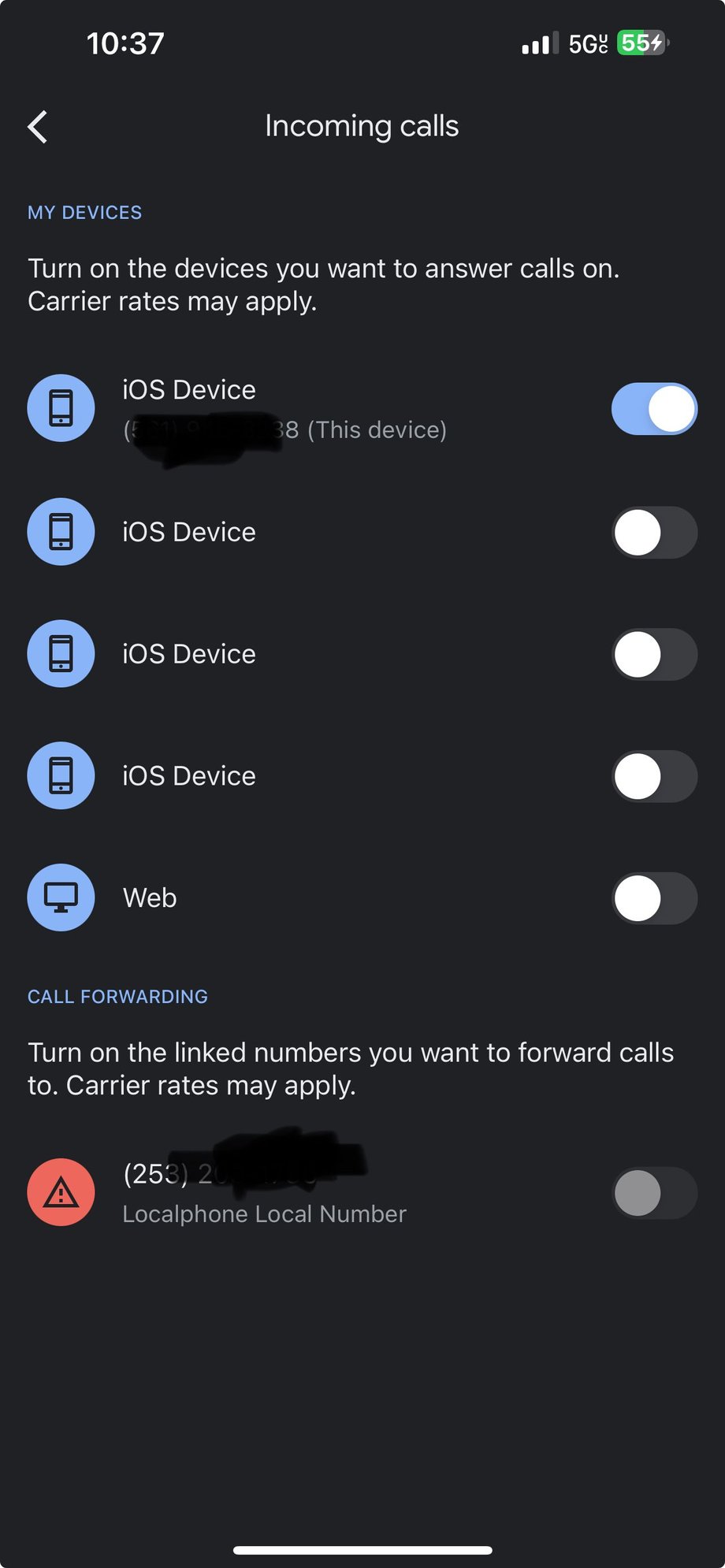
You have to turn on calls on your device. In the GV app, settings > incoming calls, then make sure your device is switched on.
And make sure you don't have GV set to ring calls to your carrier number, or callers will get stuck in an infinite loop of call forwarding. (edit: you can also just un-link the number)
And make sure you don't have GV set to ring calls to your carrier number, or callers will get stuck in an infinite loop of call forwarding. (edit: you can also just un-link the number)
Last edited by der_saeufer; Nov 19, 2023 at 11:24 pm
Nov 19, 2023 | 11:39 pm
#3
Original Poster
A FlyerTalk Posting Legend
Join Date: Sep 2002
Location: LAX/TPE
Programs: United 1K, JAL Sapphire, SPG Lifetime Platinum, National Executive Elite, Hertz PC, Avis PC
Posts: 47,227
That’s the problem - this is what I see and the only option I recognize includes forwarding to my number. The other devices don’t say what or where they are
Nov 20, 2023 | 4:28 am
#4
Join Date: Dec 2010
Location: MEX
Posts: 1,152
Looks like they've changed the way linked numbers are handled. My screen looks similar but the top line is "iOS Device / (this device)" without a phone number.
Maybe try unlinking the number that corresponds to your phone? settings > devices and numbers > your device, set to "no number" and/or delete that linked number at the bottom of the same screen.
Also, you can check that everything else is working correctly by switching on "web" on the linked devices screen and seeing if calls ring on voice.google.com in a browser.
Maybe try unlinking the number that corresponds to your phone? settings > devices and numbers > your device, set to "no number" and/or delete that linked number at the bottom of the same screen.
Also, you can check that everything else is working correctly by switching on "web" on the linked devices screen and seeing if calls ring on voice.google.com in a browser.
Nov 21, 2023 | 3:18 pm
#6
Original Poster
A FlyerTalk Posting Legend
Join Date: Sep 2002
Location: LAX/TPE
Programs: United 1K, JAL Sapphire, SPG Lifetime Platinum, National Executive Elite, Hertz PC, Avis PC
Posts: 47,227
I’ve heard of that process but it seems very complicated, or I’m just not grasping it
Nov 22, 2023 | 10:01 am
#7
Join Date: Jun 2017
Location: SEA/NYC/IAD
Programs: UA 1K, DL DM, Hyatt Globalist, Marriott Titanium
Posts: 2,368
You can do so by disabling international roaming (or more broadly, cellular data) on the primary line and setting your phone to use the secondary line for data.
If you're curious and want to read more, the specific name of this is IP Multimedia Subsystems (IMS).
Last edited by Polytonic; Nov 22, 2023 at 10:07 am
Nov 23, 2023 | 4:42 am
#8

Join Date: Feb 2017
Posts: 727
TGarza and others on this forum have a lot of experience with the IMS function for iPhones, and I can also testify about it's simplicity and reliable performance. I have personally used it for a few years while traveling, and it works quite well. It can be set up while in the US if you have access to two different lines on any carriers. I suggest you practice the setup a few times while home to establish a comfort level prior to travel. It can be left set for literally weeks without issue, and is one of the best features of a dual sim, dual standby iPhone. While traveling with T-Mobile as my primary voice line, IMS calls register as a WiFi Call in my account manager. These are "Free" of roaming charges. You also can call a US number anywhere in the world for free, as the function sees it as being two US users, both Stateside.
Nov 23, 2023 | 4:53 am
#9
Original Poster
A FlyerTalk Posting Legend
Join Date: Sep 2002
Location: LAX/TPE
Programs: United 1K, JAL Sapphire, SPG Lifetime Platinum, National Executive Elite, Hertz PC, Avis PC
Posts: 47,227
One other thing to remember with call forwarding your primary voice line elsewhere is, Text Messages do not forward. So, you will miss any that were sent while Call Forwarded.
TGarza and others on this forum have a lot of experience with the IMS function for iPhones, and I can also testify about it's simplicity and reliable performance. I have personally used it for a few years while traveling, and it works quite well. It can be set up while in the US if you have access to two different lines on any carriers. I suggest you practice the setup a few times while home to establish a comfort level prior to travel. It can be left set for literally weeks without issue, and is one of the best features of a dual sim, dual standby iPhone. While traveling with T-Mobile as my primary voice line, IMS calls register as a WiFi Call in my account manager. These are "Free" of roaming charges. You also can call a US number anywhere in the world for free, as the function sees it as being two US users, both Stateside.
TGarza and others on this forum have a lot of experience with the IMS function for iPhones, and I can also testify about it's simplicity and reliable performance. I have personally used it for a few years while traveling, and it works quite well. It can be set up while in the US if you have access to two different lines on any carriers. I suggest you practice the setup a few times while home to establish a comfort level prior to travel. It can be left set for literally weeks without issue, and is one of the best features of a dual sim, dual standby iPhone. While traveling with T-Mobile as my primary voice line, IMS calls register as a WiFi Call in my account manager. These are "Free" of roaming charges. You also can call a US number anywhere in the world for free, as the function sees it as being two US users, both Stateside.
I’m already abroad but oddly enough I’m not getting all of those sales calls that I was worried about. For outbound I’ve been using Google voice on WiFi and that seems good enough for now. I’ll look more into IMS for the option on my next trip
Nov 23, 2023 | 7:27 am
#10
Join Date: Feb 2017
Posts: 727
The biggest drawback to Texts not forwarding, is they do not store up for when you connect. My experience is they never arrive after you reconnect.
Let me reiterate on the IMS issue. When you return home, practice setting it up so that you are confident you understand the concept and procedure. When roaming overseas, when you move about, your roaming partners can change from country or region to region. This can alter your IMS functionality for free calling. It is dependent upon your voice line NOT having roaming service. For instance, let's say Vodafone is not a roaming partner in Spain where you begin your trip. You choose it for voice, and get free US calling. You then travel to Morocco, and Vodafone IS a roaming partner. You'll need to reconfigure to retain the free US calling. This is a hypothetical scenario, and is more likely if you choose an MVNO for non roaming partner, since the underlying carrier might not be known or consistent from country to country. Not a big deal, and once you get the hang of it, it only takes a minute or two to reconfigure. A glance at your top line Status Bar shows how it is set.
Let me reiterate on the IMS issue. When you return home, practice setting it up so that you are confident you understand the concept and procedure. When roaming overseas, when you move about, your roaming partners can change from country or region to region. This can alter your IMS functionality for free calling. It is dependent upon your voice line NOT having roaming service. For instance, let's say Vodafone is not a roaming partner in Spain where you begin your trip. You choose it for voice, and get free US calling. You then travel to Morocco, and Vodafone IS a roaming partner. You'll need to reconfigure to retain the free US calling. This is a hypothetical scenario, and is more likely if you choose an MVNO for non roaming partner, since the underlying carrier might not be known or consistent from country to country. Not a big deal, and once you get the hang of it, it only takes a minute or two to reconfigure. A glance at your top line Status Bar shows how it is set.
Nov 23, 2023 | 8:50 am
#11
Join Date: Sep 2015
Location: flyover country
Posts: 2,856
Thank you to all the posters who explain IMS and other intricacies.
Is voice roaming independent of data roaming? FWIW, my MVNO (Consumer Cellular) only offers international roaming by request (and it wasn't clear if that was voice or data or both), and I have not requested it.
With my iPhone, what I have done in the past is turn off data roaming for my voice line (in Settings > Cellular > [MVNO] > Data Roaming) but leave Turn On This Line enabled on the same Settings page. While out of USA, I have an eSIM (usually Airalo) with data and roaming enabled. (Cellular Data is enabled by choosing the provider in Settings > Cellular > Cellular Data and roaming is enabled in Settings > Cellular > [eSIM provider] > Data Roaming.) It seems to work, although I made few calls and do not recall receiving a call with this setup. Have I just been lucky? Am I possibly missing calls?
With my iPhone, what I have done in the past is turn off data roaming for my voice line (in Settings > Cellular > [MVNO] > Data Roaming) but leave Turn On This Line enabled on the same Settings page. While out of USA, I have an eSIM (usually Airalo) with data and roaming enabled. (Cellular Data is enabled by choosing the provider in Settings > Cellular > Cellular Data and roaming is enabled in Settings > Cellular > [eSIM provider] > Data Roaming.) It seems to work, although I made few calls and do not recall receiving a call with this setup. Have I just been lucky? Am I possibly missing calls?
Nov 24, 2023 | 10:51 pm
#12
Original Poster
A FlyerTalk Posting Legend
Join Date: Sep 2002
Location: LAX/TPE
Programs: United 1K, JAL Sapphire, SPG Lifetime Platinum, National Executive Elite, Hertz PC, Avis PC
Posts: 47,227
The biggest drawback to Texts not forwarding, is they do not store up for when you connect. My experience is they never arrive after you reconnect.
Let me reiterate on the IMS issue. When you return home, practice setting it up so that you are confident you understand the concept and procedure. When roaming overseas, when you move about, your roaming partners can change from country or region to region. This can alter your IMS functionality for free calling. It is dependent upon your voice line NOT having roaming service. For instance, let's say Vodafone is not a roaming partner in Spain where you begin your trip. You choose it for voice, and get free US calling. You then travel to Morocco, and Vodafone IS a roaming partner. You'll need to reconfigure to retain the free US calling. This is a hypothetical scenario, and is more likely if you choose an MVNO for non roaming partner, since the underlying carrier might not be known or consistent from country to country. Not a big deal, and once you get the hang of it, it only takes a minute or two to reconfigure. A glance at your top line Status Bar shows how it is set.
Let me reiterate on the IMS issue. When you return home, practice setting it up so that you are confident you understand the concept and procedure. When roaming overseas, when you move about, your roaming partners can change from country or region to region. This can alter your IMS functionality for free calling. It is dependent upon your voice line NOT having roaming service. For instance, let's say Vodafone is not a roaming partner in Spain where you begin your trip. You choose it for voice, and get free US calling. You then travel to Morocco, and Vodafone IS a roaming partner. You'll need to reconfigure to retain the free US calling. This is a hypothetical scenario, and is more likely if you choose an MVNO for non roaming partner, since the underlying carrier might not be known or consistent from country to country. Not a big deal, and once you get the hang of it, it only takes a minute or two to reconfigure. A glance at your top line Status Bar shows how it is set.
Nov 25, 2023 | 5:08 am
#13
Join Date: Feb 2017
Posts: 727
What matters is, with which carrier does T-Mobile have a roaming agreement?
During setup, your available network selection (Automatic Off) will typically populate with three to as many as six or eight. Generally speaking, the top 2-4 may be roaming partners. As you work down the list it becomes less likely they are. It's easier to just start at the bottom of the list in most cases. An MVNO might identify as the native carrier or as it's resale name. In either case, T-Mobile MIGHT roam with either or neither. It only takes a few minutes to ID one that doesn't roam, and that's all you need for that location. You should verify in the Status Bar at the top of your screen your voice carrier is "Using Cellular Data" frequently. I do this prior to any call, and out of habit any time I'm using my phone. You eventually get pretty comfortable with the IMS feature. It's also great for calling between travel companions with the same service, without fees.
During setup, your available network selection (Automatic Off) will typically populate with three to as many as six or eight. Generally speaking, the top 2-4 may be roaming partners. As you work down the list it becomes less likely they are. It's easier to just start at the bottom of the list in most cases. An MVNO might identify as the native carrier or as it's resale name. In either case, T-Mobile MIGHT roam with either or neither. It only takes a few minutes to ID one that doesn't roam, and that's all you need for that location. You should verify in the Status Bar at the top of your screen your voice carrier is "Using Cellular Data" frequently. I do this prior to any call, and out of habit any time I'm using my phone. You eventually get pretty comfortable with the IMS feature. It's also great for calling between travel companions with the same service, without fees.
Nov 26, 2023 | 9:56 am
#14

Join Date: Sep 2013
Location: DAL
Posts: 2,231
Thank you to all the posters who explain IMS and other intricacies.
Is voice roaming independent of data roaming? FWIW, my MVNO (Consumer Cellular) only offers international roaming by request (and it wasn't clear if that was voice or data or both), and I have not requested it.
With my iPhone, what I have done in the past is turn off data roaming for my voice line (in Settings > Cellular > [MVNO] > Data Roaming) but leave Turn On This Line enabled on the same Settings page. While out of USA, I have an eSIM (usually Airalo) with data and roaming enabled. (Cellular Data is enabled by choosing the provider in Settings > Cellular > Cellular Data and roaming is enabled in Settings > Cellular > [eSIM provider] > Data Roaming.) It seems to work, although I made few calls and do not recall receiving a call with this setup. Have I just been lucky? Am I possibly missing calls?
Is voice roaming independent of data roaming? FWIW, my MVNO (Consumer Cellular) only offers international roaming by request (and it wasn't clear if that was voice or data or both), and I have not requested it.
With my iPhone, what I have done in the past is turn off data roaming for my voice line (in Settings > Cellular > [MVNO] > Data Roaming) but leave Turn On This Line enabled on the same Settings page. While out of USA, I have an eSIM (usually Airalo) with data and roaming enabled. (Cellular Data is enabled by choosing the provider in Settings > Cellular > Cellular Data and roaming is enabled in Settings > Cellular > [eSIM provider] > Data Roaming.) It seems to work, although I made few calls and do not recall receiving a call with this setup. Have I just been lucky? Am I possibly missing calls?
With your configuration, WiFi calling should be enabled. There are a few MVNO plans which do not offer WiFi calling or the plan requires a customer service request to enable WiFi calling (some Red Pocket plans). A FT member from Australia or New Zealand used a carrier which placed a geo location limit to wifi calling. I am not aware of any US provider with this limitation.
At one time I traveled with a 2nd phone with a local sim and connected my US iPhone by WiFi with the roaming data off. IMS eliminated my need for a 2nd phone.
In April, I will test my work Pixel with backup calling on my trip to Latvia. This is supposed to work the same as my iPhone setup after Google updated backup calling to use roaming. The Samsung S23 is supposed to have the same capability called DSDV as the iPhone and Pixel to avoid add on international plans.
Nov 26, 2023 | 4:58 pm
#15
A FlyerTalk Posting Legend


Join Date: Dec 2000
Location: Shanghai
Posts: 46,400
I've been using GV (which, was called Hangouts for a while) for years, but never to receive incoming calls intentionally (this would be super annoying).
Rather, it's decent for outgoing calls (free to US numbers) and SMS. Just be sure to suppress its desire to place calls over your cell network if it decides your signal quality isn't up to par (there's a setting for this), and its often necessary to tunnel through a US server.
IME call quality over WiFi is usually okay for accomplishing basic tasks where the receiving party only has a phone number, but the experience falls short of enjoyable.
Rather, it's decent for outgoing calls (free to US numbers) and SMS. Just be sure to suppress its desire to place calls over your cell network if it decides your signal quality isn't up to par (there's a setting for this), and its often necessary to tunnel through a US server.
IME call quality over WiFi is usually okay for accomplishing basic tasks where the receiving party only has a phone number, but the experience falls short of enjoyable.