
























Goodbye Google Hangouts
 Nov 12, 2020 | 1:30 pm
#1
Original Poster
A FlyerTalk Posting Legend


Join Date: Sep 2002
Location: LAX/TPE
Programs: United 1K, JAL Sapphire, SPG Lifetime Platinum, National Executive Elite, Hertz PC, Avis PC
Posts: 47,244
Goodbye Google Hangouts
It looks like Google Hangouts, and the ability to make or receive wifi/data calls while abroad with Google Voice is going away. Because the Google Voice app uses a dial-back feature to connect a call, it's useless outside of the US/Canada for making long distance calls with your Google Voice number while on wifi-only, or with a foreign SIM card, and I don't believe the GV app can receive a call over wifi/data either.
Does anyone know of a Google or third party alternative dialer that will allow the use of a GV number while making or receiving calls over a wifi or data connection?
https://support.google.com/hangouts/answer/3187125
Does anyone know of a Google or third party alternative dialer that will allow the use of a GV number while making or receiving calls over a wifi or data connection?
https://support.google.com/hangouts/answer/3187125
 Nov 12, 2020 | 4:16 pm
#2

Join Date: Dec 2006
Location: SNA
Programs: Bonvoy LTTE/AMB, AmEx Plat, National EE, WN A-List Preferred, CLEAR+, Covid-19, NK Gold
Posts: 5,272
I'm 99.9% certain it's integrated into GV now; if I initiate a call from GV, it happens over WiFi.
ETA: and have neither Hangouts or the Hangouts Dialer on my phone.
ETA: and have neither Hangouts or the Hangouts Dialer on my phone.
Nov 12, 2020 | 5:29 pm
#3
Original Poster
A FlyerTalk Posting Legend
Join Date: Sep 2002
Location: LAX/TPE
Programs: United 1K, JAL Sapphire, SPG Lifetime Platinum, National Executive Elite, Hertz PC, Avis PC
Posts: 47,244
Nov 12, 2020 | 5:32 pm
#4
Join Date: Dec 2006
Location: SNA
Programs: Bonvoy LTTE/AMB, AmEx Plat, National EE, WN A-List Preferred, CLEAR+, Covid-19, NK Gold
Posts: 5,272


 Nov 12, 2020 | 6:11 pm
#6
Original Poster
A FlyerTalk Posting Legend
Join Date: Sep 2002
Location: LAX/TPE
Programs: United 1K, JAL Sapphire, SPG Lifetime Platinum, National Executive Elite, Hertz PC, Avis PC
Posts: 47,244
Nov 12, 2020 | 6:11 pm
#7
Original Poster
A FlyerTalk Posting Legend
Join Date: Sep 2002
Location: LAX/TPE
Programs: United 1K, JAL Sapphire, SPG Lifetime Platinum, National Executive Elite, Hertz PC, Avis PC
Posts: 47,244
Nov 12, 2020 | 7:49 pm
#8


Join Date: Nov 2000
Location: Upcountry Maui, HI
Posts: 13,724
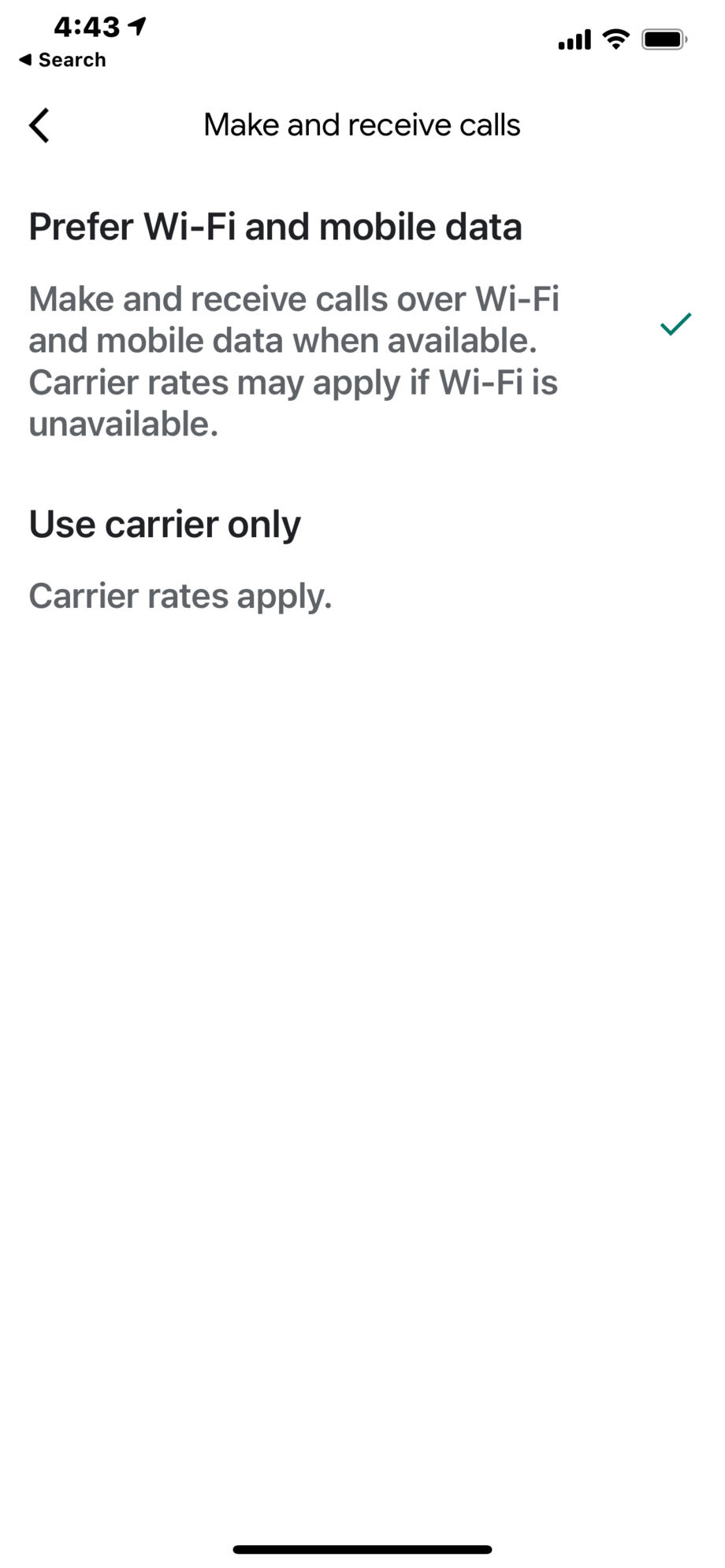
In Google Voice iOS app, it's under settings/make and receive calls; Prefer WiFi and mobile data. There's probably other settings on google.com/voice you might want to check.
I'm pretty sure I've made calls using both the iOS hangouts app and the Google Voice app over WiFi.
-David
Last edited by LIH Prem; Nov 12, 2020 at 7:55 pm
Nov 12, 2020 | 9:07 pm
#9
Join Date: Aug 2010
Location: ORF
Programs: Amex Plat, AA, BA Silver, Marriott Plat, Choice Gold, HHonors Gold, IHG Diamond
Posts: 3,860
My play for quite some time now has been Google Voice with a cheap SIM with data and voice for my travels in the UK and Europe. When cell service is poor, wifi is available in many restaurants, pubs, and accommodations so even without a local SIM, I can make calls. I haven't had a problem with Google Voice so long as I have a reliable wifi connection--and I was originally a Hangouts user. For GPS on the road, the data from the SIM is great, and occasionally, I find the SIM call quality better than wifi connections. I have a PAYG SIM through giffgaff that works well for my needs, including in Ireland, France, Austria, and Italy, but depending on where the majority of your travels are, you might find another service more reliable or cheaper or both.
Bottom line, though, is that Google Voice does everything for me that Hangouts used to. And this combination has worked so well, I haven't felt the need to move to Google Fi--although I probably would if I took, under non-covid-19 circumstances, more than three or four trips to the UK/EU each year.
Bottom line, though, is that Google Voice does everything for me that Hangouts used to. And this combination has worked so well, I haven't felt the need to move to Google Fi--although I probably would if I took, under non-covid-19 circumstances, more than three or four trips to the UK/EU each year.
Nov 13, 2020 | 1:52 am
#10
Join Date: Dec 2010
Location: MEX
Posts: 1,152
tl;dr: Bye, Hangouts. Don't let the door hit you in the @$$ on your way out.
My concern with switching to the Voice app was that since it has the ability to make "real" calls in addition to VoIP, it appeared that if I somehow didn't have data coverage it would place a "real" call to the U.S. like it would before it had VoIP capability. For those of us outside the U.S. that could get expensive pretty quick.
I just tried it, though, and it doesn't actually work. When I opened the Voice app, I skipped the part about registering my phone's number (because it wouldn't work anyway). It makes VoIP calls over wifi or cell data no problem. But when I disable wifi and cell data and try to make a call, I get an error message that Voice can't complete the call without a data connection. If I try to set it to "use carrier only" it sends me back to register my phone number, which is not possible.
So, for those of us worried that Voice may try to make "real" calls over our non-U.S. SIMs, that function does not work unless you've registered your carrier number with GV (only possible for American carrier numbers), so Voice remains a VoIP-only solution. w00t!
Also, at least for Android, the interface sucks WAY less than Hangouts--and it actually respects dark mode! I was sad about Hangouts being deprecated but with the improvements to the Voice app I'm not going to miss it in the least. The only thing I'll miss is being able to send SMS from the sidebar in Gmail, but opening another tab isn't gonna kill me.
EDIT: just grabbed the iPhone out of the drawer. Unsurprisingly, it works exactly the same on iOS.
My concern with switching to the Voice app was that since it has the ability to make "real" calls in addition to VoIP, it appeared that if I somehow didn't have data coverage it would place a "real" call to the U.S. like it would before it had VoIP capability. For those of us outside the U.S. that could get expensive pretty quick.
I just tried it, though, and it doesn't actually work. When I opened the Voice app, I skipped the part about registering my phone's number (because it wouldn't work anyway). It makes VoIP calls over wifi or cell data no problem. But when I disable wifi and cell data and try to make a call, I get an error message that Voice can't complete the call without a data connection. If I try to set it to "use carrier only" it sends me back to register my phone number, which is not possible.
So, for those of us worried that Voice may try to make "real" calls over our non-U.S. SIMs, that function does not work unless you've registered your carrier number with GV (only possible for American carrier numbers), so Voice remains a VoIP-only solution. w00t!
Also, at least for Android, the interface sucks WAY less than Hangouts--and it actually respects dark mode! I was sad about Hangouts being deprecated but with the improvements to the Voice app I'm not going to miss it in the least. The only thing I'll miss is being able to send SMS from the sidebar in Gmail, but opening another tab isn't gonna kill me.
EDIT: just grabbed the iPhone out of the drawer. Unsurprisingly, it works exactly the same on iOS.
Last edited by der_saeufer; Nov 13, 2020 at 4:11 am
Nov 13, 2020 | 4:30 am
#11

Join Date: Sep 2013
Location: DAL
Posts: 2,236
I have the option in GV for iOS. I tested and completed a call using a iPhone 5S which does not have cellular service. Previously I could only use Hangouts to make calls. The 5S has an older version of GV than my iPhone 12 because the app icons are different.
Last edited by TGarza; Nov 13, 2020 at 8:22 am
Nov 13, 2020 | 1:03 pm
#12

Join Date: Jan 2010
Posts: 1,717
Very happy to hear this. The very first thing I do whenever I get a new phone is disable Hangouts. It takes up a lot of memory, and it is impossible to uninstall with a bootloader. I have never once had any desire to actually see what it is capable, and apparently I am not alone. One less bloatware app for future phones; if only they would allow us to remove it from the existing phones. Running out of space on the primary memory is the reason all of my phones have become obsolete, and they keep decreasing the number of apps which can operate from a memory card. It is really my only complaint about Android, but at least we are allowed to have memory cards.
Nov 13, 2020 | 1:36 pm
#13
FlyerTalk Evangelist


Join Date: Apr 2001
Location: Denver, CO
Programs: UA Silver, Bonvoy Gold, Hyatt Discoverist
Posts: 23,203
I have to communicate with different friends via different platforms: Facebook Messenger, Google Hangouts, and Whatsapp. Not a big deal, really.
Mrs. Swede uses Google Voice when working remotely in Sweden. Enter the phone number in the web UI; it then calls her phone (doesn't matter which SIM card she has in there), once she answers, it dials the number. Easy peasy and no charges.
Mrs. Swede uses Google Voice when working remotely in Sweden. Enter the phone number in the web UI; it then calls her phone (doesn't matter which SIM card she has in there), once she answers, it dials the number. Easy peasy and no charges.
Nov 13, 2020 | 4:22 pm
#14
Join Date: Sep 2013
Location: DAL
Posts: 2,236
Now Mrs Swede can configure her phone GV app to call from her phone using wfi/data without a call to the states to complete the call. This update allows local SIMs to be used when traveling overseas which is why I used Hangouts. Bye bye Hangouts for me.
Nov 13, 2020 | 7:57 pm
#15

Join Date: Jul 2017
Location: YVR
Programs: UA 1K
Posts: 1,010
I just swapped to the GV app yesterday and I can make / receive calls using data / wifi by selecting 'prefer -wi-fi and mobile data'.
However, if you use GV app to manage your SMS, your desktop hangouts app will no longer be in sync. So that's a bit of nuisance but it is what it is.
However, if you use GV app to manage your SMS, your desktop hangouts app will no longer be in sync. So that's a bit of nuisance but it is what it is.