
























GMAIL / Outlook Question
 Nov 22, 2016 | 8:31 am
#1
Original Poster
Flyertalk Evangelist and Moderator: Coupon Connection and Travel Products


Join Date: Jul 2000
Location: Milton, GA USA
Programs: Hilton Diamond, IHG Platinum Elite, Hyatt Discoverist, Radisson Elite
Posts: 19,217
GMAIL / Outlook Question
Dear Friends,
I am up in Rochester NY helping out an elderly friend.
I am trying to streamline her email for her and make it easier for her.
I am running into an issue and thought I would ask for some help from the experts.
On my system, I often access my emails on my iPad/iPhone. If I delete messages before they have downloaded to Outlook, they never get there. In addition, if I have already downloaded the messages to Outlook and then go to my Gmail account and delete all emails (I do not keep emails up on GMAIL after I have downloaded them) I still have the emails on my Outlook account.
However, this is not working on her system. For some reason, after all emails are downloaded to Outlook, I go to her Gmail account and delete all the emails. When I then come back to Outlook, it has deleted all those same emails.... I do not want that.... I want my deleting emails in her Gmail account to NOT impact what has already been downloaded to her Outlook account.
Hope that made sense. Any idea what I need to do or set up differently in order to fix this issue so it operates the same as it does on my account. I have Outlook 2010 and she has the latest version.
Thanks in advance.
I am up in Rochester NY helping out an elderly friend.
I am trying to streamline her email for her and make it easier for her.
I am running into an issue and thought I would ask for some help from the experts.
On my system, I often access my emails on my iPad/iPhone. If I delete messages before they have downloaded to Outlook, they never get there. In addition, if I have already downloaded the messages to Outlook and then go to my Gmail account and delete all emails (I do not keep emails up on GMAIL after I have downloaded them) I still have the emails on my Outlook account.
However, this is not working on her system. For some reason, after all emails are downloaded to Outlook, I go to her Gmail account and delete all the emails. When I then come back to Outlook, it has deleted all those same emails.... I do not want that.... I want my deleting emails in her Gmail account to NOT impact what has already been downloaded to her Outlook account.
Hope that made sense. Any idea what I need to do or set up differently in order to fix this issue so it operates the same as it does on my account. I have Outlook 2010 and she has the latest version.
Thanks in advance.
 Nov 22, 2016 | 11:12 am
#3
Original Poster
Flyertalk Evangelist and Moderator: Coupon Connection and Travel Products
Join Date: Jul 2000
Location: Milton, GA USA
Programs: Hilton Diamond, IHG Platinum Elite, Hyatt Discoverist, Radisson Elite
Posts: 19,217
That is not happening... she is too attached to Outlook and all her files/attachments. HECK, even I have not figured out how to move all my folders and attachments to GMAIL to stop using Outlook!
She has been using her Outlook account for a few years so already set up as IMAP... it will not let me change to POP.
Do I need to start over? and set up new GMAIL access with POP and delete the old one with IMAP?
Sorry for the questions.
She has been using her Outlook account for a few years so already set up as IMAP... it will not let me change to POP.
Do I need to start over? and set up new GMAIL access with POP and delete the old one with IMAP?
Sorry for the questions.
Nov 22, 2016 | 12:09 pm
#4


Join Date: Mar 2016
Location: Everywhere, mostly AMS
Posts: 4,578
Just remove the account and create a new one, but why not use IMAP and have the e-mails in gmail as well? That way you always have a backup in case something happens to the computer, you can read them from anywhere using the web interface or configure the account on a mobile phone/tablet and they will all be in sync about read/unread status etc.
I think gmail gives 15G of free storage these days... should be more than enough to keep using IMAP.
Additionally with IMAP you should be able to "upload" the folders to gmail, I never actually tried but I know it sees the existing directories (or rather, "labels") so there should be no reason why it wouldn't work.
I think gmail gives 15G of free storage these days... should be more than enough to keep using IMAP.
Additionally with IMAP you should be able to "upload" the folders to gmail, I never actually tried but I know it sees the existing directories (or rather, "labels") so there should be no reason why it wouldn't work.
Nov 22, 2016 | 12:23 pm
#5
Original Poster
Flyertalk Evangelist and Moderator: Coupon Connection and Travel Products
Join Date: Jul 2000
Location: Milton, GA USA
Programs: Hilton Diamond, IHG Platinum Elite, Hyatt Discoverist, Radisson Elite
Posts: 19,217
She does not want the backups... unfortunately it confuses her... she wants to delete spam and messages she no longer needs.
Just remove the account and create a new one, but why not use IMAP and have the e-mails in gmail as well? That way you always have a backup in case something happens to the computer, you can read them from anywhere using the web interface or configure the account on a mobile phone/tablet and they will all be in sync about read/unread status etc.
I think gmail gives 15G of free storage these days... should be more than enough to keep using IMAP.
Additionally with IMAP you should be able to "upload" the folders to gmail, I never actually tried but I know it sees the existing directories (or rather, "labels") so there should be no reason why it wouldn't work.
I think gmail gives 15G of free storage these days... should be more than enough to keep using IMAP.
Additionally with IMAP you should be able to "upload" the folders to gmail, I never actually tried but I know it sees the existing directories (or rather, "labels") so there should be no reason why it wouldn't work.
Nov 22, 2016 | 12:43 pm
#6
Join Date: Mar 2016
Location: Everywhere, mostly AMS
Posts: 4,578
I'm not saying you should keep all your messages forever, I just don't understand why delete e-mails from gmail but keep them in outlook?
I think "downloading" e-mails using POP accounts is really a thing of the past, in the days where everyone used ISP addresses which only had 100MB or even less.
Nov 22, 2016 | 8:12 pm
#7
In Memoriam


Join Date: Jun 2000
Programs: Honors Diamond, Hertz Presidents Circle, National Exec Elite
Posts: 36,111
I still and will always, as long as its an option, download my email to a pop3 client (same one I've been using since ~1997 and in which every email is stored). I've not found a web interface, even gmail (which I use as a backup by having a copy of every message forwarded there), which allows me the granular filing capabilities I need to have.
Nov 23, 2016 | 12:02 am
#8
Join Date: Mar 2016
Location: Everywhere, mostly AMS
Posts: 4,578
Hardly.
I still and will always, as long as its an option, download my email to a pop3 client (same one I've been using since ~1997 and in which every email is stored). I've not found a web interface, even gmail (which I use as a backup by having a copy of every message forwarded there), which allows me the granular filing capabilities I need to have.
I still and will always, as long as its an option, download my email to a pop3 client (same one I've been using since ~1997 and in which every email is stored). I've not found a web interface, even gmail (which I use as a backup by having a copy of every message forwarded there), which allows me the granular filing capabilities I need to have.
Nov 24, 2016 | 12:39 pm
#9

Join Date: Sep 2008
Location: Dayton, OH
Programs: Delta SkyMiles, Marriott Platinum
Posts: 415
Nov 24, 2016 | 2:36 pm
#10
Join Date: Sep 2003
Location: Anwhere ex-MAN
Programs: Nil
Posts: 2,709
https://gmelius.com/ is the secret to a greatly improved Gmail interface.
Nov 24, 2016 | 7:59 pm
#11
In Memoriam
Join Date: Jun 2000
Programs: Honors Diamond, Hertz Presidents Circle, National Exec Elite
Posts: 36,111
Yes.
Agreed. Very nice plug-in for gmail.
https://gmelius.com/ is the secret to a greatly improved Gmail interface.
Nov 26, 2016 | 9:53 am
#12
Join Date: Oct 2007
Programs: DL GM
Posts: 640
POP3 is an old connection method that doesn’t work well if you use multiple devices. IMHO the confusion is caused because the OP doesn't understand the fundamental differences between POP and IMAP.
The above actions are required because you're using two different POP clients (iPad and Outlook) to download from the POP server. If desired you could easily configure Outlook to delete messages from the server after you've downloaded them. There's no need to go to Gmail on the web to do it. You just have to modify the Delivery Options for the account in Outlook.
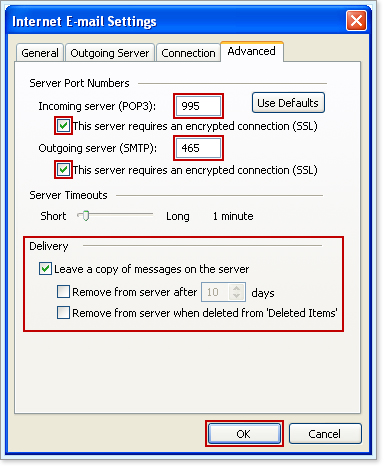
This is why IMAP is better than POP for working with multiple email clients. Delete a message once and it's deleted on all devices. The problem in what you describe is that you're applying archaic POP workflow (manually deleting mail from the server) to more modern IMAP capability.
That's the beauty of IMAP. Delete once on any client and the message is deleted everywhere. Trash, Sent Items, Deleted Items, and custom folders for saved email are also synchronized on all devices if desired.
Not sure what you don't like about IMAP, except perhaps that you don't understand it fully? As you noted POP is dated technology. For email users with multiple email clients (e.g. phone, tablet, home PC, work PC, etc.) IMAP is much easier to manage.
On my system, I often access my emails on my iPad/iPhone. If I delete messages before they have downloaded to Outlook, they never get there. In addition, if I have already downloaded the messages to Outlook and then go to my Gmail account and delete all emails (I do not keep emails up on GMAIL after I have downloaded them) I still have the emails on my Outlook account.
However, this is not working on her system. For some reason, after all emails are downloaded to Outlook, I go to her Gmail account and delete all the emails. When I then come back to Outlook, it has deleted all those same emails.... I do not want that.... I want my deleting emails in her Gmail account to NOT impact what has already been downloaded to her Outlook account.
Not sure what you don't like about IMAP, except perhaps that you don't understand it fully? As you noted POP is dated technology. For email users with multiple email clients (e.g. phone, tablet, home PC, work PC, etc.) IMAP is much easier to manage.
Nov 26, 2016 | 6:29 pm
#13
In Memoriam
Join Date: Jun 2000
Programs: Honors Diamond, Hertz Presidents Circle, National Exec Elite
Posts: 36,111
As you noted POP is dated technology. For email users with multiple email clients (e.g. phone, tablet, home PC, work PC, etc.) IMAP is much easier to manage.
I do use IMAP (and yes, I understand it, thank you) on my iPhone where I check the account for my main work/personal email and delete the spam and unnecessary emails there before downloading the remainder to my pop3 client.
My emails in that client are backed up daily three different ways, two to cloud services and one to a local NAS drive.
I appreciate the security of having my emails on my local machine, not just in the cloud.
Nov 27, 2016 | 9:38 am
#14
Join Date: Oct 2007
Programs: DL GM
Posts: 640
I do use IMAP (and yes, I understand it, thank you) on my iPhone where I check the account for my main work/personal email and delete the spam and unnecessary emails there before downloading the remainder to my pop3 client.
My emails in that client are backed up daily three different ways, two to cloud services and one to a local NAS drive.
I appreciate the security of having my emails on my local machine, not just in the cloud.
My emails in that client are backed up daily three different ways, two to cloud services and one to a local NAS drive.
I appreciate the security of having my emails on my local machine, not just in the cloud.
My original question remains: What can you do with POP that you can't do with IMAP? I'm honestly trying to understand why you perceive POP to be a better solution. You obviously feel strongly about defending your use of it.
Nov 27, 2016 | 4:31 pm
#15

Join Date: Nov 2000
Location: Upcountry Maui, HI
Posts: 13,708
Sometimes "dated" is better, depending on one's needs.
I do use IMAP (and yes, I understand it, thank you) on my iPhone where I check the account for my main work/personal email and delete the spam and unnecessary emails there before downloading the remainder to my pop3 client.
My emails in that client are backed up daily three different ways, two to cloud services and one to a local NAS drive.
I appreciate the security of having my emails on my local machine, not just in the cloud.
Don't let anybody here drag you all the way into the 1990s. Stay strong!

(Did you ever happen to look and see what's in your gmail "All Mail" "folder"?)
-David