POP3 is an old connection method that doesn’t work well if you use multiple devices. IMHO the confusion is caused because the OP doesn't understand the
fundamental differences between POP and IMAP.
Originally Posted by
wharvey
On my system, I often access my emails on my iPad/iPhone. If I delete messages before they have downloaded to Outlook, they never get there. In addition, if I have already downloaded the messages to Outlook and then go to my Gmail account and delete all emails (I do not keep emails up on GMAIL after I have downloaded them) I still have the emails on my Outlook account.
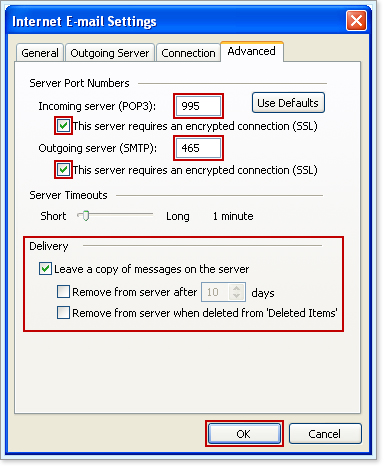
The above actions are required because you're using two different POP clients (iPad and Outlook) to download from the POP server. If desired you could easily configure Outlook to delete messages from the server after you've downloaded them. There's no need to go to Gmail on the web to do it. You just have to modify the Delivery Options for the account in Outlook.
Originally Posted by
wharvey
However, this is not working on her system. For some reason, after all emails are downloaded to Outlook, I go to her Gmail account and delete all the emails. When I then come back to Outlook, it has deleted all those same emails.... I do not want that.... I want my deleting emails in her Gmail account to NOT impact what has already been downloaded to her Outlook account.
This is why IMAP is better than POP for working with multiple email clients. Delete a message once and it's deleted on all devices. The problem in what you describe is that you're applying archaic POP workflow (manually deleting mail from the server) to more modern IMAP capability.
Originally Posted by
wharvey
She does not want the backups... unfortunately it confuses her... she wants to delete spam and messages she no longer needs.
That's the beauty of IMAP. Delete once on any client and the message is deleted everywhere. Trash, Sent Items, Deleted Items, and custom folders for saved email are also synchronized on all devices if desired.
Originally Posted by
cblaisd
I still and will always, as long as its an option, download my email to a pop3 client (same one I've been using since ~1997 and in which every email is stored).
Not sure what you don't like about IMAP, except perhaps that you don't understand it fully? As you noted POP is dated technology. For email users with multiple email clients (e.g. phone, tablet, home PC, work PC, etc.) IMAP is much easier to manage.