
























Search for an "exact phrase"?
 Apr 2, 2026 | 8:19 am
#1
Original Poster


Join Date: Jul 2005
Location: Barcelona, Spain
Posts: 221
Search for an "exact phrase"?
I have searched (pun semi-intended) and I failed to find information about this.
I've been trying to search the forums for "tumi" and "boarding bag" (That's the name of an actual Tumi product). It finds lots (and lots) of threads/posts, none of which seem to actually contain the exact phrase "boarding bag".
I also tried +"tumi" +"boarding bag" (same large set of not-actually-matches results), and also +tumi +boarding+bag (no space between boarding and the + and the bag), which interestinly returned a much reduced set of results .. still none of which contained "boarding bag".
How to search for an "exact phrase" in the Flyertalk forums?
thank you,
I've been trying to search the forums for "tumi" and "boarding bag" (That's the name of an actual Tumi product). It finds lots (and lots) of threads/posts, none of which seem to actually contain the exact phrase "boarding bag".
I also tried +"tumi" +"boarding bag" (same large set of not-actually-matches results), and also +tumi +boarding+bag (no space between boarding and the + and the bag), which interestinly returned a much reduced set of results .. still none of which contained "boarding bag".
How to search for an "exact phrase" in the Flyertalk forums?
thank you,
 Apr 2, 2026 | 8:25 am
#2
Moderator: Hyatt, American Express; FlyerTalk Evangelist


Join Date: Jun 2015
Location: WAS
Programs: :rolleyes:, DL DM, AA EXP, UA Silver, Hyatt Glob, Mlife Noir (=> Marriott Amb), invol FT beta tester
Posts: 21,706
I have searched (pun semi-intended) and I failed to find information about this.
I've been trying to search the forums for "tumi" and "boarding bag" (That's the name of an actual Tumi product). It finds lots (and lots) of threads/posts, none of which seem to actually contain the exact phrase "boarding bag".
I also tried +"tumi" +"boarding bag" (same large set of not-actually-matches results), and also +tumi +boarding+bag (no space between boarding and the + and the bag), which interestinly returned a much reduced set of results .. still none of which contained "boarding bag".
How to search for an "exact phrase" in the Flyertalk forums?
thank you,
I've been trying to search the forums for "tumi" and "boarding bag" (That's the name of an actual Tumi product). It finds lots (and lots) of threads/posts, none of which seem to actually contain the exact phrase "boarding bag".
I also tried +"tumi" +"boarding bag" (same large set of not-actually-matches results), and also +tumi +boarding+bag (no space between boarding and the + and the bag), which interestinly returned a much reduced set of results .. still none of which contained "boarding bag".
How to search for an "exact phrase" in the Flyertalk forums?
thank you,
In full desktop mode if I use the Search dropdown menu at the top (in between New Posts and Quick Links) then Search => Advanced Search

(the capital B is unimportant, I just didn't release the shift key fast enough after typing the quotation mark)
this produces only 8 results (one of which is yours
 and my post will probably show up at some point, not entirely sure how the forum software does its search indexing but it does not seem to be 100% realtime), which though they all do seem to mention "tumi" and "boarding bag" they aren't necessarily referring to that specific product, and also the most recent is 2019 (and most are even older than that).
Apr 3, 2026 | 7:08 am
and my post will probably show up at some point, not entirely sure how the forum software does its search indexing but it does not seem to be 100% realtime), which though they all do seem to mention "tumi" and "boarding bag" they aren't necessarily referring to that specific product, and also the most recent is 2019 (and most are even older than that).
Apr 3, 2026 | 7:08 am
#3
Original Poster
Join Date: Jul 2005
Location: Barcelona, Spain
Posts: 221
Apologies, I should have included further information.
This is in Chrome on a Windows Desktop, using either the Search dropdown in the centre of the top horizontal blue menu bar (click the search dropdown, type the sample search phrases from my original post, hit enter) or the search-within-this-forum option while viewing any forum.
It is matching things that shouldn't match such a specific search phrase as +"boarding bag", e.g. it finds this thread: The way how Finnair implement the new cabin bag control
.. which as far as I can tell never contains the exact phrase "boarding bag".
This is in Chrome on a Windows Desktop, using either the Search dropdown in the centre of the top horizontal blue menu bar (click the search dropdown, type the sample search phrases from my original post, hit enter) or the search-within-this-forum option while viewing any forum.
It is matching things that shouldn't match such a specific search phrase as +"boarding bag", e.g. it finds this thread: The way how Finnair implement the new cabin bag control
.. which as far as I can tell never contains the exact phrase "boarding bag".
Apr 3, 2026 | 8:14 am
#4
Moderator: Hyatt, American Express; FlyerTalk Evangelist
Join Date: Jun 2015
Location: WAS
Programs: :rolleyes:, DL DM, AA EXP, UA Silver, Hyatt Glob, Mlife Noir (=> Marriott Amb), invol FT beta tester
Posts: 21,706
Apr 3, 2026 | 11:14 am
#5
Join Date: Sep 2015
Location: flyover country
Posts: 2,857
When I open one of the returned threads, each occurrence of any of the search terms is highlighted, even if two or more search terms are enclosed in one set of quotation marks. Apparently the algorithm that searches for threads to return is different from the algorithm that highlights search terms.
Apr 4, 2026 | 5:42 am
#6
Original Poster
Join Date: Jul 2005
Location: Barcelona, Spain
Posts: 221
Apr 4, 2026 | 8:25 am
#7
Join Date: Sep 2015
Location: flyover country
Posts: 2,857
I'm confused by the + sign in your search. I don't use it, and the example Zorak posted apparently did not have it. What should it accomplish? Have you tried the search without it?
Apr 4, 2026 | 9:55 am
#8
Moderator: Hyatt, American Express; FlyerTalk Evangelist
Join Date: Jun 2015
Location: WAS
Programs: :rolleyes:, DL DM, AA EXP, UA Silver, Hyatt Glob, Mlife Noir (=> Marriott Amb), invol FT beta tester
Posts: 21,706
Agreed, searching as in my screenshot in post #2 produces only 12 results, 4 of which are in this thread and 1 of which is a new thread recently started by OP after this one (understandably, as the other hits are all very old!)
Apr 5, 2026 | 11:05 am
#9
Original Poster
Join Date: Jul 2005
Location: Barcelona, Spain
Posts: 221
Indeed, I was trying the Google (and before that, if I recall correctly, AltaVista) +force syntax.
But in any case, when I search
I get lots of hits, none of which contain the phrase "boarding bag". (Well, two of which. But the vast majority are false-hits).
-Jay
But in any case, when I search
"tumi" "boarding bag"
-Jay
I believe the + sign is an attempt to use Google search syntax (where it forces that term to appear in the results) but I don't think it works on FT.
Agreed, searching as in my screenshot in post #2 produces only 12 results, 4 of which are in this thread and 1 of which is a new thread recently started by OP after this one (understandably, as the other hits are all very old!)
Agreed, searching as in my screenshot in post #2 produces only 12 results, 4 of which are in this thread and 1 of which is a new thread recently started by OP after this one (understandably, as the other hits are all very old!)
Apr 5, 2026 | 12:10 pm
#10
Join Date: Sep 2015
Location: flyover country
Posts: 2,857
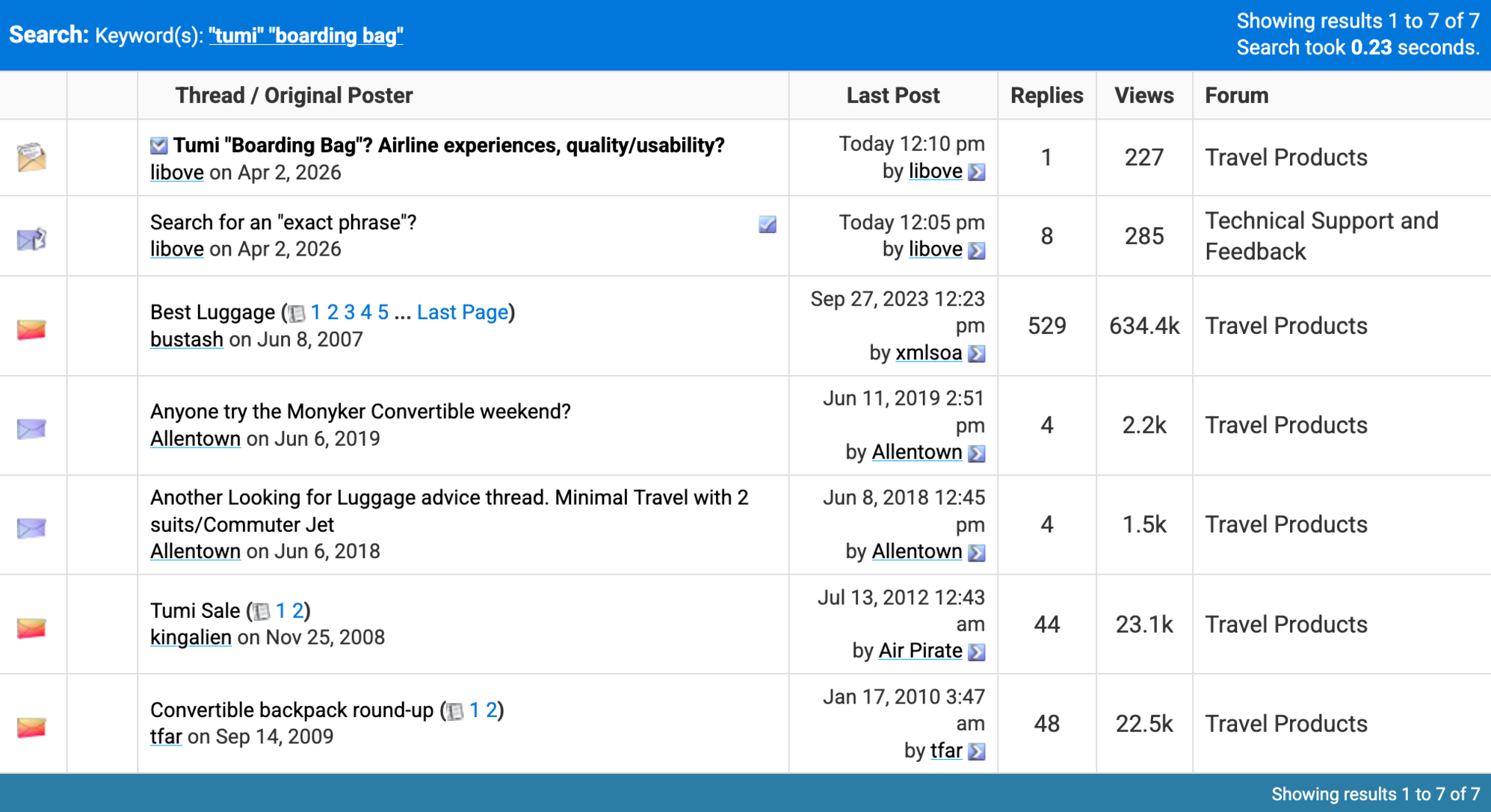
I only checked the third and fourth entries, but they both included "boarding bag". Interestingly, they had instances of "tumi" and "boarding bag" that were not highlighted, and many instances of "bag" (without boarding) that were highlighted, so it seems like the search function leaves something to be desired. Of course, that's not breaking news. Sorry I can't help.