
























JUNE 6TH, 2024 UPDATE Tech Issues Thread
 Jul 31, 2024 | 2:32 pm
#121
Moderator: United Airlines


Join Date: Jun 2007
Location: SFO
Programs: UA LT Plat 2MM, Hyatt Discoverist, Marriott LT Gold, Hilton Silver, IHG Plat
Posts: 73,218
Glad this is back!! Thanks for pushing this
A couple of observations
-- The "who quoted me" only appears when you have a new quote
-- When it does appear, there is no distinction of what is a new entry
Any news about Mentions?
A couple of observations
-- The "who quoted me" only appears when you have a new quote
-- When it does appear, there is no distinction of what is a new entry
Any news about Mentions?
 Jul 31, 2024 | 3:20 pm
#122


Join Date: Nov 2013
Location: NYC / TYO / RSW Up in the Air avoiding the Snowflakes
Programs: UA GS 1.8MM, AA 2.1MM, EK, BA, SQ, CX, Marriott LT, Accor P
Posts: 8,130
I've noticed that the list that pops up for me on the "Quotes" frequently has the wrong threads isted that I was quoted in -- is this a cache issue for me?
 Jul 31, 2024 | 6:42 pm
#123
FlyerTalk Evangelist


Join Date: Mar 2009
Location: NYC
Programs: AS MVPG, DL KM, Bee Six, Bonvoy Plat, Choice Plat, IHG Plat, Avis PC, Natl Exec, Greyhound Road Rwds
Posts: 20,130
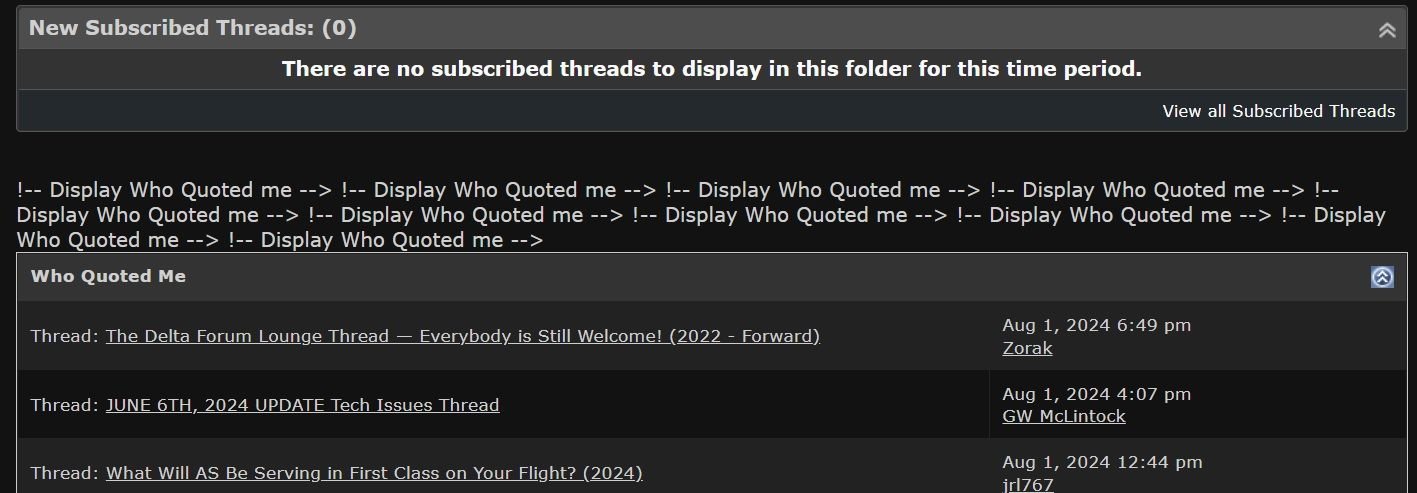
The "Who Quoted Me" window is new to me, or I just never noticed it before. Annoyingly, directly above that I get some erroneous code:
Now I need to figure out how to make that window default to staying closed when I load the MyFlyerTalk page. Once there are too many quotes I can see this easily wreaking havoc when viewing the full site on my phone. I'm hosting a DO this weekend and am expecting quite a few posts
-J.
Code:
!-- Display Who Quoted me --> !-- Display Who Quoted me --> !-- Display Who Quoted me --> !-- Display Who Quoted me --> !-- Display Who Quoted me -->
Now I need to figure out how to make that window default to staying closed when I load the MyFlyerTalk page. Once there are too many quotes I can see this easily wreaking havoc when viewing the full site on my phone. I'm hosting a DO this weekend and am expecting quite a few posts
-J.
Aug 1, 2024 | 9:38 am
#124
Administrator


Join Date: Sep 2015
Location: Los Angeles
Programs: Internet Brands
Posts: 4,443
Mentions are active. And I'm not sure what you mean. Who Quoted Me is there all the time.
Aug 1, 2024 | 9:42 am
#125
Administrator
Join Date: Sep 2015
Location: Los Angeles
Programs: Internet Brands
Posts: 4,443
Possibly. Always clear your cache/cookies when trying out a new feature. Or try the site in private browsing mode
Aug 1, 2024 | 9:52 am
#126


Join Date: Jul 2020
Location: So Cal
Programs: DL Gold, AA Gold, EK Silver
Posts: 4,007
Aug 1, 2024 | 10:15 am
#127
Join Date: Jan 2016
Location: LON
Programs: BAEC
Posts: 5,155
Touch the symbol to the left of the site name

In the menu that pops up choose Cookies and Site data

And then click the trash can to delete site data. Note this will sign you out of the site and you need to log back in again.

Hope that's useful
Aug 1, 2024 | 1:27 pm
#128
Moderator: United Airlines
Join Date: Jun 2007
Location: SFO
Programs: UA LT Plat 2MM, Hyatt Discoverist, Marriott LT Gold, Hilton Silver, IHG Plat
Posts: 73,218
Aug 1, 2024 | 2:07 pm
#129
FlyerTalk Evangelist
Join Date: Mar 2009
Location: NYC
Programs: AS MVPG, DL KM, Bee Six, Bonvoy Plat, Choice Plat, IHG Plat, Avis PC, Natl Exec, Greyhound Road Rwds
Posts: 20,130
The "Who Quoted Me" window is new to me, or I just never noticed it before. Annoyingly, directly above that I get some erroneous code:
Now I need to figure out how to make that window default to staying closed when I load the MyFlyerTalk page. Once there are too many quotes I can see this easily wreaking havoc when viewing the full site on my phone. I'm hosting a DO this weekend and am expecting quite a few posts
Code:
!-- Display Who Quoted me --> !-- Display Who Quoted me --> !-- Display Who Quoted me --> !-- Display Who Quoted me --> !-- Display Who Quoted me -->
Now I need to figure out how to make that window default to staying closed when I load the MyFlyerTalk page. Once there are too many quotes I can see this easily wreaking havoc when viewing the full site on my phone. I'm hosting a DO this weekend and am expecting quite a few posts
 Earlier it was six.
-J.
 Aug 1, 2024 | 6:18 pm
#131
FlyerTalk Evangelist
Join Date: Mar 2009
Location: NYC
Programs: AS MVPG, DL KM, Bee Six, Bonvoy Plat, Choice Plat, IHG Plat, Avis PC, Natl Exec, Greyhound Road Rwds
Posts: 20,130
Now up to 10 times. This is really becoming a problem
It shows like this both on my computer and my phone in the full site mode.
-J.
It shows like this both on my computer and my phone in the full site mode.
-J.
Aug 1, 2024 | 6:40 pm
#132
Join Date: Jul 2020
Location: So Cal
Programs: DL Gold, AA Gold, EK Silver
Posts: 4,007
This is Chrome on Android but I guess it's fairly similar on the iPhone
Touch the symbol to the left of the site name
In the menu that pops up choose Cookies and Site data
And then click the trash can to delete site data. Note this will sign you out of the site and you need to log back in again.
Hope that's useful
Touch the symbol to the left of the site name
In the menu that pops up choose Cookies and Site data
And then click the trash can to delete site data. Note this will sign you out of the site and you need to log back in again.
Hope that's useful
And now I have a new problem…. I hit desk top version whole in this thread and now any time I open only this thread I am seeing it all small and weird and there seems to be no way to revert back.
Aug 1, 2024 | 7:35 pm
#133
FlyerTalk Evangelist
Join Date: Aug 2015
Posts: 12,778
While it is a different product, we have reinstituted Quote notifications
img
You can access them from the dropdown or directly in MyFlyerTalk (main page, below your forum subscriptions)
I've already asked for the notification menu to be reorganized so PMs are the top row again.
img
You can access them from the dropdown or directly in MyFlyerTalk (main page, below your forum subscriptions)
I've already asked for the notification menu to be reorganized so PMs are the top row again.
My only slight niggling request would be, can the quote panel be put at the top of the page, above the list of subscribed threads?
Aug 2, 2024 | 9:27 am
#134
FlyerTalk Evangelist

Join Date: Aug 2002
Location: Intermountain West
Programs: Too many to list
Posts: 12,755
Aug 2, 2024 | 9:31 am
#135
Administrator
Join Date: Sep 2015
Location: Los Angeles
Programs: Internet Brands
Posts: 4,443