
























JUNE 6TH, 2024 UPDATE Tech Issues Thread
 Aug 5, 2024 | 8:13 am
#151
FlyerTalk Evangelist


Join Date: Mar 2009
Location: NYC
Programs: AS MVPG, DL KM, Bee Six, Bonvoy Plat, Choice Plat, IHG Plat, Avis PC, Natl Exec, Greyhound Road Rwds
Posts: 20,133
 Aug 8, 2024 | 8:40 pm
#153
FlyerTalk Evangelist
Join Date: Mar 2009
Location: NYC
Programs: AS MVPG, DL KM, Bee Six, Bonvoy Plat, Choice Plat, IHG Plat, Avis PC, Natl Exec, Greyhound Road Rwds
Posts: 20,133
Aug 8, 2024 | 8:44 pm
#154


Join Date: Aug 2015
Location: SFO
Programs: AS Titanium (OW), HA Platinum, SK Silver (ST), UA (*A), UR, MR, IHG Platinum Elite
Posts: 4,922
Aug 10, 2024 | 3:30 pm
#156


Join Date: Jul 2020
Location: So Cal
Programs: DL Gold, AA Gold, EK Silver
Posts: 4,009
Hey all I am finally back with my lap top and was hoping to see Post Quotes again but I have nothing under the drop down next to my user name in the top right or when I click on the bell next to my user name it is also not there.
However, for the first time in months I did see something that popped up and showed me I had 4 post quotes, along with my new likes. But then it was gone , I cant seem to find anywhere that shows the post quotes.
Can you advise where do I go to see it? I tried to go to My Flyer Talk and down below my subscribed forums but nothing is there.
To be safe I did clear cookies & cache and logged out & then back in.
I know progress was made as I saw it say 4 post quotes but now I dont see it.
Also seperate issue on my cell phone through google chrome I am still not seeing them and I can not for the life of me figure out how to clear the chase for FT on google chrome. Any help on that would be appreciated as I was told above I need to do that to see them on the mobile version of FT on chrome.
Thank you
However, for the first time in months I did see something that popped up and showed me I had 4 post quotes, along with my new likes. But then it was gone , I cant seem to find anywhere that shows the post quotes.
Can you advise where do I go to see it? I tried to go to My Flyer Talk and down below my subscribed forums but nothing is there.
To be safe I did clear cookies & cache and logged out & then back in.
I know progress was made as I saw it say 4 post quotes but now I dont see it.
Also seperate issue on my cell phone through google chrome I am still not seeing them and I can not for the life of me figure out how to clear the chase for FT on google chrome. Any help on that would be appreciated as I was told above I need to do that to see them on the mobile version of FT on chrome.
Thank you
 Aug 10, 2024 | 4:15 pm
#157
FlyerTalk Evangelist


Join Date: Feb 2003
Location: Denver, CO, USA
Programs: Sometimes known as [ARG:6 UNDEFINED]
Posts: 28,786
Hey all I am finally back with my lap top and was hoping to see Post Quotes again but I have nothing under the drop down next to my user name in the top right or when I click on the bell next to my user name it is also not there.
However, for the first time in months I did see something that popped up and showed me I had 4 post quotes, along with my new likes. But then it was gone , I cant seem to find anywhere that shows the post quotes.
Can you advise where do I go to see it? I tried to go to My Flyer Talk and down below my subscribed forums but nothing is there.
To be safe I did clear cookies & cache and logged out & then back in.
I know progress was made as I saw it say 4 post quotes but now I dont see it.
Also seperate issue on my cell phone through google chrome I am still not seeing them and I can not for the life of me figure out how to clear the chase for FT on google chrome. Any help on that would be appreciated as I was told above I need to do that to see them on the mobile version of FT on chrome.
Thank you
However, for the first time in months I did see something that popped up and showed me I had 4 post quotes, along with my new likes. But then it was gone , I cant seem to find anywhere that shows the post quotes.
Can you advise where do I go to see it? I tried to go to My Flyer Talk and down below my subscribed forums but nothing is there.
To be safe I did clear cookies & cache and logged out & then back in.
I know progress was made as I saw it say 4 post quotes but now I dont see it.
Also seperate issue on my cell phone through google chrome I am still not seeing them and I can not for the life of me figure out how to clear the chase for FT on google chrome. Any help on that would be appreciated as I was told above I need to do that to see them on the mobile version of FT on chrome.
Thank you
And you will only see it if you have new post quotes and/or new likes.
And if you click on quotes, you should see this one.
But once you click, poof! It disappears until someone else quotes you or likes you.
Aug 10, 2024 | 6:34 pm
#158
Join Date: Jul 2020
Location: So Cal
Programs: DL Gold, AA Gold, EK Silver
Posts: 4,009
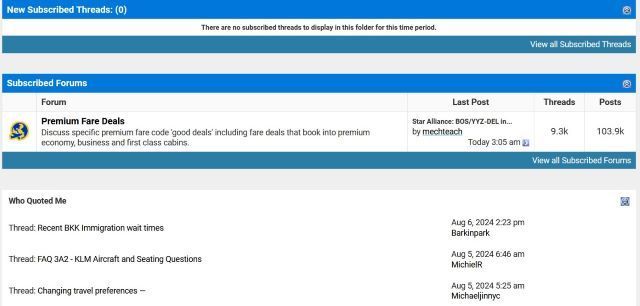
You won't see it under the bell. You'll only see it under "Welcome, happiest_at_40000. | You last visited: Today at xx:xx"
And you will only see it if you have new post quotes and/or new likes.
And if you click on quotes, you should see this one.
But once you click, poof! It disappears until someone else quotes you or likes you.
And you will only see it if you have new post quotes and/or new likes.
And if you click on quotes, you should see this one.
But once you click, poof! It disappears until someone else quotes you or likes you.
One issue though is when I did click on "Quotes" just now it did not take me a to a page where I can see my quotes and choose the new one to view. It took me to all subscribed threads I have all in black bold b/c they had a new post I presume. So I can see quotes in this new spot but I still cant go see them, this cant be right.
Lastly if you know how to clear the cache/help me see quotes on my cell would be super appreciative.
Thanks
 Aug 11, 2024 | 9:39 am
#160
FlyerTalk Evangelist
Join Date: Feb 2003
Location: Denver, CO, USA
Programs: Sometimes known as [ARG:6 UNDEFINED]
Posts: 28,786
On a desktop/laptop, you can use either the Mobile One style or the FT Desktop NG style. Those choices are at the very bottom left. Appearance of some items can vary greatly between the two styles.
Aug 13, 2024 | 8:26 pm
#161

Join Date: May 2015
Location: South Florida
Programs: DL Skymiles KE Skypass
Posts: 2,826
OK, I have clicked on the threads that I am quoted on, but they are still there, not erasing automatically like in the past. I find no way to delete them, please advise if there is a way to delete them.,,,,
Aug 14, 2024 | 9:27 am
#162
Administrator

Join Date: Sep 2015
Location: Los Angeles
Programs: Internet Brands
Posts: 4,445
Aug 14, 2024 | 12:13 pm
#163
Join Date: Jul 2020
Location: So Cal
Programs: DL Gold, AA Gold, EK Silver
Posts: 4,009
Yay! I finally have post quotes on my desk top albeit not in the same spot or as easy to find but I do have them!!
i am still stuck on my phone though (using the mobile version as it’s much better than the desk top). I just don’t see where that notification center is that shows me the quotes.
i am still stuck on my phone though (using the mobile version as it’s much better than the desk top). I just don’t see where that notification center is that shows me the quotes.
Aug 16, 2024 | 1:41 am
#164

Join Date: May 2019
Posts: 33
Where do I find this? Nothing on the bottom left that I see. Seems that my desktop is displaying what looks like mobile mode and it's awful. Really makes FT almost unreadable. I want the look that I had up until last week. Not sure what changed but this looks horrible.
Aug 16, 2024 | 1:57 am
#165
Join Date: Jan 2016
Location: LON
Programs: BAEC
Posts: 5,156
Infinite / Automatic Scroll: issues, q&a, disable on desktop version