
























Redirection links instead of direct
 Jan 24, 2022 | 11:39 pm
#1
Original Poster


Join Date: Nov 2012
Location: Rhineland-Palatinate
Programs: *A Gold (A3), HHonor Gold
Posts: 6,940
Redirection links instead of direct
I noticed that now, when posting a link in a thread, it is not a direct link anymore but a redirection from flyertalk.com. Meaning the link can not be copy/paste anymore ?
Why was this done ?
Why was this done ?
 Jan 26, 2022 | 12:08 pm
#2
Join Date: Jan 2016
Location: LON
Programs: BAEC
Posts: 5,151
 Jan 26, 2022 | 12:19 pm
#3
Original Poster
Join Date: Nov 2012
Location: Rhineland-Palatinate
Programs: *A Gold (A3), HHonor Gold
Posts: 6,940
If you look at this post:
https://www.flyertalk.com/forum/33937252-post43958.html
The text is
The link is not a direct link to CNN, despite the text being a link to CNN, it is a redirection:
https://www.flyertalk.com/forum/33937252-post43958.html
The text is
Code:
https://edition.cnn.com/2022/01/26/us/anti-semitic-flyers/index.html
Code:
https://www.flyertalk.com/forum/redirect-to/?redirect=https%3A%2F%2Fwww.cnn.com%2F2022%2F01%2F26%2Fus%2Fanti-semitic-flyers%2Findex.html
Jan 26, 2022 | 8:01 pm
#4
FlyerTalk Evangelist

Join Date: Jan 2010
Posts: 10,062
If you look at this post:
https://www.flyertalk.com/forum/33937252-post43958.html
The text is
The link is not a direct link to CNN, despite the text being a link to CNN, it is a redirection:
https://www.flyertalk.com/forum/33937252-post43958.html
The text is
Code:
https://edition.cnn.com/2022/01/26/us/anti-semitic-flyers/index.html
Code:
https://www.cnn.com/2022/01/26/us/anti-semitic-flyers/index.html

truncated to:

re-directed not by FT but within CNN to:

All shown as screenshots for accuracy.
Edit: When I quote you, the second one you mentioned as being a re-direction changes within the quote to a direct link!
Feb 1, 2022 | 7:03 pm
#6
Moderator: Hyatt, American Express; FlyerTalk Evangelist


Join Date: Jun 2015
Location: WAS
Programs: :rolleyes:, DL DM, AA EXP, UA Silver, Hyatt Glob, Mlife Noir (=> Marriott Amb), invol FT beta tester
Posts: 21,685
Right now for me, if I click on the link that OP gave, which shows just that single message and nothing else, the link looks normal, no redirect shenanigans.
But if you click in the upper right where it says "Thread: Coronavirus pandemic" and click to show the post in the context of its containing thread, then when the post eventually loads (you will have to wait for the FT software to do whatever it is that takes so long probably loading all of the thread's messages just to show you a single page) and then jump to the post (number 43958) and then hover over the link again.
For a less controversial post
 which is not in OMNI/PR, here's one on the JWST Space Telescope:
single post: https://www.flyertalk.com/forum/33953366-post202.html
in thread context: James Webb Space Telescope (JWST) - 12/22/21 launch
using developer tools to inspect:
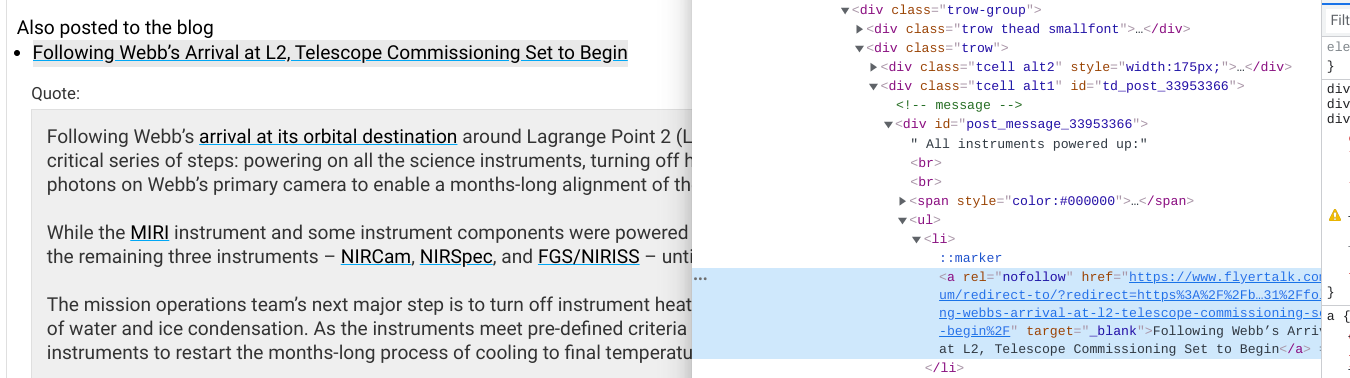
Both of these examples are in OMNI; I do NOT see the redirect markup outside of OMNI (but have only looked at a tiny number of posts so don't know if this rule holds true universally)
Feb 1, 2022 | 8:05 pm
#7
FlyerTalk Evangelist
Join Date: Jun 2010
Location: TOA
Programs: HH LTDiamond, Marriott LTPP/Platinum Premier, Hyatt Lame-ist, UA MM LT1P
Posts: 21,245
I thought so too when I first looked at this thread, but I see it now too. The interesting thing is that it doesn't happen in all views, and maybe not even all the time.
Right now for me, if I click on the link that OP gave, which shows just that single message and nothing else, the link looks normal, no redirect shenanigans.
But if you click in the upper right where it says "Thread: Coronavirus pandemic" and click to show the post in the context of its containing thread, then when the post eventually loads (you will have to wait for the FT software to do whatever it is that takes so long probably loading all of the thread's messages just to show you a single page) and then jump to the post (number 43958) and then hover over the link again.
For a less controversial post which is not in OMNI/PR, here's one on the JWST Space Telescope:
single post: https://www.flyertalk.com/forum/33953366-post202.html
in thread context: James Webb Space Telescope (JWST) - 12/22/21 launch
using developer tools to inspect:
Both of these examples are in OMNI; I do NOT see the redirect markup outside of OMNI (but have only looked at a tiny number of posts so don't know if this rule holds true universally)
Right now for me, if I click on the link that OP gave, which shows just that single message and nothing else, the link looks normal, no redirect shenanigans.
But if you click in the upper right where it says "Thread: Coronavirus pandemic" and click to show the post in the context of its containing thread, then when the post eventually loads (you will have to wait for the FT software to do whatever it is that takes so long probably loading all of the thread's messages just to show you a single page) and then jump to the post (number 43958) and then hover over the link again.
For a less controversial post
which is not in OMNI/PR, here's one on the JWST Space Telescope:single post: https://www.flyertalk.com/forum/33953366-post202.html
in thread context: James Webb Space Telescope (JWST) - 12/22/21 launch
using developer tools to inspect:
Both of these examples are in OMNI; I do NOT see the redirect markup outside of OMNI (but have only looked at a tiny number of posts so don't know if this rule holds true universally)
Here's three examples of recent posts with links external to FlyerTalk that are outside of OMNI:
https://www.flyertalk.com/forum/hawa...l#post33955890
Points in the City Promo Starts February 3, 2022
Hilton launches Waitographer-staff trained in taking smartphone pics (UAE)
David


