
























Restoring legacy post editing functions on the new "upgraded" system?
 Nov 19, 2017 | 5:24 am
#1
Original Poster
A FlyerTalk Posting Legend


Join Date: Mar 2001
Posts: 55,213
 Restoring legacy post editing functions on the new "upgraded" system?
1. How do you imbed a hyperlink into words you type? I no longer see the globe icon so how do you do this?
2. How do you vary font size in a post?
3. How do you scroll to the top of the page of a thread? When I move the scroll bar on the side to the top, the page falls down toward the middle.
Thanks
2. How do you vary font size in a post?
3. How do you scroll to the top of the page of a thread? When I move the scroll bar on the side to the top, the page falls down toward the middle.
Thanks
Last edited by Analise; Nov 19, 2017 at 7:04 am
 Nov 19, 2017 | 8:26 am
#2
FlyerTalk Evangelist

Join Date: Mar 2013
Location: London
Posts: 17,013
1. How do you imbed a hyperlink into words you type? I no longer see the globe icon so how do you do this?
2. How do you vary font size in a post?
3. How do you scroll to the top of the page of a thread? When I move the scroll bar on the side to the top, the page falls down toward the middle.
Thanks
2. How do you vary font size in a post?
3. How do you scroll to the top of the page of a thread? When I move the scroll bar on the side to the top, the page falls down toward the middle.
Thanks
- Go to MyFlyerTalk, and click Edit Options on the left panel [ or use this direct link: https://www.flyertalk.com/forum/prof...do=editoptions ]
- Scroll to "Miscellaneous Options", close to the bottom of the page.
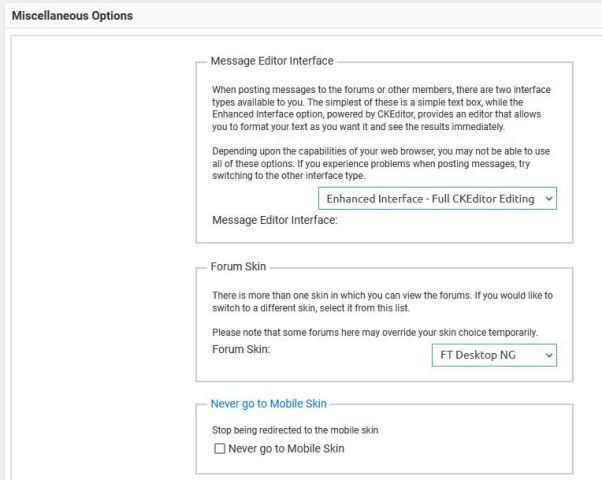
- In the first box in Miscellaneous Options, Change to the editor style of your preference. "Standard Editor" is closest to the old one.
There are other options on that page that you may find improve your experience.
Last edited by JDiver; Nov 23, 2017 at 3:02 pm Reason: Add color and formatting so others are easily drawn to this answer
Nov 19, 2017 | 9:58 am
#3
Original Poster
A FlyerTalk Posting Legend
Join Date: Mar 2001
Posts: 55,213
You can bring back the old-style post editor if you prefer.
Go to MyFlyerTalk, and click Edit Options on the left panel [ or use this direct link: [url]https://www.flyertalk.com/forum/profile.php?do=editoptions ]
Scroll to "Miscellaneous Options", close to the bottom of the page.
In the first box in Miscellaneous Options, Change to the editor style of your preference. "Standard Editor" is closest to the old one.
There are other options on that page that you may find improve your experience.
Go to MyFlyerTalk, and click Edit Options on the left panel [ or use this direct link: [url]https://www.flyertalk.com/forum/profile.php?do=editoptions ]
Scroll to "Miscellaneous Options", close to the bottom of the page.
In the first box in Miscellaneous Options, Change to the editor style of your preference. "Standard Editor" is closest to the old one.
There are other options on that page that you may find improve your experience.
Nov 19, 2017 | 10:56 am
#4


Join Date: Nov 2002
Location: SEA/YVR/BLI
Programs: UA "Lifetime" Gold, AS Titanium, OW Emerald, HH Lifetime Diamond, IC Plat, Marriott Gold, Hertz Gold
Posts: 9,583
Feb 27, 2024 | 12:44 pm
#5
A FlyerTalk Posting Legend


Join Date: Dec 2000
Location: Shanghai
Posts: 46,325
You can bring back the old-style post editor if you prefer.
There are other options on that page that you may find improve your experience.
- Go to MyFlyerTalk, and click Edit Options on the left panel [ or use this direct link: [url]https://www.flyertalk.com/forum/profile.php?do=editoptions ]
- Scroll to "Miscellaneous Options", close to the bottom of the page.
- In the first box in Miscellaneous Options, Change to the editor style of your preference. "Standard Editor" is closest to the old one.
- Scroll to "Miscellaneous Options", close to the bottom of the page.
There are other options on that page that you may find improve your experience.
Feb 27, 2024 | 9:48 pm
#6
FlyerTalk Evangelist

Join Date: Jan 2010
Posts: 10,050
Apologies for the thread bump. I've been using the old school editor (on computers only; my phones are not affected) for the past several months and have yet to figure out how to reselect the standard editor so I can post images, format, etc. I don't see "miscellaneous options" near the bottom of the "edit options" page. Please advise. Thx.
 Feb 27, 2024 | 10:09 pm
#7
A FlyerTalk Posting Legend
Join Date: Dec 2000
Location: Shanghai
Posts: 46,325
Coincidentally, the feature rich editor returned almost immediately after I posted my earlier message, but I have no idea how I brought it about.
To answer your question, when I click on the link in question (even now), I still don't see any of the miscellaneous options. If it helps with troubleshooting, when the editor returned (again, I'm not sure what I did to get it back), I also saw this really annoying red prompt at the bottom of pages telling me to turn off ad block plus...something I had never seen before (I have an ad free subscription so I didn't know that it was enabled). I did turn it off and now that red prompt is gone.
Feb 28, 2024 | 6:38 pm
#8
Moderator: Travel Safety/Security, Travel Tools, California, Los Angeles; FlyerTalk Evangelist
Join Date: Dec 2009
Location: LAX
Programs: oneword Emerald
Posts: 24,773
Feb 29, 2024 | 12:38 am
#9
A FlyerTalk Posting Legend
Join Date: Dec 2000
Location: Shanghai
Posts: 46,325
 Feb 29, 2024 | 9:27 am
#10
Moderator: Travel Safety/Security, Travel Tools, California, Los Angeles; FlyerTalk Evangelist
Join Date: Dec 2009
Location: LAX
Programs: oneword Emerald
Posts: 24,773
Switch to the desktop view and try again.
Please refer to the following thread for instructions on how to switch to the desktop view.
Feb 29, 2024 | 8:51 pm
#11
A FlyerTalk Posting Legend
Join Date: Dec 2000
Location: Shanghai
Posts: 46,325
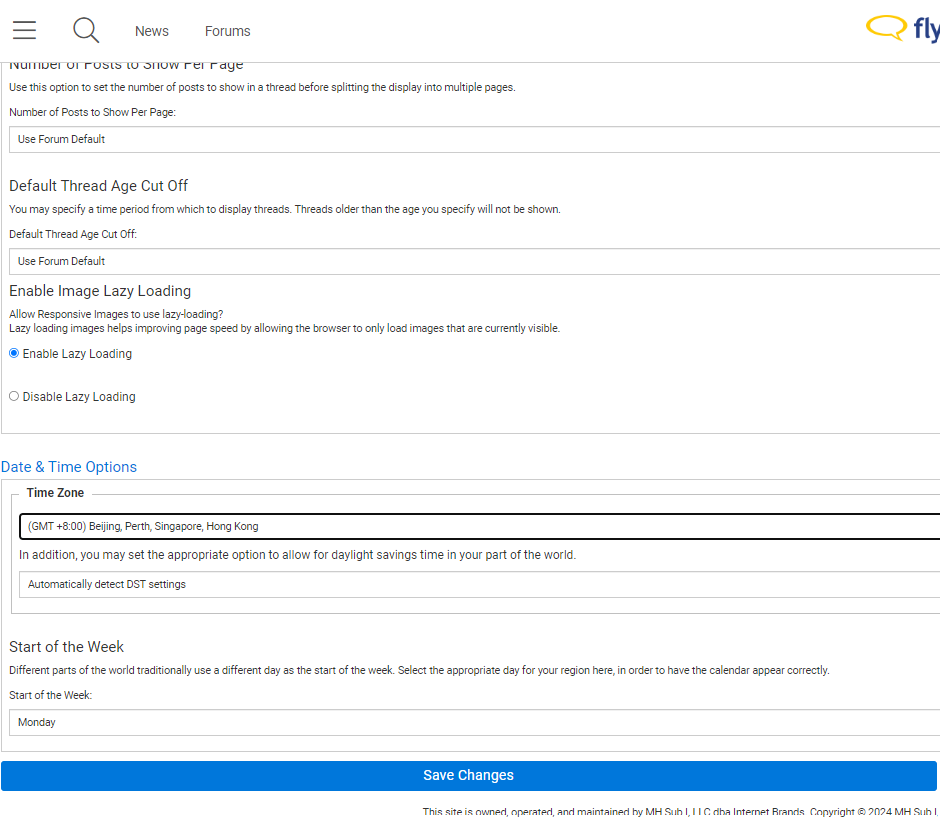
It would appear as if you are in the mobile skin, which does not give you the options to change the Message Editor Interface.
Switch to the desktop view and try again.
Please refer to the following thread for instructions on how to switch to the desktop view.
Switch to the desktop view and try again.
Please refer to the following thread for instructions on how to switch to the desktop view.
Many thanks! When I opened this link (https://www.flyertalk.com/forum/prof...ons&styleid=24) that the other thread referred to, I was able to see and edit the miscellaneous options. I'm not sure whether or not I was in the mobile skin because I don't notice any cosmetic differences now, but at least it worked.
This part of FT is a little bit confusing (i.e. not the most intuitive UI); it's good that users don't encounter it on a regular basis.