




















Community
Wiki Posts
Search

Email delivery problems

Thread Tools
 
Search this Thread
 
Old Feb 25, 2021 | 8:54 am
  #16  
Administrator
10 Countries Visited
Conversation Starter
All eyes on you!
10 Years on Site
 
Join Date: Sep 2015
Location: Los Angeles
Programs: Internet Brands
Posts: 4,435
Originally Posted by sbams
I used to get several email notifications per day from subscribed threads but since a while I receive none. I checked my email address and setting and they seem to be ok. Any ideas?
Have you whitelisted FlyerTalk and made sure none of the emails are being sent to spam?
IBJoel is offline  
Old Feb 25, 2021 | 10:40 am
  #17  
brp
FlyerTalk Evangelist
All eyes on you!
20 Years on Site
 
Join Date: Mar 2004
Location: SJC
Programs: AA EXP, BA Silver, Hyatt Globalist, Hilton diamond, Marriott Platinum
Posts: 34,035
Originally Posted by sbams
I used to get several email notifications per day from subscribed threads but since a while I receive none. I checked my email address and setting and they seem to be ok. Any ideas?
Originally Posted by IBJoel
Have you whitelisted FlyerTalk and made sure none of the emails are being sent to spam?
I m having this same issue, and they are not going to Spam. I get the periodic blog from FT, so no issues there. My subscriptions are not coming. This includes threads where responses came several months ago and I just happened to look at the thread and saw them (no notice) as well as threads I've signed up for in the last few days where responses are coming in and I'm getting no notification.

(And I'll keep an eye on this thread since subscribing likely won't show me if there are responses )

Cheers.

Last edited by brp; Feb 25, 2021 at 10:46 am
brp is offline  
Old Feb 26, 2021 | 9:43 am
  #18  
brp
FlyerTalk Evangelist
All eyes on you!
20 Years on Site
 
Join Date: Mar 2004
Location: SJC
Programs: AA EXP, BA Silver, Hyatt Globalist, Hilton diamond, Marriott Platinum
Posts: 34,035
Checking back on this to see if there's any update.

Cheers.
brp is offline  
Old Feb 27, 2021 | 10:08 pm
  #19  
FlyerTalk Evangelist
All eyes on you!
15 Years on Site
 
Join Date: Jan 2010
Posts: 10,041
Originally Posted by brp
Checking back on this to see if there's any update.
Don't hold your breath. I've not had these emails for maybe a couple of years now with some potential blame being directed at my email provider but no solution given (without changing provider which isn't going to happen).
ft101 is offline  
Old Feb 28, 2021 | 5:43 pm
  #20  
brp
FlyerTalk Evangelist
All eyes on you!
20 Years on Site
 
Join Date: Mar 2004
Location: SJC
Programs: AA EXP, BA Silver, Hyatt Globalist, Hilton diamond, Marriott Platinum
Posts: 34,035
Originally Posted by ft101
Don't hold your breath. I've not had these emails for maybe a couple of years now with some potential blame being directed at my email provider but no solution given (without changing provider which isn't going to happen).
Didn't get notified about your response The monthly or so blogs they send make it, so I know that the email address works. They don't seem very intent on fixing this based on the lack of response here, unfortunately.

Cheers.
brp is offline  
Old Mar 1, 2021 | 4:36 am
  #21  
10 Countries Visited
20 Countries Visited
30 Countries Visited
10 Years on Site
 
Join Date: May 2012
Location: AMS
Programs: BA, KL PFL, LH *G, Hilton LTD, Marriott
Posts: 1,364
Originally Posted by brp
I m having this same issue, and they are not going to Spam. I get the periodic blog from FT, so no issues there. My subscriptions are not coming. This includes threads where responses came several months ago and I just happened to look at the thread and saw them (no notice) as well as threads I've signed up for in the last few days where responses are coming in and I'm getting no notification.

(And I'll keep an eye on this thread since subscribing likely won't show me if there are responses )

Cheers.
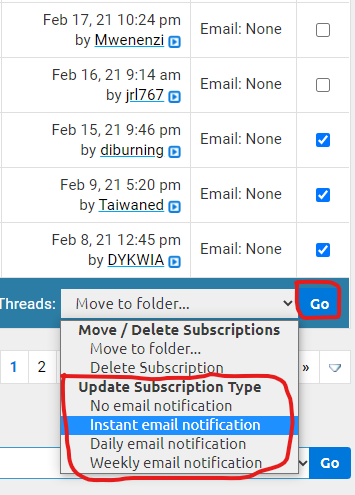
Exactly. I do see that all the check boxes for my "Subscribed Threads email notification" are UNchecked. Despite checking them all again, the next time I return to look they are unchecked. There doesn't seem to be a "save" button or anything to acknowledge that I have made changes to the check boxes.
sbams is offline  
Old Mar 1, 2021 | 7:05 am
  #22  
Administrator
10 Countries Visited
Conversation Starter
All eyes on you!
10 Years on Site
 
Join Date: Sep 2015
Location: Los Angeles
Programs: Internet Brands
Posts: 4,435
Try whitelisting specifically: [email protected]. The forum emails and newsletter use two different emails.
IBJoel is offline  
Old Mar 1, 2021 | 11:10 am
  #23  
brp
FlyerTalk Evangelist
All eyes on you!
20 Years on Site
 
Join Date: Mar 2004
Location: SJC
Programs: AA EXP, BA Silver, Hyatt Globalist, Hilton diamond, Marriott Platinum
Posts: 34,035
Originally Posted by IBJoel
Try whitelisting specifically: [email protected]. The forum emails and newsletter use two different emails.
Thanks. I can certainly do that. Since the messages are not being trapped by my Spam filtering intermediary, it's unlikely that this is the cause. But it certainly won't hurt to do this anyway while you folks look further into this.

Cheers,
brp is offline  
Old Mar 1, 2021 | 11:13 am
  #24  
brp
FlyerTalk Evangelist
All eyes on you!
20 Years on Site
 
Join Date: Mar 2004
Location: SJC
Programs: AA EXP, BA Silver, Hyatt Globalist, Hilton diamond, Marriott Platinum
Posts: 34,035
Originally Posted by sbams
Exactly. I do see that all the check boxes for my "Subscribed Threads email notification" are UNchecked. Despite checking them all again, the next time I return to look they are unchecked. There doesn't seem to be a "save" button or anything to acknowledge that I have made changes to the check boxes.
Good point. All of mine are unchecked as well. Does that mean that notification si actually turned off for some reason? That would certainly explain why we're not getting notified
But, as you say, there seems no way to check these and keep them checked. Bug?

Cheers.
brp is offline  
Old Mar 1, 2021 | 11:48 am
  #25  
Administrator
10 Countries Visited
Conversation Starter
All eyes on you!
10 Years on Site
 
Join Date: Sep 2015
Location: Los Angeles
Programs: Internet Brands
Posts: 4,435
Originally Posted by sbams
Exactly. I do see that all the check boxes for my "Subscribed Threads email notification" are UNchecked. Despite checking them all again, the next time I return to look they are unchecked. There doesn't seem to be a "save" button or anything to acknowledge that I have made changes to the check boxes.
Originally Posted by brp
Good point. All of mine are unchecked as well. Does that mean that notification si actually turned off for some reason? That would certainly explain why we're not getting notified
But, as you say, there seems no way to check these and keep them checked. Bug?

Cheers.
Oooohh maybe this was it? So check all of them that you want email notifications for. Then scroll to the bottom and select how often you'd like to get an email for them. Then click "Go" and it will update all threads on that page.

IBJoel is offline  
Old Mar 1, 2021 | 2:00 pm
  #26  
brp
FlyerTalk Evangelist
All eyes on you!
20 Years on Site
 
Join Date: Mar 2004
Location: SJC
Programs: AA EXP, BA Silver, Hyatt Globalist, Hilton diamond, Marriott Platinum
Posts: 34,035
Originally Posted by IBJoel
Oooohh maybe this was it? So check all of them that you want email notifications for. Then scroll to the bottom and select how often you'd like to get an email for them. Then click "Go" and it will update all threads on that page.

Doesn't seem to have helped. I did exactly this and, after hitting Go, they all show as unchecked again.I have already tried the whitelisting suggestion above and didn't, for example get notified of your response here.

Cheers.
brp is offline  
Old Mar 1, 2021 | 2:18 pm
  #27  
Administrator
10 Countries Visited
Conversation Starter
All eyes on you!
10 Years on Site
 
Join Date: Sep 2015
Location: Los Angeles
Programs: Internet Brands
Posts: 4,435
Originally Posted by brp
Doesn't seem to have helped. I did exactly this and, after hitting Go, they all show as unchecked again.I have already tried the whitelisting suggestion above and didn't, for example get notified of your response here.

Cheers.
They don't need to be checked, they need to say "Email: Instant/Daily/Weekly" in the column immediately to the left of the "checkbox" column.
IBJoel is offline  
Old Mar 2, 2021 | 9:21 am
  #28  
brp
FlyerTalk Evangelist
All eyes on you!
20 Years on Site
 
Join Date: Mar 2004
Location: SJC
Programs: AA EXP, BA Silver, Hyatt Globalist, Hilton diamond, Marriott Platinum
Posts: 34,035
Originally Posted by IBJoel
They don't need to be checked, they need to say "Email: Instant/Daily/Weekly" in the column immediately to the left of the "checkbox" column.
At present they do.indicate "Instant". And the notices are, as before, not coming. Your latest response here is a current example. seems not to be working. Help fixing this appreciated.

Cheers.
brp is offline  
Old Mar 4, 2021 | 5:06 am
  #29  
10 Countries Visited
20 Countries Visited
30 Countries Visited
10 Years on Site
 
Join Date: May 2012
Location: AMS
Programs: BA, KL PFL, LH *G, Hilton LTD, Marriott
Posts: 1,364
My subscribed threads were showing "instant" all along but I did recheck them and select GO as suggested. It hasn't helped unfortunately
sbams is offline  
Old Mar 4, 2021 | 8:13 am
  #30  
Administrator
10 Countries Visited
Conversation Starter
All eyes on you!
10 Years on Site
 
Join Date: Sep 2015
Location: Los Angeles
Programs: Internet Brands
Posts: 4,435
Standby, we're examining the possibility of doing a "Forced Send" (which should theoretically unclog the drain, so to speak), but are looking at if we can target it a little more precisely.
IBJoel is offline  


Contact Us - Archive - Advertising - Cookie Policy - Privacy Statement - Terms of Service -

This site is owned, operated, and maintained by MH Sub I, LLC dba Internet Brands. Copyright © 2026 MH Sub I, LLC dba Internet Brands. All rights reserved. Designated trademarks are the property of their respective owners.