
























TRIPS aren't showing on website
 Oct 1, 2025 | 11:54 am
#1
Original Poster
FlyerTalk Evangelist


Join Date: Aug 2002
Location: Intermountain West
Programs: Too many to list
Posts: 12,734
TRIPS aren't showing on website
When I log in to the website and chose "Trips" it takes me to the "Manage Your Reservation" page where I have to enter my name & Conf. code. Then it still doesn't pull up the trip. What's going on? Can others ck and see it it's just me?
I can see my TRIPS just fine on the app but I prefer to use the website.
I can see my TRIPS just fine on the app but I prefer to use the website.
 Oct 1, 2025 | 12:48 pm
#2


Join Date: Aug 2015
Location: SFO
Programs: AS Titanium (OW), HA Platinum, SK Silver (ST), UA (*A), UR, MR, IHG Platinum Elite
Posts: 4,836
When I log in to the website and chose "Trips" it takes me to the "Manage Your Reservation" page where I have to enter my name & Conf. code. Then it still doesn't pull up the trip. What's going on? Can others ck and see it it's just me?
I can see my TRIPS just fine on the app but I prefer to use the website.
I can see my TRIPS just fine on the app but I prefer to use the website.
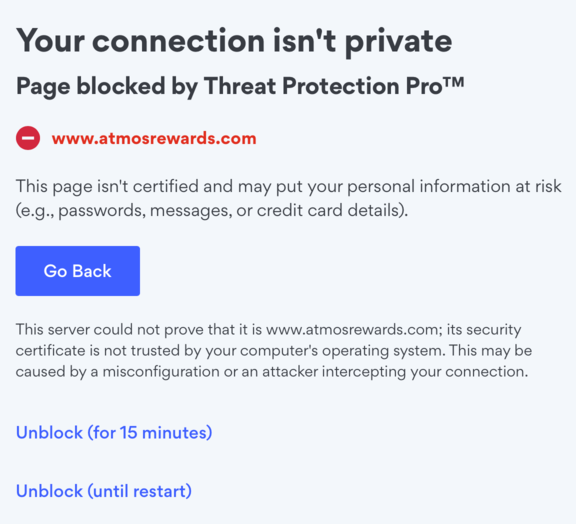
Unblocking it leads to the entering confirmation code and last name that you see.
Without NordVPN's Threat Protection running I get this in Safari.
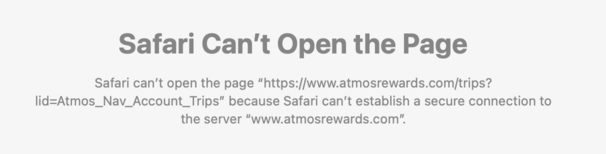
But still no list of trips. Running Ventura on an older iMac, so not the latest MacOS.
I get the list of trips in other browsers such as Chrome.
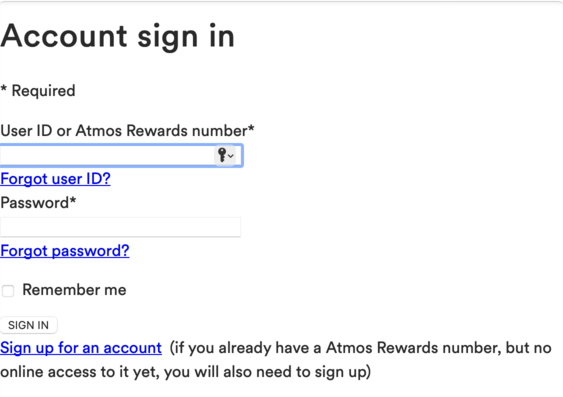
By the way, logging in using Safari looks funny too.
Last edited by vanillabean; Oct 1, 2025 at 2:26 pm
Oct 1, 2025 | 1:05 pm
#3
Join Date: May 2012
Location: HNL
Programs: Atmos Ti MM
Posts: 1,832
When I log in to the website and chose "Trips" it takes me to the "Manage Your Reservation" page where I have to enter my name & Conf. code. Then it still doesn't pull up the trip. What's going on? Can others ck and see it it's just me?
I can see my TRIPS just fine on the app but I prefer to use the website.
I can see my TRIPS just fine on the app but I prefer to use the website.
Oct 1, 2025 | 1:29 pm
#4
FlyerTalk Evangelist

Join Date: Dec 2006
Location: Pacific Northwest
Programs: UA Gold 1MM, AS Plat, AA EP, Bonvoy Plat, Hilton Dia, Hyatt Glob, IHG Plat, ...
Posts: 21,432
I have no more trips planned for this year, and unless family emergencies require air travel, I will be able to watch the integration process (and gov shutdown) from my couch. I do hope to book / refine some travel for next year over the next few weeks, so hopefully that part of the website settles down quickly.
Oct 1, 2025 | 1:36 pm
#5
Join Date: May 2012
Location: HNL
Programs: Atmos Ti MM
Posts: 1,832
I have no more trips planned for this year, and unless family emergencies require air travel, I will be able to watch the integration process (and gov shutdown) from my couch. I do hope to book / refine some travel for next year over the next few weeks, so hopefully that part of the website settles down quickly.
Oct 1, 2025 | 2:15 pm
#6
A FlyerTalk Posting Legend, Moderator, Information Desk, Ambassador, Alaska Airlines


Join Date: Dec 2006
Location: FAI
Programs: AS MVP Gold100K, AS 1MM, Maika`i Card, AGR, Hertz PC, Marriott Lifetime Plat, CO, 7H, BA, 8E
Posts: 44,266
This has been broken for at least a day. Can go via the app, but doesn't work for desktop.


 Oct 1, 2025 | 2:44 pm
#8
Original Poster
FlyerTalk Evangelist
Join Date: Aug 2002
Location: Intermountain West
Programs: Too many to list
Posts: 12,734
 Now to get to work on schedule changes--5 hour layovers are not working for me.
  Oct 1, 2025 | 9:16 pm
#9


Join Date: Apr 2007
Location: The Far, Far North
Programs: Alaskans fly everywhere on any aircraft going there!
Posts: 1,370
Called customer care today to see what is going on....could pull up things on phone but, as above, trips was requiring me to enter conf code or ticket no. individually for each trip. Can't seem to fix it on the website...signing in and going to trips takes me to a sort of funky, beta looking sign in page, signing in takes me tp trips odd looking page that has to have conf code or ticket number.....Very weird....agent and I decided it was some glitch going on and she said she would bump it over to folks who might clear it up. just tried again...no improvement.
Oct 2, 2025 | 4:10 pm
#10
FlyerTalk Evangelist
Join Date: May 2012
Location: DCA, lived MCI, SEA/PDX,BUF (born/raised)
Programs: Marriott, IHG, Hyatt, Choice, AS, UA, WN
Posts: 10,673
When I log in to the website and chose "Trips" it takes me to the "Manage Your Reservation" page where I have to enter my name & Conf. code. Then it still doesn't pull up the trip. What's going on? Can others ck and see it it's just me?
I can see my TRIPS just fine on the app but I prefer to use the website.
I can see my TRIPS just fine on the app but I prefer to use the website.
a few days ago I did see some loading glitches in trips.
also during this time I’m seeing my account auto saved. I go onto the home page I’m not signed in. I click on to sign in, it auto signs me in.
Oct 2, 2025 | 11:53 pm
#11
Join Date: Nov 2022
Programs: Alaska 100K Hilton Diamond
Posts: 395
Oct 3, 2025 | 12:12 am
#12
Join Date: May 2012
Location: HNL
Programs: Atmos Ti MM
Posts: 1,832
Oct 3, 2025 | 7:47 am
#13
FlyerTalk Evangelist

Join Date: Nov 2009
Location: SEA — the REAL Washington; occasionally in the other Washington (DCA area)
Programs: AS MVPG 100K (Atmos Titanium) / 0.5MM; DL fallen PM (1.58MM = “Complimentary Annual GM”); AA Gold
Posts: 24,383
 this is asinine
everything was working fine the past couple days, but this morning the iPhone app asked me to log in … after the “synching your trips” message and the spinning circle disappeared, the only trip that showed up in My Trips is a placeholder award on HA metal in June
spent the last 10-15 min going back and forth to email to find the dozen or so PNRs that *should* be there, and manually adding each
spent the last 10-15 min going back and forth to email to find the dozen or so PNRs that *should* be there, and manually adding each
Oct 3, 2025 | 12:40 pm
#14
Join Date: Dec 2007
Location: Las Vegas
Programs: DL Platinum, AA Lifetime Gold, Hilton Diamond, Marriott Platinum, Radisson Premium
Posts: 6,730
Mine weren't even showing in the app in the last two days but they're back now
Last edited by demkr; Oct 3, 2025 at 1:53 pm
Oct 3, 2025 | 2:05 pm
#15
Join Date: May 2009
Location: SEA
Programs: AS MVPG, DL FO, Marriott Gold, Hertz 5 Whatevers
Posts: 1,144
Also broken for me on Chrome. I log in, it takes me to the Atmos rewards screen. I then click on trips, and it tells me to enter in a confirmation code or log in. If I try to log in again, I get taken back to the Atmos Rewards screen. Only way I can see my trips is the App (for now). I hope they fix this. This is really basic/fundamental functionality. I really don't care about the fresh coat of paint if the fundamentals don't work.
Clearing browser cache also doesn't work.
Clearing browser cache also doesn't work.