
























Question: Split PNR and upgrades
 Jun 18, 2021 | 5:49 pm
#1
Original Poster


Join Date: Apr 2008
Location: Ottawa
Programs: United Premier Silver / Bonvoy Titanium Elite
Posts: 939
Split PNR and upgrades
So, I'm going to try not to turn this into a long story.
I have a booking with 2 pax. YOW - YVR return. Outbound upgrades cleared. Return we are waitlisted.
Upon checking in at YOW this morning she had difficulty checking baggage. To solve the issue she put all the bags (2) under my name since I'm E50k. To do this she slit the PNR in two.
I'm totally confused why this was required but my question is - will the other passenger still have the same upgrade priority as myself? He's just AE nothing with no eUps or anything.
We both still show as waitlisted on seperate PNRs if that helps.
Thanks!
I have a booking with 2 pax. YOW - YVR return. Outbound upgrades cleared. Return we are waitlisted.
Upon checking in at YOW this morning she had difficulty checking baggage. To solve the issue she put all the bags (2) under my name since I'm E50k. To do this she slit the PNR in two.
I'm totally confused why this was required but my question is - will the other passenger still have the same upgrade priority as myself? He's just AE nothing with no eUps or anything.
We both still show as waitlisted on seperate PNRs if that helps.
Thanks!
 Jun 18, 2021 | 8:23 pm
#2
A FlyerTalk Posting Legend


Join Date: Sep 2012
Location: SFO
Programs: AC SE MM, SK Gold, Bonvoy Plat LTG, Hyatt Glob, HH Diamond
Posts: 47,358
Hard to say, because that upgrade scenario is not allowed per policy. When you check in, see if you're together on the list? But I don't think anyone can really do anything to fix it if you're not together.
I would have said "no, you cannot divide the PNR" and walked to a better agent.
I would have said "no, you cannot divide the PNR" and walked to a better agent.
Jun 19, 2021 | 10:39 am
#3
Original Poster
Join Date: Apr 2008
Location: Ottawa
Programs: United Premier Silver / Bonvoy Titanium Elite
Posts: 939
Flight is not until the 28th and R0 right now so I guess we will see. I'm going to be kinda irritated if one upgrade clears but the other doesn't. This was the whole point of putting them on one reservation.
I called reservations and was told that you said, you can't combined them after they have been split.
Jun 27, 2021 | 10:56 pm
#4
Original Poster
Join Date: Apr 2008
Location: Ottawa
Programs: United Premier Silver / Bonvoy Titanium Elite
Posts: 939
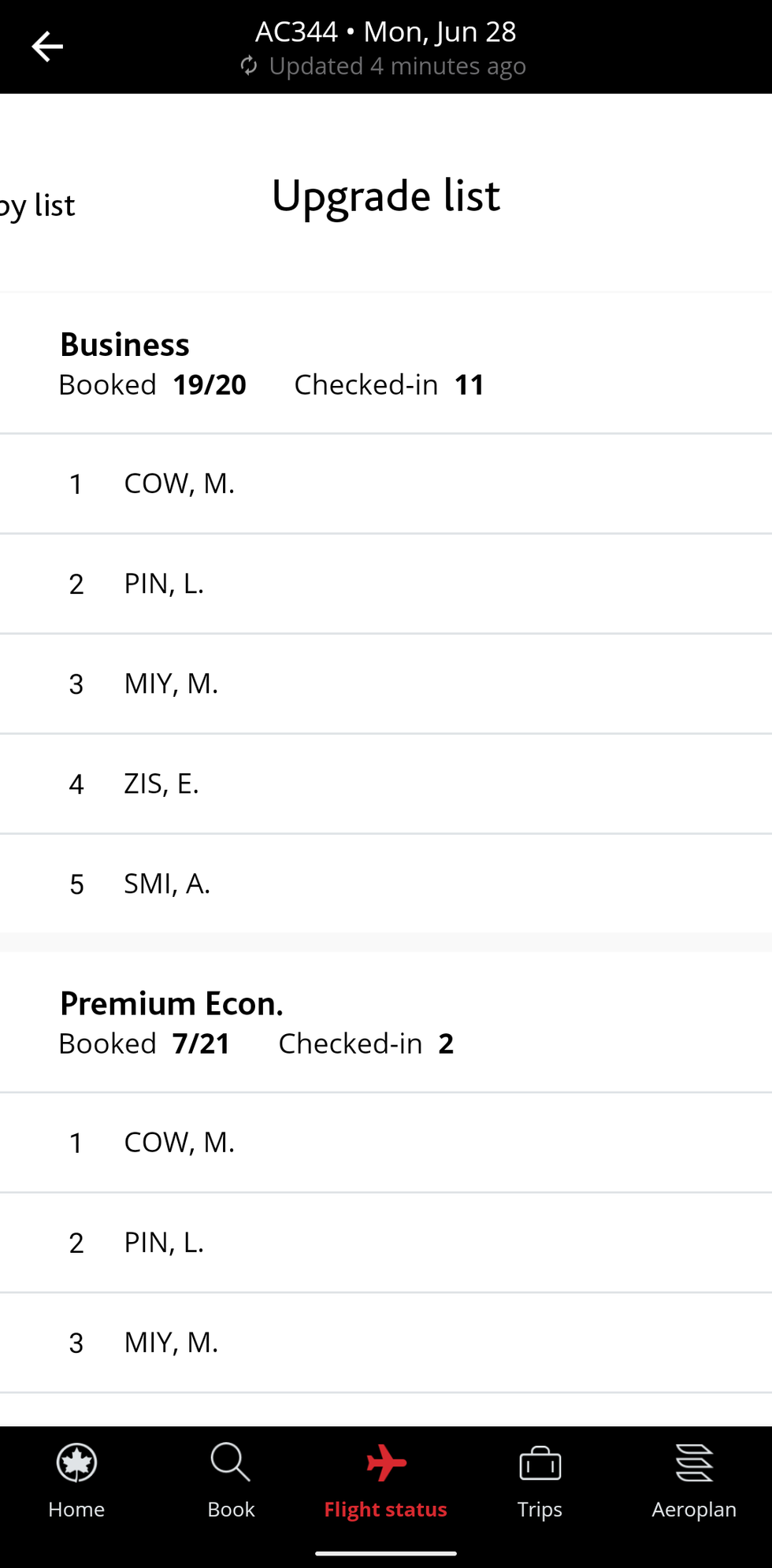
So it looks like we are positions 1 and 3. With myself being first.
I'm curious how somebody gets between us? If that person was higher than E50k would they not be no 1 on the list?
Anyway, it's sort of a mute point as it seems there is only 1 J seat left.
Is it worth upgrading to PE? Last I heard the food was a soggy chicken wrap
 Jun 27, 2021 | 11:22 pm
#5
A FlyerTalk Posting Legend
Join Date: Sep 2012
Location: SFO
Programs: AC SE MM, SK Gold, Bonvoy Plat LTG, Hyatt Glob, HH Diamond
Posts: 47,358
She's no status. The person between you could be 25K.
I can't comment on PY, but you better talk to the GA before accepting that is you don't want it.
I can't comment on PY, but you better talk to the GA before accepting that is you don't want it.
Jun 27, 2021 | 11:30 pm
#6
Original Poster
Join Date: Apr 2008
Location: Ottawa
Programs: United Premier Silver / Bonvoy Titanium Elite
Posts: 939
So this is exactly what I did not want to happen. Do you think this is something I can raise an issue with?
The whole idea of me booking together is so we upgrade together.
I'm mildly irritated. It's sort of mute since it seems like there is not enough space for two. But other than having a hissy fit at the gate the only option is to write in to complain?
Thanks!
Jun 28, 2021 | 2:58 am
#7
A FlyerTalk Posting Legend
Join Date: Sep 2012
Location: SFO
Programs: AC SE MM, SK Gold, Bonvoy Plat LTG, Hyatt Glob, HH Diamond
Posts: 47,358
The main problem is that it's a technical.issie at this point.
When the PNR was divided, you lost the shared upgrade priority.
If it makes you feel any better, you're experiencing the way it was supposed to work prior to last November.
If this happened to me, as a knowledgeable SE, I would pressure them to create a new PNR, attach our tickets, and cancel the old PNR
But I don't know that's a reasonable option for you.
My best advice is to see what happens. How many people get upgraded? Based on your screenshot, if the answer to my question isn't 2, there's really no issue. If 2 people get it, then I'd write in, but I'd come back to this thread for advice on that before doing it.
When the PNR was divided, you lost the shared upgrade priority.
If it makes you feel any better, you're experiencing the way it was supposed to work prior to last November.
If this happened to me, as a knowledgeable SE, I would pressure them to create a new PNR, attach our tickets, and cancel the old PNR
But I don't know that's a reasonable option for you.
My best advice is to see what happens. How many people get upgraded? Based on your screenshot, if the answer to my question isn't 2, there's really no issue. If 2 people get it, then I'd write in, but I'd come back to this thread for advice on that before doing it.
Jun 28, 2021 | 9:16 am
#8
Original Poster
Join Date: Apr 2008
Location: Ottawa
Programs: United Premier Silver / Bonvoy Titanium Elite
Posts: 939
Thanks canadiancow I'll see what happens at the gate and report back.
Jun 29, 2021 | 10:19 am
#9
Original Poster
Join Date: Apr 2008
Location: Ottawa
Programs: United Premier Silver / Bonvoy Titanium Elite
Posts: 939
Good afternoon.
So just before checkin closed J went to 4 so both of the upgrades cleared
I chatted with the concierge in YVR but I am a bit confused as to how this is supposed to work, or maybe I had the wrong idea of how it is supposed to work.
I assumed that if I booked myself and my partner on the same booking then we got the same priority on the upgrade list. Am I wrong? Since he has no status then any other passenger with status would go between myself and him?
So just before checkin closed J went to 4 so both of the upgrades cleared
I chatted with the concierge in YVR but I am a bit confused as to how this is supposed to work, or maybe I had the wrong idea of how it is supposed to work.
I assumed that if I booked myself and my partner on the same booking then we got the same priority on the upgrade list. Am I wrong? Since he has no status then any other passenger with status would go between myself and him?
Jun 29, 2021 | 10:43 am
#10
A FlyerTalk Posting Legend
Join Date: Sep 2012
Location: SFO
Programs: AC SE MM, SK Gold, Bonvoy Plat LTG, Hyatt Glob, HH Diamond
Posts: 47,358
Good afternoon.
So just before checkin closed J went to 4 so both of the upgrades cleared
I chatted with the concierge in YVR but I am a bit confused as to how this is supposed to work, or maybe I had the wrong idea of how it is supposed to work.
I assumed that if I booked myself and my partner on the same booking then we got the same priority on the upgrade list. Am I wrong? Since he has no status then any other passenger with status would go between myself and him?
So just before checkin closed J went to 4 so both of the upgrades cleared
I chatted with the concierge in YVR but I am a bit confused as to how this is supposed to work, or maybe I had the wrong idea of how it is supposed to work.
I assumed that if I booked myself and my partner on the same booking then we got the same priority on the upgrade list. Am I wrong? Since he has no status then any other passenger with status would go between myself and him?
Jun 29, 2021 | 11:38 am
#11
Original Poster
Join Date: Apr 2008
Location: Ottawa
Programs: United Premier Silver / Bonvoy Titanium Elite
Posts: 939
Jun 29, 2021 | 11:43 am
#12
A FlyerTalk Posting Legend
Join Date: Sep 2012
Location: SFO
Programs: AC SE MM, SK Gold, Bonvoy Plat LTG, Hyatt Glob, HH Diamond
Posts: 47,358
The only difference from a year ago is that I can upgrade a no-status companion on my PNR, and they'll have my priority.