
























Power Adapters for Laptops
 May 5, 2009 | 11:50 am
#1
Original Poster


Join Date: Jan 2004
Location: SFO, SJC, OAK, LVK AA Lifetime Plat 2MM, LUV A-List, Hyatt Gold, SPG Lifetime Gold, Commercial Pilot (not employed by airlines)
Posts: 1,533
Power Adapters for Laptops
I usually can get by on the battery that's in my laptop, but tomorrow I have a long flight and a lot of work to do. I was looking on the web for places to get a power port adapter but I can't find any. My guess is Best Buy has them but I can't find them on the website because I don't even know what they are called. Can any one guide me towards getting ahold of one of these? And ... what are they called?
I'm flying on an American 767-300, and yes, there is a port at my seat.
I'm flying on an American 767-300, and yes, there is a port at my seat.
 May 5, 2009 | 12:07 pm
#3
Original Poster
Join Date: Jan 2004
Location: SFO, SJC, OAK, LVK AA Lifetime Plat 2MM, LUV A-List, Hyatt Gold, SPG Lifetime Gold, Commercial Pilot (not employed by airlines)
Posts: 1,533
Thanks for the reply. I looked on Best Buy's site for "Kensington" and see other types of adapters but not one for aircraft. Do you know what it's called, specifically?
May 5, 2009 | 12:26 pm
#4
FlyerTalk Evangelist


Join Date: Oct 2006
Location: Marriott or Hilton hot tub with a big drink <glub> Beverage: To-Go Bag™ DYKWIA:SSSS /rolleyes ☈ Date Night:Costco
Programs: Sea Shell Lounge Platinum, TSA Pre✓ Refusnik Diamond, PWP Gold, FT subset of the subset
Posts: 12,524
Check out the The In Flight Power Knowledge Compendium.
May 5, 2009 | 1:26 pm
#5
FlyerTalk Evangelist
Join Date: Mar 2004
Location: Newport Beach, California, USA
Posts: 36,062

The specs are here:
http://us.kensington.com/html/13874.html
Buy.com has them for $115.97 with free shipping:
http://www.buy.com/prod/kensington-w...205147258.html
Buy.com is reliable, but this is a very common item and it's worth shopping around. I have three or four of them and they're terrific. I've found them on eBay for as little as $39.
I'd also recommend the retractable travel cable, as it doesn't get tangled:
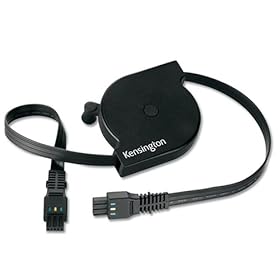
Buy.com has this for $23.23 shipped:
http://www.buy.com/prod/travel-cable...202188853.html
May 5, 2009 | 1:34 pm
#6
Join Date: Mar 2006
Location: MOB / PNS / GPT
Programs: DL Gold Hopefully be DL nothing in 1 more year / Hertz Something / Hilton Honors Diamond
Posts: 838
OP has a long flight tomorrow, highly doubt it will be shipped an receieved by that time unless anybody knows any B&M stores that carry the item.
May 5, 2009 | 2:00 pm
#7
In Memoriam, FlyerTalk Evangelist
Join Date: Jun 2000
Location: Benicia CA
Programs: Alaska MVP Gold 75K, AA 3.8MM, UA 1.1MM, enjoying the retired life
Posts: 31,849
Power plugs and adapters for AA flights (consolidated)
May 5, 2009 | 2:10 pm
#8
FlyerTalk Evangelist
Join Date: Mar 2004
Location: Newport Beach, California, USA
Posts: 36,062
Edited to add:
I saw this on the BestBuy website:
http://www.bestbuy.com/site/olspage....=1218005635783
It's a different model and it doesn't provide the power rating, but it might do.
May 5, 2009 | 2:38 pm
#9
Join Date: Jan 2008
Location: PHL
Programs: US Plat, SPG Gold
Posts: 1,331
Perhaps just an extra battery? It could be easier and you don't have to worry about having the correct adapter or winding up on a plane without in-seat power. I have one from APC that works great.
May 5, 2009 | 2:47 pm
#10
FlyerTalk Evangelist
Join Date: Mar 2004
Location: Newport Beach, California, USA
Posts: 36,062
I have a universal extension battery -- it's like a tray that the laptop sits on -- from APC that works great. In many ways, it's more convenient than a power adapter.

 May 25, 2009 | 10:16 pm
#12
Join Date: May 2009
Posts: 1
Here are several tips to prolong your battery life.
1 Lower the brightness on your LCD. The brighter the LCD screen, the faster you'll drain the battery. Setting it to 1/2 the max brightness will easily give you 15-30 minutes more.
2 Run only the programs you are using at the time of use. Programs that run in the background use more system resources and drain laptop battery life.
And Keep a spare battery is another good idea. Batteries are affordable these days and easily purchased online from electronics sites-
Hope it helps.
1 Lower the brightness on your LCD. The brighter the LCD screen, the faster you'll drain the battery. Setting it to 1/2 the max brightness will easily give you 15-30 minutes more.
2 Run only the programs you are using at the time of use. Programs that run in the background use more system resources and drain laptop battery life.
And Keep a spare battery is another good idea. Batteries are affordable these days and easily purchased online from electronics sites-
Hope it helps.
Last edited by sbm12; Jun 1, 2009 at 11:19 am