
























Need Help picking a laptop
 Mar 16, 2023 | 9:38 pm
#16
FlyerTalk Evangelist


Join Date: May 2008
Location: San Francisco
Programs: GM on VX, UA, AA, HA, AS, SY; Budget Fastbreak; GM with hotels; Waymo; Honda crv; iOS
Posts: 36,716
You realise this forum is not all about you? The OP asks a question, and you just respond with some random fact about yourself that has no relevance (Netbooks haven't been produced for about 10 years).
To the OP... As mentioned above, any Dell, Lenovo, Toshiba mid range would be good. Most will have some USB-A ports, along with the newer USB-C ports.
To the OP... As mentioned above, any Dell, Lenovo, Toshiba mid range would be good. Most will have some USB-A ports, along with the newer USB-C ports.
and I guess Toshiba isn’t making them now? Weird.
Omg I’ve used the same hp color laser jet since 2009 and it still works!! Granted Tomer cartridges are like $140+ CYMK apiece. Brutal. Worth it.
 Mar 17, 2023 | 7:55 am
#17

Join Date: Aug 2012
Posts: 7,359
I'd go with Dell or Lenovo.
When it comes to PC laptops, I find Dell's XPS series pretty good and Lenovo's Thinkpads (T series or X series). Depending on your budget, I'd go with one of those, and call it a day. When combined with some cashback sites, CC rewards and maybe promos, you can get one at a pretty decent price.
When it comes to PC laptops, I find Dell's XPS series pretty good and Lenovo's Thinkpads (T series or X series). Depending on your budget, I'd go with one of those, and call it a day. When combined with some cashback sites, CC rewards and maybe promos, you can get one at a pretty decent price.
 Mar 17, 2023 | 8:04 am
#18


Join Date: Feb 2013
Programs: Hilton Diamond, Delta Gold
Posts: 5,933
Yea, all my HP printers both home and office has lasted well over a decade with solid use. And true the toner is expensive and I have learned its best to not get the cheaper toner, just suck it up for the HP toner
Mar 17, 2023 | 8:25 am
#19
Original Poster
FlyerTalk Evangelist, Ambassador: World of Hyatt

Join Date: Jul 2001
Location: New Jersey
Programs: Hyatt Globalist, Fairmont Lifetime Plat, UA Silver, dirt elsewhere
Posts: 47,408
Wow... The responses are overwhelming. Thank you.
They are the old style USB ports and I think there are plugs for the monitor & keyboard. I may keep the laptop until it's time for a new computer.
Not sure about the screen size. I will go look After our initial moving around, I doubt I'll be mobile with it. I do have to print periodically, and neither printer nor scanner can do wireless.
Thanks.
Thanks
Thanks. I just may do Costco. My desktop came from there too.
I planned on looking at Dell, just needed to know the product line. I always had them for work in a docking station.
I'm not into any of that stuff. I think I have a huge hard drive now and it's not even 1/4 full
When my former company moved away they let me have my HP laser Jet. It's at least 10 years old and works perfectly.
Thank you.
What plugs are the scanner, printer, back-up drive and monitor? Do you want native ports for the equipment you're keeping, or are you comfy with using adaptors if needed? A lot of laptops are moving to USB-C only and expect you to use a hub off the USB ports for anything you attach.
For the use you're describing, and without knowing the ports you need/prefer, I'd suggest looking at almost any of the mid-range Lenovo or Toshiba laptops. They both still turn out solid, durable, long-lived options. Expect something in the US$500-$750 range. Alternatively, if you're looking for a desktop later and the laptop idea is justa temp thing, then maybe a mini-computer? They will outperform most laptops for a given price point, and will have more ports and a greater variety of them. You can pick up good mini-computers for US$350-$500.
For the use you're describing, and without knowing the ports you need/prefer, I'd suggest looking at almost any of the mid-range Lenovo or Toshiba laptops. They both still turn out solid, durable, long-lived options. Expect something in the US$500-$750 range. Alternatively, if you're looking for a desktop later and the laptop idea is justa temp thing, then maybe a mini-computer? They will outperform most laptops for a given price point, and will have more ports and a greater variety of them. You can pick up good mini-computers for US$350-$500.
Some burning questions...
What size screen do you want? The three typical choices are... 13.3", 14", and 15.6". If you're unsure, I would highly recommend going to a store that sells laptops and compare the screen sizes.
How often do you think you'll be mobile with the laptop? A lot of people actually just plop it on a desk and never move it. When on a desk, the laptop is hooked up to a docking station (aka hub)--and from there, you can hook up an external monitor, scanner, printer, etc. to it. If you want to be mobile somewhat often, then weight and size should be a factor for you.
When mobile, how often are you going to need to print/scan? Does your printer and scanner have the abilities to operate on a wireless network?
Just for a bit of future proofing, I would highly recommend looking at 12th generation Intel processors, 16GB RAM (though 8GB should be absolutely fine for you), and 256GB SSD hard drive.
What size screen do you want? The three typical choices are... 13.3", 14", and 15.6". If you're unsure, I would highly recommend going to a store that sells laptops and compare the screen sizes.
How often do you think you'll be mobile with the laptop? A lot of people actually just plop it on a desk and never move it. When on a desk, the laptop is hooked up to a docking station (aka hub)--and from there, you can hook up an external monitor, scanner, printer, etc. to it. If you want to be mobile somewhat often, then weight and size should be a factor for you.
When mobile, how often are you going to need to print/scan? Does your printer and scanner have the abilities to operate on a wireless network?
Just for a bit of future proofing, I would highly recommend looking at 12th generation Intel processors, 16GB RAM (though 8GB should be absolutely fine for you), and 256GB SSD hard drive.
I own a Lenovo X280. While it's a few years old, it is an excellent performer.
https://www.amazon.com/s?k=refurbish...ref=nb_sb_noss
https://www.amazon.com/s?k=refurbish...ref=nb_sb_noss
Find something you like at Costco and be done with it. 
Or one of these on Amazon - including refurbs that are great deals: https://www.amazon.com/Lenovo-IdeaPa...dp/B09RNC69K8/
https://www.amazon.com/dp/B09JGP5YHM
You might also consider a desktop all-in-one like this: https://www.amazon.com/HP-Micro-Edge...dp/B0B48W9K3D/
When you say printer and scanner ports: Everything these days plugs in via USB. Old style exclusive printer and scanner ports simply don't exist on modern laptops. If 2-3 USB ports are not enough for you, consider adding a USB hub like this: https://www.amazon.com/gp/product/B0828GDSF6/
I'm assuming you want a "common" laptop - 14 inch or 15 inch screen, running Windows 10 or 11. I recommend an Intel Core i5 processor or better; 8 GB RAM or more; 256GB hard drive or larger; ALWAYS a solid state drive (SSD), NEVER a spinning disk drive these days; screen resolution 1920x1080 or better.
Or one of these on Amazon - including refurbs that are great deals: https://www.amazon.com/Lenovo-IdeaPa...dp/B09RNC69K8/
https://www.amazon.com/dp/B09JGP5YHM
You might also consider a desktop all-in-one like this: https://www.amazon.com/HP-Micro-Edge...dp/B0B48W9K3D/
When you say printer and scanner ports: Everything these days plugs in via USB. Old style exclusive printer and scanner ports simply don't exist on modern laptops. If 2-3 USB ports are not enough for you, consider adding a USB hub like this: https://www.amazon.com/gp/product/B0828GDSF6/
I'm assuming you want a "common" laptop - 14 inch or 15 inch screen, running Windows 10 or 11. I recommend an Intel Core i5 processor or better; 8 GB RAM or more; 256GB hard drive or larger; ALWAYS a solid state drive (SSD), NEVER a spinning disk drive these days; screen resolution 1920x1080 or better.
I actually just bought at a replacement laptop this morning -- a 16 inch Dell Vostro 5620 Dell as currently having a semi-annual sale at their website and added on a wireless mouse since I lost my last one. Normally I would get an Inspiron but there was a really good deal on the Vostro and it has Windows 11 Pro. I have tried a few other PC brands over the year but have always end up back to Dell afterwards. I just get regular non-touch screen laptops. I have a big iPad Pro for app sort of things, the laptop is for real computer stuff.
The one comment I'd make on the above suggestions is that if you're into photography - let alone video - or think you might be during this computer's lifetime, get a 512G hard drive (more likely to be a solid-state drive today). Sensor pixel counts keep going up, file sizes track them (not the same, but more or less keeping the same relationship), and nobody wants to throw out old photos/videos if they don't have to. Most laptops give you that choice. The incremental cost of 512G over 256G is small and getting smaller. "I wish I had less storage space" said nobody, ever.
I'd go with Dell or Lenovo.
When it comes to PC laptops, I find Dell's XPS series pretty good and Lenovo's Thinkpads (T series or X series). Depending on your budget, I'd go with one of those, and call it a day. When combined with some cashback sites, CC rewards and maybe promos, you can get one at a pretty decent price.
When it comes to PC laptops, I find Dell's XPS series pretty good and Lenovo's Thinkpads (T series or X series). Depending on your budget, I'd go with one of those, and call it a day. When combined with some cashback sites, CC rewards and maybe promos, you can get one at a pretty decent price.
Mar 17, 2023 | 9:20 am
#20
In Memoriam


Join Date: Jun 2000
Programs: Honors Diamond, Hertz Presidents Circle, National Exec Elite
Posts: 36,111
My 2007 HP Laserjet 1018 still works excellently. I do a search on all of Craigslist for toner and always find someone willing to sell for 1/3 retail and ship cheap.
Mar 17, 2023 | 9:23 am
#21
Join Date: Nov 2007
Location: Colorado
Programs: UA Gold (.85 MM), HH Diamond, SPG Platinum (LT Gold), Hertz PC, National EE
Posts: 6,516
We have this small hub for my wife’s laptop that works great. Look below my monitor in the picture attached. I run two separate computers to the same monitor as well, one being a desktop. Also have an old HP Laserjet printer via usb connected. That thing is older than dirt but keeps plugging away. We have a color inkjet HP as well that’s from 2013 still working.
That said, working returns at Costco, I wouldn’t recommend HP for laptops or printers. The old stuff was good, the new not so much. I like the Lenovo and Dell products we sell though. If and when we need a new printer I’m going with Canon, not HP or Epson.
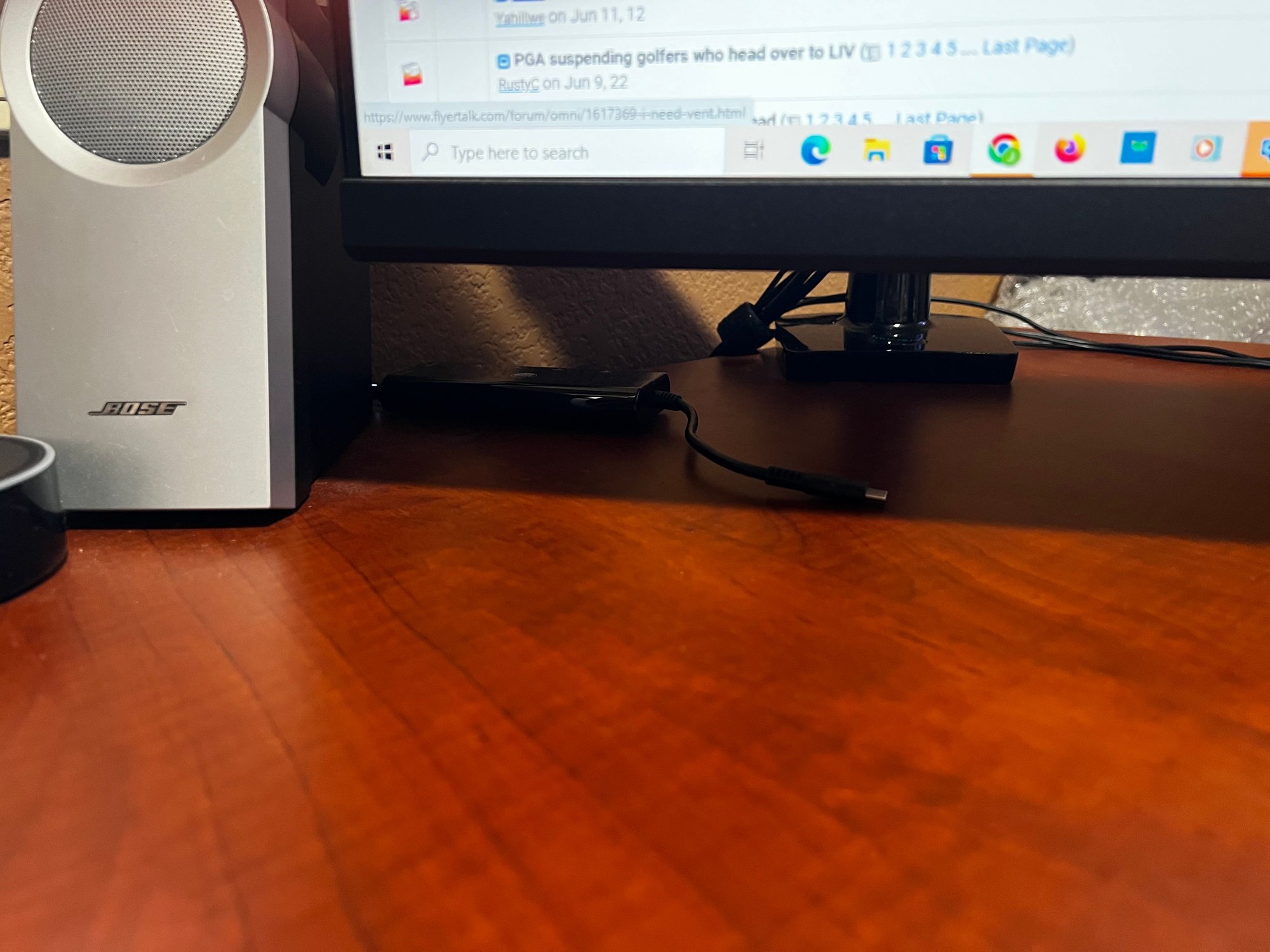
That said, working returns at Costco, I wouldn’t recommend HP for laptops or printers. The old stuff was good, the new not so much. I like the Lenovo and Dell products we sell though. If and when we need a new printer I’m going with Canon, not HP or Epson.
Last edited by COSPILOT; Mar 17, 2023 at 10:33 am
Mar 17, 2023 | 9:48 am
#22
A FlyerTalk Posting Legend


Join Date: Aug 2002
Programs: UALifetimePremierGold, Marriott LifetimeTitanium
Posts: 74,154


But - one of the things you'll need to consider is if your 10 yr old printer & scanner will work w/ a new laptop (or desktop) that's newest version/windows 11 - aka, are there even drivers for older model printers & scanners. Not saying there aren't, but you may need to take that into consideration as well.
Cheers.
Mar 17, 2023 | 9:53 am
#23
A FlyerTalk Posting Legend

Join Date: Feb 2000
Location: Cambridge
Posts: 63,783
FWIW, it used to be more important to pick laptops based on available ports. With the USB-C standard, that's usually no longer a concern since you'd likely use an external hub to connect all your peripherals so that you do a plug-once.
If you plan to use it without external monitor for a while, that should really influence how big of a screen you should go for. The smaller 13.3" ones might seem nice and portable, but can be uncomfortable if that's your primary monitor for extended time periods.
A lot of laptop models these days make it difficult to add RAM, so I'd suggest you go big right from the start - 8GB minimum, 16GB recommended.
With regard to drivers, HP started using "universal" drivers many years ago which have minimum viable support for old models. They make drivers for newer models which allow you to access specific features, but the "universal" ones will generally work for older equipment.
If you plan to use it without external monitor for a while, that should really influence how big of a screen you should go for. The smaller 13.3" ones might seem nice and portable, but can be uncomfortable if that's your primary monitor for extended time periods.
A lot of laptop models these days make it difficult to add RAM, so I'd suggest you go big right from the start - 8GB minimum, 16GB recommended.
With regard to drivers, HP started using "universal" drivers many years ago which have minimum viable support for old models. They make drivers for newer models which allow you to access specific features, but the "universal" ones will generally work for older equipment.
Mar 17, 2023 | 9:53 am
#24
Join Date: Nov 2007
Location: Colorado
Programs: UA Gold (.85 MM), HH Diamond, SPG Platinum (LT Gold), Hertz PC, National EE
Posts: 6,516
As DenverBrian & other FTers know, I'm not the most techie person
But - one of the things you'll need to consider is if your 10 yr old printer & scanner will work w/ a new laptop (or desktop) that's newest version/windows 11 - aka, are there even drivers for older model printers & scanners. Not saying there aren't, but you may need to take that into consideration as well.
Cheers.
But - one of the things you'll need to consider is if your 10 yr old printer & scanner will work w/ a new laptop (or desktop) that's newest version/windows 11 - aka, are there even drivers for older model printers & scanners. Not saying there aren't, but you may need to take that into consideration as well.
Cheers.


 Mar 17, 2023 | 10:30 am
#26
FlyerTalk Evangelist
Join Date: Jun 2010
Location: TOA
Programs: HH LTDiamond, Marriott LTPP/Platinum Premier, Hyatt Lame-ist, UA MM LT1P
Posts: 21,242
Mary2e : It depends.
If your intent is simply replace your desktop with a laptop, then you've gotten quite a few inputs earlier in this thread.
If your intent is now to be more mobile in your computing, the laptop is only one element to be considered if you're now going to lift and shift to Hawaii. The fewer and lighter items are, the easier it will be to bring things with you as you travel - this includes a possible mobile printer/scanner, separate keyboard, etc.
Having a laptop that has a compatible docking station will assist in being able to plug the laptop back into the station and having your future monitor/keyboard/mouse/desktop scanner/etc. easily operational without having to re-hook up everything every time.
Also to note that, while smaller notebooks and netbooks are available, you'll also find that their keyboards are a bit smaller and many keys are overloaded by having a single key serve as many possible depending on ctrl / alt / fn press combination sequences which can be a pain. Larger heavier notebooks with fullsize keyboards are easier to transition too but also are larger and heavier and generally come with a larger heavier power transformer/charger block. And even more crap to carry.
I'd recommend going down to an electronics-type store or even Costco and putting hands on keyboards, looking and and touching those touchscreens and hefting the laptops to get a feel for what you think you'll prefer. Ask to see the cables and connectors to get an idea of what it will take to haul all of those items with you in order to use the device.
No one laptop will likely meet all of your needs. But some come close.
David
If your intent is simply replace your desktop with a laptop, then you've gotten quite a few inputs earlier in this thread.
If your intent is now to be more mobile in your computing, the laptop is only one element to be considered if you're now going to lift and shift to Hawaii. The fewer and lighter items are, the easier it will be to bring things with you as you travel - this includes a possible mobile printer/scanner, separate keyboard, etc.
Having a laptop that has a compatible docking station will assist in being able to plug the laptop back into the station and having your future monitor/keyboard/mouse/desktop scanner/etc. easily operational without having to re-hook up everything every time.
Also to note that, while smaller notebooks and netbooks are available, you'll also find that their keyboards are a bit smaller and many keys are overloaded by having a single key serve as many possible depending on ctrl / alt / fn press combination sequences which can be a pain. Larger heavier notebooks with fullsize keyboards are easier to transition too but also are larger and heavier and generally come with a larger heavier power transformer/charger block. And even more crap to carry.
I'd recommend going down to an electronics-type store or even Costco and putting hands on keyboards, looking and and touching those touchscreens and hefting the laptops to get a feel for what you think you'll prefer. Ask to see the cables and connectors to get an idea of what it will take to haul all of those items with you in order to use the device.
No one laptop will likely meet all of your needs. But some come close.
David
Mar 17, 2023 | 10:34 am
#27
FlyerTalk Evangelist
Join Date: Nov 2002
Location: ORD
Posts: 14,773
Honestly, Mary, I would just go to Costco and pick one you like in your price range. These days, laptops are commodities with the innards all produced by the same handfuls of companies. Costco has a great return policy. Get something with at least 8GB of RAM (preferably 12 or 16) and at least a 256GB solid state drive (SSD - this type of hard drive is MUCH FASTER than the traditional type and is generally pretty standard these days but make sure you get one). All laptops come with at least 1-2 USB-C ports (the new, smaller one) and usually just 1 USB-A port (the old fashioned rectangular type that's been around for 25 years). If you need more ports you just buy a dock that plugs into one of the USB-C ports and has a bunch of ports on it for power, monitor, keyboard/mouse/scanner/printer/whatever. Everything connects between the dock and you via the single USB-C connection, which also provides power.
Mar 17, 2023 | 11:05 am
#28
Original Poster
FlyerTalk Evangelist, Ambassador: World of Hyatt
Join Date: Jul 2001
Location: New Jersey
Programs: Hyatt Globalist, Fairmont Lifetime Plat, UA Silver, dirt elsewhere
Posts: 47,408
I've tried to use my husband's Mac, and it drives me nuts. We even had one in the suite in Waikiki and trying to change a flight drove me so crazy, I just called them
Mar 17, 2023 | 11:47 am
#29
Join Date: Nov 2007
Location: Colorado
Programs: UA Gold (.85 MM), HH Diamond, SPG Platinum (LT Gold), Hertz PC, National EE
Posts: 6,516
Mar 17, 2023 | 11:50 am
#30
In Memoriam
Join Date: Jun 2000
Programs: Honors Diamond, Hertz Presidents Circle, National Exec Elite
Posts: 36,111
Lenovo is having a decent sale today, but I agree with those who suggest going to Costco and trying out their Lenovos.g