
























Different Interface Appearance
 Feb 16, 2023 | 9:09 am
#1
Original Poster


Join Date: Feb 2011
Location: NYC suburbs
Programs: UA LT Gold 1.2MM (BIS), AA LT Plat (SUBs, BD/Bask), Hilton Dia (CC), Hyatt Glob (BIB), et. al.
Posts: 4,589
Different Interface Appearance
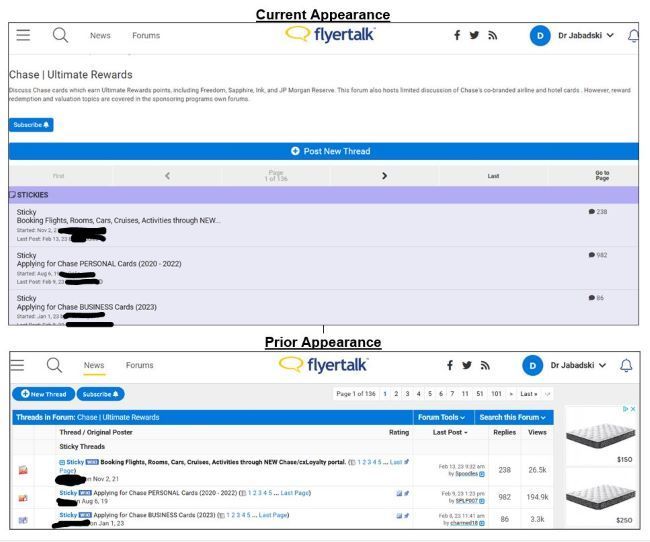
Different appearance of forums as per images below for 1-2 days on desktop PC using Chrome and today using Edge after an Edge update. Prior Appearance most definitely preferred. Today was able to bring up Prior Appearance momentarily on Edge before Edge updated. Cannot locate “settings” tab on any FT webpage.
Appearance differences extend to all pages in the forums and make all aspects of navigation (opening last page of a thread, replying, forum jumping) much more difficult. Also cannot see "My Notifications" or "Notifications" (of PMs,, quotes, likes) and cannot see "reason for editing" (of a forum post) on the Current Appearance.
Is this a FT settings issue or my personal issue? Please advise. Thank you very much.
Appearance differences extend to all pages in the forums and make all aspects of navigation (opening last page of a thread, replying, forum jumping) much more difficult. Also cannot see "My Notifications" or "Notifications" (of PMs,, quotes, likes) and cannot see "reason for editing" (of a forum post) on the Current Appearance.
Is this a FT settings issue or my personal issue? Please advise. Thank you very much.
Last edited by Dr Jabadski; Feb 16, 2023 at 9:39 am Reason: "Also cannot see ... " and "Thank you ..." added.


 Feb 16, 2023 | 10:40 am
#3
Original Poster
Join Date: Feb 2011
Location: NYC suburbs
Programs: UA LT Gold 1.2MM (BIS), AA LT Plat (SUBs, BD/Bask), Hilton Dia (CC), Hyatt Glob (BIB), et. al.
Posts: 4,589
Thank you very much. Clicked on the upper left 3 lines, did not see "View Full Site".
But, logged off thinking I might see "View Full Site" when logged off, again didn't see it.
But, upon logging in again, appearance was back to "Prior Appearance" (as per image in my first post above).
Thanks very much again. Outstanding support.
But, logged off thinking I might see "View Full Site" when logged off, again didn't see it.
But, upon logging in again, appearance was back to "Prior Appearance" (as per image in my first post above).
Thanks very much again. Outstanding support.
Mar 2, 2023 | 10:28 am
#4

Join Date: Dec 2008
Location: CLE
Programs: UA Silver
Posts: 1,284
Had the same issue as OP today with the site's appearance, and there is no "View Full Site" option that I could find in the upper left menu. I logged out and back in again and that seems to have fixed the issue.

