
























Set limits on photo sizes
 Jun 26, 2009 | 2:22 pm
#1
Original Poster
A FlyerTalk Posting Legend, In Memoriam


Join Date: Jul 2003
Location: Yiron, Israel
Programs: Bates Motel Plat
Posts: 69,201
Set limits on photo sizes
An experience I had yesterday and today made me realize that TalkBoard should revise its decision to allow photos to be embedded and include a maximum size for each.
I had started this thread on trip reports and at one point, I was asked by one poster to include some photos.
I did, but the photo was much too large. In order to see the entire photo you would have had to scroll both up and down and also left to right.
This not only impacted the one post on which the photo appeared but made loading the entire page difficult for anyone wanting to read it.
I went to Technical Issues to ask how I (or FT) could fix the problem and was informed by FlyinHawaiian that the moderators have been concerned with this problem but were told that the only plug-in which would automatically reduce the size of pictures would degrade the site's performance.
I don't doubt what he said, but KVS came up with a solution which was so simple that even the most technically-challenged person (which is undoubtedly me) can implement it.
The main difference between what KVS suggested and what FlyinHawaiian was talking about is that KVS's method puts the burden on the poster, not on FlyerTalk -- and hence there is no degradation of the site.
To this end, I would like to suggest that TB amend its original decision to limit photos to a size in which they can be seen entirely without any scrolling.
This limit might be able to be enforced technologically (with the software automatically rejecting any picture which exceeds the limits) or by the moderators (who could remove the pictures and send a PM to the poster giving the advice which KVS gave to me).
I had started this thread on trip reports and at one point, I was asked by one poster to include some photos.
I did, but the photo was much too large. In order to see the entire photo you would have had to scroll both up and down and also left to right.
This not only impacted the one post on which the photo appeared but made loading the entire page difficult for anyone wanting to read it.
I went to Technical Issues to ask how I (or FT) could fix the problem and was informed by FlyinHawaiian that the moderators have been concerned with this problem but were told that the only plug-in which would automatically reduce the size of pictures would degrade the site's performance.
I don't doubt what he said, but KVS came up with a solution which was so simple that even the most technically-challenged person (which is undoubtedly me) can implement it.
The main difference between what KVS suggested and what FlyinHawaiian was talking about is that KVS's method puts the burden on the poster, not on FlyerTalk -- and hence there is no degradation of the site.
To this end, I would like to suggest that TB amend its original decision to limit photos to a size in which they can be seen entirely without any scrolling.
This limit might be able to be enforced technologically (with the software automatically rejecting any picture which exceeds the limits) or by the moderators (who could remove the pictures and send a PM to the poster giving the advice which KVS gave to me).
Last edited by Dovster; Jun 26, 2009 at 2:50 pm
 Jun 26, 2009 | 2:58 pm
#2
A FlyerTalk Posting Legend
Join Date: Apr 2001
Location: PSM
Posts: 69,232
There are a couple problems with this that make it very difficult to deal with from an administrative perspective, not the least of which is what is the correct maximum size? There are lots of different screen sizes out there. And the plugin that would resize the images on the server side is much more likely to break the site than help it.
The solution that KVS provided is what we've been having people do to deal with the problem. If there are images that are unduly large (and they are RBP'd) moderators will remove them to protect the layout/loading of FlyerTalk.
Here's the question...why change the policy rather than just resize your images when you're posting them? Having images in the fora adds great value to the site, IMO. Revoking that would be a bad thing.
The solution that KVS provided is what we've been having people do to deal with the problem. If there are images that are unduly large (and they are RBP'd) moderators will remove them to protect the layout/loading of FlyerTalk.
Here's the question...why change the policy rather than just resize your images when you're posting them? Having images in the fora adds great value to the site, IMO. Revoking that would be a bad thing.
Jun 26, 2009 | 3:31 pm
#3
Original Poster
A FlyerTalk Posting Legend, In Memoriam
Join Date: Jul 2003
Location: Yiron, Israel
Programs: Bates Motel Plat
Posts: 69,201
I believe, however, that many users -- like myself until this problem came up -- have no idea of how to reduce an overly-large picture. Indeed, they may not even know that it is possible.
I think the evidence of this is the reply that I got from FlyinHawaiian -- that the moderators are aware of the problem.
So what I am suggesting is that TB establish the maximum size permitted (and I don't believe that depends on the screen size -- it would simply have to appear in the space which FTer sees a post without scrolling). Then, if someone tries posting something which is too large he would either (if technically possible) have it rejected or else the mods would remove it and send him a PM with KVS's suggestion.
Last edited by Dovster; Jun 26, 2009 at 3:57 pm Reason: typo
Jun 26, 2009 | 3:50 pm
#4
FlyerTalk Evangelist
Join Date: Feb 2003
Location: Greener Pastures
Posts: 10,515
So far, this hasn't been a prevalent on-going challenge. If it continues to be amongst many users in many forums, then it may be worth revisiting.
Jun 26, 2009 | 4:18 pm
#5
Original Poster
A FlyerTalk Posting Legend, In Memoriam
Join Date: Jul 2003
Location: Yiron, Israel
Programs: Bates Motel Plat
Posts: 69,201
If the mods have spoken to the tech people about it, and the tech people have spent time and effort trying to find a solution, I have to assume that it is an on-going problem.
Jun 26, 2009 | 6:34 pm
#6
Moderator: Hawaii-based airlines & Hawai'i forums

Join Date: Mar 2003
Location: Ka ʻĀpala Nui, Nuioka
Programs: NEXUS/Global Entry, Delta, United, Hyatt, IHG, Marriott, and Hertz
Posts: 18,726
Speaking for myself, it's a "problem" but not a pressing one. I'd catagorize it as something that would be nice to have and not something that requires immediate and priority attention. I think a working search engine would be something I'd want the techies to work on before addressing image size.
I haven't found image size to be a serious issue in any of the forums I help moderate but I am glad this was investigated as a proactive step to help posters such as yourself who, though no fault of their own, inadvertantly post a large image. In my perfect world, users should could post acceptable images without the need for any aditional steps on their part to resize it. As you can see from my other response, as much as I enjoy helping other members, I can't resize an image for a member, so the onus is on the poster.
I haven't found image size to be a serious issue in any of the forums I help moderate but I am glad this was investigated as a proactive step to help posters such as yourself who, though no fault of their own, inadvertantly post a large image. In my perfect world, users should could post acceptable images without the need for any aditional steps on their part to resize it. As you can see from my other response, as much as I enjoy helping other members, I can't resize an image for a member, so the onus is on the poster.
 Jun 26, 2009 | 6:48 pm
#7
Original Poster
A FlyerTalk Posting Legend, In Memoriam
Join Date: Jul 2003
Location: Yiron, Israel
Programs: Bates Motel Plat
Posts: 69,201
That being said, FT will be helped if the poster doesn't make the mistake that I made. A FT with pages which load badly, or are difficult to see (as oversized pictures make them) is not in anyone's interest.
As things stand right now, somebody can put up an oversized photo and not be in violation of FT's rules.
I believe TB should make it a hard and fast rule that this is not acceptable. Ideally, the best way to enforce that rule would be for the software to reject the picture, with a notice saying, "Your picture was too large to fit on our pages. Please see this explanation of how to solve the problem."
If, for technical reasons, that is impossible, than moderators, who are responsible for enforcing the rules, should simply take the pictures down and send the poster a PM giving that exact explanation.
IMHO, if a poster makes that mistake once, and receives such instructions, he will know for the future and not need to be told again.
Jun 26, 2009 | 8:37 pm
#8
FlyerTalk Evangelist
Join Date: Jan 2004
Location: Worldwide
Posts: 12,952

In terms of the maximum image size, 640x480 is a safe bet for most users. The link to the original image should also be added, which would preserve the integrity of the post and also allow those readers, who are interested in accessing the original full-size image to do so, simply by clicking the resized image in the [edited] post.
Lastly, members can be provided with tips as to how to resize their images before posting them -- perhaps by way of a help link or a notice, which would appear when one tries to insert an image...
Jun 29, 2009 | 4:00 am
#9
A FlyerTalk Posting Legend
Join Date: Oct 2002
Location: back to my roots in Scotland!
Programs: Tamsin - what else is there to say?
Posts: 47,843
So KVS, do you think that moderators should maintain an account on image sharing sites simply to edit other people's images? And that we should effectively start hosting these images in our accounts for the members who wish to share these images?
Sorry, no, that to me is somewhat beyond my remit. I'm happy to pass on the advice about how to resize images to members who are having difficulty. I'm also happy to remove images from a thread which are causing problems until such time as the member has been able to resize them themselves. I think asking me to host pictures on my account for other members simply because it's my duty as a mod opens up a can of legal, ethical and personal worms.
Sorry, no, that to me is somewhat beyond my remit. I'm happy to pass on the advice about how to resize images to members who are having difficulty. I'm also happy to remove images from a thread which are causing problems until such time as the member has been able to resize them themselves. I think asking me to host pictures on my account for other members simply because it's my duty as a mod opens up a can of legal, ethical and personal worms.
Jun 29, 2009 | 4:34 am
#10
FlyerTalk Evangelist


Join Date: Jun 2000
Location: Sunny SYDNEY!
Programs: UA Million Miler. (1.9M) Virgin Platinum. HH Diamond + SPG Gold
Posts: 32,351
I run a fairly large industry Bulletin Board and probably half the 500,000 posts contain images, and I enabled images from day #1 as in some threads it really adds to the dept of the info offered.
Like FT they are all hosted by 3rd party sites.
99% of members there use the free www.photobucket.com server to do that.
If FT decides on 800 x 600 pixels max dimension it is a dead simple key-stoke on the Admin software to ensure that NOTHING larger than that size can be posted. The post gives users an error message the image exceeds the allowed size.
We originally did try a hack where the software "choked" everything down to 800 x 600 max that was larger to start with.
That worked until we updated to the new software update, and that gave Mods about 500 hours of unpaid work to go and manually alter all image codes.
800 x 600 is a standard photobucket settings option for folks to choose, that their images then never exceed.
Max size of images allowed to be posted is a standard Admin option to amend and will take 30 seconds for HOM to key-in on control panel.
Solution to the issue raised by Dovster.
I used to allow photos with a max of 1024 pixels but changed it at Xmas to be 800 pixels as some found that too wide - 800 is this size:

Like FT they are all hosted by 3rd party sites.
99% of members there use the free www.photobucket.com server to do that.
If FT decides on 800 x 600 pixels max dimension it is a dead simple key-stoke on the Admin software to ensure that NOTHING larger than that size can be posted. The post gives users an error message the image exceeds the allowed size.
We originally did try a hack where the software "choked" everything down to 800 x 600 max that was larger to start with.
That worked until we updated to the new software update, and that gave Mods about 500 hours of unpaid work to go and manually alter all image codes.
800 x 600 is a standard photobucket settings option for folks to choose, that their images then never exceed.
Max size of images allowed to be posted is a standard Admin option to amend and will take 30 seconds for HOM to key-in on control panel.
Solution to the issue raised by Dovster.
I used to allow photos with a max of 1024 pixels but changed it at Xmas to be 800 pixels as some found that too wide - 800 is this size:
Last edited by ozstamps; Jun 29, 2009 at 4:48 am
Jun 29, 2009 | 4:39 am
#11
FlyerTalk Evangelist
Join Date: Jun 2000
Location: Sunny SYDNEY!
Programs: UA Million Miler. (1.9M) Virgin Platinum. HH Diamond + SPG Gold
Posts: 32,351
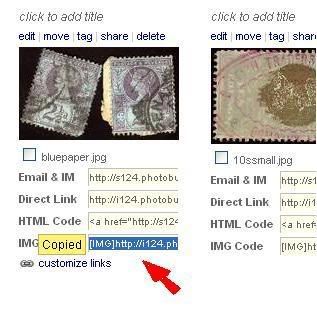
Photobucket gives you the HTML code in place all ready to paste here.
Jun 29, 2009 | 10:43 am
#12
FlyerTalk Evangelist
Join Date: Jan 2004
Location: Worldwide
Posts: 12,952
Sorry, no, that to me is somewhat beyond my remit. I'm happy to pass on the advice about how to resize images to members who are having difficulty. I'm also happy to remove images from a thread which are causing problems until such time as the member has been able to resize them themselves. I think asking me to host pictures on my account for other members simply because it's my duty as a mod opens up a can of legal, ethical and personal worms.
Member education should certainly be the preferred method, but when there is an issue with a particular post, resizing the image for the member may well take less time than editing the post and sending an explanation to that member.
So, going back to FlyinHawaiian's point, it would really be a matter of moderators, who 'do not wish to', rather than "can't" resize...
Jun 29, 2009 | 10:57 am
#13
Original Poster
A FlyerTalk Posting Legend, In Memoriam
Join Date: Jul 2003
Location: Yiron, Israel
Programs: Bates Motel Plat
Posts: 69,201
If a mod resizes a photo instead of telling a member how to do it, the member will not learn and the mod will be stuck resizing his subsequent photos as well.
Jun 29, 2009 | 11:34 am
#14
Moderator: Luxury Hotels and FlyerTalk Evangelist
Join Date: Sep 2002
Location: Palo Alto, California,USA
Posts: 18,254
I think the problem is with photos that are so wide that my version of Firefox, at least, can't deal with it properly. The photo that Ozstamps posted above, for example, extends this page out with a slider at the bottom of the screen, it makes reading the page a pain. Very long URL's can do the same.
Edited to add: hey, now it doesn't anymore, at least on this page? What changed?
Edited to add: hey, now it doesn't anymore, at least on this page? What changed?
Last edited by RichardInSF; Jul 5, 2009 at 7:48 pm
Jun 29, 2009 | 6:00 pm
#15
A FlyerTalk Posting Legend
Join Date: Oct 2002
Location: back to my roots in Scotland!
Programs: Tamsin - what else is there to say?
Posts: 47,843
I agree with Dovster

