
























2026 Activity Tracking (text, not meter): still cannot locate
 Jan 27, 2026 | 12:43 am
#1
Original Poster


Join Date: May 2002
Posts: 586
2026 Activity Tracking (text, not meter): still cannot locate
Yes, have located "Activity" for each Stay (nothing changed: Past, Upcoming, etc)
But, still cannot locate Text (which replaced the graphics meter, "nights-meter"?).
1) AI Searched which says should find by clicking on your name / account, but do not see next link to give 2026 Activity Summary / Nights-meter
2) Have written twice to Hilton on Twitter ...there were a few items asked ...Hilton answered the other items but not this one
Had two reservations Dec 28-31 and Dec 31-Jan 3 ,back-to-back, which got joined (correct) and see total points on the Dec 31-Jan 3 Stay, which should be 2026 Activity, yet cannot see any 2026 Activity Summary.
It's not a big issue as I'm time-waiting for Lifetime, so do not need to re-qualify in 2026 and no point to reach 40 nights for the start of rather-worthless 10k points Milestones.
But,would be nice to see / find the 2026 Activity
Hints/tips welcomed
But, still cannot locate Text (which replaced the graphics meter, "nights-meter"?).
1) AI Searched which says should find by clicking on your name / account, but do not see next link to give 2026 Activity Summary / Nights-meter
2) Have written twice to Hilton on Twitter ...there were a few items asked ...Hilton answered the other items but not this one
Had two reservations Dec 28-31 and Dec 31-Jan 3 ,back-to-back, which got joined (correct) and see total points on the Dec 31-Jan 3 Stay, which should be 2026 Activity, yet cannot see any 2026 Activity Summary.
It's not a big issue as I'm time-waiting for Lifetime, so do not need to re-qualify in 2026 and no point to reach 40 nights for the start of rather-worthless 10k points Milestones.
But,would be nice to see / find the 2026 Activity
Hints/tips welcomed
 Jan 28, 2026 | 6:45 am
#2

Join Date: Oct 2002
Location: Aberdeen, UK
Posts: 398
I'm not entirely sure what your query is or whether it relates to the website or (Android / iOS) app.
In my case, with the Android app (version 2026.1.13), the 2026 activity information is right there in both text and "meter" form on the Account -> Status tab:
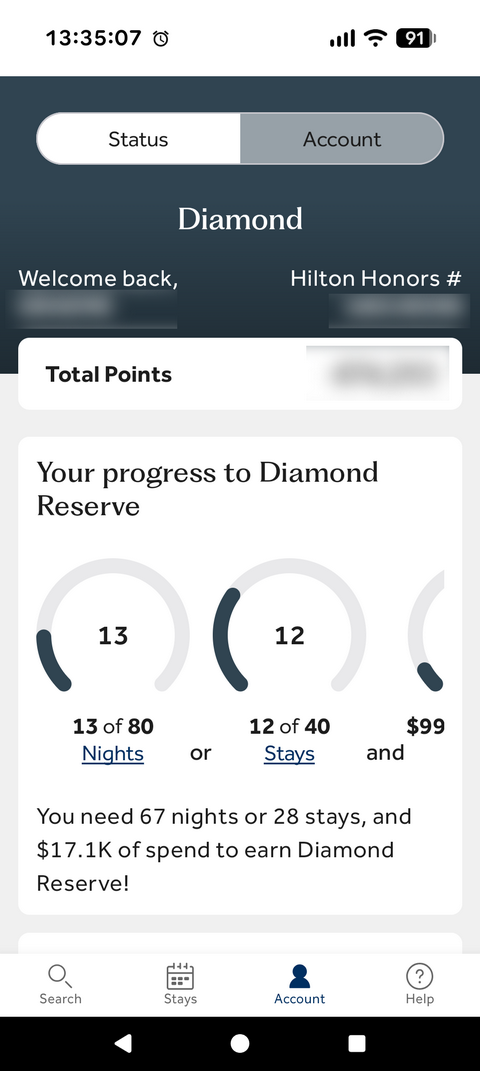
Screenshot of Android app Status tab.
Tapping on the underlined Nights, Stays or Spend brings up the detail for each category:
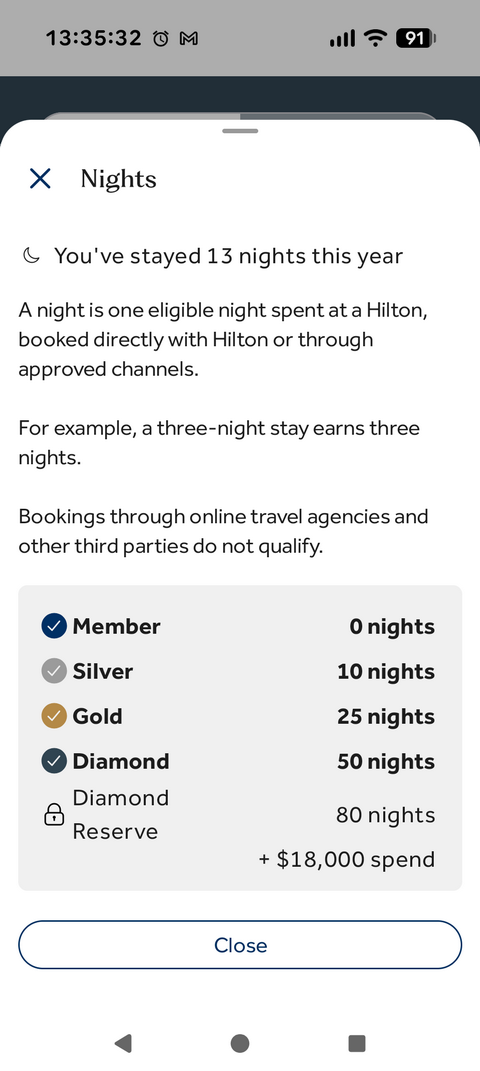
Screenshot of Android app "Nights" detail.
The same information is there under the "Hilton Honors Home" when logged in to the website:
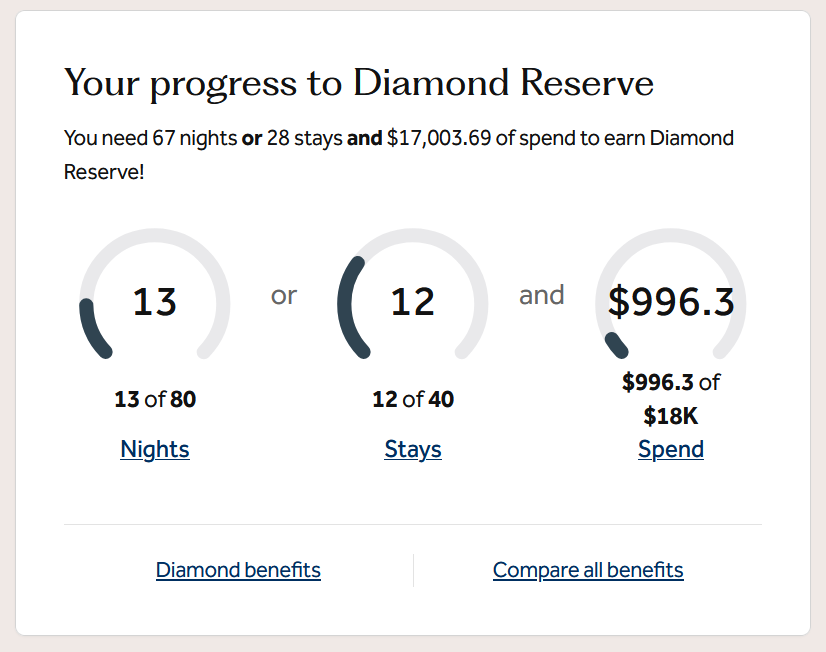
Screenshot from website "Hilton Honors Home" page.
In my case, with the Android app (version 2026.1.13), the 2026 activity information is right there in both text and "meter" form on the Account -> Status tab:
Screenshot of Android app Status tab.
Tapping on the underlined Nights, Stays or Spend brings up the detail for each category:
Screenshot of Android app "Nights" detail.
The same information is there under the "Hilton Honors Home" when logged in to the website:
Screenshot from website "Hilton Honors Home" page.
Feb 1, 2026 | 2:13 am
#4
Original Poster
Join Date: May 2002
Posts: 586
Three times more emailed to Hilton, twice they responded about the App . Now the say try a different browser and to clear cache on website ...none of which affect displaying the Activity Tracker.
Copilot gave steps, but no Activity Tracker appeared.
ChatGPT response is better and acknowledges for some members the Activity Tracker will not appear, but not saying why.Here’s the current situation (early 2026) with how Hilton Honors displays — or doesn’t display — your 2026 nights/stays/points progress and status-mile threshold tracking on hilton.com / Hilton Honors app:
Try this if you haven’t already:
📍 1. Use the Hilton Honors app carefully
Some users say that the app still shows the progress and that tapping the nights / stays / spend fields expands a summary. (FlyerTalk)
📍 2. Contact Hilton Honors customer service
If you can’t locate a dashboard summary:
Occasionally they include status progress in monthly statements.
Copilot gave steps, but no Activity Tracker appeared.
ChatGPT response is better and acknowledges for some members the Activity Tracker will not appear, but not saying why.Here’s the current situation (early 2026) with how Hilton Honors displays — or doesn’t display — your 2026 nights/stays/points progress and status-mile threshold tracking on hilton.com / Hilton Honors app:
🔎 Where the activity used to be shown
Traditionally, Hilton showed a graphical progress tracker (sometimes a circle meter or bar) on your Hilton Honors account page (under “Status” or “Account”) that let you see how many nights you’ve completed vs. how many you need for your next status or Milestone Bonus. (FlyerTalk)📉 Current reality (2026): Many members cannot find it
Right now many Hilton Honors members are reporting that:- The 2026 activity summary / nights meter is not visible on hilton.com in the logged-in account dashboard. (FlyerTalk)
- It’s also not always visible in the Hilton Honors app for some users — it can be inconsistent between Android vs iOS or by account. (FlyerTalk)
- Users say Hilton removed or replaced the old graphical tracker in some views, and now it may only show very basic text or hidden detail (if at all). (FlyerTalk)
🔎 Where it might still appear
Some members report that the Status / Account tab in the Hilton Honors app still shows progress in text or meter form for:- Nights
- Stays
- Eligible spend
Try this if you haven’t already:
- Log in to your Hilton Honors account.
- Go to “Account” or “Status” (in app or website).
- Look for “Your progress to …” followed by nights / stays / spend — clicking or tapping those lines may expand detail. (FlyerTalk)
❗ Possible reasons it’s missing
Based on community reports:- Hilton has revised its interface/design, and the old nights meter isn’t visible for everyone anymore. (FlyerTalk)
- Some users see their progress only if they are below a certain stage or actively working toward a higher tier. (FlyerTalk)
- Rollover nights may not always show clearly, even though they do count under the hood (per Hilton’s own support). (Hilton)
📌 If you still can’t find the summary
Here are a couple of options:📍 1. Use the Hilton Honors app carefully
Some users say that the app still shows the progress and that tapping the nights / stays / spend fields expands a summary. (FlyerTalk)
📍 2. Contact Hilton Honors customer service
If you can’t locate a dashboard summary:
- Hilton’s support can tell you nights toward status, Milestone Bonus progress, etc.
- For lifetime progress (e.g., lifetime Diamond) you often must ask directly — it’s not shown online. (PointsCrowd)
Occasionally they include status progress in monthly statements.
🧾 Summary
Feature Shown on hilton.com? Shown in Hilton Honors app? Nights toward current status Often missing from site dashboard Sometimes visible under Status Milestone progress (e.g., 40/60/100 nights) Often not shown graphically May appear in text (tap for detail) Progress to next tier Sometimes hidden or convoluted May show as text with a few taps Lifetime status progress Not shown (must request manually) Not shown (support only)If you’d like, I can walk you through where to click or tap step-by-step (with screenshots of what it should look like) — just let me know whether you’re using the website or the mobile app (and on iPhone or Android).
Feb 1, 2026 | 3:11 am
#5


Join Date: Jul 2012
Programs: HH:D MB:S IOR:S
Posts: 1,943
https://www.hilton.com/en/hilton-honors/guest/activity/
But this page is offering up some rather excellent news.
https://www.hilton.com/en/hilton-hon...st/my-account/

If I dismiss the great news, it shows the total number of nights and stays for 2026.
Is this not working on your end?
 Feb 1, 2026 | 7:00 am
#6
Original Poster
Join Date: May 2002
Posts: 586
Thanks Sisosig ...i concur with no details , just total, at link https://www.hilton.com/en/hilton-honors/guest/activity/
With your second link / when i click on my account, i get no further link to give more detailed / Activity Tracking . Mainly, i want to make sure something works and nothign suddenly disappears ...i just time-waiting now for Lifetime Diamond .. Still, it's rather annoying and somewhat concerning, that at February 1st, that Hilton hasn't fixed the problem.
With your second link / when i click on my account, i get no further link to give more detailed / Activity Tracking . Mainly, i want to make sure something works and nothign suddenly disappears ...i just time-waiting now for Lifetime Diamond .. Still, it's rather annoying and somewhat concerning, that at February 1st, that Hilton hasn't fixed the problem.