
























The Decline of JB IFE
 Dec 24, 2025 | 8:17 am
#16
Original Poster
FlyerTalk Evangelist


Join Date: Mar 2009
Location: NYC
Programs: AS MVPG, DL KM, Bee Six, Bonvoy Plat, Choice Plat, IHG Plat, Avis PC, Natl Exec, Greyhound Road Rwds
Posts: 20,112
I just got back from a trip on a 32M, 32S, and 3NS.
On the 32S I enjoyed listening to XM radio while watching the map, until my school's football game started. I didn't watch the entire thing as we were destroyed but I could at least revert back to the XM radio and the map.
On the 3NS I just watched the map with no sound and did some work on my phone. I also took a nap. The screen on the NEO is nice and big, but music would have been nice.
-J.
On the 32S I enjoyed listening to XM radio while watching the map, until my school's football game started. I didn't watch the entire thing as we were destroyed
but I could at least revert back to the XM radio and the map.On the 3NS I just watched the map with no sound and did some work on my phone. I also took a nap. The screen on the NEO is nice and big, but music would have been nice.
-J.
 Dec 24, 2025 | 8:57 am
#17
Join Date: Jan 2009
Location: New York suburbs
Posts: 4,380
I recently flew on an aircraft LAX-JFK where the wifi didn't seem to work for anyone's phone, but a few passengers were able to use it for their tablets or laptops. The FAs admitted the same problem had happened the day before, and all they could do was reboot the router several times. The network showed good signal, and the phone acted like it was trying to connect. Yet my email and web browsers wouldn't refresh or load. I tried to disconnect and reconnect, but Flyfi.com kept hanging. Is this a common issue these days?
In contrast, the old aircraft that swapped in for my flight the week before, JFK-LAX, had excellent, surprisingly fast wifi. I was emailing, FB Messaging, and WhatsApping the whole time.
In contrast, the old aircraft that swapped in for my flight the week before, JFK-LAX, had excellent, surprisingly fast wifi. I was emailing, FB Messaging, and WhatsApping the whole time.
Dec 24, 2025 | 9:01 am
#18
Join Date: Jan 2009
Location: New York suburbs
Posts: 4,380
Speaking of which, I noticed on the screen something that implied an audio channel was also available to listen to air traffic control, similar to what United used to have ~15 years ago. I didn't have earplugs, but is JetBlue indeed offering this now?
Dec 24, 2025 | 2:48 pm
#19
Original Poster
FlyerTalk Evangelist
Join Date: Mar 2009
Location: NYC
Programs: AS MVPG, DL KM, Bee Six, Bonvoy Plat, Choice Plat, IHG Plat, Avis PC, Natl Exec, Greyhound Road Rwds
Posts: 20,112
I recently flew on an aircraft LAX-JFK where the wifi didn't seem to work for anyone's phone, but a few passengers were able to use it for their tablets or laptops. The FAs admitted the same problem had happened the day before, and all they could do was reboot the router several times. The network showed good signal, and the phone acted like it was trying to connect. Yet my email and web browsers wouldn't refresh or load. I tried to disconnect and reconnect, but Flyfi.com kept hanging. Is this a common issue these days?
In contrast, the old aircraft that swapped in for my flight the week before, JFK-LAX, had excellent, surprisingly fast wifi. I was emailing, FB Messaging, and WhatsApping the whole time.
In contrast, the old aircraft that swapped in for my flight the week before, JFK-LAX, had excellent, surprisingly fast wifi. I was emailing, FB Messaging, and WhatsApping the whole time.

-J.
Dec 31, 2025 | 9:11 am
#20
Join Date: Sep 2022
Programs: TrueBlue, Bonvoy
Posts: 17
I'm on another A220 now and I turned off my screen in advance of the ads. Joke's on me this time, the screen won't turn back on. It is on (I can see that it is backlit) and if there's an announcement that message pops up (among others), but otherwise nothing. Luckily I have an open middle seat so I have the map up on that PTV.
I know it can be individually reset by the FA up front, but this is a 40 minute flight and it just isn't worth the effort.
-J.
I know it can be individually reset by the FA up front, but this is a 40 minute flight and it just isn't worth the effort.
-J.
Dec 31, 2025 | 9:20 am
#21
Original Poster
FlyerTalk Evangelist
Join Date: Mar 2009
Location: NYC
Programs: AS MVPG, DL KM, Bee Six, Bonvoy Plat, Choice Plat, IHG Plat, Avis PC, Natl Exec, Greyhound Road Rwds
Posts: 20,112
You can individually reset the new IFE screens by pressing on the power icon (on the left) for about 30 seconds. It can take a few minutes to reboot, but all should be OK after that. I've gotten on a few planes with the new IFE with what appeared to be inoperable screens this year - the reset procedure fixed them.
-J.
Dec 31, 2025 | 9:22 am
#22

Join Date: Jul 2019
Programs: Hyatt Globalist, B6 Mosaic 2, AA Platinum Pro
Posts: 882
Not the biggest deal in the world, but my browser for the past couple of weeks has given a big warning page that the security certificate on the site that connects your phone to the IFE expired. Not sure if it's my phone acting silly, or someone at B6 just forgot.
Mar 6, 2026 | 12:48 pm
#23
Original Poster
FlyerTalk Evangelist
Join Date: Mar 2009
Location: NYC
Programs: AS MVPG, DL KM, Bee Six, Bonvoy Plat, Choice Plat, IHG Plat, Avis PC, Natl Exec, Greyhound Road Rwds
Posts: 20,112
On N821JB this morning, a Thales-equipped 32M, the screen turned back off after PAs! That was really nice.
Now I am paying the price. Doing a transcon on a dark cabin (IFE inop) Mint A321 At least the Fly-Fi marginally works.
-J.
Now I am paying the price. Doing a transcon on a dark cabin (IFE inop) Mint A321
At least the Fly-Fi marginally works.-J.
Mar 6, 2026 | 3:47 pm
#24
Join Date: Apr 2023
Posts: 44
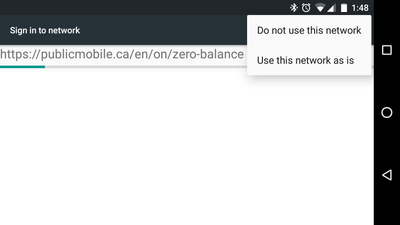
The Fly-Fi experience for Android is pretty bad. Nothing in the instructions ever tells you that you might need to click on that three button menu in the corner to accept the Wi-Fi connection as is. Otherwise, it'll just disconnect you. I'm not sure if the flight attendants know how to walk people through this. Your average person would simply think the Wi-Fi is broken the whole flight even after resets.
Mar 8, 2026 | 10:20 am
#25
Original Poster
FlyerTalk Evangelist
Join Date: Mar 2009
Location: NYC
Programs: AS MVPG, DL KM, Bee Six, Bonvoy Plat, Choice Plat, IHG Plat, Avis PC, Natl Exec, Greyhound Road Rwds
Posts: 20,112
The Fly-Fi experience for Android is pretty bad. Nothing in the instructions ever tells you that you might need to click on that three button menu in the corner to accept the Wi-Fi connection as is. Otherwise, it'll just disconnect you. I'm not sure if the flight attendants know how to walk people through this. Your average person would simply think the Wi-Fi is broken the whole flight even after resets.
 I've been using Fly-Fi on Samsung Galaxy S devices since its introduction (including a redeye landing this morning) and have never had to do that.
-J.
Mar 8, 2026 | 4:35 pm
#26
Join Date: Apr 2023
Posts: 44
It's similar to this older example.
 Mar 8, 2026 | 5:38 pm
#27
Original Poster
FlyerTalk Evangelist
Join Date: Mar 2009
Location: NYC
Programs: AS MVPG, DL KM, Bee Six, Bonvoy Plat, Choice Plat, IHG Plat, Avis PC, Natl Exec, Greyhound Road Rwds
Posts: 20,112
I get this prompt more often when connecting to hotel wifi, and again it pops up automatically each time.
-J.
Mar 30, 2026 | 4:13 pm
#29
Original Poster
FlyerTalk Evangelist
Join Date: Mar 2009
Location: NYC
Programs: AS MVPG, DL KM, Bee Six, Bonvoy Plat, Choice Plat, IHG Plat, Avis PC, Natl Exec, Greyhound Road Rwds
Posts: 20,112

Also, if you fly Alaska Airlines or any other airline where you get free wifi with a T-Mobile account, then you have a complimentary MLB.tv membership (from T-Mobile) and most onboard wifi connections support streaming.
-J.