
























 May 18, 2014, 11:08 am
Last edit by: JDiver
Using the Search Feature on FlyerTalk: the Definitive Thread
The moderators did a great job of re-organizing this discussion pertaining to the use of the Search function available on FlyerTalk after it was moved from its original forum — posted long before there was an Information Desk forum.
However, the functionality does change over the years — and you can help keep information regarding the functionality updated by contributing to this WikiPost.
Please contribute your helpful tips, tricks and suggestions on how fellow FlyerTalk members can improve the results of searching for anything which has been posted on FlyerTalk.
Thank you.
Regards,
Canarsie
_______________________________
This long-overdue thread is intended to contain all of the information you need to know pertaining to how to successfully search for information on FlyerTalk. This thread also assumes that you possess basic knowledge pertaining to how to navigate around the FlyerTalk Internet web site.
The vision I have for this thread is not only to simply give instructions on how to perform every kind of search possible on FlyerTalk, as well as how to search for information without using the FlyerTalk search engine, but it is also open to questions about how to perform specific types of searches, as well as give tutorials on how to do all types of searches on FlyerTalk. Be as creative as you can be in having the FlyerTalk search engine perform the most efficient search for information for you and post your questions in this thread!
Although I will do my best to help, I do not intend to be the only person assisting other FlyerTalk members with the FlyerTalk search function. I encourage other knowledgeable FlyerTalk members to also participate in and contribute to this thread not only by helping other FlyerTalk members, but also by posting tips and tricks to help harness the power of the FlyerTalk search engine and use it as efficiently as possible.
This thread is NOT for asking about technical issues regarding the Search feature for FlyerTalk, such as “Search is not working today — what is the problem?”. Please post your questions and comments regarding technical issues pertaining to the FlyerTalk search engine separately in this forum.
Thank you in advance for your assistance and for your patience.
The following are quick links to take you directly to the specific infomation which you are seeking:
Basic Uses of Search
- Basic Search on FlyerTalk in General
- Basic Search Within a Forum on FlyerTalk
- Basic Search Within a Thread on FlyerTalk
Advanced Uses of Search
- Search Using Two or More Key Words
- The Wildcard Search: Asterisk You Take...
- Advanced Search Functionality: Specific Forums or FlyerTalk in General
- Advanced Search Functionality: Specific Threads
- How to Customize Search to Your Specifications
- Searching Multiple Forums — or Fora, if you prefer...
Searching for Information Without Using Search
- Look for “Sticky” Threads in Your Favorite Forum
- Using Display Options to Search Instead of Using the Search Feature
- Go to the Internet Web Site of Your Favorite Frequent Travel Loyalty Program to Find Information
Tips and Tricks for Searching for Information on FlyerTalk
_________________
Please add more links to the above list when you add your own tips and tricks to this discussion. Thank you in advance.

Using the Search Feature on FlyerTalk: The Definitive Thread
May 1, 2024 | 7:05 pm
#106


Join Date: Aug 2009
Location: AKL
Programs: NZ Silver
Posts: 1,856
Is it still possible to search within a specific forum? I worked out how to search for a keyword within individual threads, but can no longer find the search function to search a keyword in posts, within different threads
 May 1, 2024 | 7:12 pm
#107


Join Date: Jul 2009
Location: Washington, DC
Programs: DL PM; Hilton Dia; Marriott Titanium/LT Gold
Posts: 8,523
 May 1, 2024 | 9:50 pm
#108
Join Date: Aug 2009
Location: AKL
Programs: NZ Silver
Posts: 1,856
Jun 21, 2024 | 2:53 pm
#109
Original Poster
Moderator: Hilton Honors forums

Join Date: Dec 2002
Location: Marietta, Georgia, United States
Posts: 25,440
Including and Excluding Forums in Your Search
When conducting a search of the entire site of FlyerTalk, you might not want to include some forums — for example, the OMNI forum, to which not all FlyerTalk members have access.
To exclude all three OMNI forums, copy and paste the text below:
The numbers at the end of the text above reflect the number which is assigned to the forum. For example, 457 is OMNI; 652 is OMNI/PR; and 699 is OMNI/Games. To find those numbers, simply go to the forum...
...and you will find the forum number at the end of the Universal Resource Locator; or URL.
You can also include a forum with the following text, using the three OMNI forums once again as an example and using the word include instead of exclude as an example:
Try it for yourself!
To exclude all three OMNI forums, copy and paste the text below:
Code:
http://www.flyertalk.com/forum/search.php?do=getdaily&exclude=457,652,699
Code:
https://www.flyertalk.com/forum/omni-457/
You can also include a forum with the following text, using the three OMNI forums once again as an example and using the word include instead of exclude as an example:
Code:
http://www.flyertalk.com/forum/search.php?do=getdaily&include=457,652,699
Jul 26, 2025 | 5:51 pm
#110


Join Date: Jun 2003
Location: Lewisville, TX USA
Programs: AA EXP 1MM; Hyatt Globalist; Bonvoy LT Ti; National EE; WDW Passholder
Posts: 890
Has the ability to search a specific forum been removed? When I'm looking at a forum, the only search I see is at the very top of the page. When I click the magnifying glass at the top of the page, it opens a giant "Search FlyerTalk Forums" prompt, but this search seems to be across the site and not the forum.
Jul 26, 2025 | 9:32 pm
#111
FlyerTalk Evangelist


Join Date: Mar 2002
Location: Saipan, MP 96950 USA (Commonwealth of the Northern Mariana Islands = the CNMI)
Programs: UA Silver, Hilton Silver. Life: UA .60 MM, United & Admirals Clubs (spousal), Marriott Platinum
Posts: 18,085
Has the ability to search a specific forum been removed? When I'm looking at a forum, the only search I see is at the very top of the page. When I click the magnifying glass at the top of the page, it opens a giant "Search FlyerTalk Forums" prompt, but this search seems to be across the site and not the forum.

From there, near the top right corner (above), one has to click on "Advanced >>" (in blue ink, as a link).

One can input the same terms. But if you scroll down to the bottom of that page, you will see an option to search specific forums, "Search in Forum(s)".

The default is "Search All Open Forums". But if you click on that line, you will be given a list of all open forums:

Again, "Search All Open Forums" is the default. From there, one has to uncheck that and pick one or more other particular forums for greater specificity.
If quoting this post, please do not copy all four pictures!

Last edited by SPN Lifer; Jul 26, 2025 at 9:45 pm
 Jul 27, 2025 | 10:14 am
#112
Moderator: Travel Safety/Security, Travel Tools, California, Los Angeles; FlyerTalk Evangelist


Join Date: Dec 2009
Location: LAX
Programs: oneword Emerald
Posts: 24,846
Has the ability to search a specific forum been removed? When I'm looking at a forum, the only search I see is at the very top of the page. When I click the magnifying glass at the top of the page, it opens a giant "Search FlyerTalk Forums" prompt, but this search seems to be across the site and not the forum.
 Jul 27, 2025 | 5:54 pm
#113
Join Date: Jun 2003
Location: Lewisville, TX USA
Programs: AA EXP 1MM; Hyatt Globalist; Bonvoy LT Ti; National EE; WDW Passholder
Posts: 890
When beginning a search, by clicking the magnifying glass, the initial search is as you describe.
From there, near the top right corner (above), one has to click on "Advanced >>" (in blue ink, as a link).
One can input the same terms. But if you scroll down to the bottom of that page, you will see an option to search specific forums, "Search in Forum(s)".
The default is "Search All Open Forums". But if you click on that line, you will be given a list of all open forums:
Again, "Search All Open Forums" is the default. From there, one has to uncheck that and pick one or more other particular forums for greater specificity.
If quoting this post, please do not copy all four pictures!
From there, near the top right corner (above), one has to click on "Advanced >>" (in blue ink, as a link).
One can input the same terms. But if you scroll down to the bottom of that page, you will see an option to search specific forums, "Search in Forum(s)".
The default is "Search All Open Forums". But if you click on that line, you will be given a list of all open forums:
Again, "Search All Open Forums" is the default. From there, one has to uncheck that and pick one or more other particular forums for greater specificity.
If quoting this post, please do not copy all four pictures!
Last edited by lbbzman; Jul 27, 2025 at 6:02 pm
Jul 27, 2025 | 6:08 pm
#114
Moderator: Travel Safety/Security, Travel Tools, California, Los Angeles; FlyerTalk Evangelist
Join Date: Dec 2009
Location: LAX
Programs: oneword Emerald
Posts: 24,846
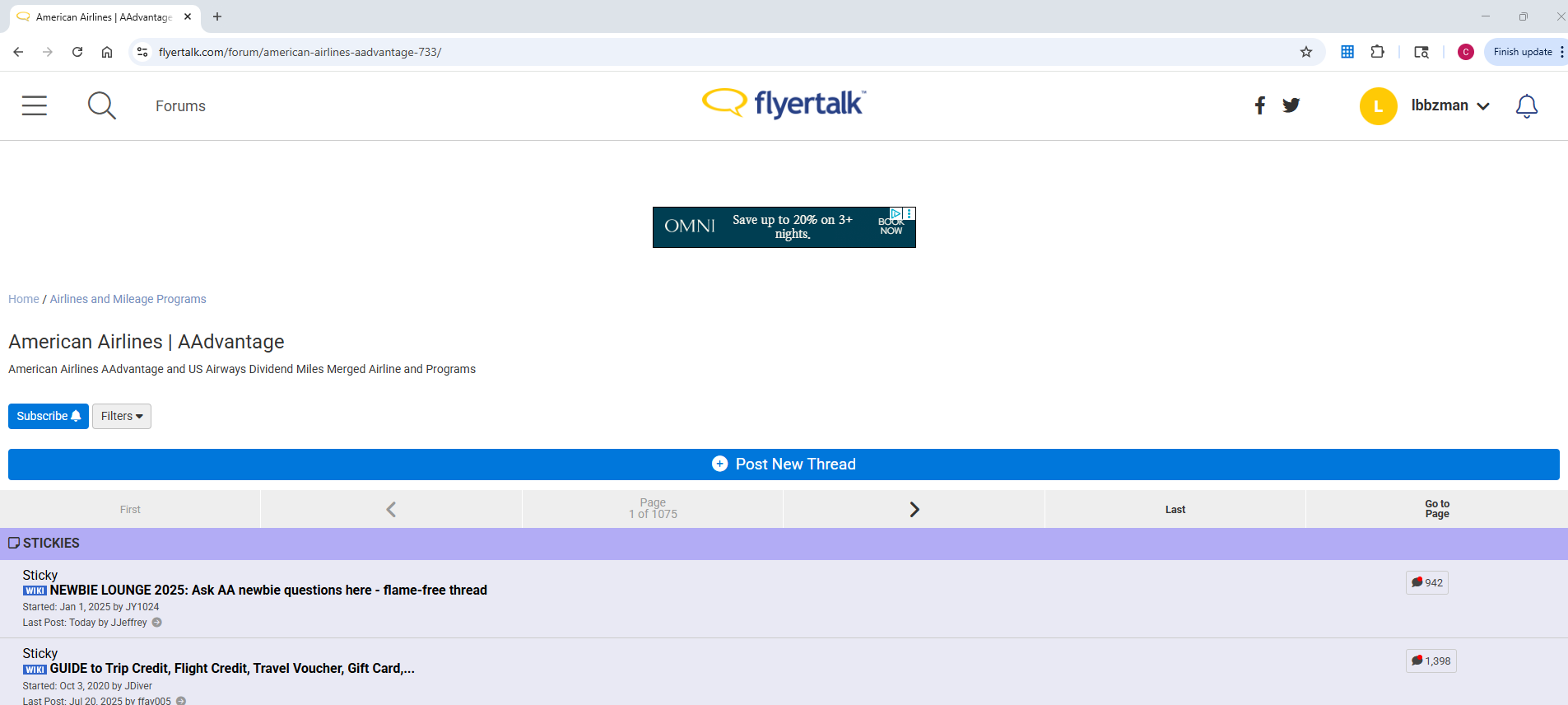
Thanks, TWA884. The screenshot you posted is what I'm accustomed to seeing, complete with the "Search this Forum" link. However, the screen I see now in my desktop browser is pasted below. The Search this Forum funciton isn't there. I must say I much prefer TWA884's screen layout over this one!
Switched to mobile view and can't switch back to desktop view
You can also force the full desktop skin by adding "?styleid=24" to the URL parameters. If there's already a ?x=y parameter in the URL you can append "&styleid=24" instead.
If anyone is reading this in mobile mode against their volition, you can click on this direct link to the desktop version of the "Edit Options" page: https://www.flyertalk.com/forum/prof...ons&styleid=24 where you can change the Forum Skin (2nd item under "Miscellaneous Options" near the bottom) to "Use Forum Default"
If anyone is reading this in mobile mode against their volition, you can click on this direct link to the desktop version of the "Edit Options" page: https://www.flyertalk.com/forum/prof...ons&styleid=24 where you can change the Forum Skin (2nd item under "Miscellaneous Options" near the bottom) to "Use Forum Default"