Hey y'all! Back again with a new tool for you guys to try out! This new release is a tool to help you plan a oneworld multi-carrier itinerary. Since we've now officially entered T minus 85 days countdown until AM devaluation, best get started soon with those round the world itineraries! Let's start off with a screenshot, which should be quite self explanatory:

The rules of the oneworld award are quite simple. You are allowed a maximum of 10 segments, with a total distance not exceeding 50,000 miles, and you are allowed 5 stopovers. 2 transits, and 2 open jaws. You must utilise at least 2 oneworld partners in addition to CX (required if over 3 partners are involved).
Building out a valid itinerary used to entail a convoluted mess of spreadsheets and a combination of hopping between sites like google flights, flightconnections.com, or flightsfrom.com to find available routes, then popping over to gcmap.com to map out all the distances, then adding all the distances to determine what distance category you fall into, trying to find alternative flights to fit into particular distance categories, and then finding out that the flight you wanted doesn't even offer the class you want. This tool allows you to do all that in a single page! Here are some of the main things you can do:
1. City pair options
2. Carrier options
3. Route distances
4. Class options by route and carrier
5. Carrier combination validation
6. Stopover, transfer, openjaw combination validation
7. Distance category calculation (based on current and new award pricing)
Some tips on using the tool
One you enter your departure city, it will:
1. Show you all available route options from that city, grouped by country. (Countries can be collapsed by clicking on their headers)
2. Show you all the carriers that fly this route.
3. Show you the flight distance to each city.
The distances are based on a mixture of data of CX mileage earning data and Great Circle Mapper distances. For most routes it should be more in line with how CX actually calculates mileage.
 Origin and destination Auto Complete
The input boxes accept airport codes, as well as full destination names.
They support autocomplete, in English and Chinese, for airport code, city name, and country name. (Support for continents will be added too in the near future)
The autocomplete for the origin city of each leg will display:
1. For the initial origin, all airports served by OW partners.
2. If stop type is stopover or transfer, will show airports in the same city as the destination of the previous leg.
3. If destination for the leg is already set, will show same city airports, as well as cities with flights to the destination. If an airport in a different city from the previous leg's destination is chosen, the stop type will be changed to an open jaw.
For the destination city of each leg, it will always show cities with flights from the origin city of that leg.
The UI is both mouse and keyboard friendly, for all the power users out there. Some keyboard features currently implemented are:
1. Use the Up and Down arrows to scroll through the airports list.
2. Tab or Enter selects the currently active airport, or airport with a fully matching airport code.
Carrier selection
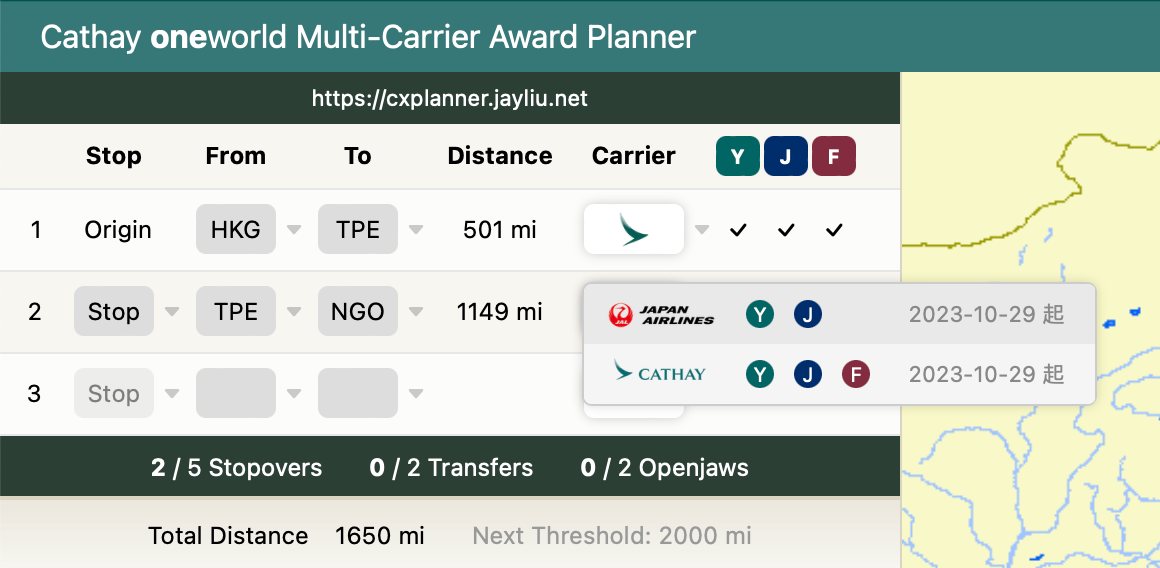
If multiple carriers serve the same route, you can click on the carrier dropdown to view the airlines. Each entry will show you the classes available for that carrier on that route. It will also show you the earliest date that the carrier will start serving that route.
Route validation

The validation engine checks that the itinerary conforms to the following rules.
1. Carrier combination must be either:
a. Two oneworld carriers, or
b. Cathay, plus two or more oneworld carriers
2. Itinerary must have a maximum of 5 stopovers, 2 transfers and 2 openjaws.
3. Distance cannot exceed 50,000 miles.
4. Final destination must return to the origin country or region of departure.
And finally, it works with spreadsheets!
You can select the entire route and it will perfectly paste into Google sheets, or Excel, if you wish to keep tabs on multiple route designs.
Planned future additions
1. Ability to save multiple itineraries.
2. Ability to share itineraries using a url.
3.Ability to filter by continent
4.Ability to filter by carrier
For users of the unelevated plugin,
5. Ability to click through to the CX flight award page and automatically search the routes for availability using the unelevated search plugin.
6. Ability to see available flights you have saved using the unelevated search plugin for each route.
If you have any other wishlists, please let me know!
Also, I have only tested this on Mac and iOS, so please let me know if there are any bugs.
If you notice anything wrong with the validation login (e.g. invalid routes that it says are OK, or valid routes it says are not) please let me know!
Try it out here: https://cxplanner.jayliu.net