Originally Posted by
EmptyKim
Microsoft Teams has a blur background feature.
Originally Posted by
javabytes
Zoom does as well. It kinda works, but it's not perfect at detecting you vs. stuff behind you. I have a high-backed chair and it thinks the chair is part of my head sometimes. Zoom also has a setting that allows you to tell it if you have an actual green screen behind you.
One thing I hate about Zoom is that it allows meeting organizers to default webcams to on... which can be a surprise to those who aren't expecting it.
Originally Posted by
gfunkdave
Except Teams!
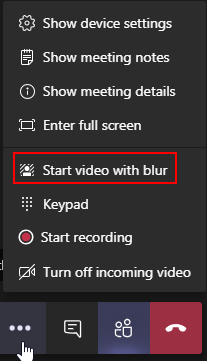
Blurring background is a good and acceptable way of not showing your background in a clear detailed look. This is probably the most cost-effective way of not letting your background be a distraction.
Originally Posted by
LAXlocal
Ok, it looks like green screen is not as easy as I thought ,
What background would you use ? Go to the store and buy some drapes or material and hang it behind you ,
What about lighting ?
Thanks for your ideas
Yes, a neutral single colour background works the best. I have some which are surplus/end of roll drapery fabric which was bought cheap long time ago.
Originally Posted by
TechnoTourist
Zoom let's you pick a background photo (virtual background), I have mine set to mountains at the moment. It can look a bit weird with bulky headphones, but it works pretty well.
The whole idea of background is to complement the main subject, YOU. Also, it needs to look natural.
When I use scenery as a zoom background they are always taken inside with part of the room showing to give that natural look.
You can add some patio door or window frame lines to your background photo.
Originally Posted by
DYKWIA
What does it matter what's behind you? Why would anybody care?
Originally Posted by
Craig6z
Maintain a professional image.
If you don't care about a professional image then "nothing really matters".
Clean simple background enhances your "look". If you are in an internal meeting, it probably doesn't matter. If you are teaching/training/coaching then you need that professional image.
Recall the BBC correspondent doing live feed and his child, then mother burst into the room?
As someone who was a professional photographer during the times of chemical sensors, lighting is very important. While the technology of capturing the light/image has changed the physics of lighting has not changed.
Chromakey (green screen) does work very well. There is a cost involved in making it work, a good quality green screen and lighting it properly (evenly) is step one.
Then you need to light yourself properly. In order to look natural, the direction of the main light should be from the same direction on you as it is in the background photo.
To light yourself well and still be able to read your screen/monitor is another can of worms.
OMG, we haven't even touched on Audio
Takeaway:
Keep things simple within the expectation of your audience. If it is work from home internal meetings then blurring the background is probably enough.
Once you start down this techno-prefecto path there is no end in sight and a money pit.