Using the vouchers
Gold Upgrade vouchers must be used within 12 months from the date of issue - but can be applied to flights up to 355 days in the future - the actual date of the GUF’ed flight doesn’t have to be in the validity period of the voucher. However, making a booking including a GUF beyond the original validity date of the voucher can be difficult - and if the booking is cancelled beyond the original validity date of the voucher the GUF is not returned.
There are two ways to use a Gold Upgrade Voucher. The easiest way is to book through BA. This requires redemption availability in the upgraded cabin and can be done on ba.com or through the Service Centre. The second is through a Travel Agent (TA). Why would you do this? Well because a TA doesn’t need redemption availability and can book the Gold Upgrade Voucher into a revenue bucket which is a big advantage.
A GUF can be applied to:
- BA issued tickets (can include other carriers but only BA flights would be upgraded)
- TA issued (on BA stock) booking with only BA flights
A GUF cannot be applied to:
- TA issued (on BA stock) booking with other carriers
- Tickets issued on non-BA stock
Additionally the TA has to issue the ticket in the country of your BAEC membership.
You can't apply a GUF to a BA marketed and non-BA operated flight even if the ticket is issued on BA (125-xxx) stock. The flight must be both BA marketed and operated.
Booking with BA
To use the voucher when doing a booking directly with BA there has to be reward availability in the cabin you want to upgrade in to for the number of passengers who are to be upgraded. Reward availability can be easily checked by doing a dummy booking on ba.com. If there isn’t reward availability in the cabin you want to upgrade to then you can’t use the GUF - however BA do release extra reward seats sometimes and potentially right up to the date of the flight so keep checking regularly.
GUFs can be used with any published fare sold directly by BA. However, it excludes group bookings and those sold as part of a packaged holiday.
For a booking direct with BA the GUF can be applied at the time of booking or can be applied at a later date.
If you make an Avios booking and apply the GUF at the same time then you only need availability in the upgraded cabin, not the original one. However an Avios booking that is made first and later upgraded will need availability in both cabins.
If the underlying booking is a revenue one then you only require reward availability in the cabin you want to upgrade to regardless of whether you apply the GUF at the time of booking or sometime later. There is no limitation on the original selling class to which the GUF can be applied. You can check for reward availability by doing dummy reward bookings on ba,com, or using third party tools like
expertflyer or
rewardflightfinder (which has now replaced baredemptionfinder).
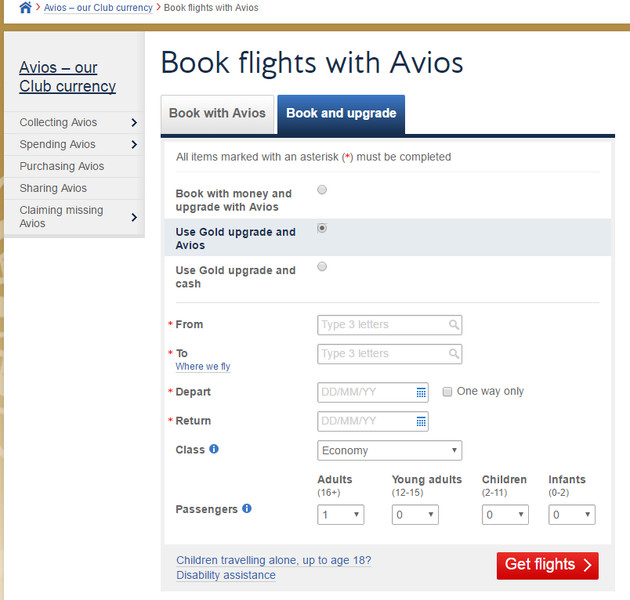
Revenue & GUF and Avios & GUF bookings can be made online via the reward search engine. In the Book flights with Avios search page use the “Book and upgrade” tab and pick from the “Use Gold upgrade and Avios” and the “Use Gold upgrade and cash” options.
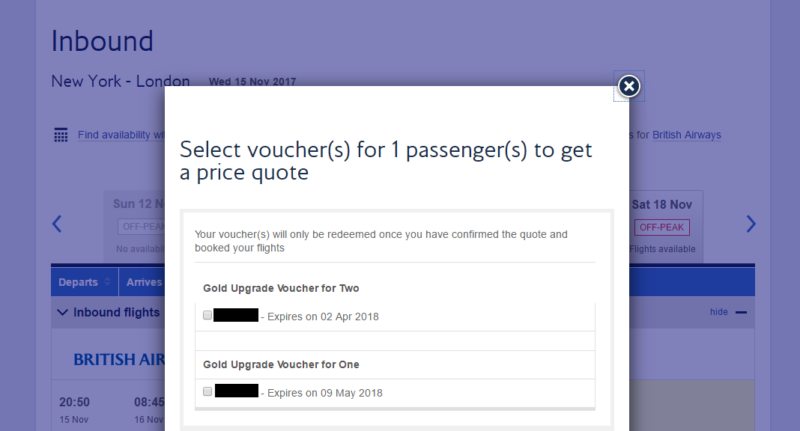
Once you select your flights you may get a pop up to select which voucher you wish to apply if you have several to choose from.
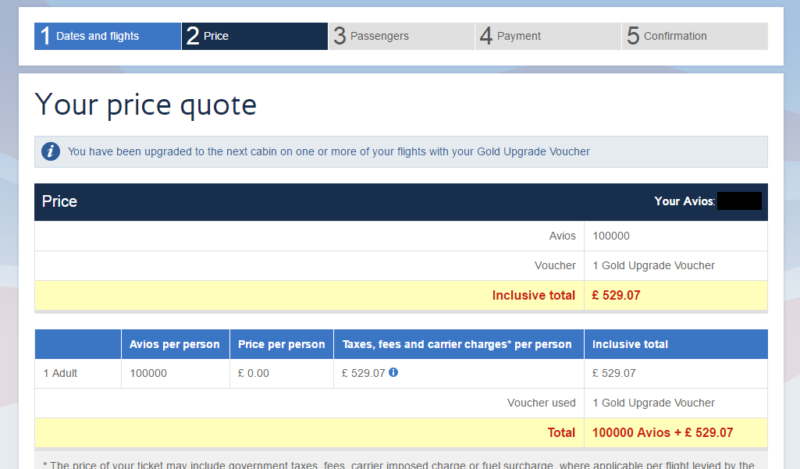
And once selected you will be taken to the quote page where it shows you are using a GUF on the booking.
Using the online booking engine should work for simple return bookings, but for complex bookings (e.g. multi-city or open jaw) you would have to call the Service Centre to book and apply the GUF.
For an existing booking there is no way to apply the GUF online so you would have to contact your Service Centre to do this.
Dual Inventory Fares (DIF) and going from WTP to CW
These new DIF fares have appeared from around mid-2016. They are a new type of fare to BA which effectively is almost like a POUG except the cost of the upgrade is included in the booking. They seem to be appearing mostly when purchasing WTP seats, and need inventory in both an economy and premium economy booking class. There have been difficulties with the fare mostly around attempting to upgrade in to CW using a GUF, and getting a correct price when trying to do this on BA.com.
If you try to use a GUF to upgrade from WT+ to Club the online booking engine on BA.com will not quote the dual-inventory WTP fare as the base fare from which you're upgrading. It will quote the regular T class fare instead. The workaround is to book the WTP fare online and then call the Service Centre to have the booking upgraded using the GUF.
There is more discussion of DIFs in the linked posts:
https://www.flyertalk.com/forum/brit...ta-matrix.html
http://www.flyertalk.com/forum/briti...ount-code.html
Booking with a domestic connection
When trying to book and upgrade using a GUF via the tool on the left-hand pane of the BAEC home page the booking engine won't apply the upgrade to domestic flights. They will remain in ET and not CE and the itinerary won't price. The workaround here is to use the "Book and Upgrade" tab under "Book flights with Avios".
Booking with a TA
You can use a GUF with a booking made by a TA. Many BA customers only book through a TA, and if using a GUF with a TA booking wasn’t allowed these customers would find GUFs to be completely useless.
The TA booking must be on a BA ticket (i.e. one starting 125-xxx). The booking must only contain BA flights (
see January 2019 update below on this point) and you need to be one of the passengers on the booking.
For TA bookings the GUF must be applied at the time of booking. You can’t apply the GUF at a later date to an existing booking.
UPDATE January 2018 - the restriction to TA bookings no longer applies. If you book with a TA you no longer need to apply the GUF it at the time of booking. You can apply the GUF at any time by contacting BA directly up to 24 hours before your flight to process the upgrade. However, it is not yet clear whether this later applied GUF could only use reward availability rather than revenue availability, and it is not clear whether the intention is to stop TA applied GUFs completely. Further updates to follow in due course.
It is expected that these GUFs applied to TA bookings when done direct with BA would only be able to use reward availability and not the revenue selling class availability as noted below. However, it is expected that a GGL member could use a joker to force reward availability in order to apply the GUF. It is also expected that any eligible TA booking would need to be on a BA stock ticket (ticket number starting 125-...), and include only BA flights. For the similar UuAs applied to TA bookings the rules have previously said that the TA has to issue the ticket in the country of your BAEC membership as well. However, apparently this is not enforced consistently so hopefully this shouldn't be an issue. See these two posts for more information on that point https://www.flyertalk.com/forum/29280847-post33.html & https://www.flyertalk.com/forum/29282377-post38.html
For now the existing TA & GUF booking route (as described below) still remains open - i.e. booking with a TA and applying the GUF at the time of booking using revenue selling class availability. However, With BA now allowing GUFs to be applied at a later date directly with BA the logic for this existing route no longer remains so time will tell whether BA will stop it in future.
UPDATE January 2019- previously it was the case that if a TA submitted a booking to BA for GUF approval and the booking contained non BA flights, the booking would be rejected. However, as of the start of 2019 there are reports of a change of policy and that bookings containing non BA flights are now getting approved for GUFs. Obviously only the BA flights get upgraded.
TAs can’t see or use reward availability so the only type of booking where this works is for a revenue & GUF one. You can’t book with a TA for reward & GUF bookings.
Since a TA can’t use reward availability, instead they use revenue selling class availability - this is a big advantage since there tends to be better availability for revenue seats. Availability needs to be present in the cabin you want to upgrade in to, and the specific selling classes needed are:
- World Traveller Plus - T selling class
- Club Europe/Club World - I selling class
- First - A selling class (noted A class has been removed from the DXB and BOS route so it isn't possible to apply a GUF via a TA for those two routes, see this thread for more information)
You can check availability of these revenue selling classes by doing a dummy revenue booking on ba.com for the date and flight you are interested in, or use a third party service like
expertflyer.
There is also more information which you can supply to your TA at the BA trade support site here:
https://www.britishairways.com/en-gb...d-card-upgrade