
























testing image linking
 Sep 9, 2007 | 9:54 pm
#1
Original Poster
Join Date: Oct 2003
Location: montreal
Posts: 305
testing image linking
I can't see the image I've posted here using the IMG
http://picasaweb.google.com/jezsik/F...93994261577394
Hints on what I'm doing wrong?

http://picasaweb.google.com/jezsik/F...93994261577394
Hints on what I'm doing wrong?
Last edited by jezsik; Sep 10, 2007 at 11:41 am


 Sep 10, 2007 | 11:34 am
#6
In Memoriam, FlyerTalk Evangelist
Join Date: Jun 2000
Location: Benicia CA
Programs: Alaska MVP Gold 75K, AA 3.8MM, UA 1.1MM, enjoying the retired life
Posts: 31,849
Right click on your image and you should see it as a jpg. Copy that link and it should post fine.
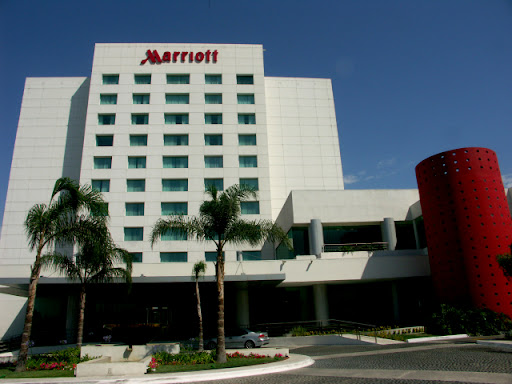
I can see it on firefox (there should be a photo of a Marriott in the post ahead of this one), but not on msie. Not sure what's going on that it would appear on one and not the other.
I can see it on firefox (there should be a photo of a Marriott in the post ahead of this one), but not on msie. Not sure what's going on that it would appear on one and not the other.
Last edited by tom911; Sep 10, 2007 at 11:42 am
Sep 10, 2007 | 12:14 pm
#7
Join Date: Feb 2006
Location: 99654
Programs: Many
Posts: 6,450
Right click on your image and you should see it as a jpg. Copy that link and it should post fine.
I can see it on firefox (there should be a photo of a Marriott in the post ahead of this one), but not on msie. Not sure what's going on that it would appear on one and not the other.
I can see it on firefox (there should be a photo of a Marriott in the post ahead of this one), but not on msie. Not sure what's going on that it would appear on one and not the other.
picasa web forces you to download the jpg... even if you right click and
try to paste that URL, it will force a download in firefox.
(I can see the above image though)
Sep 10, 2007 | 6:21 pm
#9
In Memoriam, FlyerTalk Evangelist
Join Date: Jun 2000
Location: Benicia CA
Programs: Alaska MVP Gold 75K, AA 3.8MM, UA 1.1MM, enjoying the retired life
Posts: 31,849
Smugmug even has a similar issue, as you typically look at the photos without the jpg file name (I played with this recently on another travel site). For instance, this is a page where I have some Lake Tahoe photos, but as you're not highlighting one specific photo in jpg format it won't display (though the link is fine for anyone clicking through). It won't display as an image file, so here's the plain link.
http://tom911.smugmug.com/gallery/33...186566812-L-LB
However, if I click on the same photo, and ask to "view image", it will display it as a jpg, and then if I use that link, it will display.

http://tom911.smugmug.com/gallery/33...186566812-L-LB
However, if I click on the same photo, and ask to "view image", it will display it as a jpg, and then if I use that link, it will display.
Sep 10, 2007 | 6:50 pm
#10
Join Date: Feb 2006
Location: 99654
Programs: Many
Posts: 6,450
Sep 10, 2007 | 9:02 pm
#11
In Memoriam, FlyerTalk Evangelist
Join Date: Jun 2000
Location: Benicia CA
Programs: Alaska MVP Gold 75K, AA 3.8MM, UA 1.1MM, enjoying the retired life
Posts: 31,849
This is going to drive me crazy. I can see the Tahoe photo on msie, but still can't see the Marriott photo. Both of them appear on firefox.
Sep 11, 2007 | 8:00 am
#13
Original Poster
Join Date: Oct 2003
Location: montreal
Posts: 305
VERY interesting
The Tahoe photo shows up, no problem, but my test photo of Chicago showed a warning message from Imagestation. But that was yesterday. Today, the warning message is gone and I see the Chicago test image. Weird.
In any event, I posted some photos on another site and was able to link them to my trip report http://www.flyertalk.com/forum/showthread.php?t=734773
In any event, I posted some photos on another site and was able to link them to my trip report http://www.flyertalk.com/forum/showthread.php?t=734773
Sep 12, 2007 | 6:50 am
#14


Join Date: Jul 2006
Location: SEA
Programs: A3*G, AC, IHG Plat AMB
Posts: 1,606
I'm slowly working away at this upcoming TR, but also have most of the pictures on Picasa so this thread was of particular interest.
One method I've found that seems to work is to right-click on the "next image" arrow and just select "copy link target". This might require going back two images from where you want to be, since the right-click itself will actually move the image one over, but I've tested it out on a couple and they have worked so far.
This Image in particular.
One method I've found that seems to work is to right-click on the "next image" arrow and just select "copy link target". This might require going back two images from where you want to be, since the right-click itself will actually move the image one over, but I've tested it out on a couple and they have worked so far.
This Image in particular.