
























I built my own Flying Blue analytics suite… UXP question for the experts
 Jan 1, 2026 | 7:01 pm
#46
Original Poster


Join Date: May 2025
Location: AMS
Posts: 140
First of all, Happy New Year!
I've been playing around with it a few more times and tried manually adjusting the qualification date but still running into issues. Screenshot attached shows that the date selection is not working correctly as it doesn't show what's selected and stays at the current date. Under XP qualification I see that it's changing, however the dashboard shows the default welcome message and prompts me to run the setup again.
I've been playing around with it a few more times and tried manually adjusting the qualification date but still running into issues. Screenshot attached shows that the date selection is not working correctly as it doesn't show what's selected and stays at the current date. Under XP qualification I see that it's changing, however the dashboard shows the default welcome message and prompts me to run the setup again.
Thanks for the detailed report. I've just pushed a fix that should resolve this issue.
What was happening: When you changed the Cycle Start Date, the app was briefly refetching all your data, causing the UI to "flash" back to the welcome screen even though your flights were still there.
The fix: The app now keeps your existing data visible while saving changes in the background, preventing that reset behavior.
Please give it another try and let me know if it works correctly now!
 Jan 1, 2026 | 7:10 pm
#47
Original Poster
Join Date: May 2025
Location: AMS
Posts: 140
It looks sleek, and I appreciate the effort especially as I am also a software dev, but import (AI or text copy/paste) are giving me wildly incorrect values for my actual account values (both miles and XP), double importing BofA and Amex earnings, etc. Which would require me to go in and edit years' worth of transactions to get it to match. I look forward to using it when the import and such works!
I'm working on a way for users to anonymously share (parts of) their statements to help improve the parser. The more real-world data I can analyze, the better I can handle edge cases like yours.
I'd love to take a look and fix whatever's causing the duplicate BofA/Amex entries.
Jan 9, 2026 | 4:09 am
#49
Original Poster
Join Date: May 2025
Location: AMS
Posts: 140
Quick status on the PDF import saga.
Why is this so hard?
Flying Blue PDFs look standardized to the human eye: a clean table with dates, descriptions and numbers. But machines see something different. Layouts differ by language, region and sometimes even by month. A single flight can appear as one row or five (SAF bonuses, upgrades, etc). Date formats vary wildly. “My trip to Bangkok” summary rows mix with individual segments. What looks consistent to you is chaos for a parser.
What I’ve tried
The local parser has been through countless iterations: direct PDF extraction, copy-paste input, step-by-step wizards, trip totals vs segment parsing. Each fix breaks something else. Works for Dutch PDFs, fails on English or French ones.
AI parsing with my own data via OpenAI showed better accuracy, but hallucinates XP, guesses wrong airlines and produces different results on repeated runs.
Where I’m heading
Azure Document Intelligence is supposed to show 93%+ accuracy on visual table recognition. I’ve just implemented this on my test server. The plan is to combine this with a verification wizard: Azure extracts the data, you step through the results to confirm or correct before import.
The PDF header serves as the sanity check. Every statement shows your status, total miles and XP/UXP at the top. Parser finds 195 XP but header says 205? The wizard flags the gap and helps you locate or add the missing transaction. I’ve got this already working on the test server.
The reality
Perfect automated parsing is not happening. But something Azure plus human verification gets the best of both worlds: fast bulk extraction with guaranteed accuracy. Your totals will match Flying Blue’s records because you verified them.
Still iterating. Hopefully Flying Blue implements a proper export one day.
Jan 27, 2026 | 1:44 pm
#50


Join Date: Jan 2021
Location: YYZ
Programs: AC SE, FB Plat, MB Plat, Hilton Gold
Posts: 70
Nice tool - thank you for putting it together. Has anyone else experienced an issue with the links in the left hand side bar? Can't seem to get a response from any of them (tried Safari and Chrome so far with same result)
Jan 27, 2026 | 2:20 pm
#51


Join Date: Apr 2012
Location: LCY is always preferred
Programs: FB Plat, BAC Silver, LH SEN, HHonors Gold
Posts: 1,106
I also have quite a few miles from Amex transfers. How do we put those in?. Is there a way to put in offers, such as double XP and Hotel earned miles?.
Jan 27, 2026 | 9:36 pm
#52
Original Poster
Join Date: May 2025
Location: AMS
Posts: 140
Whoops. Thanks for the bug report. This was indeed a bug on my end. A refactoring mishap that accidentally broke the sidebar navigation. Already fixed and deployed!
Jan 27, 2026 | 11:43 pm
#53
Original Poster
Join Date: May 2025
Location: AMS
Posts: 140
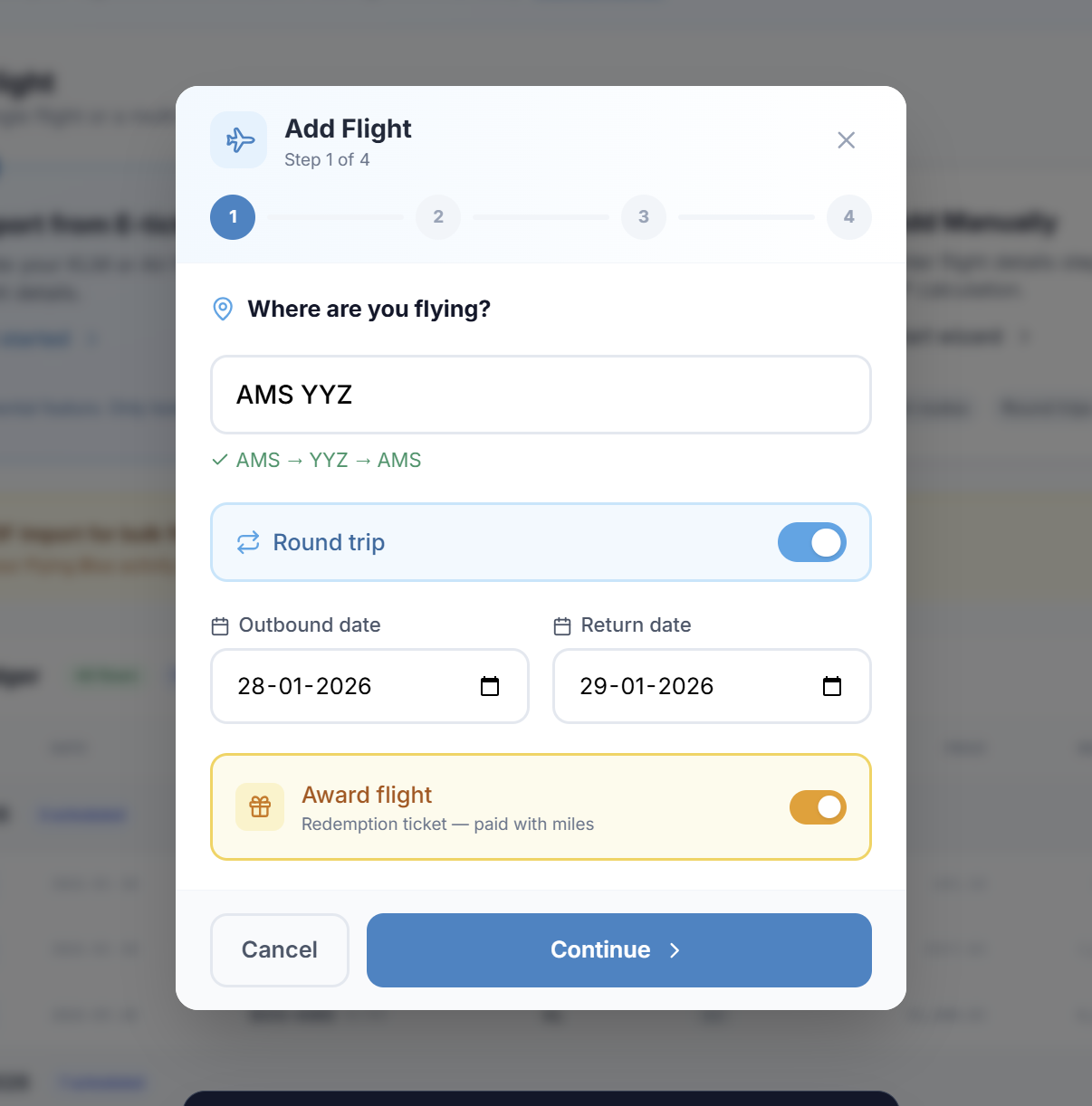
Me too. When I was putting in flights though, there didn't seem to be any way of stating a flight was an award flight. I have a couple of award flights, and bought SAF on them, so need them to show the SAF but not the XP I would have earned for a paid ticket.
I also have quite a few miles from Amex transfers. How do we put those in?. Is there a way to put in offers, such as double XP and Hotel earned miles?.
I also have quite a few miles from Amex transfers. How do we put those in?. Is there a way to put in offers, such as double XP and Hotel earned miles?.
For Amex transfer miles: use "Add Miles" in the Miles section. For bonus XP (double XP promotions, hotel miles, etc.): use the XP Engine. Click on your XP total and you can add/adjust via "Misc XP" or "Manual Correction".

 Jan 28, 2026 | 3:57 am
#54


Join Date: Dec 2025
Location: MAN
Programs: FB Gold
Posts: 2
Good morning!
Thank you for implementing the changes that you mentioned in your reply. I have just finished inputting all the costs and class changes to my flights.
When I look at the analytics pages there are some anomalies? In the screenshot below, the number of miles earned is correct and agrees with my KLM account. There have been no redemptions. Am I incorrect in imagining that the total invested should reflect the total costs of the flights that I have taken? Interestingly, the number of miles shown against the total invested is different to the total number of miles that I've accumulated. I cannot account for this.

Similarly, when I look at the XP tab, the total number of XP accumulated in a calendar year does not agree with the actual number of XP that I have earned.
Paul
Thank you for implementing the changes that you mentioned in your reply. I have just finished inputting all the costs and class changes to my flights.
When I look at the analytics pages there are some anomalies? In the screenshot below, the number of miles earned is correct and agrees with my KLM account. There have been no redemptions. Am I incorrect in imagining that the total invested should reflect the total costs of the flights that I have taken? Interestingly, the number of miles shown against the total invested is different to the total number of miles that I've accumulated. I cannot account for this.
Similarly, when I look at the XP tab, the total number of XP accumulated in a calendar year does not agree with the actual number of XP that I have earned.
Paul
Jan 28, 2026 | 6:13 pm
#55
Join Date: Jan 2021
Location: YYZ
Programs: AC SE, FB Plat, MB Plat, Hilton Gold
Posts: 70